
PS-100BL - Docking Station Sven - Free user manual and instructions
Find the device manual for free PS-100BL Sven in PDF.


| Product Type | Universal Docking Station |
| Brand | Sven |
| Model | PS-100BL |
| Dimensions (W x D x H) | 150 x 80 x 30 mm |
| Weight | 250 g |
| Material | ABS Plastic |
| Color | Black |
| Power Input | 5V DC, 2A (microUSB) |
| USB Output | 1 x USB-A (5V, 1A) |
| Audio Output | 3.5 mm stereo jack |
| Bluetooth Version | 5.0 |
| Supported Devices | Smartphones, tablets, MP3 players |
| Charging Modes | Sync and charge |
| Standby Power Consumption | < 0.5 W |
| Operating Temperature | 0°C to 40°C |
| Cable Length | 1.0 m |
| Included Accessories | Docking station, microUSB cable, user manual |
| Warranty | 1 year |
| Certifications | CE, RoHS |
| Cleaning Instructions | Wipe with dry cloth; do not use liquids |
| Safety Precautions | Do not expose to water or excessive heat |
| Spare Parts Availability | MicroUSB cable available separately |
| Repairability | No user-serviceable parts; contact support |
| General Information | Designed for convenient charging and audio playback |
Frequently Asked Questions - PS-100BL Sven
User questions about PS-100BL Sven
0 question about this device. Answer the ones you know or ask your own.
Ask a new question about this device
Download the instructions for your Docking Station in PDF format for free! Find your manual PS-100BL - Sven and take your electronic device back in hand. On this page are published all the documents necessary for the use of your device. PS-100BL by Sven.
USER MANUAL PS-100BL Sven
natural_image
Black and silver electronic device labeled 'NEAS' with control buttons and speaker grille (no readable text beyond branding)natural_image
Black and silver electronic device labeled 'NEAS' with control buttons and speaker grille (no readable text beyond branding)natural_image
Black and silver electronic device labeled 'NEAS' with control buttons and speaker grille (no readable text beyond branding)Operation Manual
PS-100BL
Congratulations on your purchase of the Sven speaker system!
COPYRIGHT
© 2014. SVEN PTE. LTD. Version 1.0 (V 1.0).
This Manual and information contained in it are copyrighted. All rights reserved.
TRADEMARKS
All trademarks are the property of their legal holders.
NOTICE OF RESPONSIBILITY RESTRICTION
Despite the exerted efforts to make this Manual more exact, some discrepancies may occur. The information in this Manual is given on «as is» terms. The author and the publisher do not bear any liability to a person or an organization for loss or damage which has arisen from the information contained in this Manual.
CONTENTS
RUS 1
UKR 7
ENG 14
- BUYER RECOMMENDATIONS .... 15
- PACKAGE CONTENTS.... 16
- SAFETY PRECAUTIONS .... 16
- TECHNICAL DESCRIPTION ...... 16
- PREPARATION AND OPERATION ...... 17
- TROUBLESHOOTING.... 19
- TECHNICAL SPECIFICATIONS ....20
1. BUYER RECOMMENDATIONS
- Unpack the device carefully. Make sure there are no accessories left in the box. Check up the device for damage; if the product was damaged during transportation, address the firm which carried out the delivery; if the product functions incorrectly, address the dealer at once.
- Check up the package contents and availability of the warranty card. Make sure the warranty card has a shop stamp, a legible signature or the seller's stamp and purchase date, and the goods number corresponds to that in the warranty card. Remember: in case of warranty card loss or discrepancy of numbers you forfeit the right for warranty repairs.
- Do not switch on the speaker system immediately after you bring it into a room from environment with negative temperature! After unpacking, the speaker system should be kept in conditions of room temperature for at least 4 hours.
- Before installing and using the speaker system, read this Manual carefully and keep it for future reference.
Technical support is on www.sven.fi.
2. PACKAGE CONTENTS
- Speaker system – 1 pc
- Mini-jack to mini-jack signal cable – 1 pc
- USB to micro USB power cable – 1 pc
• Operation Manual – 1 pc - Warranty card – 1 pc
3. SAFETY PRECAUTIONS
- Do not open the multimedia speaker system (MSS) and do not perform repairs by yourself. Service and repairs should be performed only by qualified specialists in an authorized service center. The list of authorized service centers is available on www.sven.fi.
- Do not put foreign objects inside the holes of the MSS.
- Protect the MSS from high humidity, ingress of splashes and drops of water as well as dust on the device; do not place any vessels with liquids on it.
- Protect the MSS from heating: do not place it closer than 1 m from a heat source. Do not expose it to direct sunlight.
- Do not place open flame sources closely to MSS.
- Do not use any chemical agents for cleaning. Clean it with dry soft cloth only.
4. TECHNICAL DESCRIPTION
PS-100BL Multimedia Speaker System (MSS) is designed to play music and sound games, movies, etc. MSS can be connected to the audio source via a signal cable (included). Also the MSS has the built-in V2.1 Bluetooth module, thanks to which it can be connected to audio sources without using the cable, if they have built-in Bluetooth module.
Special features
- The MSS is compatible with PC, Media/MP3 players, mobile devices
• Built-in V2.1 + EDR Bluetooth module - Ability to control the tracks (in Bluetooth mode)
- Headset mode
- AUX stereo input
• Passive emitters
• Built-in lithium battery with capacity 1150 mA·h - Support for iPod
MSS design
① Operation mode indicator
② MIC: microphone
③ Support for iPod
④ Battery charging mode indicator
⑤ DC 5V: micro USB port to connect the device to a charger or USB port of a notebook/PC
⑥ AUX IN: jack to connect an external sound source
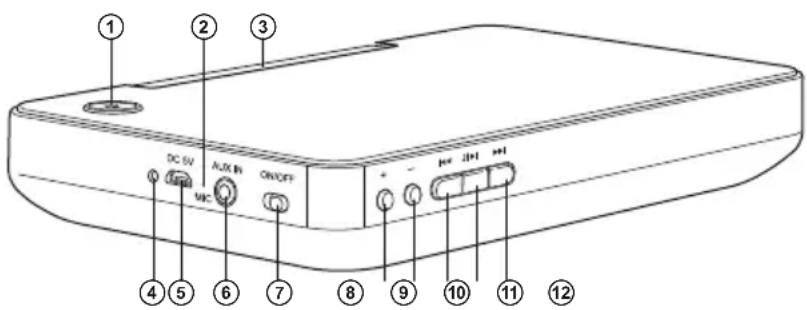
Fig. 1. MSS design
Operation Manual
PS-100BL
⑦ ON/OFF: MSS power switch
⑧ +: volume level up button
⑨ -: volume level down button
⑩: previous track switch button (short pressing)
⑪ J/▶II: Play/Pause (pressed short in Bluetooth mode);
when there is a call answer/rejection (in Bluetooth mode);
entry into search Bluetooth mode (long pressing, more than 2 sec)
⑫ ▶▶: next track switch button (short pressing)
5. PREPARATION AND OPERATION
Speaker placement
- Place the device in an easy-to-use place for a user.
- Place the MSS far away from monitors and TV sets, as insignificant image distortion in these supersensitive devices is possible.
MSS connecting
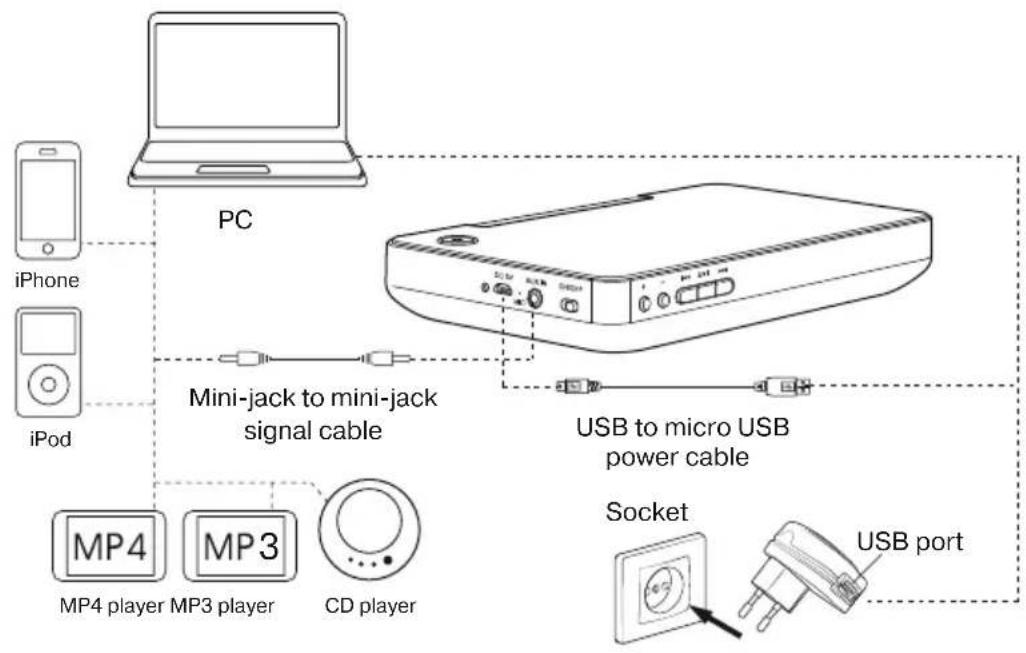
PS-100BL speaker system can be connected to virtually any audio source: PC, notebook, MP3/MP4 players, mobile devices etc. (see connection diagram in Fig. 2 and 3)
- Before use, the built-in battery in the speaker system must be charged. Connect DC 5V jack ⑤ with USB port of a computer or 5V DC power unit using USB cable (included). During connection to an external power source, the charging mode indicator ④ will light red. Upon the battery charging completion the indicator ④ will change the light color to green.
- To connect the MSS to PC, MP3/CD players via AUX IN jack ⑥ use the mini-jack to mini-jack signal cable (included). For this purpose insert mini jack of the signal cable into the jack ⑥, then the second mini jack into the sound card linear output of a PC or MP3/CD player (see Fig. 2).
- Put the switch ⑦ on the MSS side panel in ON position to switch on the MSS.
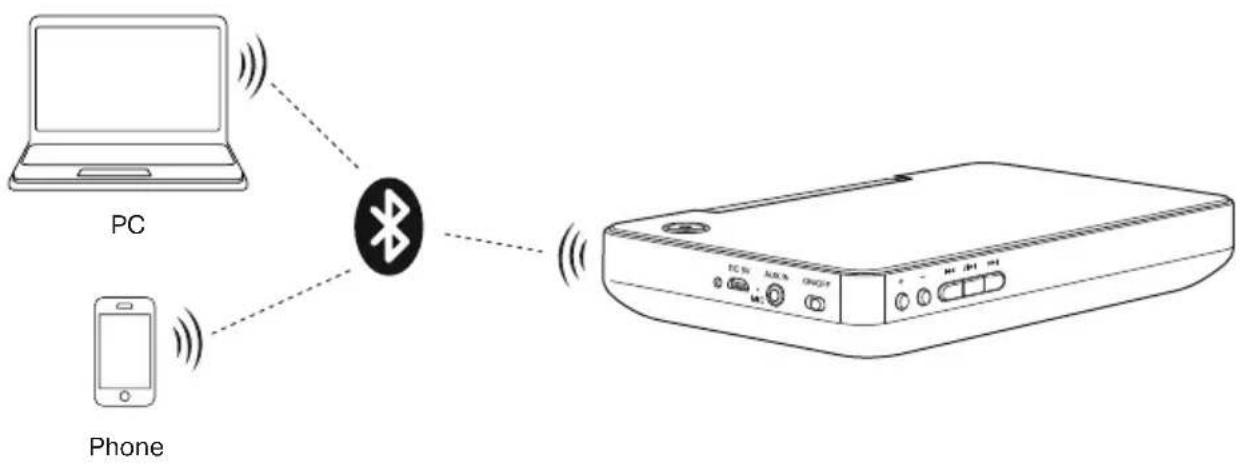
- When connecting to a sound source via Bluetooth, it is necessary to fulfill the intercommunication procedure with an audio signal source (see Fig. 3).
- Select the desired volume level with buttons ⑧ and ⑨ on the side panel.
- After the MSS use, switch off the power supply with the switch ⑦ on the side panel.
Bluetooth mode
This mode is active in the absence of connected jack in AUX IN jack ⑥.
- For the signal transmission in this mode it is necessary first to interconnect the MSS with a signal source long pressing, more than 2 sec the button ⑪. The MSS will go to the search mode, the indicator ① will start blinking blue color frequently (2-4 Hz) (Bluetooth searching) and the MSS will beep the confirmation signal. Then on the signal source (telephone, smartphone, etc.) choose the search mode of devices with Bluetooth. The name of the MSS “SVEN PS-100BL” will be displayed on the signal source screen, with which you need to intercommunicate*. Select this device and the “connect” command.
- When the connection is successful, the MSS will beep the confirmation signal and the indicator ① on the front panel will reduce the blinking frequency ( 1 Hz).
- To switch the MSS to the search mode you can also press long the button Ⓤ (or to switch off the MSS and then to switch on it once again).
flowchart
graph TD
    A["PC"] --> B["iPhone"]
    A --> C["iPod"]
    C --> D["Mini-jack to mini-jack signal cable"]
    D --> E["USB to micro USB power cable"]
    E --> F["Socket"]
    F --> G["USB port"]
Fig. 2. Audio signal source connection diagram
flowchart
graph LR
    A["PC"] -->|Wireless Signal| B["Bluetooth"]
    C["Phone"] -->|Wireless Signal| B
    B -->|Wireless Signal| D["Device"]
Fig. 3. Audio sources connection diagram via Bluetooth module
- After interconnection with the signal source you can control the player of the signal source using buttons ⑩, ⑪ and ⑫.
- You can receive/finish incoming calls (after their receipt) with the button ⑪.
Operation Manual
PS-100BL
AUX Mode
- The MSS enters into AUX mode automatically after the plug insertion into AUX IN jack ⑥ on the side panel.
-
At the instant of connection, the MSS will beep the confirmation signal and the indicator ① on the front panel will change its light to green.
-
TROUBLESHOOTING
| Problem | Cause | Solution |
| The MSS does not turn on. | Built-in battery is discharged. | Connect the MSS to a charger, USB port of a notebook or PC to charge the battery. |
| No sound or there is too quiet sound of speakers. | The volume level is set at minimum value. | Press the button “vol+” on the front panel. |
| No connection via Bluetooth / wrong connection or selection of an audio signal source. | Fulfill the interconnection procedure via Bluetooth / connect or select an audio signal source correctly. | |
| Distortion of sound. | High amplitude of the input signal. | Turn down the source volume and the MSS volume. |
If none of the above methods can solve the problem, please seek professional advice at your nearest service center. Never attempt to repair the product yourself.
- TECHNICAL SPECIFICATIONS
| Parameter, measurement unit | Value |
| Output power (RMS), W | 6 (2 × 3) |
| Frequency range, Hz | 80 – 20,000 |
| Speaker diameter, mm | 2 × ∅ 40 |
| Power supply: lithium-ion accumulator, mA·hUSB, V | 1150DC 5 |
| Bluetooth version | 2.1 + EDR |
| Bluetooth operating range, m | 8 |
| Dimensions (W × H × D), mm | 195 × 115 × 35 |
| Weight, kg | 0.437 |
Notes:
- Technical specifications given in this table are supplemental information and cannot give occasion to claims.
- Technical specifications are subject to change without notice due to the improvement of SVEN production.
natural_image
Exterior view of a black and silver electronic device with ports and a logo (no visible text or symbols)Модель: PS-100BL
Manufacturer: SVEN PTE. LTD, 176 Joo Chiat Road, N° 02-02, Singapore, 427447. Produced under the control of Oy Sven Scandinavia Ltd. 15, Kotolahdentie, Kotka, Finland, 48310. Made in China.
® Registered Trademark of Oy SVEN Scandinavia Ltd. Finland.
PS-100BL
- Operation Manual
- PS-100BL
- Congratulations on your purchase of the Sven speaker system!
- COPYRIGHT
- TRADEMARKS
- NOTICE OF RESPONSIBILITY RESTRICTION
- CONTENTS
- BUYER RECOMMENDATIONS
- PACKAGE CONTENTS
- SAFETY PRECAUTIONS
- TECHNICAL DESCRIPTION
- Special features
- MSS design
- PREPARATION AND OPERATION
- Speaker placement
- MSS connecting
- Bluetooth mode
- AUX Mode
- Notes:
- Модель: PS-100BL
Brand : Sven
Model : PS-100BL
Category : Docking Station