
PS-36 - Docking Station Sven - Free user manual and instructions
Find the device manual for free PS-36 Sven in PDF.


| Type | Docking Station |
| Brand | Sven |
| Model | PS-36 |
| Dimensions | 12.5 x 8.0 x 3.5 cm |
| Weight | 150 g |
| Power Input | 5V DC, 1A |
| Compatible Devices | Smartphones, Tablets |
| Charging Port | USB-C, Micro-USB |
| Audio Output | 3.5 mm jack |
| Data Transfer | USB 2.0 |
| LED Indicator | Power and charging status |
| Material | ABS plastic |
| Cable Length | 50 cm |
| Color | Black |
| Functions | Charging, data sync, audio output |
| Safety | Overcurrent and short-circuit protection |
| Care | Wipe with dry cloth, avoid moisture |
| Spare Parts | USB cable, power adapter |
| General Information | Compact design, plug and play |
Frequently Asked Questions - PS-36 Sven
User questions about PS-36 Sven
0 question about this device. Answer the ones you know or ask your own.
Ask a new question about this device
Download the instructions for your Docking Station in PDF format for free! Find your manual PS-36 - Sven and take your electronic device back in hand. On this page are published all the documents necessary for the use of your device. PS-36 by Sven.
USER MANUAL PS-36 Sven
natural_image
Black SVEN portable speaker with mesh grille and stand (no visible text or symbols on device body)
natural_image
Black rectangular electronic device with a mesh grille and 'SVEN' logo on the front panel (no other text or symbols visible)natural_image
Black SVEN portable speaker with mesh grille and stand (no visible text or symbols on device body)
natural_image
Black rectangular electronic device with a mesh grille and 'SVEN' logo on the front panel (no other text or symbols visible)natural_image
Black SVEN portable speaker with mesh grille and stand (no visible text or symbols on device body)
natural_image
Black rectangular electronic device with a mesh grille and 'SVEN' logo on the front panel (no other text or symbols visible)Operation Manual
SVEN PS-36
Congratulations on your purchase of the Sven speaker system!
COPYRIGHT
© 2014. SVEN PTE. LTD. Version 1.0 (V 1.0).
This Manual and information contained in it are copyrighted. All rights reserved.
TRADEMARKS
All trademarks are the property of their legal holders.
NOTICE OF RESPONSIBILITY RESTRICTION
Despite the exerted efforts to make this Manual more exact, some discrepancies may occur. The information in this Manual is given on «as is» terms. The author and the publisher do not bear any liability to a person or an organization for loss or damage which has arisen from the information contained in this Manual.
CONTENTS
RUS 1
UKR 5
ENG 10
-
BUYER RECOMMENDATIONS ...... 11
-
PACKAGE CONTENTS.... 12
-
SAFETY PRECAUTIONS 12
-
TECHNICAL DESCRIPTION ...... 12
-
PREPARATION AND OPERATION 13
-
TROUBLESHOOTING.... 14
-
TECHNICAL SPECIFICATIONS ...... 14
1. BUYER RECOMMENDATIONS
- Unpack the device carefully. Make sure there are no accessories left in the box. Check up the device for damage; if the product was damaged during transportation, address the firm which carried out the delivery; if the product functions incorrectly, address the dealer at once.
- Check up the package contents and availability of the warranty card. Make sure the warranty card has a shop stamp, a legible signature or the seller's stamp and purchase date, and the goods number corresponds to that in the warranty card. Remember: in case of warranty card loss or discrepancy of numbers you forfeit the right for warranty repairs.
- Do not switch on the speaker system immediately after you bring it into a room from environment with negative temperature! After unpacking, the speaker system should be kept in conditions of room temperature for at least 4 hours.
- Before installing and using the speaker system, read this Manual carefully and keep it for future reference.
2. PACKAGE CONTENTS
- Speakers — 2 pcs
• Universal connecting cable — 1 pc - Battery compartment — 1 pc
• Operation manual — 1 pc - Warranty card — 1 pc
3. SAFETY PRECAUTIONS
- To avoid electric shock, do not open the MSS and do not perform repairs by yourself. Service and repairs should be performed only by qualified specialists in an authorized service center. The list of authorized service centers is available on www.sven.fi
- Do not allow the circuit of wires (including the grounded ones) between the speakers, on the power amplifier or the ground, for it causes damage to the power amplifier output stage.
- Do not put foreign objects inside the holes of the MSS.
- Protect the MSS from high humidity, water and dust.
- Protect the MSS from heating: do not place it closer than 1 m from a heat source. Do not expose it to direct sunlight.
- Do not place any open flame sources on or close to MSS.
- Do not place the MSS in poorly ventilated areas. Leave an air gap of 10cm or more. When operating the MSS, do not put any devices on it, do not cover it with cloth or other objects preventing it from cooling.
- Do not use any chemical agents for cleaning. Clean it with dry soft cloth only.
4. TECHNICAL DESCRIPTION
SVEN PS-36 2.0 USB Portable Multimedia Speaker System (MSS) is designed to play music, sound games, etc. A distinctive feature of the MSS is presence of an external power supply (battery compartment) providing autonomous work of the speaker system, as well as magnetic holders converting the speakers into a single unit, which simplifies transporting and storage of this compact device considerably.
Special features
- Compact design
- Speaker system is compatible with PCs, DVD/Media-players, mobile devices and other sound sources
- Powered via a USB port or by 4 AAA type batteries (not included)
• Magnetic speaker holders
System requirements
- Notebook (netbook) or PC with a USB port
- Any signal output with 3.5 mm mini-jack
Operation Manual
SVEN PS-36
5. PREPARATION AND OPERATION
Speaker placement
- Place speakers symmetrically to the listener at a distance not less than one meter.
- Place MSS far away from monitors and TV sets, as insignificant image distortion in these super-sensitive devices is possible.
MSS Connecting
SVEN PS-36 2.0 USB Portable Multimedia Speaker System can be connected to virtually any audio source: DVD/CD, PC sound card, etc.
- Connect the speakers according to the connection diagram (see Fig. 1).
- Place the batteries into the battery compartment.
- Connect the USB power cable to a USB port of a laptop or a computer or to the battery compartment (in the portable mode). Switch on the speakers by pressing the button on the battery compartment. The power LED is on.
- Connect the green 3.5 mm mini-jack of the connecting cable to your audio source.
- Adjust the speakers' volume by means of your software or your portable device.
Note: Connect the speakers to a USB port of your laptop or PC, otherwise please use an active USB hub.
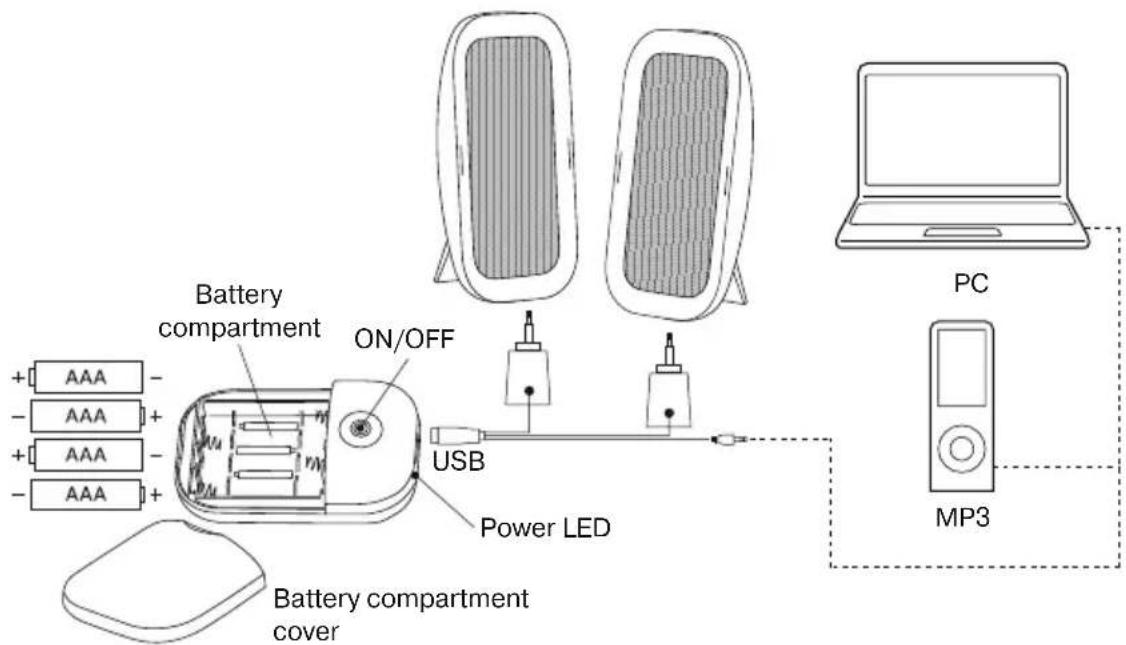
Fig. 1. Connection diagram
6. TROUBLESHOOTING
- If there is weak sound or there is no sound in the speakers, please make sure that the USB cable is plugged to the laptop or PC and it is powered on.
- Check the batteries.
-
Check the volume level at the sound source.
-
TECHNICAL SPECIFICATIONS
| Parameter, measurement unit | Value |
| Output power (RMS), W | 6 (2 × 3) |
| Frequency range, Hz | 80 – 20 000 |
| Speaker diameter, mm | ∅ 50 |
| Power supply, V | 5 DC/USB |
| Dimensions (one speaker) (W × H × D), mm | 75 × 120 × 45 |
| Weight, kg | 0.267 |
Notes:
- Technical specifications given in this table are supplemental information and cannot give occasion to claims.
- Technical specifications are subject to change without notice due to the improvement of SVEN production.
natural_image
Two black electronic devices labeled 'SVEN' on stands, no additional text or symbols visible.Модель: SVEN PS-36
Manufacturer: SVEN PTE. LTD., 176 Joo Chiat Road, N° 02-02, Singapore, 427447. Produced under the control of Oy Sven Scandinavia Ltd. 15, Kotolahdentie, Kotka, Finland, 48310. Made in China.
® Registered Trademark of Oy SVEN Scandinavia Ltd. Finland.
SVEN PS-36
- Operation Manual
- SVEN PS-36
- Congratulations on your purchase of the Sven speaker system!
- COPYRIGHT
- TRADEMARKS
- NOTICE OF RESPONSIBILITY RESTRICTION
- CONTENTS
- BUYER RECOMMENDATIONS
- PACKAGE CONTENTS
- SAFETY PRECAUTIONS
- TECHNICAL DESCRIPTION
- Special features
- System requirements
- PREPARATION AND OPERATION
- Speaker placement
- MSS Connecting
- TROUBLESHOOTING
- Notes:
- Модель: SVEN PS-36
Brand : Sven
Model : PS-36
Category : Docking Station