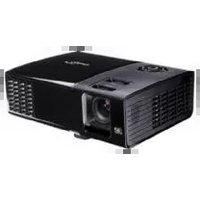
OPTOMA ZU707T - Projector

ZU707T - Projector OPTOMA - Free user manual and instructions

Find the device manual for free ZU707T OPTOMA in PDF.

📄 76 pages English EN Download 💬 AI Question 10 questions ⚙️ Specs
Notice OPTOMA ZU707T - page 1
Pick your language and provide your email: we'll send you a specifically translated version.
Product type DLP laser projector
Brand OPTOMA
Model ZU707T
Display technology DLP Texas Instruments 0.67" WUXGA DMD S600HB
Native resolution 1920 x 1200 (WUXGA)
Maximum resolution (HDMI 2.0) 3840 x 2160 at 60 Hz (4K UHD)
Light source Class 1 laser (IEC 60825-1:2014, RG2 IEC 62471-5:2015)
Lens 1.6x zoom (TR 1.2-1.92) or short throw (TR 0.58) depending on model
Lens shift (zoom 1.6x model) Vertical: 100% to 120%; Horizontal: ±10%
Keystone correction Vertical and horizontal (-30° to +30°), automatic, four-corner adjustment
Built-in speaker 2 x 15 W
Input connectivity HDMI 2.0 x2, HDBaseT, VGA x2, Audio 1/2, Composite video
Output connectivity HDMI, Audio, USB (5V/1.5A), Sync 3D, 12V trigger
Control LAN RJ45, RS232, IR, Crestron/Extron/PJLink/AMX support
Power consumption (typical) 366 W (bright mode), 240 W (ECO mode)
Power supply AC 110-220 V, 3.7 A / 1.85 A
Dimensions (W x D x H) 374 x 302 x 117 mm (with feet)
Weight 6.3 kg ± 0.5 kg
Operating temperature 0°C to 40°C
Special features Game mode, HDR/HLG, 3D DLP-Link, 360° free orientation, DynamicBlack, preset image modes
Lens cleaning Use compressed air and a special cloth; do not use harsh detergents
Spare parts / filters Optional filter (adjustable reminder from 300 to 1000 h)

Frequently Asked Questions - ZU707T OPTOMA

How to clean the projector lens?
Before cleaning, turn off the projector and unplug the power cord. Use compressed air to remove dust, then a special cloth to wipe gently. Do not touch the lens with your fingers and do not use solvents or harsh detergents.
What to do if the projected image is blurry?
Turn the focus ring clockwise or counterclockwise until the image is sharp. Also check that the distance between the projector and the screen is within the recommended range (see the distance table in the manual).
What batteries to use for the remote control?
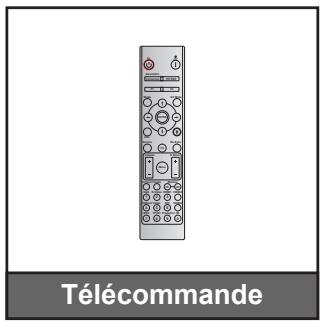
The remote control uses two AAA batteries. Ensure correct polarity and never mix new and old batteries. Remove the batteries if the remote will not be used for a long time.
How to adjust keystone correction?
Access the OSD menu, then go to Display > Geometric Correction. You can adjust vertical and horizontal keystone manually, or enable automatic correction. A four-corner adjustment is also available.
Can the projector be ceiling mounted?
Yes, the projector supports ceiling installation. Preferably use the Optoma mounting kit. The installation orientation can be set in the menu Setup > Projector Installation (front, rear, ceiling-up, rear-up).
What is the minimum projection distance?
It depends on the lens model. For the 1.6x zoom model, the minimum distance is about 1.3 m for a 31.5-inch image. For the short throw model, it is 0.37 m for 30 inches. Refer to the distance table in the manual.
How to connect an HDMI device?
Connect a certified high-speed HDMI cable up to 5 meters to either HDMI 1 or HDMI 2 port. The projector automatically detects the source. You can also manually select the input via the Source button on the remote.
Does the projector support 3D?
Yes, it is 3D compatible via DLP Link. To enable 3D mode, go to Image > 3D. You will need compatible DLP Link 3D glasses. 4K resolution is not supported in 3D.
How to update the firmware?
Firmware update is not detailed in this manual. Please consult the Optoma support website or contact technical support for the procedure and necessary files.
What to do if the projector does not turn on?
Check that the power cord is properly connected and the outlet works. If the power indicator remains solid red, press the Power button. If it blinks red, it may indicate overheating or a fault. Let it cool down and try again. Contact customer service if the problem persists.

User questions about ZU707T OPTOMA

0 question about this device. Answer the ones you know or ask your own.

Ask a new question about this device

The email remains private: it is only used to notify you if someone responds to your question.

No questions yet. Be the first to ask one.

Download the instructions for your Projector in PDF format for free! Find your manual ZU707T - OPTOMA and take your electronic device back in hand. On this page are published all the documents necessary for the use of your device. ZU707T by OPTOMA.

USER MANUAL ZU707T OPTOMA

natural_image Line drawing of a portable projector with control panel and display (no text or symbols)

TABLE DES MATIÈRES

SÉCURITÉ .... 4

IEC 60825-1:2014, EN 60825-1:2014+A11:2021, EN 50689:2021 CLASS 1 CONSUMER LASER PRODUCT RISK GROUP 2, Complies with 21 CFR 1040.10 and 1040.11 except for conformance as a Risk Group 2 LIP as defined in IEC 62471-5:Ed.1.0. For more information see Laser Notice No. 57, dated May 8, 2019. IEC 60825-1:2014 等級1雷射產品RG2危險等級 IEC 60825-1:2014 1类激光产品RG2危险等级

This Class B digital apparatus complies with Canadian ICES-003.
natural_image Illustration of a projector device with a labeled projection (no text or symbols on the device itself)

OPTOMA ZU707T - SÉCURITÉ .... 4 - 1

natural_image Line drawing of a person sitting in a chair watching TV, with a monitor on a desk and a wall-mounted screen (no text or symbols)
natural_image Line drawing of a person sitting in a chair facing a wall-mounted device, no text or symbols present
natural_image Line drawing of a person sitting in a chair watching a projector screen (no text or symbols)
natural_image Line drawing of a person sitting in a chair facing a wall-mounted device, no text or symbols present
natural_image Circular diagram showing six different kitchen appliances arranged in a ring, with no text or symbols present.
natural_image Illustration of two stacked heat sinks with a red X symbol crossed out (no text or symbols present)

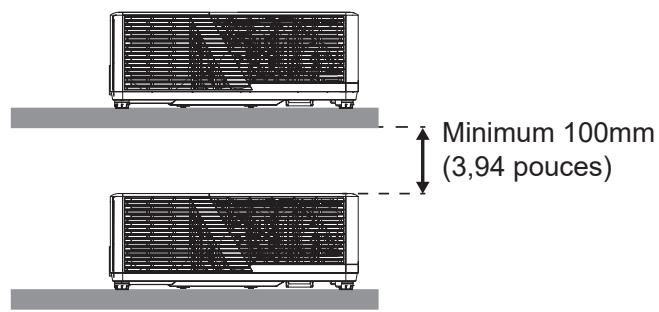
Minimum 100mm (3,94 pouces)

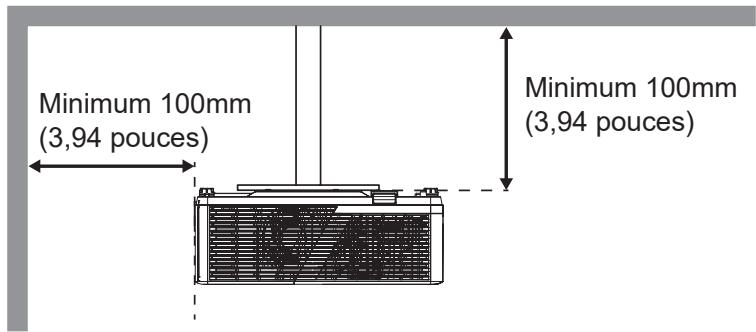
Minimum 100mm (3,94 pouces) Minimum 100mm (3,94 pouces)

natural_image Technical line drawing of a washing machine with control knobs and fan (no text or symbols)

UTILISER LE PROJECTEUR

UTILISER LE PROJECTEUR

État du système

UTILISER LE PROJECTEUR

LPCM(IEC 60958 PCM[30,31]

INFORMATIONS SUPPLÉMENTAIRES

Optoma Technology, Inc.

47697 Westinghouse Drive.

Fremont, Ca 94539

888-289-6786

510-996-4794

services@optoma.com

Canada

Optoma Technology, Inc.

47697 Westinghouse Drive.

Fremont, Ca 94539

888-289-6786

510-996-4794

services@optoma.com

Amérique Latine

Optoma Technology, Inc.

47697 Westinghouse Drive.

Fremont, Ca 94539

888-289-6786

510-996-4794

services@optoma.com

Europe

1 Bourne End Mills

Hemel Hempstead

Hertfordshire

HP1 2UJ

Royaume-Uni

www.optoma.eu

service@tsc-europe.com

France

Bâtiment E

81-83 avenue Edouard Vaillant

92100 Boulogne Billancourt, France

+31 (0) 36 8200 250

+31 (0) 36 548 9052

+33 1 41 46 12 20

+33 1 41 46 94 35

savoptoma@optoma.fr

Espagne

C/ José Hierro, 36 Of. 1C 28529 Rivas

https://www.optoma.com/kr/

Japon

https://www.optoma.com/jp/

Taiwan

https://www.optoma.com/tw/

Chine

Room 2001, 20F, Building 4,

No.1398 Kaixuan Road,

Changning District

Shanghai, 200052, Chine

Australie

https://www.optoma.com/au/

+86-21-62947376

+86-21-62947375

www.optoma.com.cn

Manual assistant
Powered by Anthropic
Waiting for your message
Product information

Brand : OPTOMA

Model : ZU707T

Category : Projector