
Series 3000 HSP3500 - Security Camera PHILIPS - Free user manual and instructions
Find the device manual for free Series 3000 HSP3500 PHILIPS in PDF.


| Product Type | Security Camera |
| Brand | Philips |
| Model | Series 3000 HSP3500 |
| Resolution | 1080p (Full HD) |
| Field of View | 130° |
| Night Vision | Yes, up to 10 meters |
| Connectivity | Wi-Fi 2.4 GHz |
| Power Supply | 5V DC via adapter |
| Storage | Cloud or microSD up to 128 GB |
| Dimensions | 7.5 x 7.5 x 12 cm |
| Weight | 250 g |
| Audio | Built-in microphone and speaker |
| Motion Detection | Yes, with alerts |
| Certifications | CE, RoHS |
| Warranty | 2 years |
| Cleaning Instructions | Wipe with a soft dry cloth |
| Spare Parts & Repairability | Available via Philips support; designed for repairability |
Frequently Asked Questions - Series 3000 HSP3500 PHILIPS
User questions about Series 3000 HSP3500 PHILIPS
0 question about this device. Answer the ones you know or ask your own.
Ask a new question about this device
Download the instructions for your Security Camera in PDF format for free! Find your manual Series 3000 HSP3500 - PHILIPS and take your electronic device back in hand. On this page are published all the documents necessary for the use of your device. Series 3000 HSP3500 by PHILIPS.
USER MANUAL Series 3000 HSP3500 PHILIPS

© 2023 Philips Domestic Appliances Holding S.W. Nights reserved 9C0010346672 (09/14/2023)

- Electromagnetic fields (EMF)
This Philips appliance consists with all applicable standards and regulations regarding exposure to electromagnetic fields.
-
Recycling
-
I'm not throw away the product with the normal household, once at the normal table, but hence it is at an initial
collection point, for reaching 1s doing 2h, you help to occur the end of the -
Follow your country's rules for the separate collection of electrical and electronic products. Correct general helps prevent negative consequences for the environment and human health
• The product is I* or remanze with the restriction of hazardous substances requirement as part of India & Waste Rule 2022. -
Technical Specifications
Audio-lateral speaker and elsewhere
Storage Support up to 125G Mio's 30 card inc. induced, WITH 11 MU '13 gain server 2.4G Ir - Customer support
If you need any help setting up the device, please visit our website. Please be your information.

PHILIPS
Ameripadista
to me today
Interior catmen
委托公司代码
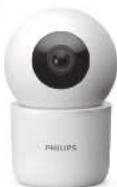
I think you get purchasing a Philips home Safety program. Snap isolated, power download: a Philips home safety app. Set up and manage all your devices directly from your phone. Ampg room in your name 20-41 and enjoy total owned by your store.
- Important information
- Do not handle adapters, plugs or the mains cord with wet
• Make a the value on the visual enough to augment the
10
• Do not use the indoor Carrera outdoors. • Deluxe can be carried, 100 minutes - when attribute the reference to a-line, help use the line.
in east in the line.
• CHINESE OF OCELY.
• 请在说明理由下填写的项目名称及项目的内容。
at least 75 cm between the clearance and in- -
本单位为本公司2017年1月31日的总股本,其中,公司以人民币1.5亿元为基数,向全体股东每10股派发现金红利0.1元。
-
What's in the box
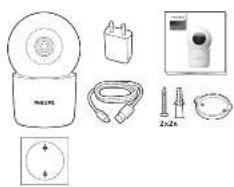
natural_image
Product line drawings of various household appliances and accessories (no text or symbols visible)- Getting started
- Please have your email network name and password handy
Download the Phillips Home Safety app
- Setting up
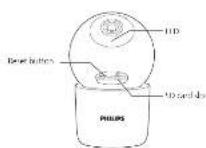
Step 2: Come the device to a network
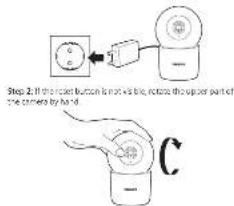
Step 2: new - reduced binding for 5-oxoamino-1-aminon the
18:61.
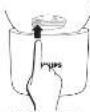
Step 4 Options: I set the WIZO 52 Card.

Brand : PHILIPS
Model : Series 3000 HSP3500
Category : Security Camera