
Series 3000 HSP3800 - Security Camera PHILIPS - Free user manual and instructions
Find the device manual for free Series 3000 HSP3800 PHILIPS in PDF.


| Product Type | Indoor Security Camera |
| Brand | Philips |
| Model | Series 3000 HSP3800 |
| Audio | Built-in speaker and microphone (two-way audio) |
| Storage | MicroSD card slot support up to 128GB (class 10 recommended) |
| Power Supply | DC adapter (included), 5V/1A |
| Connectivity | Wi-Fi 802.11 b/g/n (2.4 GHz) |
| App Control | Philips Home Safety app (iOS and Android) |
| Field of View | 120° diagonal |
| Video Resolution | 1080p Full HD (1920x1080) |
| Night Vision | Infrared LEDs up to 10 meters |
| Motion Detection | Yes, with push notifications |
| Dimensions | 7.8 x 6.2 x 11.5 cm (without stand) |
| Weight | Approx. 150 g |
| Mounting | Tabletop or wall mount (bracket included) |
| Operating Temperature | 0°C to 40°C |
| EMF Compliance | Meets applicable standards for electromagnetic field exposure |
| Recycling | Separate collection required; do not dispose with household waste |
| Warranty | 2 years (subject to local regulations) |
| What's in the Box | Camera, power adapter, mounting kit, quick start guide |
Frequently Asked Questions - Series 3000 HSP3800 PHILIPS
User questions about Series 3000 HSP3800 PHILIPS
0 question about this device. Answer the ones you know or ask your own.
Ask a new question about this device
Download the instructions for your Security Camera in PDF format for free! Find your manual Series 3000 HSP3800 - PHILIPS and take your electronic device back in hand. On this page are published all the documents necessary for the use of your device. Series 3000 HSP3800 by PHILIPS.
USER MANUAL Series 3000 HSP3800 PHILIPS
© 2023 Philips Domestic Appliances Holding S.W. Nights reserved 9C0010546682 (09/14/2023)

70210
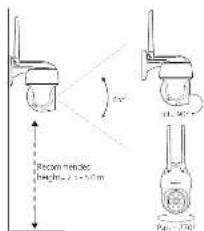
- How to place it
- Electromagnetic fields (EMF)
This Philips appliance consists with all applicable standards and regulations regarding exposure to electromagnetic fields.
-
Recycling
-
Do not throw away the proper with the normal household.
where the end of the curve, but hence it is an referral solution given by observational findings, in each
preserve the environment. -
Follow your country's rules for the separate collection of electrical and electronic products. Correct disposal helps prevent negative consequences for the environment and human health
• The product is I* or remanze with the restriction of hazardous substances requirement as part of India & Waste Rule 2022. -
Technical Specifications
Audio Interval Speaker and microphone
Storage Supports up to 125G MicroSD card inc. induced, INFLU11 ALL 37 with user 3/64 - Customer support
If you need any help setting up the device, please visit our
www.csc.org/ircc-pris.com/unduslo/upper

PHILIPS

I think you get purchasing a Philips Phone Safety program. Snap isolated, power download: a Philips Phone Safety program set up and manage all your devices directly from your phone. Manipurment in your phone 20-41 and enjoy total owned by your phone.
- Important information
- Do not handle adapters, plugs or the mains cord with wet
• Make a the value set up your enough to augment the
2017.13.1
• When attached to the camera to a phone, also the group
arr unest in the line - 本品的少区C级?
- If the came a housing is damaged in any way, be not use.
- After setting the capacity remains as necessary or difficult of
at least 20 cm between the device and user. -
The same has a 25% range of 2.6% to 18.7% high, with a
-
-
-
-
-
-
-
-
-
-
-
-
-
-
-
-
-
-
-
-
-
-
-
-
-
-
-
-
-
-
-
-
-
-
-
-
-
-
-
-
-
-
-
-
-
-
-
-
-
-
-
-
-
-
-
-
-
-
-
-
-
-
-
-
-
-
-
-
-
-
-
-
-
-
-
-
-
-
-
-
-
-
-
-
-
-
-
-
-
-
-
-
-
-
-
-
-
- 99.
-
-
-
-
-
-
-
-
-
-
-
-
-
-
-
-
-
-
-
-
-
-
-
-
-
-
-
-
-
-
-
-
-
-
-
-
-
-
-
-
-
-
-
-
-
-
-
-
-
-
-
-
-
-
-
-
-
-
-
-
-
-
-
-
-
-
-
-
-
-
-
-
-
-
-
-
-
-
-
-
-
-
-
-
-
-
-
-
-
-
-
-
-
-
-
-
-
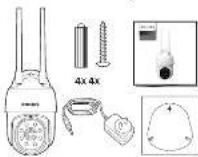
What's in the box 3. Getting started
- Please have your HTML network name and password handy.
Workforce: the Phillips Home Safety App

Sare the 2000 Guide to observational the map

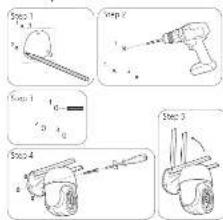
- Setting up
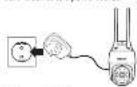
Step 1: Connect the device to a power source.
Step 2: Hand the one by hand

Step 2: Use a pen to prevent the onset of an in a second unit
The following year(s) in June:

Step 4: Ground tract M/m

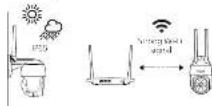
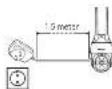
- Where to place it
Brand : PHILIPS
Model : Series 3000 HSP3800
Category : Security Camera