
Series 1000 HSP1000 - Security Camera PHILIPS - Free user manual and instructions
Find the device manual for free Series 1000 HSP1000 PHILIPS in PDF.


| Type de produit | Caméra de sécurité intérieure |
| Marque | Philips |
| Modèle | Series 1000 HSP1000 |
| Résolution vidéo | Full HD 1080p (1920x1080) |
| Angle de vue | 120 degrés |
| Vision nocturne | Oui, jusqu'à 10 mètres (infrarouge) |
| Audio bidirectionnel | Oui, microphone et haut-parleur intégrés |
| Détection de mouvement | Oui, notifications push sur l'application |
| Connectivité | Wi-Fi 802.11 b/g/n (2,4 GHz) |
| Application mobile | Philips HomeCam (iOS et Android) |
| Stockage | Cloud (abonnement) ou carte microSD (jusqu'à 128 Go) |
| Alimentation | Adaptateur secteur 5V/1A (USB) |
| Dimensions | 70 x 70 x 110 mm |
| Poids | 150 g (sans câble) |
| Montage | Sur bureau ou mural (support inclus) |
| Température de fonctionnement | 0°C à 40°C |
| Indice de protection | IP20 (usage intérieur) |
| Entretien | Nettoyer avec un chiffon doux et sec |
| Sécurité | Chiffrement AES 128 bits, conformité RGPD |
| Contenu de la boîte | Caméra, adaptateur secteur, câble USB, support mural, vis, guide de démarrage rapide |
Frequently Asked Questions - Series 1000 HSP1000 PHILIPS
User questions about Series 1000 HSP1000 PHILIPS
0 question about this device. Answer the ones you know or ask your own.
Ask a new question about this device
Download the instructions for your Security Camera in PDF format for free! Find your manual Series 1000 HSP1000 - PHILIPS and take your electronic device back in hand. On this page are published all the documents necessary for the use of your device. Series 1000 HSP1000 by PHILIPS.
USER MANUAL Series 1000 HSP1000 PHILIPS
© 2023 Philips Domestic Appliances Holding S.A.
(1) 2020年1月16日
9.00162456 2 (0.5) m2.023
Step 3: Onshore pipe + Vare 201 and
70210
-
How to use it
-
Electromagnetic fields (EMF)
This Philips appliance consists with all applicable standards and regular stores regarding exposure to electromagnetic fields. - Recycling
- Do not brew away the product with the normal household.
ascise at the end of Europe, but hence it in an initial selection vote for example to determine which
preserving the investment. - Follow your country's rules for the separate collection of electrical and electronic products. Correct disposal helps prevent negative consequences for the environment and human health
- The product is in accordance with the restriction of hazardous substances requirements as per the India & Waste Rule 2022.
[Non-Text]
- Technical Specifications
Audio Interval Speaker and microphone
Storage Support: up to 125G Micro 3D card inc. induced;
WHITT MID 15-29-10 SEP 7 23, 18
- Customer support
If you need any help setting up the device, please visit our
www.cureEurope.com.cn
PHILIPS
10.2.3.
- 2018年1月1日
Interior Camera
转出申请时间
Thank you for purchasing a Philips Items Safety product. Snap isolated, power download: a Philips Items safety specialist set up and manage all your devices directly from your phone. Apply request in your name 20-41 and enjoy total owned by your website.
1. Important information
- Do not handle adapters, plugs or the mains cord with wet
with -
2015年1月1日,公司召开2015年第一次临时股东大会,并通知全体董事。
• 2017年1月1日
• If the same a house is damaged in an area, do not use.
• 3. The ordering of the car, man, and other members of
at head. 25 cm between the floor and one
• He came to has a 20% volume of 1,200 gm. -
-
- 2016.
-
-
What's in the box 3. Getting started
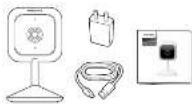
- Please have your HTML network name and password handy.
- 2014年1月1日星期六
- 2016年7月16日发布《上海证券报》
suspended
Download the Phillips Home Safety app

Sare the 9th Guide to observational the map

- Setting up
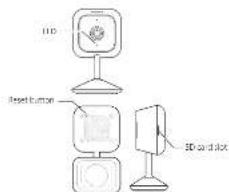
Step 2: Come the device to a network
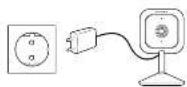
Step 2: One part begins the Desal induction for 5 radicals and the
2018年4月1日
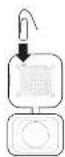
Brand : PHILIPS
Model : Series 1000 HSP1000
Category : Security Camera