KATRCM24MPA - Video camera Kogan - Free user manual and instructions
Find the device manual for free KATRCM24MPA Kogan in PDF.


| Product Type | Trail and Wildlife Camera |
| Brand | Kogan |
| Model | KATRCM24MPA |
| Image Sensor | 2MP Color CMOS |
| Max Pixel | 5600 x 4200 |
| Lens | Fixed Lens (Angle depends on lens) |
| Infrared Lamp | 940nm |
| Display | 2.0-inch TFT Color |
| Memory | microSD up to 32GB (Class 10 recommended) |
| Image Resolution | 24MP, 16MP, 12MP, 8MP, 5MP, 2MP, 1.3MP |
| Video Resolution | 1920x1080 (FHD), 1280x720 (HD), 800x480, 640x480 |
| Video Format | AVI |
| PIR Sensing Distance | Up to 15 meters (combined sensors) |
| Trigger Time | 0.5 seconds |
| Operation Modes | Day and Night, Auto Recording (PIR triggered) |
| Power Source | 8 x AA batteries (not included) or external DC 5V/2A (solar panel port DC 6V/2A) |
| Standby Current | ≤0.15mA |
| Power Consumption | 180mA (1000mA with infrared) |
| Low Battery Warning | 4.5V (shown on display) |
| Protection Rating | IP66 |
| Working Temperature | -20°C to +75°C |
| Working Humidity | 5% to 95% |
| Mounting | Strap or tripod |
| Interfaces | USB, microSD slot, external DC power socket |
| Password Protection | Yes (4-digit, factory password "pass") |
| Languages | English (11 optional languages) |
| Maintenance | Clean lens with soft cloth. Remove batteries if unused for long periods. Keep dry. |
Frequently Asked Questions - KATRCM24MPA Kogan
User questions about KATRCM24MPA Kogan
0 question about this device. Answer the ones you know or ask your own.
Ask a new question about this device
Download the instructions for your Video camera in PDF format for free! Find your manual KATRCM24MPA - Kogan and take your electronic device back in hand. On this page are published all the documents necessary for the use of your device. KATRCM24MPA by Kogan.
USER MANUAL KATRCM24MPA Kogan
natural_image
Top-down view of a camouflaged video camera with camouflage pattern and targeting lenses (no text or symbols visible)24MP TRAIL AND WILDLIFE CAMERA
KATRCM24MPA
COMPONENTS
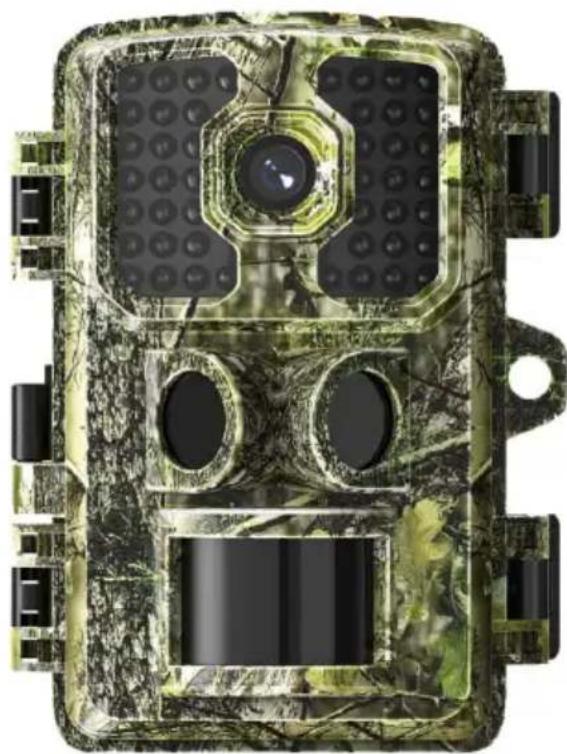
natural_image
Top-down view of a camouflage-based video camera with multiple lenses and targeting panels (no text or symbols visible)Camera
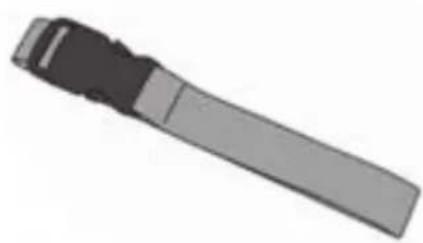
natural_image
3D rendered image of a mechanical tool or component (no text or symbols visible)Mounting Strap
User Guide
OVERVIEW
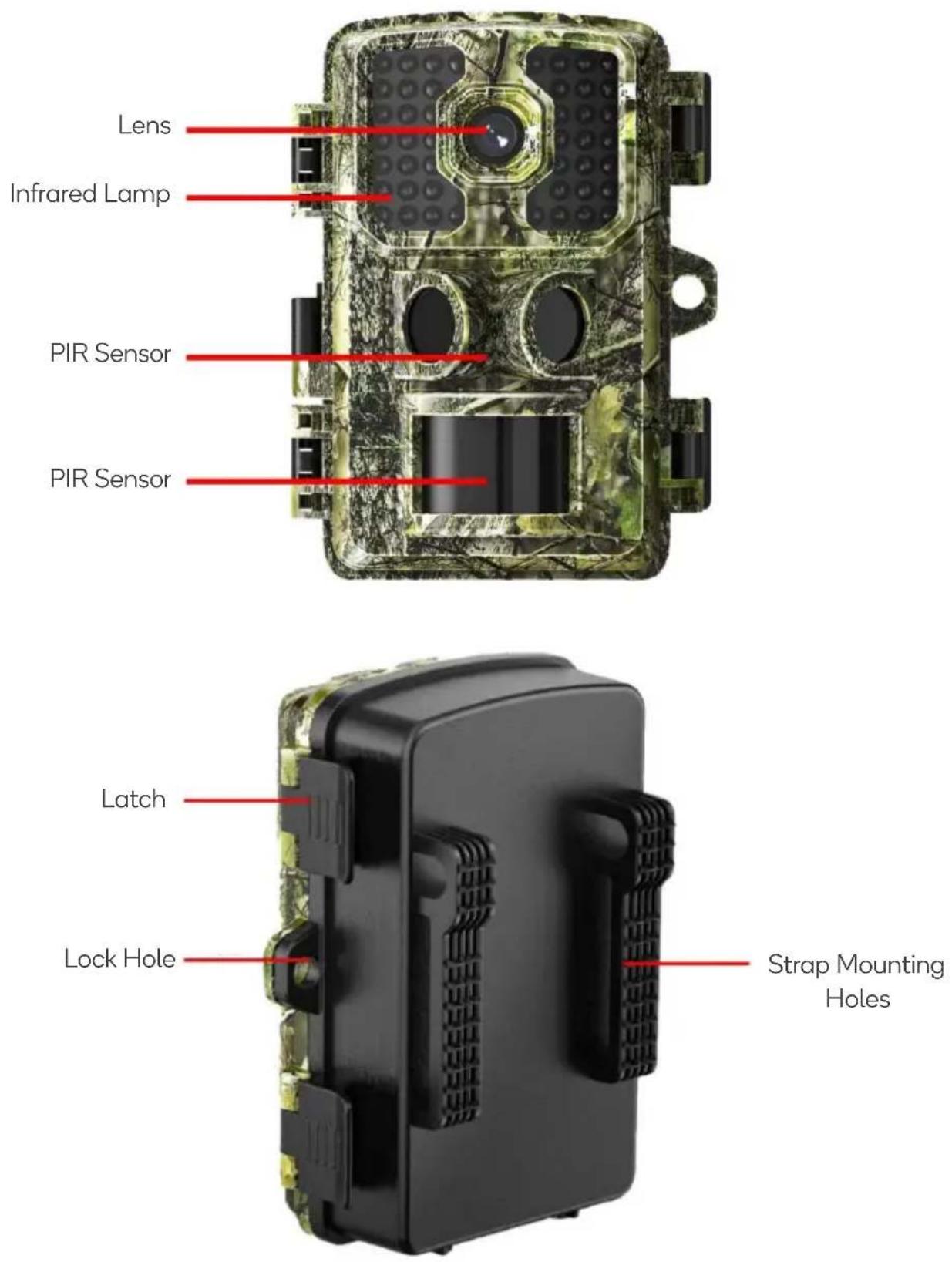
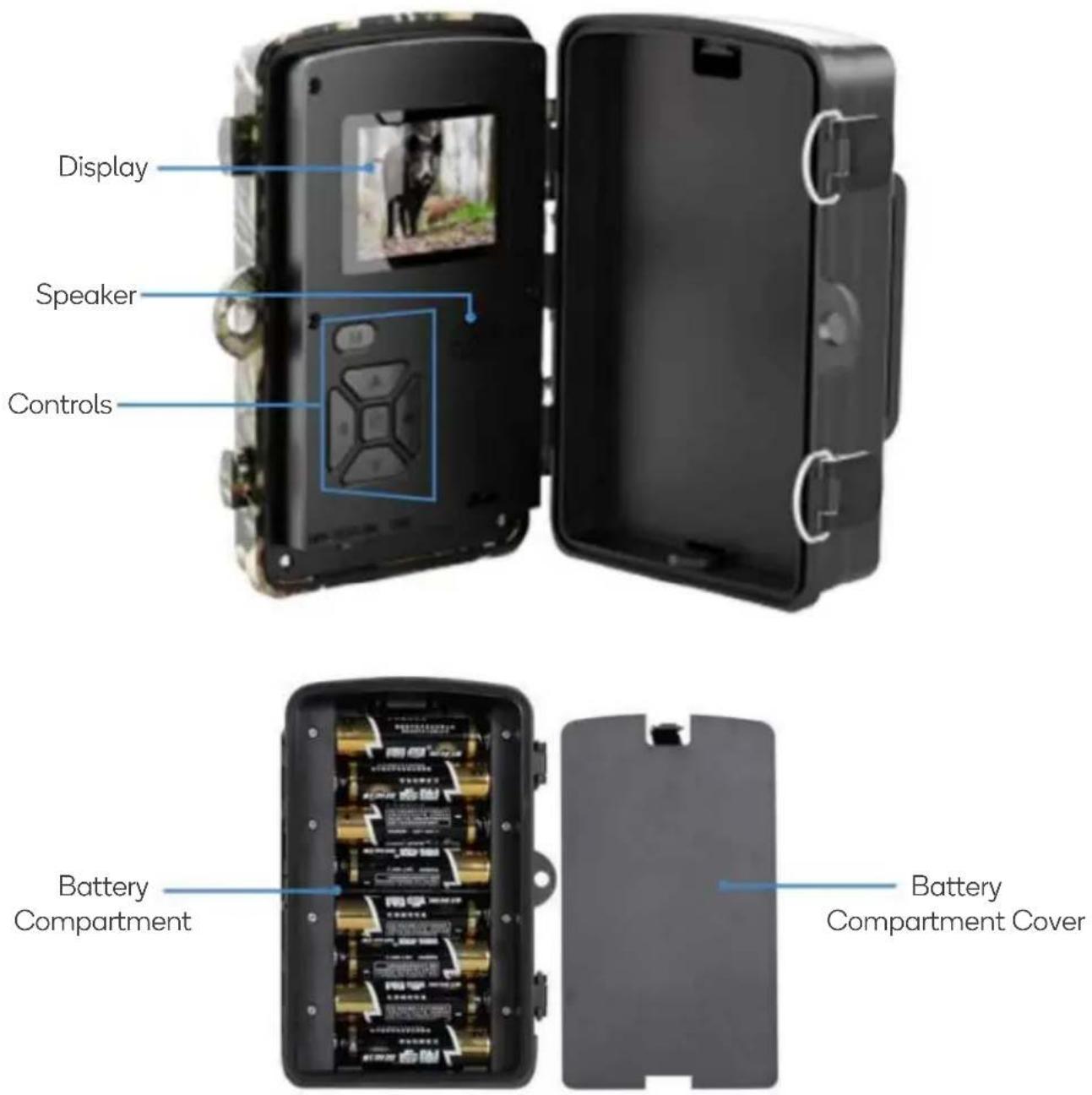
Description:
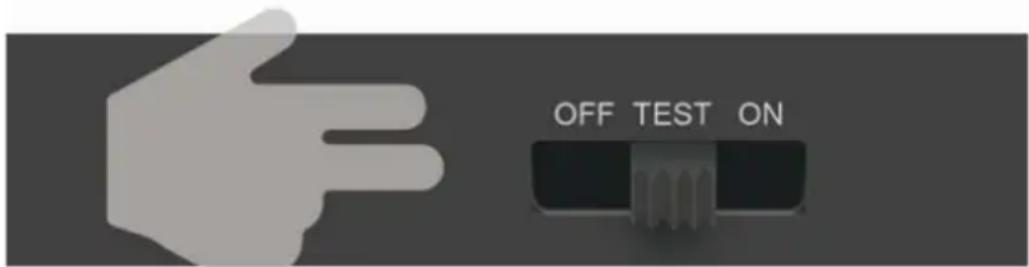
- The camera provides the following equipment connection: USB interface, TF card slot, external DC power socket. Three-way power/mode switch to select: OFF/TEST/ON;
- LED indicator: red indicates PIR monitoring: The white light flashes once and the red light means to capture a picture or camera. In ON mode, the indicator does not blink.
Batteries
- Remove the battery compartment cover.
- Install 8 AA batteries paying close attention to the orientation of the polarity symbols (+/-).
- Replace the battery compartment cover.
Note: Do not mix different kinds of batteries (e.g., alkaline, lithium, rechargeable). Never combine old and new batteries.
- When the batteries are running low, "Battery Low" will be shown on the display.
- If the camera is not to be used for an extended period, remove the batteries to avoid possible leakage damage.
- In addition, the camera can be powered using an external DC 5V/2A solar powered power supply (not supplied).
Inserting a microSD Card
To use the camera effectively, it is essential to install a microSD card since the camera lacks built-in memory. The microSD card should have a capacity of up to 32GB and a class 10 rating.
Prior to insertion into the microSD card slot, verify that the card's capacity does not exceed the recommended limit and that it has been tested for compatibility. This ensures smooth operation and enables the camera will store captured data efficiently.
Setting the Camera
Slide the mode switch from OFF to TEST position to activate the camera and view the user setup screen.
In TEST mode, the camera will operate similarly to a normal digital camera. You can capture a picture or video and enter the menu to set parameters.
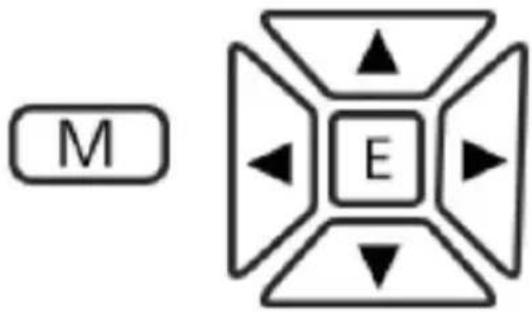
flowchart
graph TD
    A["M"] --> B["E"]
    B --> C["Arrow Up"]
    B --> D["Arrow Down"]
    B --> E["Arrow Left"]
    B --> F["Arrow Right"]
| M | Press to open the settings menu.When in the setting menu, press to exit the menu. |
| E | Press in the photo/video state to enter playback mode.Press in the video file to play the video. In the main menu press to confirm the settings. |
 | Press in the photo/video state to enable photos/videos.In playback mode, press this key to exit the video mode.Press to move to the left in the menu interface |
 | Enter the video mode.Move up in the menu mode and turn the page in the playback mode. |
 | When setting parameters in the menu, press to move to the right. |
 | Enter the photo mode.Move down in the menu mode and turn the page in the playback mode. |
OFF/TEST/ON switch
• OFF: Turns the camera off.
- TEST: Test each function of the camera.
- ON: Place the camera in Auto Recording Mode. After 5 seconds the camera will enter standby automatically. When PIR detects objects moving in front of it, it will automatically capture photos/video.
Super Password
In the event you forget your password, enter the factory password "pass" to unlock the camera.
USB
With the camera switched off or while in test mode, you can connect the camera to your computer to manage the saved photo/videos (USB cable not supplied).
The pictures and videos of the camera are stored in the folder \DCIM\100MEDIA in the SD card. The file names for images will be “imag000X1.jpg” and videos will be “imag000X.avi”.
The SD cards can be placed in card readers and inserted into the computer to browse the files in the USB disk.
Auto Recording Mode
In this mode and the camera will start when prey or other objects enter the PIR sensing area, both PIRS are triggered at the same time and immediately start taking photos or recording videos.
- The PIR in the middle mainly detects the left and right viewing angles and the viewing angle distance is 45^ , within 10 meters.
- The Angle of view of the PIR below is 90^ and the distance is within 15 meters.
- If the prey strolls away from the PIR sensor, the camera will be powered off and put into standby mode.
Positioning the Camera
- It is recommended that you position the camera 1 - 2 metres above the ground.
- For best results, face the camera north or south and remove branches near the front of the camera.
Note: To avoid potential false triggers, do not point the camera at a heat source (e.g., the sun) or near a branch trunk.
Settings
| Mode Setting | CaptureVideoCapture+Video | Choose to take a picture or video. In Capture+Video mode, the camera will first capture picture and then record video. |
| Languages | Enter | 11 (Optional) |
| Photo pixel | 24MP16MP12MP8MP5MP2MP1.3MP | Select the required image resolution (1.3MP ~24 MP). Higher resolution will have better quality but occupy more space. It will take a long time to write larger files into SD card, which will slightly reduce the shutter speed. |
| Video resolution | 1080FHD720PWVGAVGA | 1920x10801280 x720800 x 480640 x 480 | Selects video resolution (pixels 1920x1080 per frame). Higher resolution 1280x720 will provide better video quality, but the files created will occupy more space. | |
| The length of the video | 10 seconds - 3 minutes | AVI format video can be played back on most video players. | ||
| Operate interval | 5 seconds - 30 minutes | Select the shortest time interval for the camera to wait and the PIR sensor will be triggered as soon as prey appears. At selected intervals, the camera will not capture pictures or video, which prevents the SD card from storing too many redundant pictures. | ||
| Date/Time | Enter | Select the date/time and press ENTER to set the date. | ||
| Time Stamp | OffOn | If you want to have a date/time watermark on each image, you can select a time watermark. Select "Off" and there will be no watermark on the picture. | ||
| Timer | OffOn | If you want the camera to operate only certain hours of the day, you can choose "on" | ||
| Password Set | OffOn | Set a password to protect the camera from unauthorized users | ||
| Serial ID Set | OffOn | Select "On" to assign a serial number to your camera. You can use 4-digit combinations to record pictures from a location. | ||
| Record Audio | OffOn | The default setting is on, when on, the camera can record, otherwise, only silent video | ||
| Format | CancelOK | When formatting an SD card, all files will be deleted. If your SD card has been used on other devices, formatting is strongly recommended. | ||
| Economy mode | OffOn | With economy mode on, the IR Brightness will be reduced to save power. | ||
| DC6V-2A port | / | The solar panel power supply port (DC 6V-2A). The wildlife camera does not support direct charging from an adapter, but it can charge the battery, replace the dry battery, or utilize a solar panel to obtain power supply. | ||
| Default setting | CancelOK | Restore the factory settings. | ||
| Version | Enter | View camera version. | ||
SPECIFICATIONS
| Image sensor | 2MP colour CMOS |
| The biggest pixel | 5600 x 4200 |
| The lens | Fixed Lens (Angle depends on lens) |
| Infrared lamp | 940nm infrared lamp |
| LED display | 2.0-inch TFT colour display |
| Memory | SD card (not included)(supports up to 32GB capacity) |
| Image resolution | 24M, 16M, 12M, 8M, 5M, 2M, 1.3M |
| Video resolution | 1920x1080, 1280x720, 800x480, 640x480 |
| PIR sensing distance | Within 10 meters |
| Working mode | Day and Night |
| Triggering time | 0.5 seconds |
| Sequence number of consecutive shots | 1 ~ 3 |
| Recording length | 10 seconds - 3 minutes |
| Photo + Video | Take the picture first and then the video |
| Password Set | 4 digits |
| Serial ID Set | 4 digits |
| Record Audio | On/Off |
| Languages | English |
| Batteries | 8 x AA (not included) |
| Standby current | ≤0.15mA |
| Auto power off | Off / 3 minutes / 5 minutes / 10 minutes |
| Power Consumption | 180mA (1000mA when illuminated by an infrared lamp), at DC 6V |
| Low battery warning | 4.5V |
| Interface | USB and SD card slots |
| Installation | Strap or tripod |
| Protection grade | IP66 |
| Working temperature | -20°C ~ +75°C |
| Working humidity | 5% ~ 95% |
| Version | DL001-B + date |
Need more information?
We hope that this user guide has given you the assistance needed for a simple set-up.
For the most up-to-date guide for your product, as well as any additional assistance you may require, head online to help.kogan.com
kogan.com
Brand : Kogan
Model : KATRCM24MPA
Category : Video camera