
DS-K1T8005EFWX - Access Control Hikvision - Free user manual and instructions
Find the device manual for free DS-K1T8005EFWX Hikvision in PDF.


| Product Type | Access Control Terminal |
| Brand | Hikvision |
| Model | DS-K1T8005EFWX |
| Keypad | Numeric keys (0-9), Direction keys, OK, ESC, Delete, Shift |
| Display | Standby screen with text input capability (likely 2.4-inch monochrome or color) |
| Authentication Methods | PIN code, optional card (not specified), optional biometric (not confirmed for this model) |
| Communication | Wi-Fi (based on model suffix EFWX), Ethernet (likely), Hik-Connect support |
| Mounting | Wall mount (with gang box) or base mount (with optional bracket) |
| Installation Environment | Indoor only |
| Power Supply | 12V DC or PoE (not specified, typical for access control) |
| Operating Temperature | 0°C to 45°C (typical, not specified in manual) |
| Certifications | CE, FCC |
| Data Protection | Encrypted biometric storage (if applicable), password protection |
| Warranty | Regional warranty, contact local support |
| Quick Operation | Device activation via password (min 8 chars with uppercase, lowercase, numbers, special) |
Frequently Asked Questions - DS-K1T8005EFWX Hikvision
User questions about DS-K1T8005EFWX Hikvision
0 question about this device. Answer the ones you know or ask your own.
Ask a new question about this device
Download the instructions for your Access Control in PDF format for free! Find your manual DS-K1T8005EFWX - Hikvision and take your electronic device back in hand. On this page are published all the documents necessary for the use of your device. DS-K1T8005EFWX by Hikvision.
USER MANUAL DS-K1T8005EFWX Hikvision
Scan the OR code to get the user manual for detailed information.
About this Document
- This Document includes instructions for using and managing the Product, Pictures, charts, images and all other information hereinafter are for description and explanation cells.
- The information contained in the Document is subject to change, website notice, due to firmware updates or other reasons. Please find the latest version of the Document at the Elikviking website: http://
www.hikvision.com. Unless otherwise agreed, Hangzhou Hicai run Digital Technology, Ltd., Ltd. or its affiliates.
(hereinafter referred to as "likvision") makes no warranties, express or implied.
- Please use the Document with the guidance and assistance of professionals trained in supporting the Product.
About this Product
This product can only enjoy the auto-sales service support in the country of region where the purchase is made. Acknowledgement of Intellectual Property Rights
• Hikvision owns the copyright and/or patent
this Document, which may include licenses obtained from third parties
■ Any part of the Document, including text, pictures, graphics, etc., belongs to Hikvision. No part of this Document may be manufactured, copied, transcribed or modified in which as in part by any more natural written
unamino? May be toampren, copra, contended, in Italian? While it is part by help me and we set a thin permission.
- Hikvision's trademarks and logos are the properties of Hikvision in various
- Other trademarks and laws were granted are the properties of their respective entities.
LEGAL DISCLAIMER
■ TO THE MAXIMUM EXCEPT PURMITTED BY APPARELL SOO, THIS DOCUMENT AND THE PRODUCT DESCRIBED WITH ITS HARDWARE, SOFTWARE AND FIRMWARE, ARE PROVIDED "AS IS" AND "WITH ALL SAULTS AND ERRORS". INFORMATION MAINS NO WARRANTIES, EXPENS ON IMPIED, INCLUDING WITHOUT LIMITATION, EMPREANTIBILITY, SATISAFICITARY QUALITY, OR FITNESS FOR A PARTICULAR PURPOSE. THE USE OF THE PRODUCT TO YOU IS AT YOUR BUSINESS, IT'S INCOME, INCOME, INCOME, INCOME, INCOME, INCOME, INCOME, INCOME, INCOME, INCOME, INCOME, INCOME, INCOME, INCOME, INCOME, INCOME, INCOME, INCOME, INCOME, INCOME, INCOME, INCOME, INCOME, INCOME, INCOME, INCOME, INCOME, INCOME, INCOME, INCOME, INCOME, INCOME, INCOME, INCOME,
- YOU ACKNOWLEDGE THAT THE NATURE OF THE INTERNET PROVIDES FOR INHERENT SECURITY RISKS, AND HIKVISION SHALL NOT TAKE ANY RESPONSIBILITIES FOR ABNORMAL OPERATION, PRIVACY LEAKAGE OR OTHER DAMAGES RESULTING FROM CHER-ATTACK, HACKER ATTACK, VIRUS INFECTION, OR OTHER INTERNET SECURITY RISKS, HOWEVER, HIKVISION WILL PROVIDE TIMELY TECHNICAL SUPPORT IF REQUIRED.
- YOU ARE TO USE THIS PRODUCT IN COMPLIANCE WITH ALL APP-CASE Lhips, AND YOU ARE SOCIETY RESPONSIBLE FOR ENBURGING THAT YOUR USE CONFORMS TO THE APPLICABLE LAW. ESPECIALLY, YOU ARE RESPONSIBLE FOR USING THIS PRODUCT IN A MANNER THAT DOES NOT INFRING ON THE RIGHTS OF THIRD ARPTS, INCLUDING WITHOUT IMPLICATION RIGHTS OF PRIORITY, INTELICIPAL PROPIRITY RIGHTS, OR DATA PRODUCTION AND OTHER PRIVACY RIGHTS. YOU WILL NOT USE THIS PRODUCT FOR ANY PROHIBITED EXHIBES, INCLUDING THE DEVELOPMENT OR PRODUCTION OF WEAPONS OF MASS DESTRUCTION, THE DEVELOPMENT OR PRODUCTION OF CHEMICAL OR BIOLOGICAL WEAPONS, ANY ACTIVITIES IN THE CONTEXT RELATED TO ANY
NUCLEAR EXPLOSIVE OR UNSAFE NUCLEAR FULL-CYCLE, OR IN SUPPORT OF HUMAN RIGHTS ABUSES. • IN THE EVENT OF ANY CONFLICTS BETWEEN THIS DOCUMENT AND THE APPLICABLE LAW. THE LATTER
PREVALS.
Data Protection
- to protect data, the development of lissation Products incorporates privacy by design principles. For example, for Products with facial recognition features, biometrics data is stored in your Products with encryption method; for fingerprint Products, only fingerprint template will be saved, which is impossible to reconstruct a fingerprint mark.
- As a data controller/processor, you may process personal data, including collection, storage, use, processing, disclosure, decision, etc. You are advised to pay attention to and comply with applicable laws and regulations related to the protection of personal data, including without limitation, conducting security controls in safeguard personal data, such as implementing responsible administrative and physical security controls, conduct periodic reviews and the assessments of the effectiveness of your security controls.
© Hangzhou Hikvision Digital Technology Co., Ltd. All rights reserved.
1 Installation
Installation Environment:
Indoor use only.
The minimum bearing weight of the wall or other places should be 3 times heavier than the device weight.
Wall Mounting
1 Make sure the gang box is installed on the wall.
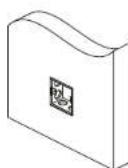
Gang box is not supplied.
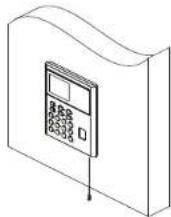
3 Align the device with the mounting plate, and secure the device on the mounting plate with 1 supplied screw (SC-CM4X14-ST10-SUSS).
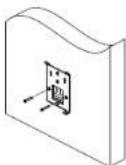
2 Secure the mounting plate on the gang box with two supplied screws (5C-KA4X22). Route the cable through the cable hole, wire the cables and insert the cables in the gang box.
Base Mounting
1 Route the cable through the cable hole of the bracket. Align the bracket with the device rear panel.
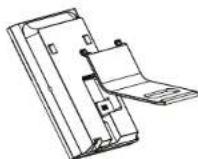
2 Press the bracket with both hands. Make sure the rear panel of the device and the buckles of the bracket are aligned with each other. Slide and buckle the bracket along the arrow.
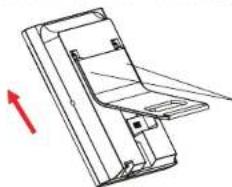
natural_image
Technical line drawing of a mechanical component with an arrow indicating direction (no text or symbols)3 Slide to the end to complete the installation.
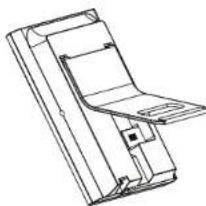
natural_image
Technical line drawing of a mechanical assembly or housing (no text or symbols)Bracket is optional.
2 Wiring
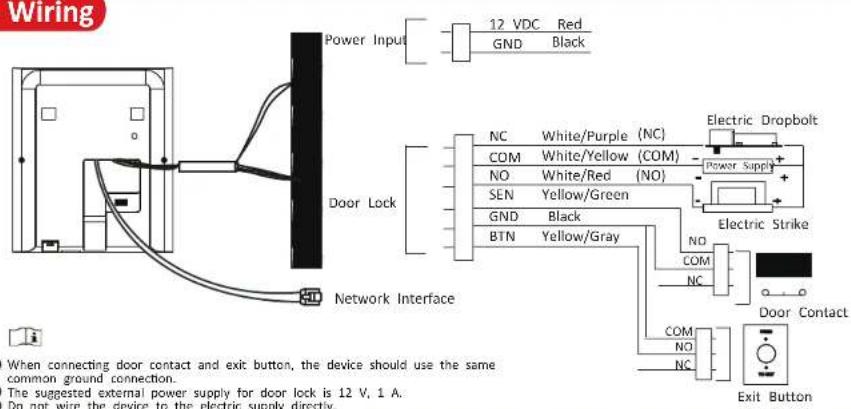
3 Appearance
Device
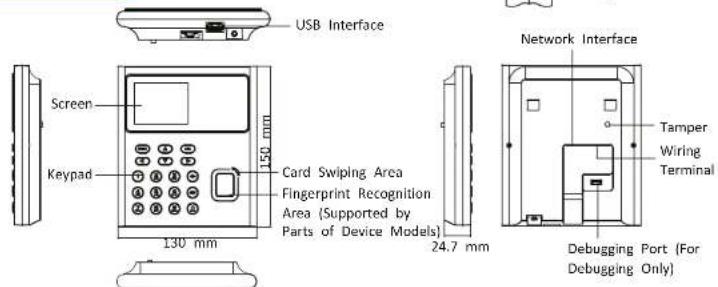
Keypad
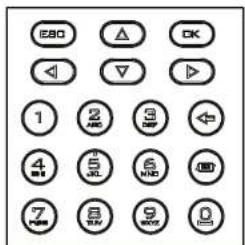
Numeric Key 0\~9. Digits, letters, and characters can be entered in the textbox via the numeric keys. 0 is reused as space bar when not entering digits. Direction Key Control four directions: front, back, left, and right.
ESC Exit key. Exit the current page or return to the previous page.
OK In the standby page, hold to enter the administrator login interface, and press to confirm. Used as confirmation and selection key after login.
Delete key. Delete textbox contents.
Input method shifting key.
4 Quick Operation
● Activation via Device
After powering on, you will enter the activation page Enter password and press "OK" to confirm password.


shift input method.
- Characters containing admin and nimda are not supported to be set as activation password.
Steps Afterwards
After activating, you can select language, set password change type, set reserved questions, set network parameters, access to Hik-Connect, set privacy, and set administrator.
STRONG PASSWORD RECOMMENDED— We highly recommend you create a strong password of your own choosing (using a minimum of 8 characters, including upper case letters, lower case letters, numbers, and special characters) in order to increase the security of your product. And we recommend you reset your password regularly, especially in the high security system, resetting the password monthly or weekly can better protect your product.
Regulatory Information
FCC Information
Please take attention that changes or modification not expressly approved by the party responsible for compliance could void the user's authority to operate the equipment. FCC compliance:
This equipment has been tested and found to comply with the limits for a Class B digital device, pursuant to part 15 of the FCC Rules. These limits are designed to provide reasonable protection against harmful interference in a residential installation. This equipment generates, uses and can radiate radio frequency energy and, if not installed and used in accordance with the instructions, may cause harmful interference to radio communications. However, there is no guarantee that interference will not occur in a particular installation. If it is necessary to be performed by radio television reception, which can be determined by turning the equipment off and on the user is encouraged to try to correct the interference by one or more of the following measures:
—Reorient or relocate the receiving antenna.
—Increase the separation between the equipment and receiver. —Connect the equipment into an outlet on a circuit different from that to which the receiver is connected.
—Consult the dealer or an experienced radio/TV technician for help
This equipment should be installed and operated with a minimum distance 20cm between the radiator and your body.
FCC Conditions
This device complies with part 15 of the FCC Rules. Operation is subject to the following two conditions:
-
This device may not cause harmful interference.
-
This device must accept any interference received, including interference that may cause undesired operation.
EU Conformity Statement
CE This product and - if applicable - the supplied accessories too are marked with "CE" and comply therefore with the applicable harmonized European standards listed under the EMC Directive 2014/30/EU, RE Directive 2014/53/EU, the R6HS Directive 2011/65/EU

2006/66/EC (battery directive): This product contains a battery that cannot be disposed of as unsorted municipal waste in the European Union. See the product documentation for specific battery information. The battery is marked with this symbol, which may include lettering to indicate cadmium [Cd], lead [Pb], or mercury [Hg]. For proper recycling, return the battery to your supplier or to a designated collection point. For more information see:www.recyclethis.info

2012/19/EU (WEEE directive): Products marked with this symbol cannot be disposed of as unsorted municipal waste in the European Union. For proper recycling, return this product to your local supplier upon the purchase of equivalent new equipment, or dispose of it at designated collection points. For more information see: www.rescylethis.info
Safety Instruction
Warning
- In the use of the product, you must be in strict compliance with the electrical safety regulations of the nation and region.
- Do not connect several devices to one power adapter as adapter overload may cause over-heat or fire hazard.
- If smoke, odors or noise rise from the device, turn off the power at once and unplug the power table, and then please contact the service center.
- The socket-outlet shall be installed near the equipment and shall be easily accessible - 1. Do not ingest battery. Chemical burn hazard!
- This product contains a coin/button cell battery. If the coin/button cell battery is swallowed, it can cause severe internal burns in just 2 hours and can lead to death.
-
Keep now and used batteries away from children.
-
If the battery compartment does not close securely, stop using the product and keep it away from children.
-
If you think batteries might have been swallowed or placed inside any part of the body, seek immediate medical attention.
-
CAUTION: Risk of explosion if the battery is replaced by an incorrect type.
-
Improper replacement of the battery with an incorrect type may defeat a safeguard (for example, in the case of some lithium battery types).
-
Do not dispose of the battery into fire or a hot oven, or mechanically crush or cut the battery, which may result in an explosion.
-
Do not leave the battery in an extremely high temperature surrounding environment, which may result in an explosion or the leakage of flammable liquid or gas.
-
Do not subject the battery to extremely low air pressure, which may result in an explosion or the leakage of flammable liquid or gas.
-
Dispose of used batteries according to the instructions

Cautino
- Do not drop the device or subject it to physical shock, and do not expose it to high electromagnetism radiation. Avoid the equipment installation on vibrations surface or places subject to shock (ignorance can cause equipment damage).
- Do not place the device in extremely hot (refer to the specification of the device for the detailed operating temperature), cold, dusty or damp locations, and do not expose it to high electromagnetic radiation.
- Exposing the equipment to direct sun light, low ventilation or heat source such as heater or radiator is forbidden (ignorance can cause fire danger). The device covers for indoor use shall be kept from rain and moisture.
- Exposing the equipment to direct sun light, low ventilation or heat source such as heater or radiator is forbidden (ignorance can cause fire danger). Please use a soft and dry cloth when clean inside and outside surfaces of the device cover, do not use alkaline detergents.
- Biometric recognition products are not 100% applicable to anti-spoofing environments.
- If you require a higher security level, use multiple authentication modes. The serial port of the equipment is used for debugging only.
- Wall Mounting: Install the equipment according to the instructions in this manual. To prevent injury, this equipment must be securely attached to the floor/wall in accordance with the installation instructions.
- Improper use or replacement of the battery may result in hazard of explosion. Replace with the same or equivalent type only. Dispose of used batteries according to the instructions provided by the battery manufacturer.
- This bracket is intended for use only with equipped devices. Use with other equipment may result in instability causing injury.
- This equipment is for use only with equipped bracket. Use with other (carts, stands, or carriers) may result in instability causing injury.

Brand : Hikvision
Model : DS-K1T8005EFWX
Category : Access Control