
DS-K1T670MX - Access Control Hikvision - Free user manual and instructions
Find the device manual for free DS-K1T670MX Hikvision in PDF.


| Type of product | Access control terminal |
| Model | DS-K1T670MX |
| Brand | Hikvision |
| Identification methods | Face recognition, fingerprint, card, PIN |
| Display | 7-inch touch screen |
| Camera | 2 MP wide-angle |
| Face capacity | Up to 3,000 faces |
| Fingerprint capacity | Up to 3,000 fingerprints |
| Card capacity | Up to 10,000 cards |
| Event log | Up to 100,000 events |
| Communication | TCP/IP, Wi-Fi (optional), RS-485, Wiegand |
| Power supply | 12 V DC, 2 A |
| Power consumption | ≤ 15 W |
| Dimensions (W × H × D) | 208 × 86 × 23 mm |
| Weight | 0.6 kg |
| Operating temperature | -10 °C to 55 °C |
| Ingress protection | IP65 (indoor/outdoor) |
| Mounting | Wall mount (with bracket included) |
| Key features | Face anti-spoofing, live detection, tamper alarm |
| Software | Compatible with Hik-Connect, iVMS-4200 |
| Warranty | 2 years |
Frequently Asked Questions - DS-K1T670MX Hikvision
User questions about DS-K1T670MX Hikvision
0 question about this device. Answer the ones you know or ask your own.
Ask a new question about this device
Download the instructions for your Access Control in PDF format for free! Find your manual DS-K1T670MX - Hikvision and take your electronic device back in hand. On this page are published all the documents necessary for the use of your device. DS-K1T670MX by Hikvision.
USER MANUAL DS-K1T670MX Hikvision
Install with Mounting Plate
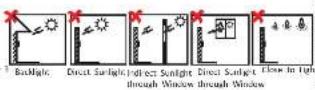
Installation Environment:
- And light, almost sunlight, and indirect sunlight. - For better recognition, there should be light source in or near the
- The minimum buying weight of the wall or other places should be times heavier than the device weight.
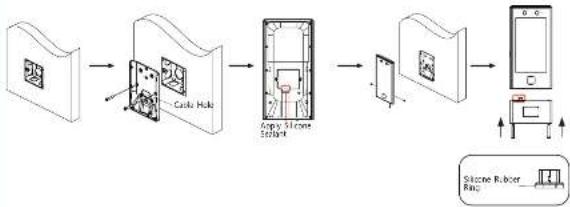
flowchart
graph LR
    A["Cable Hole"] --> B["Inner Space"]
    B --> C["Sponge Slone Stabbing"]
    C --> D["Shipped Device"]
    D --> E["Shipped Smartphone"]
    E --> F["Shipped Silicone Rubber Ring"]
① Make sure the gang box is installed on the wall.
- Care box is not supplied.
● The height of the Gang box can refer to the wall switch standard, and it is about 1.4 m above the ground.
2 Secure themounting pabon the gang line with two supplied screws (SC-8A4X35).
3 Route the cable through the cable hole, wire the cables and insert the cables in the gang box.
Apply silicone sealant among the cable wiring area to keep the raindrop from entering.
4 Align the device with the mounting plate, and secure the device on the mounting plate with 1 supplied screw (SC-KM3X8-TLO-SUS-NL)
⑤ [Optional] According to actual needs, you can connect other modules to the USB Interface, and secure them with 2 MS screws.
When inserting an peripheral module, ensure that the silicone rubber ring is intact to prevent rain and other input.
Interfaces and Dimension
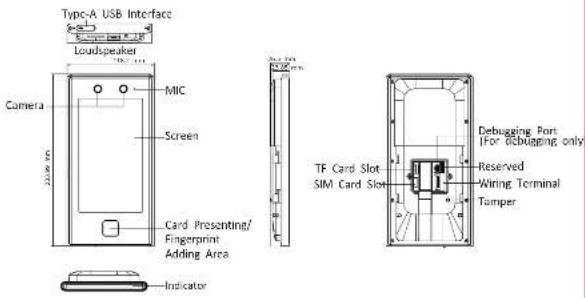
Peripheral Module
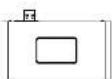
i
- if the audio plug diameter is greater than 8 mm, an external adaptor is required.
● The figures are for reference only.
● The peripheral module can be accessed according to school needs.
2 Wiring
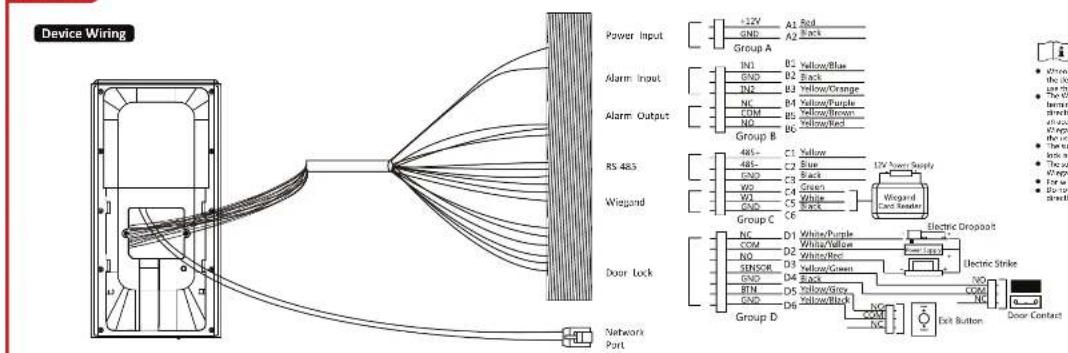
Power Input
Alarm Input
Alarm Output
RS 485
Wiegand
Door Lock
i
- When reporting more contract and/or infringement, the device and the RS 485 tool reader should
- The Wagon terminal here is a Wagon input terminal, but should set the series Wagon direction to 'Input'. It also should connect in
at an open control year should set the Vargant direction in "Output". For details, are the user memory.
- The transformer chemical power supply for downlink is 12 V, 1.4.
- The voltage output power was up
- The suggested electric power supply for all equipment and materials 12 V, 1 A.
- For wiring the fire system, one of the rear motor.
- Do not wire if a device to the electric supply directly.
2 34ring
Secure Door Control Unit Wiring
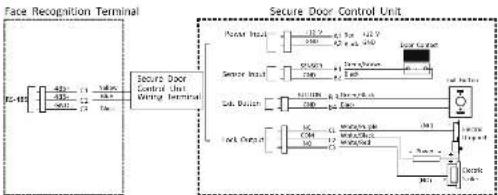
flowchart
graph TD
    A["Face Recognition Terminal"] --> B["Secure Door Control Unit Wiring Terminal"]
    B --> C["Power Head"]
    B --> D["Sensor Head"]
    B --> E["Sub-Button"]
    B --> F["Lock/Control Unit"]
    C --> G["12V 42 V 120V"]
    D --> H["550Ω 12V 120V"]
    E --> I["100Ω 12V 120V"]
    F --> J["1C 12V 120V"]
    G --> K["Motor Control Unit"]
    H --> L["Motor Control Unit"]
    I --> M["Motor Control Unit"]
    J --> N["Motor Control Unit"]
    K --> O["Motor Control Unit"]
    L --> P["Motor Control Unit"]
    M --> Q["Motor Control Unit"]
    N --> R["Motor Control Unit"]
    O --> S["Motor Control Unit"]
    P --> T["Motor Control Unit"]
    Q --> U["Motor Control Unit"]
    R --> V["Motor Control Unit"]
    S --> W["Motor Control Unit"]
    T --> X["Motor Control Unit"]
    U --> Y["Motor Control Unit"]
    V --> Z["Motor Control Unit"]
    W --> AA["Motor Control Unit"]
    X --> AB["Motor Control Unit"]
    Y --> AC["Motor Control Unit"]
1
- The secure door terminal unit shall connect to an external power supply separately.
The suspected external power supply is 12 V, 0.5 N.
- For scenarios with high safety requirement, use the secure door control unit wiring first. You can ask the technical support to purchase for the secure door control unit separately.
The picture here are parts of the wiring. For details, see the secure door control unit's user manual.
● Activation via Device
After powering on, you will enter the activation page.
Steps:
1. Create a password and confirm the password:
2. Top Activate to activate the device.
[1] Characters containing admit and nirida are not supported
to be set as activation password.
Activation
Other Operations
Steps Afterwards
After activating, you can select language, set password change type, set network parameters, access to Hik-Connect, set privacy and set administrator.
● Log in Home Page
Authenticate, face, card, fingerprint, password, or keyboard and log in the to enter the home page.
Restore to Factory
Tap "System Maintenance" - "Restore to Factory". All parameters will be restored to the factory settings. The system will reflect to take effect.
About his neighbor.
- The Content includes instructions for using and managing the Product Picture, which images are all other information were relevant are for description and explanation only.
- The information contained in the document is subject to change without notice, but it may not be written or other content. Please find the latest version of the Document at the Hinoele ad hoc Jodah/Amiehianawand &kou ad hoc or cucr. Hangzhou "info Digital Technology Co., Ltd. or its affiliates (thereafter referred to as 'Hinoele') makes a certificate" (2017) or (2018).
- From the Decocean with the guidance and assistance of versions turned in supporting for Product.
Amer this product
The product can try to play the after-tax service support in the country or region when purchase is made.
Acknowledgment of Intellectual Property, 3 items
- Hovaxi, now, the upglt to a multi points, related to the technology, remains in the products described in the Document. At that may include licenses obtained from its part and the part of the Instrument, including test, primary, grid or, etc., being to obtain part of the Document may be encroded, copied, tremlined, or modified in whole or a page name without written permission.
■ ANA (SUNIONAL) scenario are 200 and the proportion of Hovskine
• Uday yesterday are large airports on the premises (with existing room).
LOCAL DISCLAIMER
• TO THE MAXIMUM DOCUMENT REVATICALLY ON APPSACCE, ANO, IT IS DOCUMENT AND THE PROJECT IS PROCESSED WITH THE MAXIMUM DOCUMENT REVATICALLY. FOR PRESENTATION, IT IS AND "WILL ALL TAULTS AND CERED", II REACH MEANS NO IMPARAMITIC, CORRECT O PATTERN, INC. INCOME OF 12-13 months, INCOME OF 12-14 months, SE SIGNIFIC ORDER, 3 FLORES FOR A PARTICULAR FUNCTION. THE WORK OF PRESENTATION IS NOT USED ONLY. THIS DOCUMENT IS SPECIFIED AS SPECIFIED BY THE PRESENTATION OF THE PRESENTATION. THE DOCUMENT IS PROCESSED IN THE PRESENTATION, IN CASE OF THE PRESENTATION. THIS DOCUMENT IS PROCESSED IN THE PRESENTATION. THIS DOCUMENT IS SPECIFIED AS SPECIFIED BY THE PRESENTATION.
♦ VELVANIAO-THAT THE SINGUE OF THE BISCH-PRINCES FOR BISCH-SECURITY RANKS, AND HOURSING SHALL NOT TAKE ANY RESPONSIBLE USES FOR ARCHITECTORATION. POWER CHANGE OR OTHER MACHINES RELATING FROM CYCLEMNTN, NOR OIL CHERN, VEGETABLE, IN EDITION IS NOT NOT SECURITY RANKS. • HOURSING WILL PRODUCE TIMELY TECHNICAL SUPPORT IT REQUIRED.
• THIS DOCUMENT TO THE PROJECT IN CONSIDERED TO A ONE ROAD - ONLY, AND ARE SOLELY. RESPONSES ARE ENLOSIVE THAT YOU USE CONOUNCIES TO THE APPROPICAL LAW. CONTINently, YOU ARE NO PERFORM FOR USING THE PROJECT IS APPROPICAL WITHOUT INTERIOR ON THE RIGHTS OF THIRD PATENTS, INCLUDING WITHOUT IMPLICATION, NOT OF FUNCTION, INTELLATION, PROCESSED TO BE IN DATA PRODUCTION AND OTHER PATENTS. YOU SHALL NOT USE THIS PROJECT FOR ANY FROM ITEMS AND DOTS, INCLUDING DISCUITMENT OR DISCUITATION OF ITEMS AND PROCESSES. I CONCLUSION OF DISCUITATIONS OF ITEMS AND PROCESSES. ANY OTHER IN THE WORKS RELATED TO A HAZZUM EXPOSATE OR UNEATE MUSICAL FUELLENCE OF IN SUSTAINING ITEMS. Please note that the POINT OF ANY COMPLET BETWEEN THE DOCUMENT AND THE TOPS ARE
THE LATTER MENALS
Data Protection
• To protect the development of Better Products International Privacy,
dolar power. For use, in French with social transition work, biometrics data is stored in your Products with organization method; for fingerprint maps, any fingerprint map of these, and a trip during exercise of fingerprint maps.
- As a rate of consolidation/procedure, you may process personal care, including co-action, storage, e.g. processing, maintenance, delivery, and other services to your clients and specialty with car tools, low and conversion to car to the protection or personal rights, including within inclusion, interacting security controls to setting personal rights, such as implementing systemic administrative, and providing safety critical conduct, including reviews and the measurements of the effectiveness of your security controls.
© Hangzhou Huaon Digital Technology Co., Ltd. Allingta reserved.
Seen the US node to get the user name for detailed information.

Brand : Hikvision
Model : DS-K1T670MX
Category : Access Control