
Gammaxx 200 - Computer Cooling Component DeepCool - Free user manual and instructions
Find the device manual for free Gammaxx 200 DeepCool in PDF.


| Product Type | CPU Air Cooler |
| Model | Gammaxx 200 |
| Brand | DeepCool |
| Dimensions (with fan) | 120 x 80 x 130 mm (L x W x H) |
| Weight | 330 g |
| Fan Size | 120 mm |
| Fan Speed | 600 - 2000 RPM (PWM controlled) |
| Airflow | 56.5 CFM (max) |
| Noise Level | 18 - 30 dBA |
| Bearing Type | Hydraulic Bearing |
| Power Connector | 4-pin PWM |
| Supported Sockets | Intel LGA 115x/1200/1700 (limited), AMD AM4/AM5 |
| Material | Aluminum fins, copper heat pipes (direct contact) |
| Number of Heat Pipes | 2 |
| Thermal Paste | Pre-applied on base |
| Mounting System | Push-pin / Screw mounting (depending on socket) |
| Compatible with RAM | Low-profile RAM (no overhang) |
| Maintenance | Clean dust with compressed air; lubricate fan if needed |
| Safety Precautions | Avoid liquid contact; ensure proper installation to prevent damage |
| Spare Parts Available | Replacement fan, mounting kit, thermal paste |
| Warranty | 2 years (check regional policy) |
Frequently Asked Questions - Gammaxx 200 DeepCool
User questions about Gammaxx 200 DeepCool
0 question about this device. Answer the ones you know or ask your own.
Ask a new question about this device
Download the instructions for your Computer Cooling Component in PDF format for free! Find your manual Gammaxx 200 - DeepCool and take your electronic device back in hand. On this page are published all the documents necessary for the use of your device. Gammaxx 200 by DeepCool.
USER MANUAL Gammaxx 200 DeepCool
natural_image
Technical line drawing of a CPU fan with cooling fins and heatsink (no text or symbols)GAMMAXX 200 玄冰旗舰版
- All specifications subject to change without notice.
- Under no condition shall Deepcool be liable for any indirect, incidental or consequential damages arising from any defect or error in this manual or product.
- Please ask for professional help if you are not sure of safe installation.
- Installation manual in other languages is available on our website: www.deepcoolglobal.com
Appearance Patent NO.: 201130495324.4
Brands and designs are trademarks from Beijing Deepcool Industries Co., Ltd.
All rights reserved.
Beijing Deepcool Industries Co., Ltd
MADE IN CHINA
警告声明:
natural_image
Four technical illustrations of a mechanical fan assembly with numbered parts (no text or symbols)① Heatsink 散热器主体 1pc
② AMD Metal Clip AMD扣具 1pc
Intel Push-pin Clip INTEL扣具 2pcs
4 Screw 螺丝 4pcs
AMD FM1/AM3+/AM3/AM2+/AM2/940/939/754 Installation 安装步骤
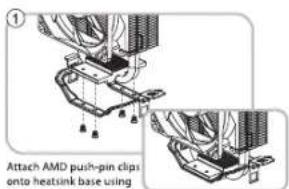
Attach AMD push-pin clips onto heatsink base using the screws.
Caution: Please keep away from touching the
thermal grease on the base.
用螺丝将AMD扣具固定在散热器主体上
注:请避免触碰散热器主体底部的导热膏
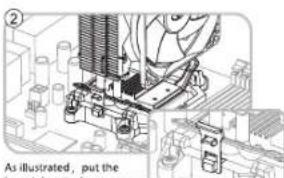
As illustrated, put the
heatsink onto the processor
and hook the vertical clip onto the retention frame tab.
将散热器放在CPU上,然后按图示方法,用扣具直扣端勾住AMD塑胶架的一端。
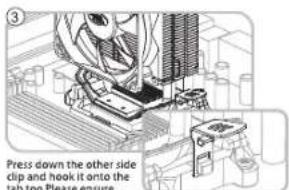
Press down the other side clip and hook it onto the tab,too.Please ensure perfect contact between the heatsink base and the CPU surface during installation.
然后用扣具手柄端勾住AMD塑胶架的另一端,检查并确认散热器底部与CPU表面完全接触。
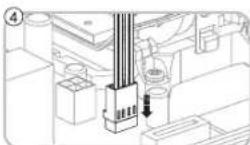
Finish the installation by connecting the fan cable to the motherboard.
将风扇插头插在主板相应位置,确认无误后完成安装。
INTEL LGA1155/LGA1156/LGA775 Installation 安装步骤
natural_image
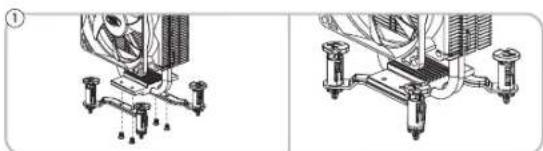
Technical diagram showing two views of a mechanical assembly with cooling fans and connectors (no text or symbols)Attach Intel push-pin clips onto heatsink base using the screws.
Caution: Please keep away from touching the thermal grease on the base.
用螺丝将Intel扣具固定在散热器主体上
注:请避免触碰散热器主体底部的导热膏。
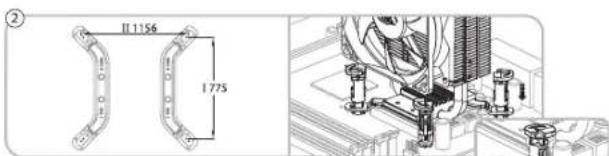
Put the cooler on the processor, check your socket type and ensure all push-pins through the motherboard mounting holes. Position the clip as shown in the picture and then push down to secure the cooler.
将散热器放在CPU上,使扣具底部穿过主板相应的孔位。如图,将上扣旋转到图示位置后,用力下压扣紧,检验散热器底部与CPU表面完全接触,无松动现象。
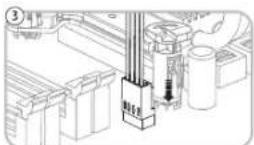
Finish the installation by connecting the fan cable
to the motherboard.
将风扇插头插在主板相应位置,确认无误后完
成安装。
Brand : DeepCool
Model : Gammaxx 200
Category : Computer Cooling Component