
IMAGERUNNER ADVANCE 500I, 400I - Laser MFP CANON - Free user manual and instructions
Find the device manual for free IMAGERUNNER ADVANCE 500I, 400I CANON in PDF.


| Product type | Multifunction laser printer |
| Brand | Canon |
| Model | imageRUNNER ADVANCE 500i / 400i |
| Dimensions (W x D x H) | Approximately 565 x 693 x 896 mm |
| Weight | Approximately 60 kg |
| Power supply | 220-240 V, 50/60 Hz |
| Power consumption | Standby: 10 W, Printing: 500 W |
| Main functions | Print, copy, scan, fax (option) |
| Print speed | Up to 50 ppm (500i) / 40 ppm (400i) |
| Print resolution | 1200 x 1200 dpi |
| Paper capacity (standard) | 1,200 sheets |
| Paper sizes | A3, A4, A5, B4, B5, envelopes |
| Touch screen | Yes, 10.4-inch color |
| Connectivity | USB, Ethernet, Wi-Fi (option) |
| Maintenance and cleaning | Regular cleaning of rollers and glass; replace toner and drum |
| Security | User authentication, hard drive encryption |
| Spare parts and repairability | Toners, drums, maintenance kits available |
| General information | Professional multifunction for offices |
Frequently Asked Questions - IMAGERUNNER ADVANCE 500I, 400I CANON
User questions about IMAGERUNNER ADVANCE 500I, 400I CANON
0 question about this device. Answer the ones you know or ask your own.
Ask a new question about this device
Download the instructions for your Laser MFP in PDF format for free! Find your manual IMAGERUNNER ADVANCE 500I, 400I - CANON and take your electronic device back in hand. On this page are published all the documents necessary for the use of your device. IMAGERUNNER ADVANCE 500I, 400I by CANON.
USER MANUAL IMAGERUNNER ADVANCE 500I, 400I CANON
Suitable for busy workgroups and departments, these compact imageRUNNER ADVANCE devices offer efficient mono output and intelligent document handling to optimise your workflows, save you money and secure your confidential information.
40-50 PPM MONO
imageRUNNER ADVANCE PLATFORM
SPACE SAVING, MODULAR DESIGN
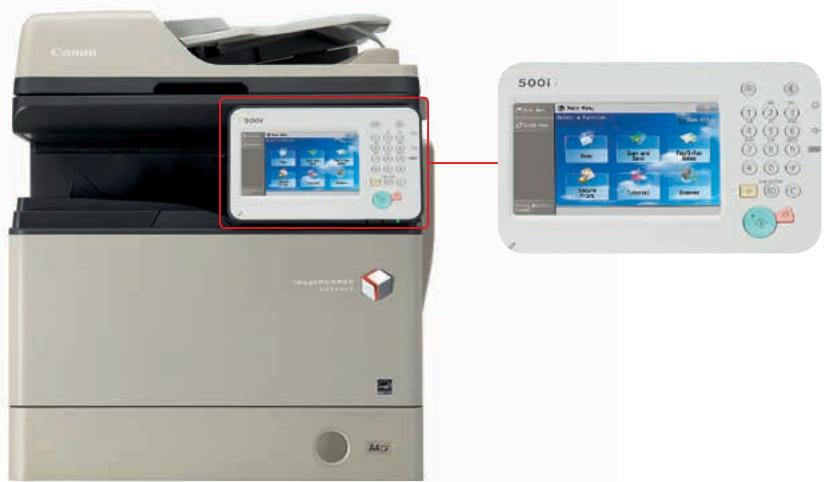
17.8 CM COLOUR TILTABLE TOUCH SCREEN
UP TO 2300 SHEET CAPACITY
UP TO A4 OUTPUT
AUTOMATIC STAPLE FINISHING OPTION
Productivity
- Unrivalled and consistent user experience through a large 17.8cm tiltable colour touch screen and intuitive menus
- Unique personalisation capabilities simplify and automate commonly performed tasks by user
- Colour duplex scanning and sending with native support for data formats such as searchable PDF and Open Office XML (Powerpoint) enables re-use and re-purpose of digital content
- Integration with powerful document, capture and output management solutions provide process optimisation
- Up to 2,300 sheet paper capacity for busy workgroups and departments
- Time-saving automatic staple finishing option Support for mobile working.
Cost Control
- The functionality of many devices in one compact multifunctional device
- Efficient and reliable monochrome output for workgroups and departments
- User-based activity tracking provides visibility of print behaviour
- Apply policies and restrict usage at function level by user
- Efficient device monitoring, reporting and diagnostics for easy management and maintenance
- Ability to use shared resources, such as fax and Advance Space, from other iR-ADV devices
- Options for cost recovery and coin vending integration.
Device and Information Security
- Award-winning and smart user authentication ensures control without impacting on user productivity or convenience
- Ability to disable functions by user to prevent unauthorised usage
- Secure Print and MailboxLite enhance document confidentiality
- A variety of standard features such as data erase, IP and MAC address filtering and IPSec protects the device and network data transfer
- An extensive range of options offer compliance to highest levels covering all aspects of information security
- Industry-first Data Loss Prevention and auditing of prints, copies, scans and faxes through uniFLOW.
Integration
- Versatile imageRUNNER ADVANCE portfolio addresses the needs of all workplaces from small workgroups through to large departments and Corporate Reprographic Departments.
- Native support for industry and network standards i.e. Genuine Adobe PostScript and PCL ensures hassle-free integration with ERP, CRM and other business information systems.
- Consistent imageRUNNER ADVANCE platform and portfolio simplifies management and operation across a fleet.
- Canon's powerful embedded MEAP & MEAP Web platform provides a strong link to a range of award-winning document, capture and output management solutions for process optimisation.
- Easily configure, manage and upgrade your device, whether individually, or as part of a larger fleet using Canon's device management tools.
- Shared resources across the network.
Sustainability
Class leading Typical Electricity Consumption (TEC)* ratings. Consumes as little as 1 W in sleep mode. Incorporates recycled materials and bio-plastics. ENERGY STAR qualified.
Main configuration options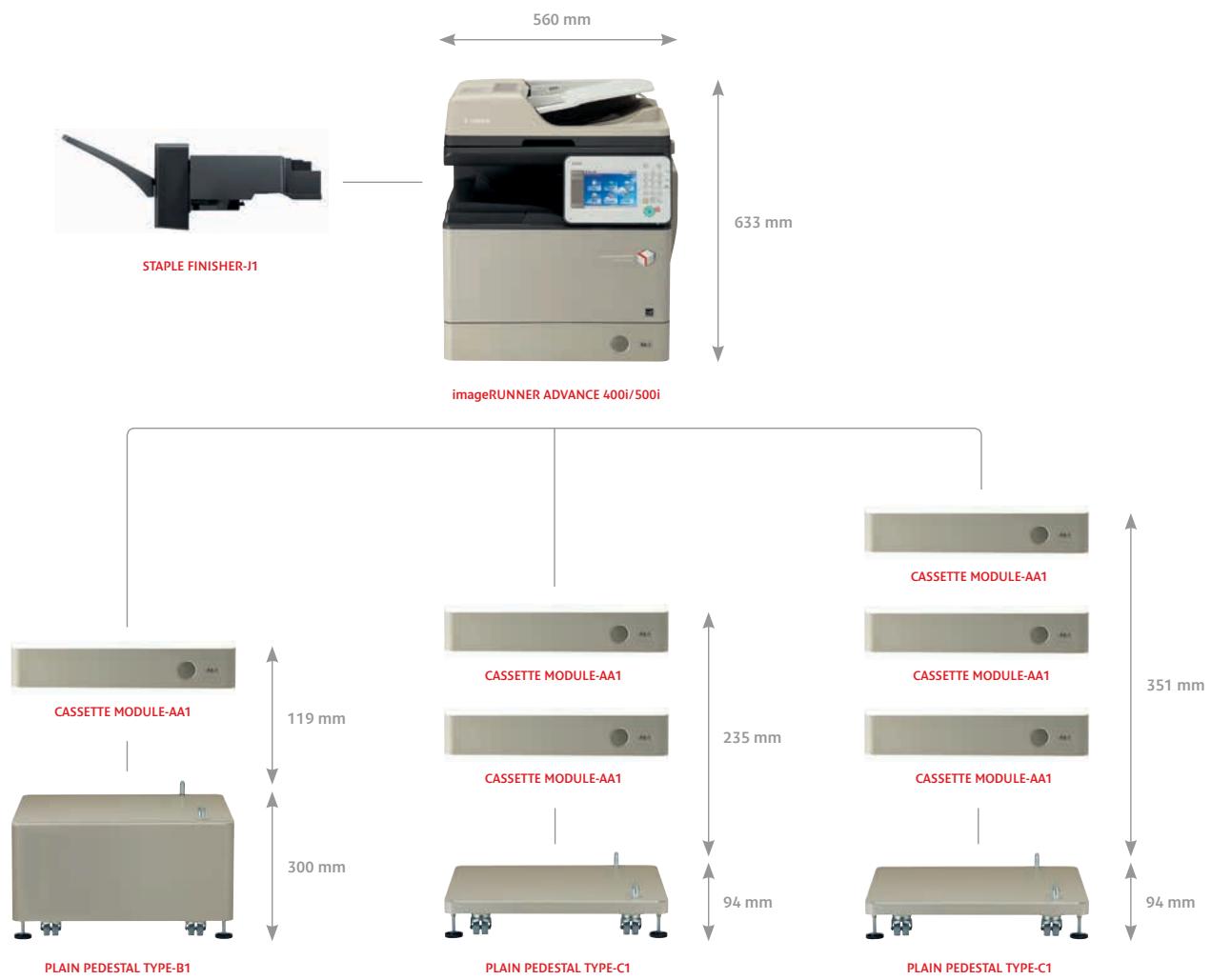
For full details of all options, please refer to the product specifications.
Specifications: imageRUNNER ADVANCE 500i/400i series
| Machine type Available Core functions | Monochrome A4 Laser Multifunctional (Reader/Printer standard) Print, Copy, Scan, Send and optional Fax |
| PRINTER SPECIFICATIONS | |
| Print speed (BW) | iR-ADV 500i: Up to 50 ppm (A4 Single-sided), 25ppm (A5 Single-sided), 49ppm (A4 Double-sided), 22ppm (A5 Double-sided) |
| iR-ADV 400i: Up to 40 ppm (A4 Single-sided), 25ppm (A5 Single-sided), 39ppm (A4 Double-sided), 22ppm (A5 Double-sided) | |
| Printing method | Monochrome Laser Beam Printing |
| Print resolution | 1200 dpi x 1200 dpi, 600 dpi x 600 dpi |
| Double sided printing | Automatic (Standard) |
| Printing from memory media | Direct printing available from USB memory key, Remote UI and Web Access* Supported file types: JPEG, Tiff, PDF, XPS** (*XPS print from websites is not supported) |
| (**XPS requires DIRECT PRINT KIT (for PDF/XPS)-H1) | |
| Printing from mobiles or internet-connected devices and cloud-based services | A range of software and MEAP-based solutions is available to provide printing from mobile devices or internet-connected devices and cloud-based services depending on your requirements. Please contact your sales representative for further information. |
| Paper input (Standard) | 1 x 550-sheet(80 gsm) cassette, 100-sheet(80 gsm) multi-purpose tray |
| Paper input (Option) | Up to 3 x 550-sheet cassettes (80 gsm) (Cassette Module-AA1) |
| Maximum paper input capacity | 2300 sheets (80 gsm) |
| Paper output capacity | Without Finisher: 250 sheets (80 gsm) With Staple Finisher: 500 sheets without stapling (80gsm), 20 sets with stapling |
| Finishing capabilities | Standard: Group Optional Staple Finisher: Collate, Group, Staple Thin paper, Plain paper, Recycled paper, Colour paper, Heavy paper, Pre-punched paper, Bond, Transparency, Label, Letterhead, Bond paper, Envelope. |
| Supported media types | Cassette/s: Plain paper, Recycled paper, Colour paper, Heavy paper, Pre-punched paper, Envelope* *Envelope support via drawer only. Requires optional Envelope Cassette-E1 Multi-purpose tray: Plain paper, Recycled paper, Colour paper, Heavy paper, Pre-punched paper, Bond, Transparency, Label, Envelope (No.10 (COM10), Monarch, ISO-C5, DL) |
| Supported media sizes | Paper Drawier 1, 3 and 4: Standard size: A4, A5, B5, Legal, Letter, Executive, Statement Paper Drawier 2: Standard size: A4, A5, B5, Legal, Letter, Executive, Statement, Envelopes* (No.10 (COM10), Monarch, ISO-C5, DL) *Requires optional Envelope Cassette-E1 Multi-purpose tray: Standard size: A4, A5, B5, Legal, Letter, Executive, Statement, Custom size (99 mm to 216 mm × 140 mm to 356 mm), Envelopes (No.10 (COM10), Monarch, ISO-C5, DL) |
| Supported media weights | Cassette/s: 64 to 105 g/m² Multi-purpose tray: 64 to 128 g/m² Duple: 64 to 105 g/m² |
| Page Description Language(s) | UFRII, PCLSe/6, Adobe PostScript Level 3 (Standard on all models) |
| Fonts | PCL fonts: 93 Roman, 10 Bitmap, 2 OCR fonts, Andale 4 PS fonts: 136 Roman fonts |
| Operating System compatibility | UFRII: Windows XP/Server 2003/Vista/Server 2008/Windows 7/Server 2008R2/ Windows B/Server 2012, MAC OS X (10.5.8 or later) |
| PCL: Windows XP/Server 2003/Vista/Server 2008/Windows 7/Server 2008 R2/ Windows B/Server 2012 | |
| PS: Windows XP/Server 2003/Vista/Server 2008/Windows 7/Server 2008 R2/ Windows B/Server 2012, MAC OS X (10.5.8 or later) | |
| PPD: MAC OS 9.1 or later; MAC OS X (10.3.9 or later), Windows 2000/Windows XP/Windows Vista/Windows 7/Windows B Please refer to http://software.can-on-europe.com/ for availability of print solutions for other operating systems and environments including AS/400, UNIX, Linux and Citrix. Some of these solutions are chargeable. SAP Device Types are available via the SAP Market Place. | |
| COPY SPECIFICATIONS | |
| Copy speed | iR-ADV 500i: Up to 50 ppm (A4) iR-ADV 400i: Up to 40 ppm (A4) |
| First Copy Output Time (FCOT) | Approx. 5.0 seconds or less |
| Copy resolution | Reading: 600 dpi x 600 dpi |
| Printing: 1200 dpi x 1200 dpi for characters/lines, 600 dpi x 600 dpi for graphics/images | |
| Multiple copy | Up to 999 copies |
| Reduction/Enlargement | Zoom: 25-400 % in 1 % increments Fixed Zoom Ratio: 25%, 50%, 70%, 100%, 141%, 200%, 400% |
| SCAN SPECIFICATIONS | |
| Optional/Standard | Standard on all models |
| Supported media size/s | A4, A5, B5, Custom sizes (W x L): Min. 140 mm x 140 mm, Max. 356 mm x 216 mm |
| Supported media weight/s | Single-sided scanning: 42 to 128 gsm/64 to 128 gsm (Mono/Colour), Double-sided scanning: 50 to 128 gsm/64 to 128 gsm (Mono/Colour) |
| Scan resolution | Mono Scan: 100 dpi, 150 dpi, 200 dpi x 100 dpi, 200 dpi, 300 dpi, 200 dpi x 400 dpi, 400 dpi, 600 dpi Colour Scan: 100 dpi, 150 dpi, 200 dpi x 100 dpi, 200 dpi, 300 dpi |
| Double sided scanning | 2-sided to 2-sided (Automatic) |
| Scan speed (A4, 300 dpi) | Mono single-sided: 50 ipm/A4(600dpi/300dpi) Mono double-sided: 32 ipm/A4(600dpi/300dpi) Colour single-sided: 50 ipm/A4(300dpi) Colour double-sided: 32 ipm/A4(300dpi) |
| Scan methods | Push Scan: Colour Universal Send functionality is standard. Integration with a range of optional MEAP-based capture software adds powerful workflow and conversion capabilities. Please contact your sales representative for further information. Pull Scan: TWAIN/WIA Pull scanning available on all models. Scan to USB Memory Key Scan to Mobiles, internet-connected devices and cloud-based services: A range of solutions is available to provide scanning to mobile devices, internet-connected devices and cloud-based services depending on your require-ments. Please contact your sales representative for further information. |
| Pull scan specifications | TWAIN via Network TWAIN Driver (Colour Network ScanGear) Supported OS: Windows 2000/Windows XP/Windows Server 2003/Windows Vista/Windows Server 2008/Windows 7/Windows 8 (32 bit, 64 bit in compatibility mode)* WIA via Network VIA Driver Supported OS: Windows Vista/Windows Server 2000/Windows 7/Windows 8 (32 bit, 64 bit)* *The drivers are available via http://software.canon-europe.com/. |
| SEND SPECIFICATIONS | |
| Optional/Standard | Standard on all models |
| Send resolution | 100 dpi, 150 dpi, 200 dpi x 100 dpi, 200 dpi, 300 dpi, 200 dpi x 400 dpi, 400 dpi, 600 dpi |
| Destinations | E-Mail/Internet FAX (SMTP), Fax(option), PC (SMB, FTP, WebDAV), Google Drive with Cloud Connect for iR-ADV MEAP application |
| Address Book/Speed dials | LDAP(Max. 2000 searchable), Local (Max. 1800 including 200 Speed dials) |
| File formats | TIFF, JPEG, PDF, XPS, PDF/XPS (compact), PDF/A-1b, Searable PDF/XPS, Office Open XML (PowerPoint) |
| Optional Universal Send Feature Sets | UNIVERSAL SEND ADVANCED FEATURE SET-E1: Create outline PDF (Trace and Smooth) and Adobe Reader Extensions PDF. UNIVERSAL SEND SECURITY FEATURE SET-D1: Send encrypted PDF and add digital device signature to PDF/XPS files. UNIVERSAL SEND DIGITAL USER SIGNATURE KIT-C1: Add digital user signature to PDF/XPS files. |
| FAX SPECIFICATIONS | |
| Optional/Standard | Optional on all models (requires SUPER G3 FAX BOARD-AM1) |
| Modem speed | Super G3 33.6kbps (Up to 3 seconds per page (see footnote 1)) |
| Fax resolution | Standard: 200 x 100 dpi Fine: 200 x 200 dpi Super fine: 200 x 400 dpi Ultra fine: 400 x 400 dpi |
| FAX memory | Up to 6000 pages (see footnote 1) |
| Speed dials | Max. 200 |
| Group dials/destinations | Max. 199 dials |
| Sequential broadcast | Max. 256 addresses |
| Memory backup | Yes (Approx. 3 hours) |
| Other features | Fax Forwarding, Dual Access, PC Fax (TX only) |
| GENERAL SPECIFICATIONS | |
| Warm-up Time | Approx. 34 seconds from power ON (Normal mode), 10 seconds from power ON (Quick Start mode) |
| Recovery from sleep mode | 10 seconds or less |
| Interface type | USB 2.0 Hi-Speed, 1000BaseT/100Base-T, 1 x USB Host (Front), 2 x USB Host(Rear) |
| Network protocols | TCP/IP*/(LPD)/Port 9100/WSD/IPP/IPPS/SMB/FTP), IPX/SPX (NDS, Binder), AppleTalk *IPv4/IPv6 support Recommended third party wireless solution is Silex SX-2500CG. For more details please refer to www.silex-europe.com |
| Processor Speed | 1.66 Ghz |
| Memory | 1.5 GB |
| Hard Disk Drive | 160 GB Hard Disk Drive (Usable space 80 GB) |
| Control panel | 17.8 cm (7 inch) WVGA Colour TFT LCD Touch & Tiltable Panel |
| Dimensions (W x D x H) | 560 mm x 567 mm x 633 mm (standard) |
| Installation space (W x D) | 560 mm x 567 mm x 752 mm (with 1 optional cassette) |
| Noise Levels | Typical Electricity Consumption (TEC) rating (see footnote 3): 2.4 kWh (IR-ADV 500i) / 1.873 kWh (IR-ADV 400i) |
| Weight | 47.9kg excluding Toner |
| Operating environment | Temperature: 10 to 30°C (50 to 86°F) |
| Power Source | Humidity: 20 to 80% RH (no condensation) |
| Power Consumption | Maximum: Approx. 1.6 KW |
| Noise Levels | Standby: Approx. 53.72 W Sleep mode: Approx. 1 W or less (see footnote 2) |
| Software and printer management | Sound Pressure (see footnote 4) Active: 75 dB or less (iR-ADV 500i), 73 dB or less (iR-ADV 400i) Standby: 53 dB or less |
| Security Features | MEAP (Multifunctional Embedded Application Platform): A powerful JAVA Embedded Platform for Canon devices which integrates the device with a wide range of Canon and third party software solutions. Universal Login Manager: iR-ADV software for smaller businesses offering convenient login, personalisation as well as user-based usage tracking and control by function. mobile PRINT & SCAN: Simple serverless iR-ADV software enabling printing from and scanning to Android and iOS mobiles and tablets. MEAP Web: Web service alternative to MEAP that allows MFP applications to be developed and deployed via web services iRW Management Console: Server-based software for centralised management of a fleet of devices eMaintenance: embedded RDS allows remote eMaintenance services such as meter capture, automatic consumables management and remote diagnostics. Content Delivery System: Allows the remote distribution of firmware, iR options and MEAP applications Remote User Interface (RUI): Web-based interface to each device that helps to provide remote device management and control. Colour Network Scanner: TWAIN-compliant scanner driver that enables computers on a network to use the pull scan functionality of the device. Canon Driver Configuration Tool: A utility for changing the factory default settings of Canon print drivers (Available via service only) iRW Desktop: Drag-and-Drop print publishing software to easily combine documents and apply finishing to create professional-looking documents REMOTE OPERATORS SOFTWARE: Allows use of device control panel screens from remote computers. For details of other software including MEAP software, please contact your sales representative Standard: IP/Mac Address Filtering, IPSEC, SNMP V3.0, IEEE 802.1X, Trusted Platform Module (TPM), Secure Print, HDD Password Lock, Data Erase, Universal Login Manager, Department ID, SSO-H, Access Management System. Optional: Encrypted Secure Print, Encrypted PDF, HDD Encryption, User and Device signatures, Secure Watermarks, MailboxLite. The following items require unFLOW: My Print Anywhere secure print, Data Loss Prevention. |
Specifications: imageRUNNER ADVANCE 500i/400i series
| CONSUMABLES | |
| Toner bottle | C-EXV 43 Black Toner (Yield: 15200 pages (see footnote 5)) |
| OTHER OPTIONS | |
| Staple Finisher 1 | STAPLE FINISHER-R1 Number of Trays: 1 Stack Capacity: With stapling: 20 sets. Without stapling: 500 sheets Maximum Stapling capacity: Up to 50 sheets Paper Weight: 64 to 128 g/m2 Staple Position: Single (Top-Left) Dimensions (W x D x H): 798 mm × 395 mm × 263 mm Weight: Approx. 10.5 kg |
| Staple Finisher 2 | N/A |
| Booklet Finisher | N/A |
| Cassette module | CASSETTE MODULE-AA1 Description: Optional cassette module with 550 sheets paper capacity. Up to 3 cassette units can be added to a main unit Dimensions (W x D x H): 540 mm x 500 mm x 119 mm Weight: Approx. 7.7 kg |
| Hardware accessories 1 | PLAIN PEDESTAL TYPE-B1: The pedestal can be placed under the standard/optional cassette module to raise the device when free-standing. This is a higher pedestal suitable for use with the standard cassette or one additional cassette module. (Height of Pedestal: 300 mm) PLAIN PEDESTAL TYPE-C1: The pedestal can be placed under the standard/optional cassette module to raise the device when free-standing. This is a lower pedestal suitable for use with an additional two or three cassette modules. (Height of Pedestal: 94 mm) ENVELOPE CASSETTE-E1: Attaches to cassette "2" for easy envelope feeding. |
| Hardware accessories 2 | MiCARD PLUS PROXIMATE CARD READER: A proximity card reader for card-based user authentication, supporting multiple card technologies (HID, HiTag, Casi Rusco, Indala and MiFare etc.). |
| Print controller accessories | BARCODE PRINTING KIT-D1: Enables barcode printing via jet caps technology. |
| Document publishing | iW DESKTOP: Drag-and-Drop print publishing software which easily combines documents from different sources, applies finishing to create professional looking documents and seamlessly links to the printer. Includes PDF creation, annotation and compression capabilities for digital workflows such as proofing and authorization. |
| System accessories | WEB ACCESS SOFTWARE-J1:Provide access to websites and MEAP Web applications.SUPER G3 FAX BOARD-AM1:Adds fax functionality.SUPER G3 2ND LINE FAX BOARD-AM1:Adds second fax line.REMOTE FAX KIT-A1:Enables the device to send and receive fax from another compatible device connected with a fax board.IC CARD READER BOX-A1:A Box to hold and secure an IC Card Reader such as MiCard Reader to the device.COPY CONTROL INTERFACE KIT-A1:Allows connection (CCVI I/F) between 3rd party copy control terminal and Canon's IR-ADV range for cost recovery use. |
| Device security accessories | HDD DATA ENCRYPTION KIT-C6:Encrypted all image data and device settings before storing them on the hard drive of the device. |
| Document security accessories | SECURE WATERMARK-B1:Deters duplication of sensitive documents by embedding hidden watermarks that become visible when copied.ENCRYPTED PRINTING SOFTWARE-D1:Encrypted the print job in transit to the device and requires a password at the printer before sensitive documents can be printed. |
| Accessibility accessories | ADF ACCESS HANDLE-A1:Attaches to the document feeder, making access easier for seated users.REMOTE OPERATORS SOFTWARE KIT-B1:Allows use of device control panel screen from remote computers. |
| Other options | STAPLE-P1:Plain staples for Staple Finisher-R1 |
| STANDARD DISCLAIMERS | All specifications subject to change without notice |
| Footnotes | |
| [1] | Based on ITU-T Standard Chart No.1 |
| [2] | 1 watt sleep mode may not be possible in all circumstances. Certain network configurations and options may prevent the device from entering deep sleep mode. Please refer to the user guide for more information. |
| [3] | Typical Electricity Consumption (TEC) rating represents the typical electricity consumed by a product during 1 week, measured in kilowatt-houses (kWh). The test methodology is defined by Energy Star (http://www.eu-energystar.org). |
| [4] | Declared noise emission in accordance with ISO 7779 |
| [5] | Based on 6% coverage (A4) |
Awards

Canon, Inc.
IW Desktop Quick Printing Tool
Outstanding Achievement
in Innovation

Canon, Inc.
Universal Login Manager
Outstanding Achievement
2013 Document Imaging Solutions
Line of the Year
Software and Solutions


Universal Login Manager


iW
Desktop

eCopy

Google Cloud Print Ready

Works with Google Drive

eCopy Scan to Cloud



iW Management Console
Certifications and compatibility

Printer Vendor Solution

Powered by ADOBE PDF LIBRARY





All company and/or product names are trademarks and/or registered trademarks of their respective manufacturers in their markets and/or countries.
Canon Inc. canon.com
Canon Europe canon-europe.com
English © Canon Europa N.V, 2013
Canon (UK) Ltd
Woodhatch Reigate Surrey RH2 8BF Telephone no 01737 220000 Facsimile 01737 220022 canon.co.uk
Canon Ireland 3006 Lake Drive Citywest, Saggart Co.Dublin, Ireland Telephone No: 01 2052400 Facsimile No: 01 2052525 canon.ie


Brand : CANON
Model : IMAGERUNNER ADVANCE 500I, 400I
Category : Laser MFP