
ZK810T - Projector OPTOMA - Free user manual and instructions
Find the device manual for free ZK810T OPTOMA in PDF.


| Product type | DLP 4K UHD Laser Projector |
| Native resolution | 3840 x 2160 (4K UHD) |
| Light source | Laser (Class 1, IEC 60825-1:2014) |
| Brightness | Not specified in the manual |
| Contrast | DynamicBlack, Extreme Black, 1,000,000:1 (typical) |
| Keystone correction | Motorized vertical and horizontal |
| Lens shift | Motorized, vertical 110%, horizontal 50% |
| Zoom and focus | Motorized |
| Video inputs | HDMI 2.0 x2, HDBaseT, 3D Sync In |
| Video outputs | HDMI 2.0, USB 5V/1.5A, 3D Sync Out |
| Control inputs | RS-232C, LAN, 12V trigger, wired remote control |
| Built-in speakers | 2 x 10 W |
| 3D | DLP Link, 3D Sync, formats: Frame Packing, SBS, Top-Bottom |
| Power consumption | 530 W (normal), 285 W (eco) |
| Power supply | 100 – 240 V AC, 50/60 Hz, 6.5 A |
| Dimensions (W x D x H) | 486 x 432.5 x 176 mm (without feet) |
| Weight | 13.5 kg (1.6x lens model) |
| Operating temperature | 5 °C to 40 °C |
| Operating humidity | 10% to 85% (non-condensing) |
| Lens cleaning | Compressed air or special cloth, avoid solvents |
| Warranty | See supplied warranty card |
Frequently Asked Questions - ZK810T OPTOMA
User questions about ZK810T OPTOMA
0 question about this device. Answer the ones you know or ask your own.
Ask a new question about this device
Download the instructions for your Projector in PDF format for free! Find your manual ZK810T - OPTOMA and take your electronic device back in hand. On this page are published all the documents necessary for the use of your device. ZK810T by OPTOMA.
USER MANUAL ZK810T OPTOMA
natural_image
Line drawing of a projector with front panel and side wheels (no text or symbols)TABLE DES MATIÈRES
SÉCURITÉ .... 4
Menu Communication....54
Menu Informations....59
INFORMATIONS SUPPLÉMENTAIRES ...... 62
natural_image
Technical line drawing of a computer monitor case with ventilation grilles and control knobs (no text or symbols)natural_image
Illustration of a projector with a labeled projection (no text or symbols on the device itself)
Remarque :
geo
| Dimension | Width (%) | Height (%) | | :--- | :--- | :--- | | Top Left | 10% | 40 | | Top Right | 10% | 40 | | Bottom Left | 110 | 80 | | Bottom Right | 10% | 30 | | Bottom Center | 110 | 50 | | Bottom Right | 10% | 50 | | Middle Left | ΔV | 110 | | Middle Right | ΔVo | 30 | | Middle Center | V | 80 | | Bottom Left | ΔV | 110 | | Bottom Right | ΔVo | 30 | | Bottom Center | ΔH | 50 | | Bottom Right | ΔVo | 30 | The chart displays a grid layout with shaded triangular regions indicating different height differences. The labels 'ΔHo' and 'ΔVo' appear in the top left and bottom right cells respectively.Remarque :
UTILISER LE PROJECTEUR
UTILISER LE PROJECTEUR
Mise hors tension
natural_image
Pure geometric diagram with dashed and solid lines forming a trapezoid (no text or symbols)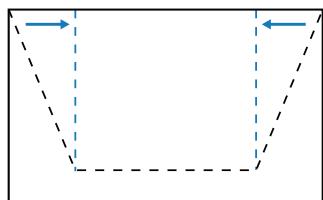
natural_image
Pure geometric shape with dashed lines and arrows, no text or symbols presentTrapèze H.
natural_image
Pure geometric diagram of a rectangle with four sides and dashed internal lines, no text or symbols presentDéformation
OMS (Optoma Management Suite)
| Pass: | O | k | n |
| Variable | |||

■ System Automatically Send
| I | N | F | O | n |
| Variable | ||||
| Write Command | ||
| Command | ||
| CMD | S Place | SetPara. |
| Read Command | ||
| Command | ||
| CMD | CMD Value | Pass |
When projector in standby, RS232 have to support
| Power Off | |||||
| Power On | |||||
| Power On with password | |||||
| Information | info String | ||||
| Light Source Hours |
| ~XX00 | 0 | |
| ~XX00 | 1 | |
| ~XX00 | 1 ~nnnn | |
| *XX124 | 1 | 0 | k | 0 | ||
| *XX124 | 1 | 0 | k | 1 | ||
| *XX150 | 1 | 0 | k | abbbbbccddddee (Note*1) | ||
| *XX108 | 1 | 0 | k | nnnnn (nnnnn= hour digits) |
Other Items
| Power Off | |||||
| Power On | |||||
| Power On with password | |||||
| Re-Sync | |||||
| AV Mute | Off | ||||
| On | |||||
| Mute | Off | ||||
| On | |||||
| Freeze | Unfreeze | ||||
| Freeze | |||||
| 3D Sync Out | To Emitter | ||||
| To Next Projector | |||||
| Output 3D state | 2D | ||||
| 3D | |||||
| System Auto Send | Standby Mode | ||||
| Warming up | |||||
| Cooling Down | |||||
| Out of Range | |||||
| Over Temperature | |||||
| Cover Open | |||||
| Color Wheel Unexpected Stop | |||||
| FAN 1 Lock | |||||
| FAN 2 Lock | |||||
| FAN 3 Lock | |||||
| FAN 4 Lock | |||||
| FAN 5 Lock | |||||
| LD NTC (1) Over Temperature | |||||
| LD NTC (2) Over Temperature | |||||
| High Ambient Temperature | |||||
| System Ready | |||||
| FAN 6 Lock | |||||
| FAN 7 Lock | |||||
| FAN 8 Lock | |||||
| System Temperature Level | Green/Normal | ||||
| Orange/Notice | |||||
| Red/Warning, About to trigger shutdown | |||||
| Fan Status Level | Green/Normal | ||||
| Orange/Notice | |||||
| Red/Warning, About to trigger shutdown | |||||
| Device Type | Projector | ||||
| Model Name | Optoma UHD | ||||
| OSD Lock | On | ||||
| Off | |||||
| Regulatory Model | |||||
| Software Version | |||||
| LAN FW version | |||||
| Fan Speed | Fan 1 Speed | 0000~9999 | |||
| Fan 2 Speed | 0000~9999 | ||||
| Fan 3 Speed | 0000~9999 | ||||
| Fan 4 Speed | 0000~9999 | ||||
| Fan 5 Speed | 0000~9999 | ||||
| Fan 6 Speed | 0000~9999 | ||||
| Fan 7 Speed | 0000~9999 | ||||
| Fan 8 Speed | 0000~9999 | ||||
| System Temperature | Info String | ||||
| Information | Native Resolution | ||||
| Main Source | |||||
| - Resolution | |||||
| - Signal Format | |||||
| - Pixel Clock | |||||
| - Horz Refresh | |||||
| - Vert Refresh | |||||
| Light Source Mode | |||||
| Standby Power Mode | Active | ||||
| Eco. | |||||
| Communication | |||||
| DHCP | Off | ||||
| On | |||||
| System Temperature | |||||
| Refresh rate | |||||
| Source Lock | On | ||||
| Off | |||||
| Display message on the OSD | |||||
| Filter Wheel Index | |||||
| Phosphor Wheel Index | |||||
| *XX00 | 0 | |
| *XX00 | 1 | |
| *XX00 | 1 ~nnnn | |
| *XX01 | 1 | |
| *XX02 | 0 | |
| *XX02 | 1 | |
| *XX03 | 0 | |
| *XX03 | 1 | |
| *XX04 | 0 | |
| *XX04 | 1 | |
| *XX232 | 0 | |
| *XX232 | 1 | |
| 1 ~nnnn | ||
| *XX239 | 2 ~nnnn | |
| *X124 | 1 | O | k | 0 | |
| *X124 | 1 | O | k | 1 | |
| *X355 | 1 | O | k | 0 | |
| *X355 | 1 | O | k | 1 | |
| *X356 | 1 | O | k | 0 | |
| *X356 | 1 | O | k | 1 | |
| *X357 | 1 | O | k | 0 | |
| *X357 | 1 | O | k | 1 | |
| *XX130 | 1 | O | k | 0 | |
| *X130 | 1 | O | k | 1 | |
| I | N | F | O | ||
| I | N | F | 0 | ||
| I | N | F | O | ||
| I | N | F | O | ||
| I | N | F | O | ||
| I | N | F | O | ||
| I | N | F | O | ||
| I | N | F | O | ||
| I | N | F | O | ||
| I | N | F | O | ||
| I | N | F | O | ||
| I | N | F | O | 12 | |
| I | N | F | O | ||
| I | N | F | O | ||
| I | N | F | O | ||
| I | N | F | O | ||
| I | N | F | O | ||
| I | N | F | O | ||
| I | N | F | O | ||
| I | N | F | O | ||
| *X155 | 1 | O | k | 1 | |
| *X155 | 1 | O | k | 2 | |
| *X155 | 1 | O | k | 3 | |
| *X159 | 1 | O | k | 1 | |
| *X159 | 1 | O | k | 2 | |
| *X159 | 1 | O | k | 3 | |
| *X149 | 1 | O | k | 1 | |
| *X151 | 1 | O | k | 6 | |
| *X229 | 1 | O | k | 1 | |
| *X229 | 1 | O | k | 0 | |
| *X151 | 3 | O | k | DAZKBGZTDAZKBGZTST | |
| *X122 | 1 | O | k | nnnnnn (Software Version) | |
| *X357 | 1 | O | k | nnnnnn (LAN FW version) | |
| *X351 | 0 | O | k | 0000~9999 | |
| *X351 | 1 | O | k | 0000~9999 | |
| *X351 | 2 | O | k | 0000~9999 | |
| *X351 | 3 | O | k | 0000~9999 | |
| *X351 | 4 | O | k | 0000~9999 | |
| *X351 | 5 | O | k | 0000~9999 | |
| *X351 | 6 | O | k | 0000~9999 | |
| *X351 | 7 | O | k | 0000~9999 | |
| *X352 | 1 | O | k | 0000~9999 | |
| *X150 | 1 | O | k | abbabbbccfdddee (Note*1) | |
| *X150 | 2 | O | k, nn (e.g. Ok1920x1080) | ||
| *X150 | 3 | O | k | nnn,nn (e.g. OkHDM8) | |
| *X150 | 4 | O | k | nnn,nn (e.g. Ok1920x1080) | |
| *X150 | 5 | O | k | nnn,nn | |
| *X150 | 6 | O | k | nnn,nn | |
| *X150 | 7 | O | k | nnn,nn | |
| *X150 | 8 | O | k | nnn,nn | |
| *X150 | 15 | O | k | nnn,nn | |
| *X150 | 16 | O | k | 1 | |
| *X150 | 16 | O | k | 0 | |
| *X150 | 16 | O | k | 3 | |
| *X150 | 17 | O | k | 0 | |
| *X150 | 17 | O | k | 1 | |
| *X150 | 18 | O | k | nnn,nn (e.g. Ok48) | |
| *X150 | 19 | O | k | nnn,nn (e.g. Ok60Hz) | |
| *X530 | 1 | O | k | 0000~9999 | |
| *X531 | 1 | O | k | 0000~9999 | |
Remote Control Simulation
| Power | |||||
| Power Off | |||||
| Up | |||||
| Left | |||||
| Outer (for projection MENU) | |||||
| Right | |||||
| Down | |||||
| V Keystone + | |||||
| V Keystone - | |||||
| Brightness | |||||
| Menu | |||||
| AV Mute | |||||
| Contrast | |||||
| Zoom + | |||||
| Zoom - | |||||
| Focus + | |||||
| Focus - | |||||
| Mode | |||||
| Info | |||||
| Re-sync | |||||
| HDMI 1 | |||||
| HDMI 2 | |||||
| Source | |||||
| 1 | |||||
| 2 | |||||
| 3 | |||||
| 4 | |||||
| 5 | |||||
| 6 | |||||
| 7 | |||||
| 8 | |||||
| 9 | |||||
| 0 | |||||
| Gamma | |||||
| Lens H(Left) | |||||
| Lens H(Right) | |||||
| Lens V(Rleft) | |||||
| Lens V(Right) | |||||
| H Keystone + | |||||
| H Keystone - | |||||
| Hot Key (user1)(F1) | |||||
| Hot Key (user2)(F2) | |||||
| Pattern | |||||
| Exit | |||||
| Mute | |||||
| Return |
| *XX140 | 1 | |
| *XX140 | 2 | |
| *XX140 | 10 | |
| *XX140 | 11 | |
| *XX140 | 12 | |
| *XX140 | 13 | |
| *XX140 | 14 | |
| *XX140 | 15 | |
| *XX140 | 16 | |
| *XX140 | 19 | |
| *XX140 | 20 | |
| *XX140 | 24 | |
| *XX140 | 28 | |
| *XX140 | 32 | |
| *XX140 | 33 | |
| *XX140 | 34 | |
| *XX140 | 35 | |
| *XX140 | 36 | |
| *XX140 | 40 | |
| *XX140 | 41 | |
| *XX140 | 42 | |
| *XX140 | 43 | |
| *XX140 | 47 | |
| *XX140 | 51 | |
| *XX140 | 52 | |
| *XX140 | 53 | |
| *XX140 | 54 | |
| *XX140 | 55 | |
| *XX140 | 56 | |
| *XX140 | 57 | |
| *XX140 | 58 | |
| *XX140 | 59 | |
| *XX140 | 60 | |
| *XX140 | 61 | |
| *XX140 | 64 | |
| *XX140 | 65 | |
| *XX140 | 66 | |
| *XX140 | 67 | |
| *XX140 | 68 | |
| *XX140 | 69 | |
| *XX140 | 70 | |
| *XX140 | 71 | |
| *XX140 | 73 | |
| *XX140 | 74 | |
| *XX140 | 77 | |
| *XX140 | 82 |
Optoma Technology, Inc.
47697 Westinghouse Drive.
Fremont, Ca 94539
888-289-6786
510-996-4794
services@optoma.com
Japon
https://jp.optoma.com/
Taiwan
https://www.optoma.com/tw/
Canada
Optoma Technology, Inc.
47697 Westinghouse Drive.
Fremont, Ca 94539
888-289-6786
510-996-4794
services@optoma.com
Chine
Room 2001, 20F, Building 4,
No.1398 Kaixuan Road,
Changning District
Shanghai, 200052, Chine
+86-21-62947376
+86-21-62947375
www.optoma.com.cn
Amérique Latine
Optoma Technology, Inc.
47697 Westinghouse Drive.
Fremont, Ca 94539
888-289-6786
510-996-4794
services@optoma.com
Australie
https://www.optoma.com/au/
Europe
1 Bourne End Mills
Hemel Hempstead
Hertfordshire
HP1 2UJ
Royaume-Uni
www.optoma.eu
service@tsc-europe.com
Benelux BV
Optoma Benelux BV
Europalaan 770 D
1363BM Almere
Les Pays-Bas
www.optoma.nl
+31 (0) 36 8200 250
+31 (0) 36 548 9052
France
Bâtiment E
81-83 avenue Edouard Vaillant
92100 Boulogne Billancourt, France
+33 1 41 46 12 20
+33 1 41 46 94 35
savoptoma@optoma.fr
Espagne
C/ José Hierro, 36 Of. 1C 28529 Rivas
https://www.optoma.com/kr/
Brand : OPTOMA
Model : ZK810T
Category : Projector