STV-24LEDG9 - Television Shivaki - Free user manual and instructions
Find the device manual for free STV-24LEDG9 Shivaki in PDF.


Pick your language and provide your email: we'll send you a specifically translated version.
| Product Type | LED TV |
| Screen Size | 24 inches (61 cm) |
| Resolution | 1366 x 768 (HD Ready) |
| Display Type | LED-backlit LCD |
| Aspect Ratio | 16:9 |
| Dimensions (with stand) | 550 x 340 x 80 mm |
| Weight (with stand) | 3.5 kg |
| Power Consumption (max) | 30 W |
| Standby Power | < 1 W |
| Input Voltage | 100-240 V AC, 50/60 Hz |
| Connectivity | HDMI, VGA, AV (RCA), USB, Headphone |
| Picture Adjustments | Brightness, Contrast, Sharpness, Saturation, Hue |
| Audio Features | Music mode, Stereo sound |
| Remote Control | Included with OK button and navigation |
| Built-in Tuner | DVB-T/T2, DVB-C, DVB-S/S2 (depending on region) |
| Media Playback | USB: MP4, AVI, MKV, MP3, JPEG |
| Cleaning Instructions | Wipe with a soft, dry cloth. Do not use liquid cleaners. |
| Safety Notes | Keep away from heat sources and moisture. Do not block ventilation. |
| Spare Parts Available | Remote control (model: Shivaki RC-24LED) |
| Manual Languages | English, Russian (and others via request) |
Frequently Asked Questions - STV-24LEDG9 Shivaki
How do I connect my cable box to the TV?
Use an HDMI cable for best quality. Connect the cable box to any HDMI port on the TV. Then press Source on the remote and select the correct HDMI input.
Why is there no sound from the TV speakers?
First check if the TV is muted or volume is low. Press Volume Up on the remote. If still no sound, go to Menu > Audio and ensure TV Speaker is enabled. Also check if headphones are plugged in.
How do I use the USB media player?
Insert a USB drive with video, music or photo files. Press Source on the remote and select USB. Use the arrow keys to navigate and OK to play. Supported formats: MP4, AVI, MKV, MP3, JPEG.
Can I mount the TV on a wall?
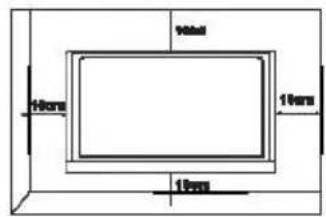
Yes, the TV is VESA 100x100 compatible. Use a standard wall mount kit designed for 24-inch TVs. Ensure the mount supports at least 3.5 kg and screw size M4.
What do I do if the remote control stops working?
First replace the batteries with new AAA ones. Check for obstructions between remote and TV receiver. If still not working, try resetting by removing batteries for 30 seconds. Consider purchasing a replacement remote: Shivaki RC-24LED.
How do I adjust the picture settings?
Press Menu on the remote, then navigate to Picture. You can adjust Brightness, Contrast, Sharpness, Saturation, and Hue. There are also presets like Standard, Movie, and Music.
Why does the TV turn off by itself?
This may be due to the Sleep Timer being set. Press Menu, go to Timer and set Sleep to Off. Also check if Auto Power Off is enabled (usually turns off after 4 hours of inactivity). If problem persists, check for overheating.
How do I connect an antenna?
Connect your antenna to the RF IN port on the back of the TV. Then go to Menu > Channel > Auto Search to scan for channels. Make sure the antenna is positioned for good reception.
Can I record TV programs?
No, this model does not support USB recording. It only has media playback. Recording requires an external PVR device.
Where can I find the user manual?
The manual is available for free download on notice-facile.com in PDF format. You can also request a translated version via email. Look for Shivaki STV-24LEDG9.
User questions about STV-24LEDG9 Shivaki
0 question about this device. Answer the ones you know or ask your own.
Ask a new question about this device
No questions yet. Be the first to ask one.
Download the instructions for your Television in PDF format for free! Find your manual STV-24LEDG9 - Shivaki and take your electronic device back in hand. On this page are published all the documents necessary for the use of your device. STV-24LEDG9 by Shivaki.
USER MANUAL STV-24LEDG9 Shivaki
Mini AV кабель




ПОДСОЕДИНЕНИЕ И НАСТРОЙКА
Sleep: Off

Brightness/Contrast/Sharpness/Saturation/Hue
Music (Музыка)

Table of contents
Click a title to access it
Manual assistant
Powered by Anthropic
Waiting for your message
Product information
Brand : Shivaki
Model : STV-24LEDG9
Category : Television