STV-22LED15W - Television Shivaki - Free user manual and instructions
Find the device manual for free STV-22LED15W Shivaki in PDF.


Pick your language and provide your email: we'll send you a specifically translated version.
| Product Type | Television |
| Brand | Shivaki |
| Model | STV-22LED15W |
| Screen Size | 22 inches (diagonal) |
| Display Type | LED |
| Resolution | HD Ready (1366 x 768) |
| Aspect Ratio | 16:9 |
| Dimensions (with stand) | Approx. 510 x 340 x 160 mm |
| Weight | Approx. 3.5 kg |
| Power Supply | AC 100-240V, 50/60Hz |
| Power Consumption | ≤ 35W (typical) |
| Inputs | HDMI, USB, VGA, AV, RF Antenna |
| Outputs | Audio (3.5mm headphone jack) |
| Remote Control | Included |
| Wall Mount Support | VESA 100x100 mm |
| Additional Features | USB media playback, EPG, sleep timer |
| Cleaning | Use soft dry cloth; avoid liquids |
| Safety | Do not expose to moisture; unplug during storms |
| Spare Parts & Repairability | Contact Shivaki service or qualified technician |
| Manual Languages | English (default), translations available via email |
Frequently Asked Questions - STV-22LED15W Shivaki
How do I connect external devices like a DVD player or game console?
Use the HDMI or AV inputs on the back of the TV. Connect the device with the appropriate cable, then select the correct input source using the Source button on the remote.
How can I reset the TV to factory settings?
Go to Settings > System > Reset and confirm. This will erase all custom settings and return the TV to original defaults.
What should I do if there is no signal?
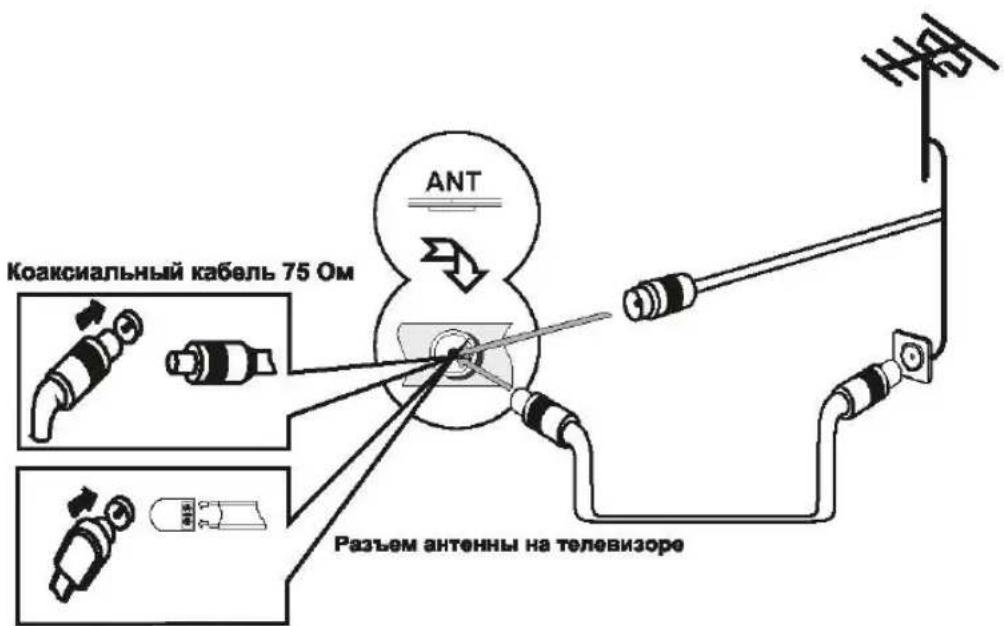
Check that the antenna cable is properly connected. Use the Auto Tuning function in the menu to scan for channels. Also verify the correct input source is selected.
How do I clean the TV screen?
Turn off the TV and let it cool. Use a soft, dry microfiber cloth to gently wipe the screen. Do not use water, alcohol, or abrasive cleaners.
Can I mount this TV on a wall?
Yes, it supports VESA 100x100 mm wall mounts. Use a compatible mount and follow the instructions. Ensure the wall can support the weight.
How do I play media from a USB drive?
Insert the USB drive into the USB port. Press the Source button and select USB. Use the remote to navigate and play supported files (e.g., MP4, MP3, JPEG).
Why is the remote not working?
Replace the batteries with new AAA ones. Make sure there are no obstructions between the remote and the TV sensor. If still not working, try resetting the TV by unplugging for 30 seconds.
How do I enable the sleep timer?
Press the Sleep button on the remote (if available) or go to Settings > Time > Sleep Timer. Select a duration from 30 to 120 minutes.
What do I do if the TV turns off by itself?
Check if the sleep timer is active. It could also be a power issue: ensure the power cord is secure and try a different outlet. If problem persists, contact Shivaki service.
How can I get a manual in another language?
Visit notice-facile.com, select your desired language from the dropdown, enter your email, and the translated manual will be sent to you.
User questions about STV-22LED15W Shivaki
0 question about this device. Answer the ones you know or ask your own.
Ask a new question about this device
No questions yet. Be the first to ask one.
Download the instructions for your Television in PDF format for free! Find your manual STV-22LED15W - Shivaki and take your electronic device back in hand. On this page are published all the documents necessary for the use of your device. STV-22LED15W by Shivaki.
USER MANUAL STV-22LED15W Shivaki
natural_image
Simple line drawing of a computer monitor with a 'X' symbol crossed out, no text or labels present.Вниманные
- ИСТОЧНИК СИГНАЛА
natural_image
Three identical rectangular devices with internal components, each showing a downward arrow and a small up/down arrow (no text or symbols)УСТАНОВКА АНТЕННЫ
natural_image
Line drawing of people watching television on a couch, with a dolphin flying out the screen (no text or symbols)МЕНЮ
2.Treble (Тембр ВЧ) / Bass (Бас) / Balance (Баланс)
MEHIO

8. Signal Information (Информация о сигнале)
МЕНЮ
3. Subtitle (Субтитры)
MEHIO
МЕНО
natural_image
Tropical beach scene with leaning palm trees and clear blue sky (no text or symbols visible)Music (Музыка)
Table of contents
Click a title to access it
Manual assistant
Powered by Anthropic
Waiting for your message
Product information
Brand : Shivaki
Model : STV-22LED15W
Category : Television