STV-24LED15W - Television Shivaki - Free user manual and instructions
Find the device manual for free STV-24LED15W Shivaki in PDF.


Pick your language and provide your email: we'll send you a specifically translated version.
| Product Type | LED Television |
| Brand | Shivaki |
| Model | STV-24LED15W |
| Screen Size (inches) | 24 |
| Display Resolution | HD (1366 x 768 pixels) |
| Aspect Ratio | 16:9 |
| Brightness | 200 cd/m² |
| Contrast Ratio | 1000:1 (typical) |
| Viewing Angle | 178°/178° |
| TV Tuner | DVB-T/T2 (terrestrial) |
| HDMI Ports | 2 (HDMI 1.4) |
| USB Ports | 1 (USB 2.0 for media playback) |
| Other Inputs | VGA, Composite (AV), RF, Headphone jack |
| Power Consumption | 30W (typical) |
| Standby Power | <0.5W |
| Dimensions (W x H x D, without stand) | 552 x 339 x 70 mm |
| Weight (without stand) | 2.5 kg |
| VESA Mount Pattern | 100 x 100 mm |
| Remote Control | Included (batteries not included) |
| Warranty | 1 year (manufacturer) |
| Cleaning and Care | Unplug before cleaning; use a soft, dry cloth. Avoid solvents. |
| Safety | Do not install near heat sources; ensure adequate ventilation. |
| Spare Parts Availability | Contact Shivaki service center for replacement parts. |
| Repairability | Serviceable by qualified technician; do not disassemble. |
| Manual Language | English (PDF available) |
Frequently Asked Questions - STV-24LED15W Shivaki
How do I connect an external device like a DVD player?
Use an HDMI cable for high-quality video and audio. Connect one end to the DVD player's HDMI output and the other to one of the HDMI ports on the TV. Then select the corresponding HDMI input using the Source button on the remote.
Why is there no picture when I turn on the TV?
First, ensure the power cord is plugged in and the TV is turned on (check the standby LED). If it's on but no picture, try adjusting the brightness or backlight settings. Also verify the correct input source is selected. If the issue persists, perform a factory reset via the menu.
How can I mount the TV on a wall?
This TV supports VESA 100x100 mm wall mount. Use a compatible wall mount bracket (not included). Follow the instructions provided with the bracket, ensuring it is securely attached to the wall studs and the TV. Do not over-tighten the screws.
How do I scan for TV channels?
Press the Menu button on the remote, go to Channel Setup (or similar), select Auto Scan (or Auto Tuning). Choose Terrestrial (DVB-T/T2). The TV will scan for available channels and store them. This may take a few minutes.
Can I play videos from a USB drive?
Yes, insert a USB drive into the USB port. Press the Source button and select USB. Use the on-screen media player to navigate and play video, photo, or audio files. Supported formats include MP4, AVI, MKV for video, JPEG for photos, and MP3 for audio.
How do I adjust picture settings?
Press the Menu button and navigate to Picture Settings. You can adjust Brightness, Contrast, Color, Sharpness, and select from presets like Standard, Vivid, or Movie. Use the arrow keys to change values.
What should I do if the remote control stops working?
First, replace the batteries with new ones. Ensure there is a clear line of sight between the remote and the TV's IR receiver. If still not working, try using the physical buttons on the TV (if available) to control basic functions. If the remote is defective, contact Shivaki support for a replacement.
How do I clean the TV screen?
Unplug the TV before cleaning. Use a soft, dry, lint-free cloth to gently wipe the screen. For stubborn spots, slightly dampen the cloth with water (not wet). Never use alcohol, ammonia, or abrasive cleaners as they can damage the screen.
Is there a child lock feature?
Yes, the TV includes a Parental Lock (often under Channel Setup or System Settings). You can set a PIN code and restrict access to certain channels or inputs. Refer to the manual for default PIN (usually 0000 or 1234).
How do I perform a factory reset?
Press Menu, go to Setup or System, select Reset to Factory Defaults (or similar). Confirm the action. This will erase all personal settings (tuned channels, picture adjustments). The TV will restart and prompt initial setup.
User questions about STV-24LED15W Shivaki
0 question about this device. Answer the ones you know or ask your own.
Ask a new question about this device
No questions yet. Be the first to ask one.
Download the instructions for your Television in PDF format for free! Find your manual STV-24LED15W - Shivaki and take your electronic device back in hand. On this page are published all the documents necessary for the use of your device. STV-24LED15W by Shivaki.
USER MANUAL STV-24LED15W Shivaki
Вниманные
I. ИСТОЧНИК СИГНАЛА
УСТАНОВКА АНТЕННЫ

МЕНЮ
2.Treble (Тембр ВЧ) / Bass (Бас) / Balance (Баланс)
MEHIO
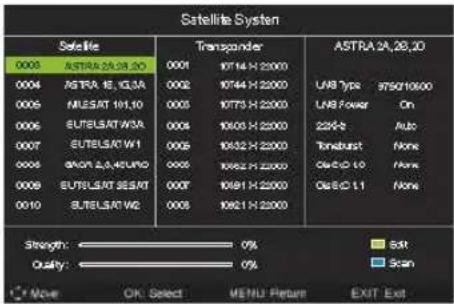

- Signal Information (Информация о сигнале)
MEHIO
3. Subtitle (Субтитры)
4.Teletext (Телетекст)
MEHIO
6.Time Settings (Настройка времени)
MEHIO
Music (Музыка)
Table of contents
Click a title to access it
Manual assistant
Powered by Anthropic
Waiting for your message
Product information
Brand : Shivaki
Model : STV-24LED15W
Category : Television