STV-49LED16 - Television Shivaki - Free user manual and instructions
Find the device manual for free STV-49LED16 Shivaki in PDF.


Pick your language and provide your email: we'll send you a specifically translated version.
| Product Type | LED Television |
| Brand | Shivaki |
| Model | STV-49LED16 |
| Screen Size | 49 inches (diagonal) |
| Resolution | 1920 x 1080 pixels (Full HD) |
| Refresh Rate | 60 Hz |
| Brightness | 300 cd/m² |
| Contrast Ratio | 5000:1 (dynamic) |
| Viewing Angle | 178° horizontal / 178° vertical |
| Audio Output Power | 2 x 8W |
| Power Consumption (max) | 120 W |
| Standby Power Consumption | < 0.5 W |
| Input Voltage | AC 100-240 V, 50/60 Hz |
| Dimensions (without stand) | 1098 x 642 x 85 mm |
| Dimensions (with stand) | 1098 x 700 x 240 mm |
| Weight (without stand) | 11.5 kg |
| Weight (with stand) | 12.5 kg |
| VESA Mount | 200 x 200 mm |
| HDMI Inputs | 2 |
| USB Ports | 1 |
| RF Input | 1 |
| Composite Video Input | 1 (shared with audio) |
| Headphone Output | 1 (3.5mm) |
| Digital TV Tuner | DVB-T2/C |
| Analog TV Tuner | PAL/SECAM |
Frequently Asked Questions - STV-49LED16 Shivaki
How do I turn on the TV for the first time?
Connect the power cord and press the Power button on the remote or on the TV. Follow the on-screen setup wizard to select language, country, and scan for channels.
What should I do if the remote control does not work?
Check if the batteries are inserted correctly with correct polarity. Replace with new AAA batteries. Ensure there are no obstacles between remote and TV sensor.
How can I connect external devices like a game console?
Use an HDMI cable to connect the device to one of the HDMI ports on the TV. Switch the TV input source to the corresponding HDMI channel using the Source button.
How do I perform a factory reset?
Go to Menu > Settings > Reset (or similar). Confirm the reset. This will erase all personalized settings and channels.
Why is there no sound from the TV speakers?
Check if the volume is muted or set too low. Ensure Mute is off. If using external speakers, check connections. Go to Sound settings and ensure TV speakers are enabled.
Can I mount this TV on a wall?
Yes, the TV is VESA compatible with 200x200 mm pattern. Use a wall mount kit that supports this standard and the TV's weight (approx. 12.5 kg with stand).
How do I clean the screen safely?
Turn off the TV and unplug. Use a soft, dry microfiber cloth to gently wipe the screen. Do not use liquid cleaners or spray directly onto the screen.
Why does the TV turn off automatically?
Check the Sleep Timer setting in the menu. Also, ensure the Auto Power Off feature is not enabled. If overheating, ensure ventilation holes are not blocked.
How can I update the TV firmware?
Go to Menu > Settings > Software Update. Select USB or Network (if available). Visit the Shivaki support website to download the latest firmware to a USB drive.
What is the warranty period for this TV?
The standard warranty for Shivaki TVs is typically 1 year from date of purchase. Keep your receipt. For specific terms, contact your local Shivaki distributor.
User questions about STV-49LED16 Shivaki
0 question about this device. Answer the ones you know or ask your own.
Ask a new question about this device
No questions yet. Be the first to ask one.
Download the instructions for your Television in PDF format for free! Find your manual STV-49LED16 - Shivaki and take your electronic device back in hand. On this page are published all the documents necessary for the use of your device. STV-49LED16 by Shivaki.
USER MANUAL STV-49LED16 Shivaki
Внимание
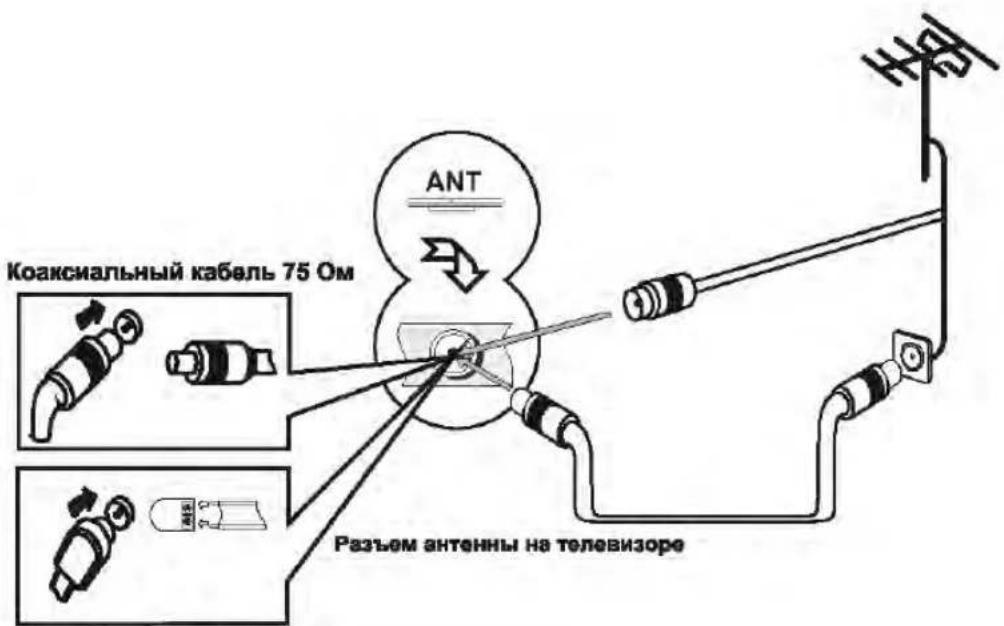
УСТАНОВКА АНТЕЕННЫ
MEHIO


9. Signal Information (Информация о сигнале)
MEHIO
3. Subtitle (Субтитры)
MEHIO
6.Time Settings (Настройка времени)
MEHIO
МЕНЮ
9. Reset (Сброс)
МЕНЮ VGA SETTING (НАСТРОЙКИ ПК)
Music (Музыка)
Table of contents
Click a title to access it
Manual assistant
Powered by Anthropic
Waiting for your message
Product information
Brand : Shivaki
Model : STV-49LED16
Category : Television