
Core Elite Go GC313Pro - Video Capture Card AVERMEDIA - Free user manual and instructions
Find the device manual for free Core Elite Go GC313Pro AVERMEDIA in PDF.


| Product Type | Video Capture Card |
| Brand | AVerMedia |
| Model | Core Elite Go GC313Pro |
| Dimensions | Approx. 100 x 60 x 20 mm (3.94 x 2.36 x 0.79 in) |
| Weight | Approx. 50 g (1.76 oz) |
| Power Supply | USB bus-powered (5V, 0.5A) |
| Video Input | HDMI 2.0 (up to 4K60 HDR) |
| Video Output | HDMI 2.0 passthrough (up to 4K60 HDR) |
| Capture Resolution | Up to 4K30 or 1080p120 (via USB 3.0) |
| Audio Input | HDMI embedded audio |
| Audio Output | 3.5mm mic/line-in combo jack |
| Interface | USB 3.2 Gen 1 Type-C |
| Compatibility | Windows, macOS, select Android devices |
| Software | RECentral, OBS, XSplit, Streamlabs |
| Main Functions | Game streaming, video recording, live streaming, passthrough |
| Maintenance | Clean with soft, dry cloth; avoid liquids |
| Safety | Use certified USB cables; avoid overheating; keep away from moisture |
| Spare Parts | USB-C cable (included); replacement cable available |
| Repairability | Not user-serviceable; contact support for repairs |
| General Information | Compact portable design; 2-year limited warranty |
Frequently Asked Questions - Core Elite Go GC313Pro AVERMEDIA
User questions about Core Elite Go GC313Pro AVERMEDIA
0 question about this device. Answer the ones you know or ask your own.
Ask a new question about this device
Download the instructions for your Video Capture Card in PDF format for free! Find your manual Core Elite Go GC313Pro - AVERMEDIA and take your electronic device back in hand. On this page are published all the documents necessary for the use of your device. Core Elite Go GC313Pro by AVERMEDIA.
USER MANUAL Core Elite Go GC313Pro AVERMEDIA
Reviewer's Guide
Table of Contents
Introduction ...... 2
ELITE GO (GC313Pro) 3
Key Features....4
System Requirements....6
Specifications 6
Product Overview....7
Connection....8
Power Allocation....9
Contact Us....9
About AVerMedia....9
AVerMedia
Introduction
This document is your Reviewer's Guide for the ELITE GO (GC313Pro). We have written this guide to provide you with the information you need to quickly and smoothly use the AVerMedia product.
After a quick introduction of the ELITE GO and their target audience, we will dive into its key features, system requirements, and technical specs and show you how to set up and install the device. Lastly, this guide will finish with a link to our technical support team and with some brief information on AVerMedia's background.
Thank you for taking the time to use and try out our latest device, we hope you enjoy using it as much as we enjoyed making it. If you have any questions or suggestions on our products or need any further editorial assistance, please don't hesitate to contact us.
ELITE GO (GC313Pro)
The Premium Go Series is a brand-new product line featuring three versatile products, each offering different levels of functionality. The ELITE GO GC313Pro stands out with its 100W Quick Charge feature and 1080p60 video capture, allowing users to charge their device and capture video simultaneously. The Premium Go Series provides exceptional mobility and compatibility for various handheld devices, enhancing the user experience in multiple scenarios.
The ELITE GO GC313Pro Charging Capture combines the benefits of a connectivity hub and an AC charger into one convenient device. With two USB-C ports, a USB Type-A 3.0 port, and an HDMI port, it enables users to charge their device while playing on a big screen simultaneously.
The ELITE GO GC313Pro offers the perfect balance between capture functionality and charging convenience, catering to gamers who prioritize versatility and mobility. The key difference between the ELITE GO and the CORE GO is the ELITE GO's superior video capture capabilities, making it an ideal choice for those who need both charging and high-quality video capture features.
Key Features

PD3.0 Quick Charge
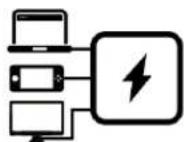
Triple-Device Charging

Overload Protection

Fast Charging
- Fast and Efficient: With PD3.0 Quick Charge, your devices get powered up rapidly, saving you valuable time.
- Versatile Compatibility: It supports a wide range of devices, ensuring your gadgets are always ready to go.
- Advanced Technology: The PD3.0 standard guarantees a safe and stable charging experience.
• Multi-Device Support: Charge up to three devices simultaneously, maximizing convenience and efficiency.
- Compact and Powerful: This feature eliminates the need for multiple chargers, saving space and reducing clutter.
- Universal Compatibility: It works seamlessly with a variety of devices, from smartphones to tablets and laptops.
• Enhanced Safety: Protects your devices from electrical overloads, ensuring a safe charging environment.
• Smart Monitoring: Automatically detects and prevents overcurrent and overvoltage conditions.
- Peace of Mind: Safeguards your valuable electronics against potential damage.
- Quick Power-Up: Delivers rapid charging speeds to minimize downtime and keep you connected.
- Optimized Efficiency: Intelligent charging technology ensures your devices charge faster than ever.
• Universal Support: Compatible with a wide array of devices for consistent, fast charging performance.
 100W GaN Charger 100W GaN Charger | ·High Power Output:Provides up to 100W of power for fast and efficient charging of high-demand devices.·GaN Technology:Uses Gallium Nitride for improved efficiency and reduced heat generation.·Compact Design:Despite its high power output, it remains small and portable for easy transport. |
 HDMI 4K60 Display HDMI 4K60 Display | ·Ultra-High Definition:Supports 4K resolution at 60Hz for stunning visual clarity.·Seamless Connectivity:Easily connects your devices to external displays, enhancing your viewing experience.·Versatile Usage:Ideal for presentations, gaming, and entertainment with crisp and clear visuals. |
 Charging, Displaying, Connecting Charging, Displaying, Connecting | ·All-in-One Solution:Combines charging, video output, and connectivity in a single, convenient device.·Streamlined Functionality:Simplifies your setup by reducing the number of cables and adapters needed.·Enhanced Productivity:Perfect for multitasking, ensuring you stay productive and connected. |
 1080p60 Video Capture 1080p60 Video Capture | ·High-Quality Recording:Captures video in Full HD at 60 frames per second for smooth and detailed playback.·Professional-Grade:Ideal for content creators, streamers, and gamers seeking top-notch recording quality.·Easy Integration:Seamlessly integrates with your existing setup for hassle-free recording and streaming. |
*Wall chargers with GaN technology offer faster charging times and greater power efficiency due to fewer electrical components and improved heat performance.
System Requirements
Operating System: Windows ® 10 or later (Support UVC Protocol)
Desktop
- Intel ® i5-3330 or comparable (i7 recommended)
AMD A10-7890K (Quad-core) or above - NVIDIA GTX 650 / AMD Radeon TM R7 250X or above are recommended
- 4GB RAM
Laptop
- Intel ® Core TM i7-4810MQ
- NVIDIA ® GeForce ® GTX 870M
- 4 GB RAM (8 GB recommended)
Mac System Requirement:
Operating System:
-
Mac with an Intel processor: macOS 11 or later
-
Mac with an Apple M series processor: macOS 11 or later* (*Not compatible with macOS 12)
iMac 2013
- 2.9GHz quad-core Intel Core i5 processor
- NVIDIA ® GeForce GT750M with 1GB of GDDR5 memory
- 16GB of 1600MHz DDR3L onboard memory
MacBook Pro 2013
- 2.5GHz quad-core Intel Core i7 processor
- NVIDIA GeForce GT 750M with 2GB of GDDR5 memory and automatic graphics switching
- 16GB of 1600MHz DDR3L onboard memory
MacBook Pro 2017
- 2.8GHz quad-core Intel Core i7 processor
- AMD Radeon Pro 555(2GB GDDR5) at least
- 16GB of 2133MHz LPDDR3 at least
Specifications
| Power | AC Pin: US |
| Input: AC 100-240V~50/60Hz | |
| Output: USB-C1/C2: 5V/3A, 9V/3A, 12V/3A, 15V/3A, 20V/4.5A, 20V/5AUSB-A: 5V/1A | |
| Fast Charging Protocol | PD3.0 |
| Interfaces | Short Circuit, Over Current,Over Voltage, Over Temperature |
| Max. Pass-Through Resolution | 4K60 |
| Video & Audio | Max. Pass-Through Resolution: 4K60Max. Capture Resolution: 1080p60Video Format: YUV422, MJPEGAudio Output: Stereo |
| Dimensions (W x D x H) | 66 x 36.6 x 62 mm (2.60 x 1.44 x 2.44 in.) |
| What's in the Box | GC313ProUSB Type-C to Type-C CableQuick Start Guide |
Specifications are subject to change without prior notice. Please visit AVerMedia official website for the latest information.
Product Overview

Connection
![graph TD A["Laptop"] --> B["USB"] A --> C["USB"] A --> D["USB"] A --> E["USB"] A --> F["USB"] A --> G["USB"] A --> H["USB"] A --> I["USB"] A --> J["USB"] A --> K["USB"] A --> L["USB"] A --> M["USB"] A --> N["USB"] A --> O["USB"] A --> P["USB"] A --> Q["USB"] A --> R["USB"] A --> S["USB"] A --> T["US…](/content/2026/05/994814/images/2c6b1b121e78a9ed14c42b0666bbc5318d4de07f8b00af1c9ee30418a31dfdf9.jpg)
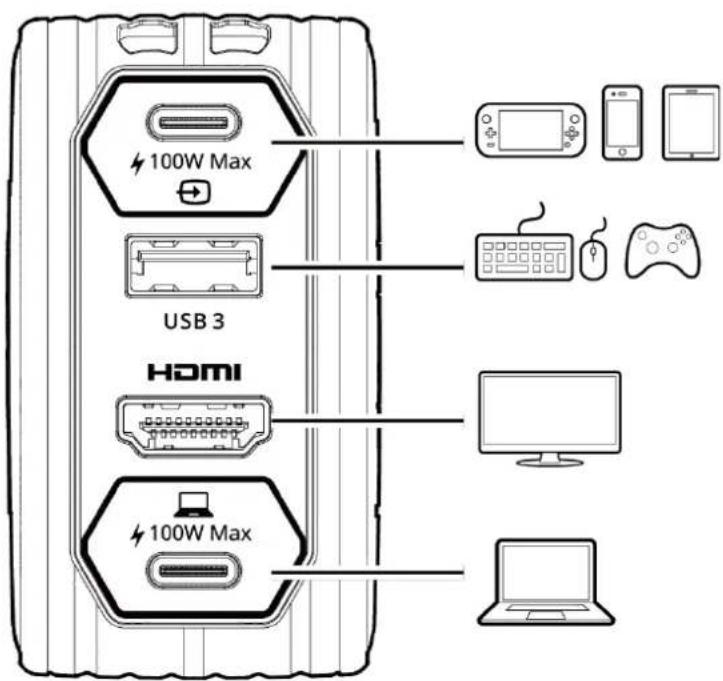
Video Source
Accessory
TV/Monitor
PC/NB
Power Allocation
| 1 Port | 2 Ports | 3 Ports | |||||
| USB-C 1 | 100W | -- | -- | 45W | 90W | -- | 45W |
| USB-C 2 | -- | 100W | -- | 45W | -- | 90W | 45W |
| USB-A | -- | -- | 5W | -- | 5W | 5W | 5W |
Contact Us
Please contact us here should you have any questions or suggestions.
About AVerMedia
AVerMedia Technologies specializes in digital video and audio technology. We provide cutting-edge, high-quality audio and video peripherals, professional capturing and streaming solutions, Edge AI technology, video collaboration solutions, and more. Our mission is to provide an enriched user experience and effective communication in education, content creation, and video communication via innovative and eco-friendly solutions.
AVerMedia is guided by a philosophy of contributing to society- whether through products that change customers' lives for the better or by ensuring our operations are socially responsible.
Connect with AVerMedia:
Website: https://www.avermedia.com/
LinkedIn: https://www.linkedin.com/company/avermedia-technologies


Brand : AVERMEDIA
Model : Core Elite Go GC313Pro
Category : Video Capture Card