
Cube 802 - PC Case Azza - Free user manual and instructions
Find the device manual for free Cube 802 Azza in PDF.


| Type de produit | PC Case, Full Tower |
| Marque | Azza |
| Modèle | Cube 802 (CSAZ-802 / CSAZ-802F) |
| Couleur | Black |
| Dimensions du châssis (L x l x H) | 360 x 300 x 300 mm (13.8 x 13.8 x 13.8 in) |
| Dimensions avec pied (L x l x H) | 380 x 300 x 340 mm (15.0 x 11.8 x 13.4 in) |
| Poids | 13.8 kg (30.4 lbs) |
| Matériau du panneau latéral | Tempered Glass (left, right, top) |
| Hauteur maximale du CPU cooler | 150 mm |
| Longueur maximale de la carte graphique | 320 mm |
| Emplacements d'extension | 7 |
| Baies de disque | 2x 2.5" SSD, 1x 3.5" HDD |
| Ventilateurs avant | 4x 120 mm (1x digital RGB fan included for CSAZ-802F) |
| Ventilateur arrière | 1x 120 mm (1x digital RGB fan included for CSAZ-802F) |
| Support water cooling | 240 mm radiator in front |
| Alimentation | Not included (PSU mounted in separate chamber) |
| Éclairage | Digital RGB light strips + fans (controlled via RF remote or motherboard) |
| Connecteurs panneau avant | Power button, USB, audio (not specified) |
| Particularités | Dual chamber design, pre-cut hole for CPU cooler installation, tempered glass top panels |
Frequently Asked Questions - Cube 802 Azza
User questions about Cube 802 Azza
0 question about this device. Answer the ones you know or ask your own.
Ask a new question about this device
Download the instructions for your PC Case in PDF format for free! Find your manual Cube 802 - Azza and take your electronic device back in hand. On this page are published all the documents necessary for the use of your device. Cube 802 by Azza.
USER MANUAL Cube 802 Azza
AZZAMISSION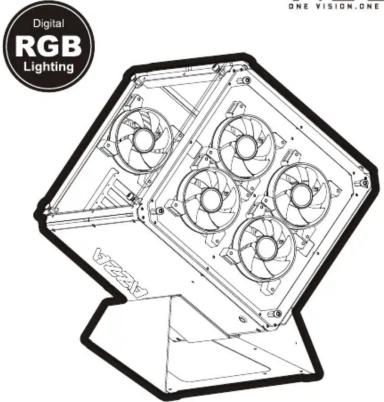 www.azzatek.com www.azzatek.com | Installation Instructions1. Specifications2. Chassis Parts3. Designed Case Stand Installation4. Control Panel Functions / PSU Installation5. 3.5"/2.5" HDD Installation6. Cooling System Installation7. AZZA Hurricane II Digital RGB Fan Installation For Motherboard8. RF Remote | SpecificationsModelModel NameCube 802Model NumberCSAZ-802/CSAZ-802FSpecificationsATX-ITX Full TowerColorBlank(extency/black)(tensor)Size Panel WindowLeft - Right - Top side of panel - Tempered Glass With Rubber MountsMax CPU cooler HeightUp to 165mmMax Video Cord LengthUp to320 mm long Video cardPower SupplyRod IncludedMotherboard CompatibilityATX-Micro ATX-Mire ITXKey dimensionsExternal S 25" Drive Bays0Internal 2.5" Drive BaysUp to 2Internal 3.5" Drive BaysUp to 1Expansion Bars7Digital RGB Light Effects(both variants come with digital RGB light strips)All digital RGB light strips are controlled by RF remote. For model CSAZ-802F, up to 5 digital RGB fans can be controlled by the motherboard. For model CSAZ-802F, please plug all digital RGB fans into an RGB 5V connector on a WS2812B-compliant motherboard. The digital RGB fans can then be controlled using the motherboard's native lighting control software. If you do not have a WS2812B-compliant motherboard that supports digital RGB lights, then you can connect the digital RGB fans into the included RF receiver instead, and control them using the included RF controller. To prevent the connector on a WS2812B motherboard or the RF receiver from shorting out, please do not decay-chain more than 5 digital RGB fans together.Fysical Specifications:90x350x350mm / 13.8x13.8x13.8 inchesDimension with Case Stand/HWxD)693x500x514mm / 23.3x19.7x20.2 inchesWeight13.8g/20.4bsFeaturesHigh-quality tempered glass side window allows for clear visuals to inner componentsTempered Glass on Three Scass WindowAvailable Fan Ports4x120mm, ports in the front(6xHurricane I Digital RGB Fan included for model CSAZ-802F only)1x120mm, ports in the rear(1xHurricane II Digital RGB Fan included for model CSAZ-802F only)Water CoolingSupports radiators up to 240mm in the FrontIsolated ChamberDual-chamber design, Power Supply is housed in one of the chamber bottoms, preventing its heat from affecting other componentsEasy Installation CoolerA pre-cut hole for easy installation of CPU cooler, eliminating the need to remove the motherboardAccessories1x RF Connector for model CSAZ-8022x RF Connectors for model CSAZ-802F1x RF Remote Controller1x Designed Case Stand1x Fan Metal Protection Net Grill*PWM Fan:The model comes with PWM fans and will run at top speed unless connected to a motherboard or controller. |
| AZZAONE VISION ONE MISSION | Chassis Parts 1Tempered glass front panel2Tempered glass top panel x23Designed case stand4Light cover x35Digital RGB strip x36LED Lens x37PCI slot cover x7812cm Fan metal protection net grill 1Tempered glass front panel2Tempered glass top panel x23Designed case stand4Light cover x35Digital RGB strip x36LED Lens x37PCI slot cover x7812cm Fan metal protection net grill | Designed Case Stand Installation Control Panel Functions/PSU Installation Control Panel Functions/PSU Installation  PSU Installed insidePower SW button PSU Installed insidePower SW button |
3.5 "/2.5" HDD Installation

■ Supports up to 320mm long video cards.

■ Supports 2.5" SSD x 2 ( A B ) ■ Supports 3.5" HDD x 1 ( C )
Install the 2.5" SDD before assembling the motherboard.
Cooling System Installation
Front
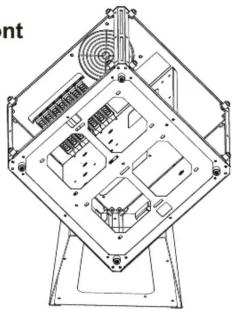
Install the fan between the chassis and glass panel.

120mm x4
Back

Install the radiator at the chassis inside.

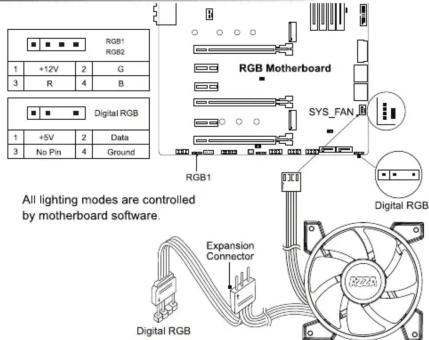
AZZA Hurricane II Digital RGB Fan Installation For Motherboard
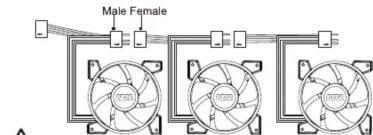
Parallel Connection ("daisy-chaining")
CAUTION
If you do not have a motherboard that is compatible with digital RGB, then you can opt to use the included
RF remote and receiver.
The addressable RGB fan has a 3-pin connector (4 holes). Please ensure that you are connecting the 3-pin connector
on the fan to the 3-pin RGB header on the motherboard or RF Remote connector.
Do not plug it into the 4-pin header, as the incompatible voltage will try the fan. The 3-pin conne
4 holes, but the 4th hole is intentionally blocked, for this reason, so please do not try to force it!
Our digital RGB devices are WS2812B-compliant. Each fan contains 10 digital/addressable LED diodes. The WS2812B
standard supports up to 6 digital RGB fans together.
RF Remote (Model Number: RF-DRGB-1366)

The first Digital RGB fan is to be connected to the Digital RGB LED RF remote in the chassis, while the rest of them can be daisy chained to the first one with their own male and female plugs.
![graph TD A["RF remote"] --> B["Male Female"] B --> C["Control panel with fan 2025"] B --> D["Control panel with fan 2026"]](/content/2026/05/994620/images/ddf576583ab64daad2803ec363e521640486118c37cf408f93b634393c9674cf.jpg)
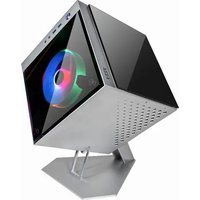
Brand : Azza
Model : Cube 802
Category : PC Case