
THA-200 - Audio Amplifier Taga Harmony - Free user manual and instructions
Find the device manual for free THA-200 Taga Harmony in PDF.


| Product Type | Integrated Stereo Amplifier |
| Dimensions (W x H x D) | 430 x 100 x 320 mm |
| Weight | 8.5 kg |
| Power Output | 2 x 100W RMS at 8 ohms |
| Frequency Response | 20 Hz – 20 kHz ±0.5 dB |
| Total Harmonic Distortion | <0.05% |
| Signal-to-Noise Ratio | >90 dB |
| Inputs | 4x RCA, 1x Phono (MM), 1x USB |
| Outputs | Speaker terminals, Pre-out, Headphone (6.3mm) |
| Speaker Impedance | 4 – 16 ohms |
| Protection | Short circuit, overheat, DC offset |
| Power Consumption | 400W max, <0.5W standby |
| Material | Aluminum front panel, steel chassis |
| Color | Black |
| Remote Control | Included (battery size CR2032) |
| Warranty | 2 years |
| Accessories Included | Power cord, remote, manual |
| Country of Origin | China |
Frequently Asked Questions - THA-200 Taga Harmony
User questions about THA-200 Taga Harmony
0 question about this device. Answer the ones you know or ask your own.
Ask a new question about this device
Download the instructions for your Audio Amplifier in PDF format for free! Find your manual THA-200 - Taga Harmony and take your electronic device back in hand. On this page are published all the documents necessary for the use of your device. THA-200 by Taga Harmony.
USER MANUAL THA-200 Taga Harmony
| HTA-200 Headphone Amplifier | 1EA |
| USB Cable | 1EA |
| DC Adapter | 1EA |
| Instruction Manual | 1EA |
Specifications
| Power Output | 2 x 500 mW x 2 @ 100 Ohm load |
| Vacuum Tubes | 1 x 6N2 |
| THD | =< 0.1% @ 100 Ohm (1kHz, 300mW) |
| Signal/Noise ratio | 88 dB |
| Input Sensitivity | 750 mW |
| Inputs | AUX, USB for PC |
| Headphone Impedance | 30 to 300 Ohm |
| DC Power | 18V 1A |
We reserve the right to amend details of the specification or designs without notice in line with technical developments.
CE Compliance Statement
This product had been subject to the testing requirements for the CE mark, and has been approved to claim the CE mark for the standards,

EN 55013:2001 + A1:2003
EN 55020:2002 + A1:2003 + A2:2005
EN 61000-3-2:2000 + A2:2005
EN 61000-3-3:1995 + A1:2001 + A2:2005
EN 60065:2002
The validity of the CE mark is restricted to those countries where it is legally enforced.

IMPORTANT!
Your product is marked with the symbol as showed on the left For EU ( European Union ) member users :
According to the WEEE (Waste electrical and electronic equipment) Directive, do not dispose of this product as household waste or commercial waste.
Waste electrical and electronic equipment should be appropriately collected and recycled as required by practices established for your country. For information on recycling of this product, please contact you local authorities, your household waste disposal service or the shop where you purchased the product.
EU DISTRIBUTOR / IMPORTER:
POLPAK POLAND Sp.z o.o. AL JEROZOLIMSKIE 333A 05-816 REGUŁY K/WARSZAWY,POLAND Email:sales@laga-audio.com Website:www.laga-audio.com
WORLDWIDE&CHINA DISTRIBUTOR:
TAGA Audio Technology Company LTD. 3F, Building D1, Shizhou Street Section, Baichen Road, Shunde District, Foshan City, Guangdong Province,
Email:sales@taga-audio.com.cn Website:www.taga-audio.com.cn
TAGA®
•HARMONY
To Achieve Glorious Acoustics
HTA-200
VACUUM TUBE HEADPHONE DAC/AMPLIFIER

Instruction Manual
Introduction
Thank you for purchasing this TAGA Harmony HTA-200 Amplifier. This instruction manual provides all of the information that you need to know about your TAGA Harmony HTA-200. Please read it carefully before you start using the unit.
The TAGA Harmony HTA-200 is a high quality vacuum tube headphone dac/amplifier.
It has several input options to enable users to connect a variety of digital and analogue music sources.
It's compact dimensions, robust build and high quality finish make it a practical, long lasting and durable Hi Fi system component.
Contents
Safety Instructions 3
Installation and Operation 5
System Setup 6
Valve Amplifier Instructions 7
Troubleshooting 8
Kit Contents 9
Specifications 9
CE Compliance Statement 9
1
2
Safety Instructions
IMPORTANT
READ THIS SECTION CAREFULLY BEFORE PROCEEDING!

WARNING
RISK OF ELECTRIC SHOCK DO NOT OPEN

WARNING: TO REDUCE THE RISK OF ELECTRIC SHOCK, DO NOT REMOVE COVER (OR BACK). NO USER-SERVICEABLE PARTS INSIDE. REFER SERVICING TO QUALIFIED SERVICE PERSONNEL.

The lightning flash with arrowpoint within an equilateral triangle warns of the presence of uninsulated “dangerous voltage” within the product's enclosure that may be of sufficient magnitude to constitute a risk of electric shock to persons.

The exclamation point within an equilateral triangle warns users of the presence of important operating and maintenance (servicing) instructions in the literature accompanying the appliance.
WARNING: TO REDUCE THE RISK OF FIRE OR ELECTRIC SHOCK, DO NOT EXPOSE THIS APPARATUS TO RAIN OR MOISTURE, AND OBJECTS FILLED WITH LIQUIDS, SUCH AS VASES, SHOULD NOT BE PLACED ON THIS APPARATUS.
CAUTION: TO PREVENT ELECTRIC SHOCK, MATCH WIDE BLADE OF PLUG TO WIDE SLOT, FULLY INSERT.
CAUTION: FOR CONTINUED PROTECTION AGAINST RISK OF FIRE, REPLACE THE FUSE ONLY WITH THE SAME AMPERAGE AND VOLTAGE TYPE. REFER REPLACEMENT TO QUALIFIED SERVICE PERSONNEL.
WARNING: UNIT MAY BECOME HOT. ALWAYS PROVIDE ADEQUATE VENTILATION TO ALLOW FOR COOLING. DO NOT PLACE NEAR A HEAT SOURCE, OR IN SPACES THAT CAN RESTRICT VENTILATION.
Important Safety Instructions
-
Read Instructions - All the safety and operating instructions should be read before the product is operated.
-
Retain Instructions – The safety and operating instructions should be retained for future reference
-
Heed Warnings – All warnings on the product and in the operating instructions should be adhered to.
-
Follow instructions - All operating and use instructions should be followed
-
Cleaning - Unplug this product from the wall outlet before cleaning. Do not use liquid cleaners or aerosol cleaners. Use a damp, soft cloth for cleaning.
-
Water and Moisture - Do not use this product near water - for example, near a bath tub, wash bowl, kitchen sink, or laundry tub; in a wet basement; or near a swimming pool; and the like
-
Accessories - Do not place this product on an unstable cart, stand, tripod, bracket or table. The product may fail, causing serious injury to a child or adult, and serious damage to the product. Use only with a cart, stand, tripod, bracket or table recommended by the manufacture, or sold with the product. Any mounting of the product should follow manufacture is instructions and should use a mounting accessory recommended by the manufacture.
-
Ventilation - Slots and openings in the cabinet are provided for ventilation and to ensure reliable operation of the product and to protect it from overheating, and these openings must not be blocked or covered. The openings should never be blocked by placing the product on a bed, sofa, rug, or other similar surface. This product should not be placed in a built-in installation such as a bookcase or rack unless proper ventilation is provided or the manufacture's instructions have been adhered to.
-
Power Sources - This product should be operated only from the type of power source indicated on the marking label. If you are not sure of the type of power supply to your home, consult your product dealer or local power company. For products intended to operate from battery power, or other sources, refer to the operating instructions.
-
Grounding and Polarization - This product may be equipped with a polarized alternating-current line plug (a plug having one blade wider than the other). This plug will fit into the power outlet only one way. This is safety feature. If you are unable to insert the plug fully into the outlet, try reversing the plug. If the plug should still fail to fit, contact your electrician to replace your obsolete outlet. Do not defeat the safety purpose of the polarized plug.
-
Power-Cord Protection - Power supply cords should be routed so that they are not likely to be walked on or pinched by items placed upon or against them, paying particular attention to cords at plugs, convenience receptacles, and the point where they exit from the product.
-
Lightning - For added protection for this product during a lightning storm, or when it is left unattended and unused for long periods of time . unplug it from the wall outlet and disconnect the antenna or cable systems This will prevent damage to the product due to lightning and power-line surges
-
Overloading - Do not overload wall outlets, extension cords, or integral convenience receptacles as this can result in a risk of fire or electric shock
-
Object and Liquid Entry - Never push objects of any kind into this product through openings as they may touch dangerous voltage points or short-out parts that could result in a fire or electric shock. Do not expose this apparatus to dripping or splashing, and ensure that no objects filled with water, such as vases, are placed on the apparatus.
-
Servicing - Do not attempt to service this product yourself as opening or removing covers may expose you to dangerous voltage or other hazards. Refer all servicing to qualified service personnel.
-
Damage Requiring Service – Unplug this product from wall outlet and refer servicing to qualified personnel under the following conditions:
- When power supply cord or plug is damaged;
- If liquid has been spilled, or objects have fallen into product;
- If the product has been exposed to rain or water; - if the product does not operate normally by following the operating instructions. Adjust only those controls that are covered by the operating instructions as an improper adjustment of other controls may result in damage and will require extensive work by a qualified technician to restore the product to its normal operation;
- If the product has been dropped or damaged in any way;
- If the product exhibits a distinct change in performance – this indicates a need for service.
-
Replacement Parts - When replacement parts are required, be sure the technician has used replacement parts specified by the manufacturer or have the same characteristics as the original part. Unauthorized substitutions may result in fire, electric shock, or other hazards.
-
Safety Check – Upon completion of any service or repairs to this product, ask the service technician to perform safety checks to determine that the product is in proper operating condition.
-
Wall or Ceiling Mounting - The product should be mounted to a wall or ceiling only as recommended by the manufacturer.
-
Heat - The product should be situated away from heat sources such as radiators, heat registers, stoves, or other products (including amplifiers) that produce heat.
Installation and operation
There are two wiring options.
OPTION A
Set the input to AUX in the rear panel. Connect the RCA cable from your CD player or computer to HTA-200 AUX input port.
OPTION B
Set the input to USB in the rear panel. Connect the USB cable from your PC/notebook computer to HTA-200 USB input port.
*Windows 98SE, ME, 2000 Professional, XP Home/Professional, Vista
*Mac OS 9.1 or later, Mac OS X 10.0 or later Once plug in HTA-200, Your computer will use "USB Speakers" as the default sound card.

Adjust the Volume to Maximum
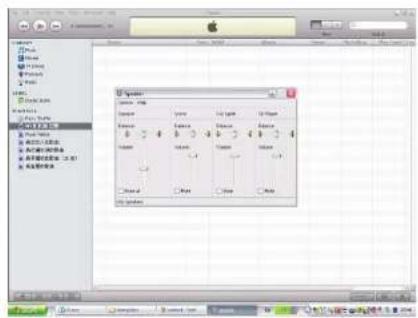
System Setup

5
6
Valve Amplifier Instructions
-
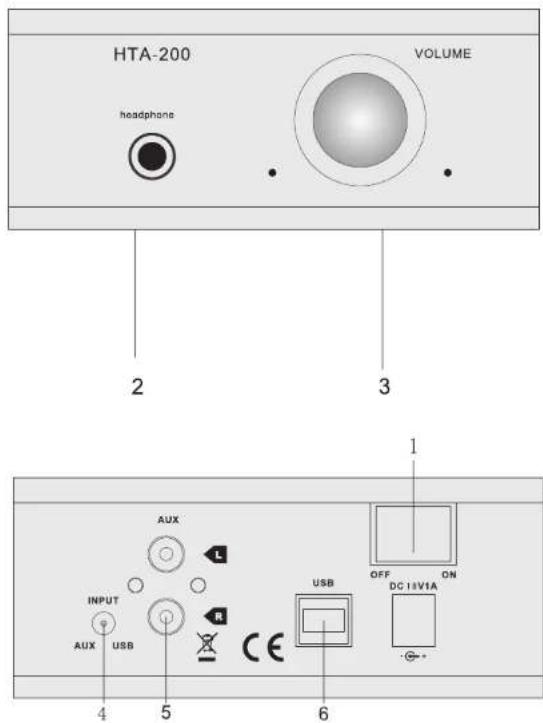
Power Switch
-
Headphone Jack
-
Volume Control
-
Input Selector
-
RCA Input
-
PC USB Input
Troubleshooting
If the unit fails to operate normally please check the following points to determine if the fault can be corrected. If the fault cannot be corrected then please disconnect the power cord and contact the authorised dealer or product helpline.
| SYSTEM | POSSIBLE PROBLEM | SOLUTION |
| No Power | Power cord is not plugged in or is not completely inserted | Plug in the power cord firmly |
| No sound | Input select is not correct | Please set the Input Selector correctly according to the input source being used |
| Input source is low | Increase the volume level on the audio source device | |
| No volume or low volume | Turn the volume control clockwise to increase the system volume level. | |
| The headphones are not properly connected to the amplifier | Connect the headphones correctly | |
| There could be a problem with your audio source | Change your audio source | |
| Application software not properly configured | Make sure that the application software (eg. Winamp,iTunes)has been properly configured to use USB audio device as its audio | |
| Sound is distorted | Volume level of the system is set too high | Decrease the volume level |
| Sound source is distorted | WAV and MIDI files are often of poor quality; Therefore distortion and noise are easily noticed with high powered speakers. Try a different audio source, (e.g., a CD player) |


- CE Compliance Statement
- IMPORTANT!
- EU DISTRIBUTOR / IMPORTER:
- WORLDWIDE&CHINA DISTRIBUTOR:
- TAGA®
- •HARMONY
- To Achieve Glorious Acoustics
- Introduction
- Contents
- Safety Instructions
- WARNING
- RISK OF ELECTRIC SHOCK DO NOT OPEN
- Important Safety Instructions
- Installation and operation
- OPTION A
- OPTION B
- System Setup
- Valve Amplifier Instructions
- Troubleshooting
Brand : Taga Harmony
Model : THA-200
Category : Audio Amplifier