
WQD74RJ5P - Water filter LG - Free user manual and instructions
Find the device manual for free WQD74RJ5P LG in PDF.


| Product Type | Water Filter |
| Brand | LG |
| Model | WQD74RJ5P |
| Height | 10.8 inches (27.4 cm) |
| Width | 5.7 inches (14.5 cm) |
| Depth | 5.7 inches (14.5 cm) |
| Weight | 0.7 lbs (0.32 kg) |
| Filtration Capacity | 300 gallons (1135 liters) |
| Flow Rate | 0.6 gpm (2.3 L/min) |
| Operating Temperature | 40°F - 100°F (4°C - 38°C) |
| Operating Pressure | 20 - 120 psi (138 - 827 kPa) |
| Contaminants Reduced | Chlorine taste & odor, Lead, Cysts, Mercury, Benzene |
| Certifications | NSF 42, NSF 53 |
| Replacement Frequency | Every 6 months or 300 gallons |
| Maintenance | Wipe exterior with damp cloth; no cleaning agents |
| Safety | BPA-free materials |
| Spare Parts | Only replacement filter cartridge |
| Compatible Refrigerators | Select LG French door refrigerators (check manual) |
| Country of Origin | South Korea |
Frequently Asked Questions - WQD74RJ5P LG
User questions about WQD74RJ5P LG
0 question about this device. Answer the ones you know or ask your own.
Ask a new question about this device
Download the instructions for your Water filter in PDF format for free! Find your manual WQD74RJ5P - LG and take your electronic device back in hand. On this page are published all the documents necessary for the use of your device. WQD74RJ5P by LG.
USER MANUAL WQD74RJ5P LG
OWNER'S MANUAL AND OPERATION GUIDE
Total Water Solution
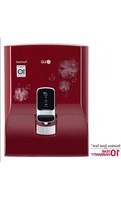
LG Electronics Healthcare Water Purifier
Keep the Owner's Manual handy.
Be sure to read "Safety Precaution" before use.
Product Warranty is inside the Owner's Manual.
WQD74RJ5P
Features of LG Healthcare Water Purifier
■ Sterilization-Hygiene 'Inside Care System'
This 'Inside care system' manages all the water passages in the purifier with LG's own Sterilization-Hygiene Tech to keep water clean.
■ Certification of Sterilization
This water purifier has gained Certification of Sterilization called 'S mark' from Korean Testing Research Institute.
■ Premium Design
The unique design that uses tempered-glass and artistic patterns upgrades the quality of kitchen interior.
■ Use of Stainless to Water Tank
We use 'Stainless' for the water tank to maintain the hygiene and quality of water.
■ Filter lamp for cleanness
Based on the change of filter lamp's color, consumers can decide when to change filters by themselves.
■ Continuous-Button
In case of you need to get plenty of water, use this Continuous-Button. This button enables water to come out continuously.
(*Regular Button Press will bring only certain amount of water.)
■ Energy saver Button
If you press Energy saver Button, then the operation hour of the heater will be reduced automatically. This process saves power-consumption.
Table of Contents
Before using
Safety Precautions 4~11
The names of each part and functions ....12
- Indicator part
Process of water purification 13
Check before using....14
The names of each part and functions ....15
- Control Panel Features
The usage
The function of control part ....16
- Filter indicator
- Hot water temperature indicator
- Cold water temperature indicator
How to manipulate ....17
- How to turn off hot water function
- How to turn off cold water function
- How to use Energy saving function
How to use....18
- To drink cold water
- To drink hot water
- To use water continuously
How to install ....19~20
How to clean ....21~24
What to know
When and how to replace a filter 25~27
Daily Check 28
Check before reporting the failure 29
Product standard ....30
Warranty card
This product is 230V use only.
Don't ever try to use 110V through transformer.
Safety Precautions
These contents are to keep users in safety and to prevent the loss of property and inconvenience.
Please read carefully and use correctly.
WARNING / CAUTION


WARNING

CAUTION
This sign is to call attention to things and manipulations that may cause danger. Read carefully and follow the directions to avoid danger.
If not followed correctly, the user may be killed or sustain a serious injury.
If not followed correctly, the user may sustain an injury or may lose property.

WARNING
Power related matters
Do not move the product when the water purifier is running.
- There is a risk of breakdown or electric shock.

The power plug must be used with a grounded 230V outlet only.
- There can be a breakdown and a risk of electric shock due to a short circuit.

Do not bend the power cord by force nor press it with heavy objects to prevent damage.
- There is a risk of electric shock or fire.

Do not pull the cord part nor touch the power plug with wet hands.
- There is a risk of electric shock or fire.

Do not connect or modify the cord randomly during installation.
- There is a risk of electric shock or fire.

Must use grounded outlet when using extension outlet.
- Using non-grounded outlet may cause electric shock and injury.


WARNING
Power related matters
Do not use multiple devices at the same time when using multi-outlet.
- There is a risk of fire unusual heat.

Do not plug in and out continuously.
- There is a risk of electric shock or fire. This may cause the product failure.

Do not force to bend the power cord or put heavy things on it.
- It may cause fire or electric shock.

When not using for a long time, lock the water supply valve and pull out the power plug.
- Water inside the cold/ hot water-tanks can go bad when not used for a long time, and therefore, make sure to empty the tanks, too.

Installation
Do not place heating equipment, electric heaters, flame-generated products, etc near the product.
- There is a risk of fire.

Do not install the water purifier on an unstable place.
- If the water purifier falls over, casualties or property damages may occur.

Safety Precautions

WARNING
During use
Avoid direct sunlight or heat, especially moisture, when installing.
- Refrigeration effects fall and there is a risk of electric shock.

No one should disassemble, repair, or remodel it on their own.
- There are risks of breakdown, electric shock, and fire. Contact the Service Center if a repair is required.

Do not install the product where combustible gas can leak.
- Gas may leak around the water purifier and explosion or fire may occur.

If the outlet cannot be grounded, and separate grounding is needed, do not ground to a gas pipe or faucet.
- There is a risk of gas explosion or electric shock.

When it is used
Do not let water get inside of the water purifier.
- There is a risk of electric shock or fire.

Do not sit nor put heavy things on the product.
- There are risks of breakdown or electric shock as well as injury.

Safety Precautions

WARNING
When it is used
Do not spray pesticides or flammable sprays while running.
- It is harmful to health as well as can cause product failure or fire.

Do not let children hang on the product.
- Children can get injured by the product falling down.

Do not poke the inside of the product with gimlet or pin.
- It can cause electric shock.

Do not put foreign objects or fingers inside the water purifier while the purifier is running.
- There are risks of scald and electric shock. (Caution is needed, especially for children)

Clean after the power plug is pulled out.
- There is a risk of electric shock or fire.

Safety Precautions

CAUTION
When installing
As an indoor product, install where the product can avoid direct sunlight and be protected from snow and rain.
- Product failure can be caused.

Connect to the power after 30 minutes of moving.
- Product failure can be caused.

Do not connect hot water to the product.
- Product failure can be caused.

Do not tilt the product more than 45 degrees when moving.
- Product failure can be caused.

The back and sides of the product need more than 10 cm of space from the wall for smooth airflow.
- Product failure can be caused.

After the installation, make sure the hose's joint does not leak.
- If the screw is loose, water leaks and electric shock and property damage can occur.

Safety Precautions

CAUTION
When it is used
If there's a strange noise, burning smell, or smoke from the water purifier, immediately turn off the purifier and cut off the power and then call service center.
- There is a risk of electric shock or fire.
Replace filters regularly according to the replacement period.
- Taste can be changed. Filter cycle is different by the usage, location, season, water quality, etc.


Safety Precautions

CAUTION
When it is used
Use LG's standard filter.
- If the filter from other company or non-standard product is used, it may cause breakdown or not purify well.
When cleaning the product, do not spray water directly nor clean with benzene, thinner, alcohol, etc. but use a soft, dry cloth.


After the installation, make sure the hose's joint does not leak.
- Malfunction and breakdown can be caused.
Do not connect hot water to the product.
- Product failure can be caused.


Drink the purified water as soon as possible so that always fresh water flows in.
- If the water is kept long, it can grow bacteria or taste can be changed.
Make sure to use cup type containers for hot water.
- There is a risk of scald.


The names of each part and functions
Indicator part
Front

Rear

Accessories


Owner's Manual Drain Hose Customer Care Card User's Guide
Process of water purification

Notice
The filter is vital to the water purifier. If an authentic filter is not used, or if an old filter is used even though it is authentic, this can cause performance deterioration.
Process of purification
Step 1: Sediment filter
This protects the part (or place) where water contacts by filtering unseen dregs and contaminated substances.

Step 2: Pre carbon filter
Remaining chlorine and volatile organic compounds are removed at this pre-carbon filter.

Step 3: Membrane Filter (R/O)
Heavy metallic substances, ionized substances, and microorganisms are removed through this membrane filter. At this step, drained water comes out along the drain hose.

Step 4: Post carbon filter
Smell left in water is filtered at this step, and the taste of water is improved.
![graph LR A["1 Sediment Filter"] --> B["2 Pre carbon Filter"] B --> C["3 Membrane Filter(R/O)"] C --> D["4 Post carbon Filter"]](/content/2026/05/994155/images/aff3c15fd727da94c423c37a2ed98c94d1b75c86277a99defb6797d477e12813.jpg)
Drained Water
- You can use drained water for daily activities like dish washing, laundry, cleaning, etc.
- Please do not use this water for drinking and cooking.
Open the Tap Water Valve
The product operates when tap water is supplied.
When the display's indicator light is turned off
When the display's indicator light is turned off, check if the power supply is stopped by a power outage or other causes.
When the product is not used for a long time (e.g., 2-3 days)
If water has been kept in the tank or hasn't been used for a long time, drain the water completely.
Do one more draining with newly purified water, then use.
After installation
Throw away the water stored to the full level in the inside tank more than once before use.
It takes around 3 hours for water to reach the full level, but the time varies depending on water pressure.
Periodical change of filter
Filter changing is very important for clean water.
Do not miss the time for filter replacement, since an old filter can't function well.
How to drain hot water
Take off the cap of the hot water drainer on the side of the product, and connect it with a drain hose.
(Please be careful not to be scalded by hot water.)

CAUTION
- This product is for 230V~50Hz use only.
- Please use an earthed socket when plugging in.
- Power is required for the operation of the water purifier.

Notice
If the product is not used for a long time, please unplug it and close the tap water valve.
Names of Parts and Functions
Control Panel Features


![graph TD A["1 Hot"] --> B["2 Energy saver"] B --> C["3 Filter"] C --> D["4 Continuous"] D --> E["5 Cold"] E --> F["6 Cold"] F --> G["7 Cold"]](/content/2026/05/994155/images/2c4e2db130d38ab94e3becbe88fcefda41caa0f01210150dd4d6e373a46ebce1.jpg)
1. Hot Water Temperature Indicator
This indicates the temperature of hot water in 3 levels.
* It indicates the temperature level but cannot be adjusted as desired.
2. "Hot" Button
This button is used to dispense hot water.
3. "Energy Saver" Button
This button helps save power by adjusting the temperature.
4 Filter Indicator
This part notifies the time for filter replacement.
(Blue indicates the filter can be used and Orange indicates the filter needs to be replaced.)
5 「Continuous」button
This button enables water to come out continuously.
(Water comes out for 30 sec.)
6 「Cold」button
This button is to use cold water.
7 Cold water temperature indicator
This indicates the temperature of cold water by 3 levels.
* It expresses the level of temperature but can't be adjusted as you want.
The function of Control part
1 Filter Indicator (This is not a button)
This notifies the time for filter replacement.


Notice
When the filter is usable, it is lit with a blue light, and when it is time to change the filter, it is lit with an orange light.
2 Hot water temperature indicator (This is not a button)
This indicates the temperature of hot water in 3 levels.


Notice
When the hot water temperature is indicated by three levels, level 3 is hotter than the other levels.
※ (The indicated temperature is the temperature inside the tank, so the temperature of the actual drinking water may be different.)
3 Cold water temperature indicator (This is not a button)
This indicates the temperature of cold water in 3 levels.


Notice
When the cold water temperature is indicated by three levels, level 3 is colder than the other levels.
※ (The indicated temperature is the temperature inside the tank, so the temperature of the actual drinking water may be different.)
How to operate
1 How to turn off the hot water function
Press the 'hot water' and 'Energy saver' buttons at the same time for 10 seconds, then the hot water function will be turned off and the LED of the 'hot water' button and the hot water indicator part will be turned off.
![graph LR A["≡"] --> B["Hot"] A --> C["Energy saver"] D["≡"] --> E["Hot"] D --> F["Energy saver"]](/content/2026/05/994155/images/56c79134e5c8ebc52f9d5a6a38d5688559d77443a794420615eb60d441b7249d.jpg)

Notice
To use hot water again, press the 'Hot Water' and 'Energy Saver' buttons simultaneously for 10 seconds, and the hot water function will be turned on.
2. How to turn off the cold water function
Press the 'Continuous' and 'Cold Water' buttons simultaneously for 10 seconds, and the cold water function will be turned off. The LED on the Cold Water button and the Cold Water indicator will turn off.
![graph LR A["Continuous"] --> B["Cold"] B --> C["→"] C --> D["Continuous"] D --> E["Cold"]](/content/2026/05/994155/images/ab124020e60d2d7a955fac04b06d47742cad51820da6926cca03a8f8b71afcf4.jpg)

Notice
To use cold water again, press the 'Cold Water' and 'Continuous' buttons simultaneously for 10 seconds, and the cold water function will be turned on.
3. How to use the Energy Saving function
If the 'Energy Saver' button is pressed, the indicator light for Power Save mode will turn on, and the operation time of the heater will be reduced automatically, thus reducing the amount of power consumption.
![graph LR A["Energy saver"] --> B["Energy saver"]](/content/2026/05/994155/images/02b929b2856370424e3473434eff88b14865af3eb4cf181d83ade9e7302d34ad.jpg)

Notice
- If 'Energy Saving' mode is selected, the lamp on the 'Energy Saver' button will turn on.
- If 'Energy Saving' mode is cancelled, the lamp on the 'Energy Saver' button will turn off.
How to Use
1. To drink cold water
Press the "Cold Water" button and then press its touch lever, or simply press only the touch lever, and the water will come out.


Notice
- Press the upper part of the touch lever for smooth operation.
- If using all cold and hot water, please wait until the water is stored to the full level. It takes around 3 hours, but the time may vary depending on water pressure.
2. To drink hot water
Press the "Hot water" button and then press its touch lever, and water will come out. To select hot water, press the "Hot water" button and then press its touch lever with a cup, and hot water will come out.
![graph LR A["Hot Water Inlet"] --> B["Hot Water Inlet"] B --> C["Product Absorption"]](/content/2026/05/994155/images/e791803f3c0c76f9eebf3c320d48ec3ec46603032d4ca7362ae3d833d4d5dc0b.jpg)

Notice
- For safety, always press the "Hot water" button and then press its touch lever for hot water to come out.
- If the hot water lever is pressed without pressing the "Hot water" button, the indication lamp will blink.
- The touch lever works well when pressed on the upper part.
- If not used after pressing the "Hot water" button, the hot water button lamp will turn off in 5 seconds.
3. To use water continuously
Press the "Continuous" button and then press the cold water touch lever only once, and water will come out continuously. To stop continuous use, press the Continuous button or the cold water touch lever once again, and the water will stop.
* Water comes out for 30 seconds with the Continuous function.
![graph LR A["Continuous"] --> B["Continuous"] B --> C["Water dispenser"]](/content/2026/05/994155/images/3a8107ccc07f9ef404a6c83c0d5eed2fa9b59378dde8340e809ec5955efa6425.jpg)

Notice
For safety, the Continuous function is available for cold water only.
How to install
* There may be some remaining water in the filter due to verification testing; this does not mean that the product is used.
- Please do not worry, it is not used.
CAUTION
For optimal performance, consult the company's installation technician for details.
Voltage
Check the voltage before use. This product is for 230V~50Hz only.

Installation of water purifier
1. Install the water purifier in a location that avoids being under the product, and also avoid humid areas, direct light, dust, and splashing water.

2. Connect tap water. ① Connect the tap water intake. ② Install the draining hose to the dishwater part or underneath the sink.

1. Origin-water-intake connection part (White) 2. Draining hose for living water part (Blue)
How to install
3. Install on a solid, flat surface at least 10 cm away from walls.

4. After installation, you must discard the full level of water more than once before use.

Notice
- It takes about 3 hours for the water to reach the full level, but this time may vary depending on water pressure.

Movement and installation
If newly installed or moved location, connect the power after 30 minutes of install.

Normal water piping
Must connect to the Normal Water Pipe. (If connect to the hot water's pipe, purifier's filter can be damaged.)

How to clean
CAUTION
Keep surroundings always clean and wash inside of water tank once in two months.
Method for cleaning the water tank
1 Fasten the tap water valve.

2 Drain the tank thoroughly by using drain hose and levers of Hot water/Cold water, and then Pull out the power plug.

Notice
* Cold water can be drained by using Continuous function or connecting drain hose to Cold water faucet. * Hot water can be drained by connecting drain hose to Hot water tank after removing the cover of Hot water that is located at the side of the product
3 Turn the cover of the water tank to the left after removing upper cover by unscrewing 2 screws at the back of the upper cover and pulling the cover.

How to clean
4 Separate Hot water/Cold water separation-screen by turning it to the left.
Separate Hot water/Cold water

5 Wipe the surface of the tank with a soft cloth.
Do not use any chemicals or detergents. If chemicals or detergents are not rinsed off completely, they may be harmful to human health.

6 Rinse the tank with purified water, then drain the water completely using the hot water/drain hose.

How to clean
7 After installing the separation screen of hot/cold water by turning it to the right, close the cover of the tank by turning it to the right.
Separate hot/cold water

Storage tank cover
8 Close the top cover and connect the power cord by tightening the 2 screws at the backside, then open the 'Tap water supply valve'. Check if water comes out by pushing the cold water touch lever.
It takes time for the water tank to be filled up. Please allow about 30 minutes to check if water comes out by pushing the touch lever.


Notice
If water has been kept in the tank or hasn't been used for a long time, drain the water completely.
After that, drain one more time with newly purified water. Use it after this process.
How to clean the water tray
1 Removing the water tray
Remove the cover of the water tray by pulling upward, and remove the water tray by pulling forward, then clean thoroughly with water.

2 Clean the surface of the water tray with a soft cloth.
3 Installing the water tray to the product
Place the cover on top of the water tray, attach it to the front side of the product, and then push it slightly to install.


Notice
Be aware that if there is too much water inside the water tray, it can spill when the tray is removed.
When and how to replace a filter
When to replace the filter
Filter
The filter is the most important part of a water purifier. If it is not a genuine filter, or even if it is a genuine filter but used for too long, it can affect the performance of the filter so that it may not purify water properly.
Replace with a genuine filter according to the replacement period.

Filter replacement period
If the filter is not replaced regularly, it can degrade the water quality of the purifier. The expected replacement period of the filter can change depending on the water quality and usage.
* Filter replacement period is based on using 10 liters daily for household use.

| Filter Name Expected replacement period | |
| Sediment Filter 3 Months | |
| Pre Carbon Filter 6 Months | |
| Membrane Filter (R/O) 24 Months | |
| Post Carbon Filter 12 Months | |
What is a valid filter capacity?
The valid filter capacity written on the product specification is to determine the performance of the purifying system and means the filter capacity calculated by the elimination rate of chloroform, etc.
About Filter Replacement Period
The filter replacement period listed above is not a guarantee of the filter's quality, but rather the expected period during which the filter will perform effectively. (Based on tap water supply)
How to Replace the Filter
1. Close the tap water valve, then completely drain the water from the tank.

2. Unscrew the 2 screws on the right side of the product, then detach the filter cover.

CAUTION
- The filter must be replaced after being washed.
- The pre-carbon, membrane, and post-carbon filters need to be washed with sediment-filtered tap water for 10 minutes before assembly.
- If replacement is done without washing the filter:
- Black-colored water may come out due to activated-carbon powder or initial activated-carbon.
- Since it is impossible to check if the filter is blocked, this may cause a breakdown.

Notice
- Activated carbon from the filter may flow into the tank.
- This fine powder of activated carbon, which improves the taste of water, comes out from the post-carbon filter and is not harmful to human health.
- Drain the water and wipe with a dry cloth.
3 Wash the filter that needs to be replaced, and then change the filter.
Detach fittings that are connected to the filter using adequate tools. Separate the old filters by pulling them from the bracket.

CAUTION

After replacing the SVC filter, be sure to perform the assembly as shown in the photograph.
After filter replacement, check the fitting and tubing for water leakage. The initial purified water needs to be drained at least once.
- The filter needs to be replaced after being washed.
- Sediment, pre-carbon, membrane, and post-carbon filters need to be washed with sediment-filtered tap water for 10 minutes. Then assemble.
• In case replacement is done without washing the filter
- Black-colored water may come out due to activated-carbon powder or initial activated-carbon.
- Since it's impossible to check if the filter is blocked, this may cause a breakdown.
- Consult with an LG Healthcare manager for details to maximize the performance of the product.
4 Close the side cover, adjusting to the furrow of the upper cover.
Push the side cover up toward the upper cover, then close it by tightening 2 screws with a screwdriver.


Notice
- To drink clean water, changing the filter is very important. Old filters cause a decline in efficiency, so don't miss the filter changing time.
- Filter replacement time varies depending on each filter's characteristics. (Refer to the Filter Replacement Period on page 25.)
Daily Check
To use the purifier safely, it is recommended to check its status often.
Check the following items often for the purifier to maintain the best condition at all times.
Power Section
- Does the display turn on and off when the power cord is moved while the power is connected?
- Is any part of the power cord hotter than usual?
- Is any part of the power cord changed in shape and color or damaged?

Notice
If any of these problems happen, immediately unplug the power cord, stop using, and call the service center.
Display
- Isn't water leaking or accumulating in the vicinity of the product?
- Isn't there any deformation of the product's shape or any abnormal odor? Contact the LG Electronics Healthcare manager about the filter replacement.
LG Service Person
Surroundings
- Does water leak out or pool around the purifier?
- Does the product change in shape or smell strangely?

Notice
If any of these problems happen, immediately unplug the power cord, stop using, and call the service center.
Check before reporting the failure
The water purifier may not operate as desired if used incorrectly or if there is a minor cause, even though the product has no fault. In these cases, check the following issues to solve simple problems without the help of the service center.
If the problem doesn't solve after checking the following issues, call the service center.
| Symptom Check-up Solution | ||
| The taste of water is strange. | ·Is the water tank cleaned? | Please clean the water tank. |
| ·Is the water-purifier used for too long time? | Drain the stored water and then clean the tank. | |
| ·Isn't it the time for changing filter? | Ask filter replacement to Service center. | |
| The amount of filtered water reduced suddenly. | ·Isn't it the time for changing filter? | Ask filter replacement to Service center. |
| ·Is the Tap water valve fastened? | Unfasten Tap water supply valve. | |
| Hot water/Cold water is not coming out. | ·Is Hot water/Cold water button turned off? | Refer to how to use Hot water/Cold water on page 17. |
| ·Is Cold water drained too much? | If cold water drained too much, then Hot water may not come out. Wait until water fills. | |
| ·Has it passed 24 hours since Tap water and power was supplied? | Use after 24 hour from the supply of Origin-water and power. | |
| ·If using all cold and hot water, and then not coming cold or hot water? | Waiting water stored to the full level, it takes around 3 hours, but it is different time by water pressure. | |
| Water is not coming out. | ·Is the filter changing time missed? | Ask filter replacement to Service center. |
| ·Tap water supply is well? | Check the Tap water supply valve. | |
| ·Is power plug connected? | Check if the power cord is plugged in 230V~50Hz. | |
| Everything is stopped suddenly, when it's under using. | ·Is the product is overflowed or is there any leakage? | Ask the after-sales service. |
| ·Is Power cord plugged in? | Check if the power cord is plugged in 230V~50Hz. | |
Product Standard
| The name of product | Total Water Solution (LG Water Purifier) | |
| Item name | Electronic Hot water/Cold water machine | |
| Model name | WQD74RJ5P | |
| Purification method | Reverse osmotic method. | |
| Power | 230 V~ 50 Hz | |
| Power consumption | 570 W - Cold water : 100W | |
| - Hot water : 470W | ||
| Extraction structure | Electronic extraction structure | |
| Function of Control part | Hot water/Cold water temperature Indicator, Energy saver, Hot water function, Cold water function, Continuous function, Filter cleanness indicator. | |
| Main function | Hot water function, Cold water function, dual safety cutoff, Overheating prevention, Energy saver function. | |
| Purified water | water | 3.0 ℓ |
| Volume of Tank | 2.1 ℓ | |
| 1.8 ℓ | ||
| Total | 6.9 ℓ | |
| Sediment filter | PE Module | |
| Filter-carbon filter | Activated Carbon | |
| Membrane filter (R/O) | Polysulfones + Polyamide | |
| Post-carbon filter | Carbon | |
| Size | 360(W) × 435(D) × 507(H) | |
| Weight | 24 Kg | |
| Effective purifying capacity | 8000 ℓ | |
| Installation water pressure | (35 - 860) kPa | |
| Temperature of environment | (5 - 35)°C | |

Notice
Purified water capacity may be slightly changed in different water pressure and temperature.
Tank capacity is decided by the size of the tank. It may be different from extracted capacity.
Standards may be changed without advanced notice for the product's performance improvement.
Name & address of importer
LG Electronics India Pvt. Ltd.
Regd. Office: A-27, Mohan Cooperative Industrial Estate, Mathura Road
New Delhi-110044, INDIA
www.lg.com
WARRANTY CARD
LG ELECTRONICS HEALTHCARE WATER PURIFIER
This warranty card is valid only for product sold by LG Electronics in Indian Market
www.lg.com/in
PURCHASER INFORMATION
PURCHASER'S NAME
ADDRESS
CITY STATE
PINCODE
MODEL NO.
SERIAL NO.
DATE OF PURCHASE
INVOICE NO.
DEALER STAMP
STAMP
DEALER INFORMATION
DEALER'S NAME
ADDRESS
CITY STATE
PINCODE
THIS WARRANTY IS NOT TRANSFERABLE AND APPLIES TO ORIGINAL PURCHASER ONLY.
COMPLETE THIS RECORD AND KEEP IT TOGETHER WITH YOUR PURCHASE DOCKET IN A SAFE PLACE. YOU WILL HAVE TO PRODUCE IT SHOULD YOU REQUIRE SERVICE UNDER THE TERMS OF THIS WARRANTY. PLEASE CONTACT US.
LG ELECTRONICS INDIA PVT LTD UNDERTAKES BY THIS WARRANTY
THE REQUIREMENT OF WARRANTY
Should your LG product fail due to a defect in material or workmanship under normal home use during the warranty period set forth below, the company will, at its option, repair or replace the product upon receipt of proof of original retail purchase.
This warranty is valid only to the original retail purchaser of the product and applies only to a product sold in India by a company authorized dealer.
WARRANTY PERIOD
The LG Water purifier comes with 1 year warranty, from the date of purchase, that comprises a 1 year warranty on all parts (except light bulb, consumables, and loose plastic parts) from the date of purchase of the product, provided always that the warranty card bears the rubber stamp, date, and signature of our Authorized Dealer.
*Note: If the original date of purchase cannot be verified from the proof of purchase, the warranty will begin after 3 months from the month of manufacture, which shall be verified from the serial number/barcode label on the product.
WHAT THIS WARRANTY COVERS
LG Electronics India Pvt. Ltd. (LGEIL/the Company) offers you a limited warranty for products sold within the territories of India, that the product will be free from defects in material and workmanship, according to the following terms and conditions.
- Repairs under warranty shall be carried out by authorized service personnel only. The details of centralized help lines are as overleaf.
- In case of repairs or replacement of any part(s) of the unit, this warranty will thereafter continue and remain in force only for the unexpired period of the warranty. Replacement of parts would be purely at the discretion of LGEIL alone. In case the replacement of the entire unit is being made (subject to the sole discretion of LGEIL), the same model shall be replaced, and in the event such model has been discontinued, it shall be replaced with the model equivalent as deemed by LGEIL.
- In the event of repair, LGEIL shall endeavor to use new parts; however, in any case fresh parts are not available, then LGEIL will have every right to use refurbished parts. The warranty on replacement model/refurbished part shall remain in force only for the unexpired period of the warranty based on original purchase.
- The company or its Authorized Service Center reserves the right to retain any part(s) or component replaced at its discretion, in the event of a defect being noticed in the equipment during the warranty period.
- The company offers 1 free replacement of Pre filter, Pre carbon filter, and Sediment filter only on request of the purchaser (call at 1800-180-9999).
- If any colored internal or external components are replaced, there will be a commitment to ensure that the shades match with the original or other components. The replaced shades, patterns, tints may vary from the customer's unit due to continuous usage of the unit. Any matching components changed at customer's request will be on a chargeable basis except the component which actually needed.
- This warranty will automatically terminate on the expiry of the warranty period as specified above, even if the LG product may not be in use for any time during the warranty period for any reason.
- In case of any unpredicted situation and spares not being available, LG's prevailing depreciation policy (subject to the sole discretion of LGEIL & could be changed without prior notice) will be applied on the product as a solution.
- Only courts in the state of Delhi and places where LGEIL has its branch office shall have the jurisdiction for settling any claims or disputes arising under the warranty.
WHAT THIS WARRANTY DOES NOT COVER
- Visiting charges of the service engineer for units installed beyond municipal limits of the jurisdiction of the company's Authorized Service Center. All expenses incurred in collecting the units or parts thereof from the company's authorized service center, as well as expenses incurred with deputizing service personnel/technicians towards conveyance and other incidentals etc. will be borne by the customer. Local charges for transportation and handling may vary from location to location. Customers are advised to verify before. In case the customer desires to bring the unit on its own to the authorized service center, the same shall be at its own risks and consequences.
- Reinstallation or un-installation of product based on customer demand. Packing material if used will also be on a chargeable basis.
- Transportation cost in case customer is shifting the product to another location.
- Damage resulting from operating the product in a corrosive atmosphere or contrary to the instructions outlined in the product's owner's manual.
- Replacement of membrane and Post Carbon Filter is not covered by this warranty.
- Damage to the product caused by accidents, pests and vermin, lightning, wind, fire, floods, or acts of God.
- Damage resulting from misuse, abuse, improper installation, repair, or maintenance. Improper repair includes use of parts not approved or specified by LGEIL.
- Damage or failure caused by unauthorized modification or alteration, or if it is used for other than the intended purpose, or any water leakage where the unit was not properly installed.
- Damage or failure caused by incorrect electrical current, voltage, or inadequate electrical services, commercial or industrial use, or use of spurious/fake accessories or components, or cleaning products that are not approved by LGEIL.
- Damage caused by transportation and handling, including scratches, dents, chips, and/or other damage to the finish of your product, unless such damage results from defect in materials or workmanship and is reported within fifteen (15) days of delivery (Call 1800-180-9999)
- Damage or missing items to any display, open box, discounted, or refurbished product.
- Free accessories provided external to the product.
- Damage to the product if the customer gets the product repaired from an unauthorized dealer/person.
- On removal, tampering or alteration of any serial number/identification labels on the machine or any of its components.
- On removal, tampering or alteration of any serial number/identification labels on the machine or any of its components.
LG Electronics India Pvt. Ltd.
Regd. Office: A-27, Mohan Cooperative Industrial Estate, Mathura Road
New Delhi-110044, INDIA
www.lg.com
Ph No: 0120 2560940
BRANCH ADDRESS & TELEPHONE NUMBER
| Sno | Branch Address | |
| 1 | Agra | LGEIL, 1/2 Kendriya Hindi Sansthan,Khandeari Crossing, Agra,Tel:0562-2530913,2530913 |
| 2 | Ahmedabad | LGEIL, 233-234, Platinum Plaza, Judges Bunglow Road, Bodakdev Road, Ahmedabad - 54,Tel:079-40040012-17 |
| 3 | Aurangabad | LGEIL, 302 CIDCO No 3, Opp Hotel Ramgiri, Jalna Road, Aurangabad - 431003, Tel:0240- 2474055, 3295438 |
| 4 | Bangalore | LGEIL, No. 914, 2nd Floor, Shri Venkateshwara Complex, Opp. IBP Petrol Bunk, 80ft Road, 6th Block, Koramangala - Bangalore - 560095, Tel:080-25507201-202 |
| 5 | Bhopal | Plot no. 10 , 2nd Floor , Alankar Complex , N.P Nagar, Zone - II, Bhopal - 462011, Tel:0755-4260717, 4062977 |
| 6 | Bhubaneshwar | LGEIL, Plot No.02,1st Flr., Bapuji Nagar, Bhubaneshwar- 751009, Tel:0674-2531430, 2534280, 2597380 , 2597280 |
| 7 | Calcutta | LGEIL, 1,Ho-Chi-Min-Sarani, 6th Floor, Metro Towers, Calcutta-700071, Tel:033-64610542, 64610543 |
| 8 | Chandigarh | LGEIL, SCO No. 142-143, 3rd Floor, Sector-34A Chandigarh.-160022, Tel:0172-5087389-90 |
| 9 | Chennai | LGEIL, AA11, 2nd Avenue,Fatima Tower, Anna Nagar West, Chennai-600040, Tel:044-65510501-04 |
| 10 | Cochin | LGEIL, 40/1270, Vasudeva Buildings, T.D.Road, Ernakulam Cochin-682011, Tel:0484- 4027444, 4027555, 2369743 |
| 11 | Coimbatore | LGEIL, 250 A, Sanganur Main Road, Kannappa Nagar, Coimbatore-641027, Tel:0422-2332197, 2332195, 2332506 |
| 12 | Dehradun | LGEIL, M - 22, Mobbewala, Tata Commercial Compound, Dehradun Saharanpur Road, Dehradun, Tel:0135-2644213-283 |
| 13 | Delhi | LGEIL, A-27, Mohan Co-operative, Industrial Estate, New Delhi, 110044, Tel:011-26991412 |
| 14 | Durgapur | LGEIL, The City Residency Hotel Building, 3rd Floor, Sahid Khudiram Sarani, City Centre, Durgapur-16, Wet Bengal.713216, Tel:343-2542632 |
| 15 | Ghaziabad | LGEIL, J-10, RDC Rajnagar Ghaziabad - 201001,Tel:0120-9811354152/ 64 /65 |
| 16 | Goa | LGEIL.S3, NOVA CIDADE COMPLEX, NH17, ALTO PORVORIM, BARDEZ, GOA 403521, Tel:832-3294759 |
| 17 | Gurgaon | LGEIL.3rd Floor, Ninex City Mart,Main Sohna Road, Sec-49, Gurgaon, Haryana, Tel:0124-4047461- 62 - 63/4272867 |
| 18 | Guwahati | LGEIL, Shanti Neer Bhawan, C K Aggarwal Path, Chenikuti, Guwahati-781003, Tel:0361-2666958, 2663895, 2664993 |
| 19 | Hubli | LGEIL, 1st Floor, Above Bellad & Co., Near Bannigida Bus stop, Gokul Road, Hubli-580030, Tel:0836-4250251, 2337251/52 |
| 20 | Hyderabad | LGEIL, 1st Floor, Survey No.54, Pulla Reddy Building, Vikarampuri Main Road Kharkhana, Secunderabad -500009, Tel:040-27811732/3/4 |
| 21 | Indore | LGEIL, 3rd Floor, 304 Bansi Trade Centre,581/5 M.G.Road, Indore-452003, Tel:0731-4264050, 4264051 |
| 22 | Jabalpur | LGEIL. 1st Floor, ABN Tower, 9 Wright Town, Gate No-3, Madan Mahal,Station Road, Jabalpur-482002, Tel:761-4047426 |
| 23 | Jaipur | LGEIL, B-71, Sahakar Marg, Lal Kothi Scheme, Jaipur-302015, Tel:0141-5111118 |
| 24 | Jalandhar | LGEIL, 4th Floor,Big C Mall, Lajpat Nagar, Jalandhar - 144001 Punjab,Tel:0181-4631411 |
| 25 | Jammu | LGEIL, Plot No.-52,Yard No. 6,Transport Nagar, Narwal, Jammu-180006,Tel:0191-2477419/2474384 |
| 26 | Jodhpur | LGEIL, 22(1-A)/21(2-B)/2, RIICO Heavy Industrial area, Jodhpur - 342003,Tel:291-2742392 |
| 27 | Karnal | LGEIL, Super Tyre Building , Near New Anaj Mandi , Opp. New world Restaurnt , G . T Road , Karnal , Haryana - 132001, Tel:0184-2220567 |
| 28 | Kolhapur | LGEIL.1st Floor,2nd Wing,Jupiter Commercial Complex Office No. 2&3, C.S No.38/B, E ward, Tarabai Park,Kolhapur- 416003, Tel:231-2521426 |
| 29 | Kozhikode | LGEIL,1/3663G,4th floor Methew Brothers Arcade,Chakkorathukulam Kannur Road,Kozhikode-673005, Kerala.,Tel:495-2366755 |
| 30 | Lucknow | LGEIL,B- 537,Hari Kunj, Keshav Nagar, Sitapur Road Lukhnow -226020,Tel:0522-2756835-36 / 2757538-39 / 2759121 |
| 31 | Ludhiana | LGEIL, Village Jhande,Near Badowal Railway Station,Opp ferozpur Road Ludhiana., Tel:0161-2804413 - 19 |
| 32 | Madurai | LGEIL,No.429, Anna Nagar, 8th East Cross,(Near Vailankanni Church) Madurai - 625020, Tel:0452-2464016/2463007 |
| 33 | Mangalore | LGEIL.D.No.19-5-299, "Satish", Near Mayura Apartment Old Kent Road, Paneshwar, Mangalore-575001,Tel:824-3259582 |
| 34 | Mumbai | LGEIL, Trade Star, 4th Floor, A Wing, J.B Nagar,Andheri Kurla Road,Andheri (E) Mumbai-400059, Tel:022-28352882 |
| 35 | Nagpur | LGEIL, 5a,Road No.13,Behind Msrtc Workshop, MIDC Hinga, Nagpur-440016, Tel:07104-235120, 235122 |
| 36 | Patna | LGEIL, 2nd Floor, Ankit Chandra Deep Complex, Bander Bageecha, Near Samrat Hotel, Patna- 800001.,Tel:0612-3298714, 3299156 |
| 37 | Pune | LGEIL, 105/106, Premium Point,GM Road, Opp Modern High School, Illrd Floor,Shivaji Marg.Pune -411005,Tel:020-66030100, 732/733/734/735 |
| 38 | Raipur | LGEIL,Office No. 613, 614 , 615 , 616, Sixth floor of magneto , The Mall , Labhandi , Raipur(C.G) 492006,Tel:0771-4251700, 4251755 |
| 39 | Rajkot | LGEIL, Sanskruti Apartment, Opp. Dr. Ambedkar Bhawan , Near Atithi Chowk , Akshar Road , Rajkot - 360004,Tel:281-2481499, 2467692, 2472837 |
| 40 | Ranchi | LGEILI, 402, Commerce Tower, Opp. Gel Church Complex, Main Road, Ranchi,Tel:0651- 3294026, 2332242 |
| 41 | Siliguri | LGEIL, Kelsons Complex, 3rd Floor, Beside City Garden, 157 Sevoke Road, Siligudi-734001,Tel:03842-231013 |
| 42 | Surat | LGEIL1001-1004, Ascon Plaza, lInd Flr, Anand Mahal Road, Behind Bhulka Bhavan School,Adajan,Surat-395009, Tel:0261-2730982 |
| 43 | Thane | LGEIL, Gall Shop No - 206,207, 2nd Floor , Sai Plaza , Above Vijay Sales Opp. Cine Wonder Mall, GhodbunderRoad, Thane(West)-400607, Tel:22-25891651, 25893617, 25891429 |
| 44 | Tirupati | LGEIL, 13-6-600/44/166, Mpr Complex,Opp. Partha Dental Hospital, Peddakapu Layout, Tirupathi., Tel:0877-2282306 /08 |
| 45 | Varanasi | LGEIL, Pama Complex, DLW, Lahartara Road, Shivdaspur, Manduadih, Varanasi UP-221002, Tel:542-2373437/36/32, |
| 46 | Vijaywada | LGEIL, Door No 32-2/1-7, Ratnam amba Street, Prajasakti Nagar, Moghalrajpuram, Vijaywada - 520010, Andhra Pradesh, Tel:0866-2497283 |
| 47 | Warangal | LGEIL,HOUSE NO. 1- 8-598/1 FIRST FLOOR, BESIDE HDFC BANK NAKKALGUTTA, HANAMAKONDA-(WARANGAL) - 506001, Tel:870-2551453 |

LG
Life's Good

LG
24 × 7
CALL CENTER OPERATIONS

1800-180-9999
(Toll Free)

5757554
(Send SMS)

www.lg.com
serviceindia@lge.com


- OWNER'S MANUAL AND OPERATION GUIDE
- TOTAL WATER SOLUTION
- LG ELECTRONICS HEALTHCARE WATER PURIFIER
- FEATURES OF LG HEALTHCARE WATER PURIFIER
- STERILIZATION-HYGIENE 'INSIDE CARE SYSTEM
- CERTIFICATION OF STERILIZATION
- PREMIUM DESIGN
- USE OF STAINLESS TO WATER TANK
- FILTER LAMP FOR CLEANNESS
- CONTINUOUS-BUTTON
- ENERGY SAVER BUTTON
- TABLE OF CONTENTS
- BEFORE USING
- THE USAGE
- WHAT TO KNOW
- SAFETY PRECAUTIONS
- WARNING / CAUTION
- WARNING
- CAUTION
- POWER RELATED MATTERS
- DO NOT MOVE THE PRODUCT WHEN THE WATER PURIFIER IS RUNNING
- THE POWER PLUG MUST BE USED WITH A GROUNDED 230V OUTLET ONLY
- DO NOT BEND THE POWER CORD BY FORCE NOR PRESS IT WITH HEAVY OBJECTS TO PREVENT DAMAGE
- DO NOT PULL THE CORD PART NOR TOUCH THE POWER PLUG WITH WET HANDS
- DO NOT CONNECT OR MODIFY THE CORD RANDOMLY DURING INSTALLATION
- MUST USE GROUNDED OUTLET WHEN USING EXTENSION OUTLET
- INSTALLATION
- DURING USE
- AVOID DIRECT SUNLIGHT OR HEAT, ESPECIALLY MOISTURE, WHEN INSTALLING
- NO ONE SHOULD DISASSEMBLE, REPAIR, OR REMODEL IT ON THEIR OWN
- DO NOT INSTALL THE PRODUCT WHERE COMBUSTIBLE GAS CAN LEAK
- IF THE OUTLET CANNOT BE GROUNDED, AND SEPARATE GROUNDING IS NEEDED, DO NOT GROUND TO A GAS PIPE OR FAUCET
- WHEN IT IS USED
- DO NOT LET WATER GET INSIDE OF THE WATER PURIFIER
- DO NOT SIT NOR PUT HEAVY THINGS ON THE PRODUCT
- DO NOT SPRAY PESTICIDES OR FLAMMABLE SPRAYS WHILE RUNNING
- DO NOT LET CHILDREN HANG ON THE PRODUCT
- DO NOT POKE THE INSIDE OF THE PRODUCT WITH GIMLET OR PIN
- DO NOT PUT FOREIGN OBJECTS OR FINGERS INSIDE THE WATER PURIFIER WHILE THE PURIFIER IS RUNNING
- CLEAN AFTER THE POWER PLUG IS PULLED OUT
- WHEN INSTALLING
- USE LG'S STANDARD FILTER
- AFTER THE INSTALLATION, MAKE SURE THE HOSE'S JOINT DOES NOT LEAK
- DO NOT CONNECT HOT WATER TO THE PRODUCT
- DRINK THE PURIFIED WATER AS SOON AS POSSIBLE SO THAT ALWAYS FRESH WATER FLOWS IN
- MAKE SURE TO USE CUP TYPE CONTAINERS FOR HOT WATER
- THE NAMES OF EACH PART AND FUNCTIONS
- INDICATOR PART
- FRONT
- REAR
- ACCESSORIES
- PROCESS OF WATER PURIFICATION
- NOTICE
- PROCESS OF PURIFICATION
- STEP 1: SEDIMENT FILTER
- STEP 2: PRE CARBON FILTER
- STEP 3: MEMBRANE FILTER (R/O)
- STEP 4: POST CARBON FILTER
- DRAINED WATER
- OPEN THE TAP WATER VALVE
- WHEN THE DISPLAY'S INDICATOR LIGHT IS TURNED OFF
- WHEN THE PRODUCT IS NOT USED FOR A LONG TIME (E.G., 2-3 DAYS)
- AFTER INSTALLATION
- PERIODICAL CHANGE OF FILTER
- HOW TO DRAIN HOT WATER
- NAMES OF PARTS AND FUNCTIONS
- CONTROL PANEL FEATURES
- THE FUNCTION OF CONTROL PART
- FILTER INDICATOR (THIS IS NOT A BUTTON)
- HOT WATER TEMPERATURE INDICATOR (THIS IS NOT A BUTTON)
- COLD WATER TEMPERATURE INDICATOR (THIS IS NOT A BUTTON)
- HOW TO OPERATE
- HOW TO TURN OFF THE HOT WATER FUNCTION
- HOW TO TURN OFF THE COLD WATER FUNCTION
- HOW TO USE THE ENERGY SAVING FUNCTION
- HOW TO USE
- TO DRINK COLD WATER
- TO DRINK HOT WATER
- TO USE WATER CONTINUOUSLY
- HOW TO INSTALL
- VOLTAGE
- INSTALLATION OF WATER PURIFIER
- INSTALL ON A SOLID, FLAT SURFACE AT LEAST 10 CM AWAY FROM WALLS
- AFTER INSTALLATION, YOU MUST DISCARD THE FULL LEVEL OF WATER MORE THAN ONCE BEFORE USE
- MOVEMENT AND INSTALLATION
- NORMAL WATER PIPING
- HOW TO CLEAN
- METHOD FOR CLEANING THE WATER TANK
- SEPARATE HOT WATER/COLD WATER SEPARATION-SCREEN BY TURNING IT TO THE LEFT
- WIPE THE SURFACE OF THE TANK WITH A SOFT CLOTH
- RINSE THE TANK WITH PURIFIED WATER, THEN DRAIN THE WATER COMPLETELY USING THE HOT WATER/DRAIN HOSE
- HOW TO CLEAN THE WATER TRAY
- REMOVING THE WATER TRAY
- CLEAN THE SURFACE OF THE WATER TRAY WITH A SOFT CLOTH
- INSTALLING THE WATER TRAY TO THE PRODUCT
- WHEN AND HOW TO REPLACE A FILTER
- WHEN TO REPLACE THE FILTER
- FILTER
- FILTER REPLACEMENT PERIOD
- WHAT IS A VALID FILTER CAPACITY
- ABOUT FILTER REPLACEMENT PERIOD
- HOW TO REPLACE THE FILTER
- WASH THE FILTER THAT NEEDS TO BE REPLACED, AND THEN CHANGE THE FILTER
- CLOSE THE SIDE COVER, ADJUSTING TO THE FURROW OF THE UPPER COVER
- DAILY CHECK
- POWER SECTION
- DISPLAY
- SURROUNDINGS
- CHECK BEFORE REPORTING THE FAILURE
- PRODUCT STANDARD
- NAME & ADDRESS OF IMPORTER
- WARRANTY CARD
- PURCHASER INFORMATION
- DEALER INFORMATION
- LG ELECTRONICS INDIA PVT LTD UNDERTAKES BY THIS WARRANTY
- THE REQUIREMENT OF WARRANTY
- WARRANTY PERIOD
- WHAT THIS WARRANTY COVERS
- WHAT THIS WARRANTY DOES NOT COVER
Brand : LG
Model : WQD74RJ5P
Category : Water filter