
PWPSB2402 - Soundbar Pyle - Free user manual and instructions
Find the device manual for free PWPSB2402 Pyle in PDF.


| Product Type | Soundbar |
| Brand | Pyle |
| Model | PWPSB2402 |
| Channels | 2.0 |
| Total Power Output | 40W |
| Speaker Configuration | 2 full-range drivers |
| Connectivity | Bluetooth 5.0, Optical, 3.5mm AUX |
| Remote Control | Included |
| Dimensions (W x H x D) | 31.5 x 2.5 x 1.8 inches |
| Weight | 3.5 lbs |
| Power Supply | AC 100-240V, 50/60Hz |
| Standby Power Consumption | <0.5W |
| Frequency Response | 20Hz - 20kHz |
| Sound Modes | Music, Movie, Dialogue |
| Mounting Options | Tabletop or wall-mountable |
| Included Accessories | Remote control, optical cable, 3.5mm cable, power adapter |
| Cleaning Instructions | Wipe with a dry soft cloth. Avoid liquids. |
| Safety Warnings | Do not expose to moisture or heat sources. Disconnect during storms. |
| Spare Parts Availability | Remote control and power adapter replaceable |
| Repairability | User-serviceable parts: none. Contact support for issues. |
| Warranty | 1 year limited |
Frequently Asked Questions - PWPSB2402 Pyle
User questions about PWPSB2402 Pyle
0 question about this device. Answer the ones you know or ask your own.
Ask a new question about this device
Download the instructions for your Soundbar in PDF format for free! Find your manual PWPSB2402 - Pyle and take your electronic device back in hand. On this page are published all the documents necessary for the use of your device. PWPSB2402 by Pyle.
USER MANUAL PWPSB2402 Pyle
natural_image
Black industrial air conditioner unit with red LED lighting and black clamps (no visible text or symbols)
natural_image
Five abstract black-and-white line drawings: star, starburst, wavy, checkmark, and eraser (no text or symbols)
Built-in Class D Stereo Power Amplifier w/ Wireless BT Streaming and LED Lights

Installation
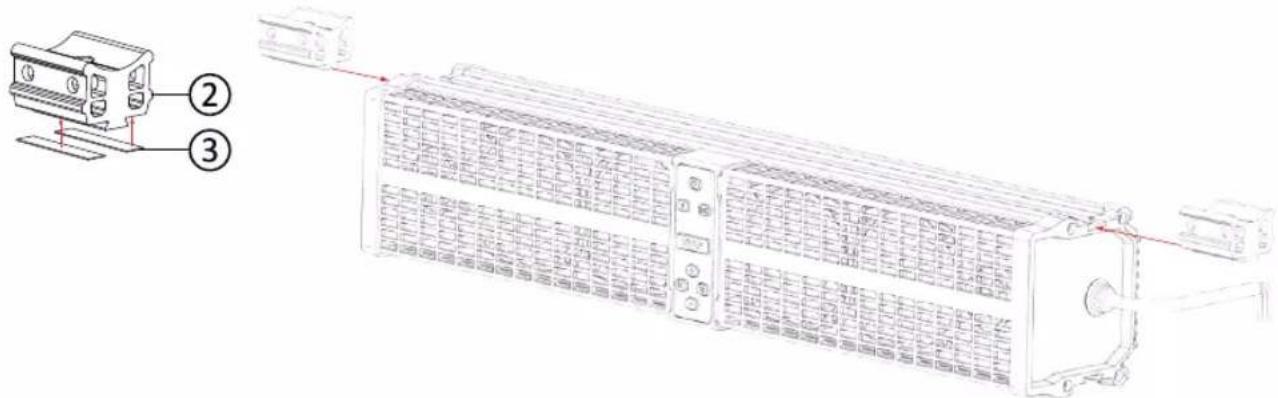
- Stick the 45X10X0.5mm non-slip rubber strips (2 pieces) on the bottom of the clamps, then insert them into the slider.

- Align the screw holes at the bottom of the clamps with the positioning holes that have been made in the slider and lock the M5X24mm screws and M5 spring washers to fix the clamps.

- Stick 48X30X2mm rubber non-slip pads on clamps.

-
Installing on the cage bar of 1.5" to 2.0". Wrap the rubber strip on the cage bar to prevent being scratched. And then, press the aluminum rings on the rubber strip. The screw mounting holes of the aluminum ring are aligned with the base.
-
2" Cage bar are installed using 2" aluminum ring and 120X14X1mm rubber strip.
- 1.875" Cage bar are installed using 2" aluminum ring and 130X14X2mm rubber strip.
- 1.75" Cage bar are installed using 1.75" aluminum ring and 120X14X1mm rubber strips.
- 1.5" Cage bar are installed using 1.75" aluminum ring and 120X14X4mm rubber strips.
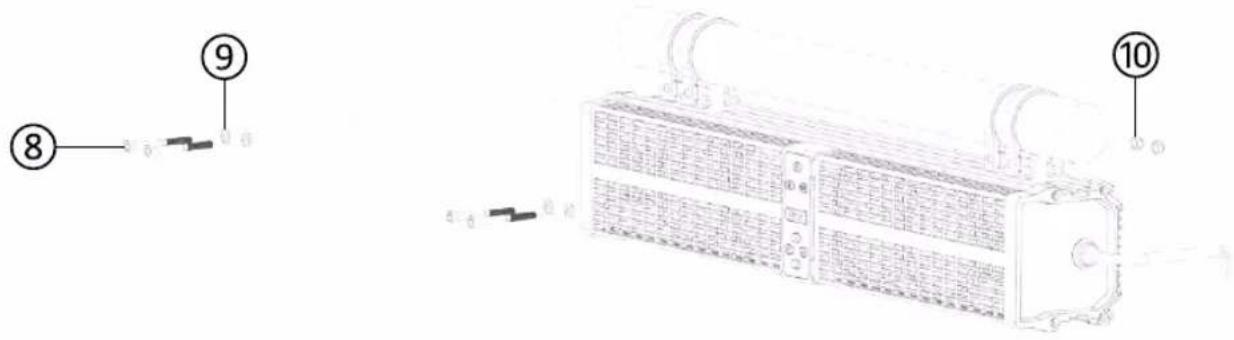
- Use M6X60mm screws and M6 spring washers to pass through the aluminum ring and the base and the M6 non-slip nut at the back to fix the aluminum ring on the base as shown in the figure. Each nut should be installed in the hexagonal groove.

natural_image
Technical line drawing of a dual-chamber industrial control panel with no visible text or symbols- Complete the installation, the PWPSB2402 will be under the cage bar as shown in the figure.

natural_image
Technical line drawing of a server rack with control panel and drive unit (no text or symbols)- The installation steps of the aluminum ring below are the same as above, after complete installation, the PWPSB2402 will be above the cage bar as shown in the figure.
BT Pairing & Connection
\*Power
- Press and hold for 3 seconds for power on and off, when the powered ON, the background led will be white.
\*BT Pairing
-
Turn on the BT, and search for "PyleUSA" to be paired. While waiting for being connected, the BT indicator light will be flashing as blue. No password needed.
-
When BT is connected, the BT indicator led will be blue constantly.
\*AUX-IN
- Short press the SRC button for switching to Aux-In mode, the indicator led will turn green.
Parts List
| 1 | Non-slip rubber pad (120 x 14 x 1mm) | 4 PCS |
| Non-slip rubber pad (120 x 14 x 4mm) | 4 PCS | |
| Non-slip rubber pad (130 x 14 x 2mm) | 4 PCS | |
| 2 | Clamp base | 2 PCS |
| 3 | Non-slip rubber strip (45 x 10mm) | 4 PCS |
| 4 | M5x24mm screw | 2 PCS |
| 5 | Spring washer for M5 screw | 2 PCS |
| 6 | Non-slip rubber pad (48 x 30mm) | 2 PCS |
| 7 | Aluminum ring 1.75" | 4 PCS |
| Aluminum ring 2" | 4 PCS | |
| 8 | M6x60mm screw | 4 PCS |
| 9 | Non-slip flat washer for M6 screw | 4 PCS |
| 10 | Non-slip nut for M6 screw | 4 PCS |
Button Function

| 1 |  | Power On/Off: Long press 3 seconds | |
| 2 |  | Play / Pause: Short press | |
| 3 |  | Switching BT /Aux In modeBT Name: “PyleUSA” | |
| 4 |  | Prevoious Song (Back): Short press | |
| 5 |  | Next Song (Forward): Short press | |
| 6 |  | Volume up:Short press for increasing by scaleLong press for continuously increasing | |
| 7 |  | Volume down:Short press for decreasing by scaleLong press for continuously decreasing | |
| 8 |  | Switching LED colors(Red / blue / purple / 3colors cycling / off) | |
Auto Connection
- When the device is out of receiving distance range, the BT will disconnect automatically, and the BT indicator led will be flashing as blue.
- When the device is back to the receiving distance range within 10 minutes, the BT will be auto connected, and the BT indicator led lights constantly.
- If within 10 minutes, the device does not connect to the BT, then it needs to re-do BT connection steps.
- If other device occupies the BT connection within 10 minutes, then its needs to re-do BT connection steps.
Wire Diagram


This product can expose you to a chemical or group of chemicals, which may include "Di (2-ethylhexyl) phthalate (DEHP)" which is known in the state of California to cause cancer, birth defects, or other reproductive harm.
WARNING: For more info, go to https://www.p65warnings.ca.gov/.
Features:
• Built-in Class D Stereo Power Amplifier
• (4) 3.5" Mid-bass Drivers with Y35 Ferrite Magnets
• Forward-firing Speakers for Maximum SPL and Sound Staging
• (2) 1" PEI Dome Tweeters
• Built-in BT Technology
• Supports A2DP Audio Streaming
• 3.5mm Auxiliary Input
• RCA Output for a Second Sound Bar, Subwoofer, Amplifier, or Powered Speakers
• Built-in LED lights (Red, Blue, Purple)
• LED Modes: Solid Color, Pulsating
• Marine Rated with Rugged Weatherproof Exterior
• IPX6 Waterproofing/Weatherproofing
• Weather Resistant Grill and Hardware
Wireless BT Connectivity:
- Wireless Music Streaming Ability
- Quick & Hassle-Free Device Pairing
- Works with All of Your Favorite BT-Enabled Devices (Smartphones, Tablets, Laptops, Computers, etc.)
- Wireless BT version 5.0
- Wireless BT Network Name: 'PyleUSA'
What's in the Box:
• (1) 24" -inch Powered Soundbar
• (2) Aluminum clamp Base
• (4) 1.75" Aluminum rings
• (4) 2" Aluminum rings
• (1) 1.5" & 1.875" Rubber Pads Bag
• (1) Screw Bag
• (1) Audio Connection Cable, 3.5mm
Technical Specs:
• Power Supply: 40 Watts RMS/80 Watts Peak
- Construction Materials: Polypropylene Mica Cone, Butyl Rubber Surround
- BT Range: 30^ + ft .
• Aluminum Clamp System Fits 1.5"-2" Bars
• Frequency Response: 20Hz-20KHz
- Speaker Size: 3.67" x 3.67" x1.99"-inches
- Tweeters: 1" -inch
- Product Dimensions (L x W x H): 23.4" x 4.6" x 4.76" -inches
PYLE
PyleUSA.com
Questions? Comments?
We are here to help!
Phone: (1) 718-535-1800
Email: support@pyleusa.com
Brand : Pyle
Model : PWPSB2402
Category : Soundbar