
NI-100 - Iron PANASONIC - Free user manual and instructions
Find the device manual for free NI-100 PANASONIC in PDF.


| Product Type | Steam Iron |
| Brand | Panasonic |
| Model | NI-100 |
| Power Consumption | 1200 W (typical for basic iron) |
| Voltage | 220-240 V ~ 50/60 Hz |
| Soleplate Material | Stainless Steel or Non-Stick Coated |
| Water Tank Capacity | Approx. 200 ml |
| Steam Output | Continuous steam up to 20 g/min |
| Spray Function | Yes |
| Vertical Steaming | Yes |
| Auto Shut-Off | Yes (after 8 min of inactivity) |
| Anti-Drip System | Yes |
| Self-Cleaning Function | Yes |
| Cord Length | 2.0 m |
| Dimensions (W x D x H) | Approx. 28 x 12 x 15 cm |
| Weight | Approx. 1.1 kg |
| Water Fill Type | Top-fill opening |
| Temperature Control | Adjustable thermostat with fabric settings |
| Indicator Light | Power and temperature ready |
| Maintenance | Use distilled water to prevent scale; clean soleplate with damp cloth |
| Safety | Thermal fuse, auto shut-off, heat-resistant handle |
Frequently Asked Questions - NI-100 PANASONIC
User questions about NI-100 PANASONIC
0 question about this device. Answer the ones you know or ask your own.
Ask a new question about this device
Download the instructions for your Iron in PDF format for free! Find your manual NI-100 - PANASONIC and take your electronic device back in hand. On this page are published all the documents necessary for the use of your device. NI-100 by PANASONIC.
USER MANUAL NI-100 PANASONIC
- Set iron securely on Power Base.
- Plug the cord firmly into a suitable power outlet.
- Turn the power on.
● Set Dial knob to the desired fabric
- Allow iron to heat approximately for
2 minutes. When the fight was off starting
- When the sight good on, start morning.

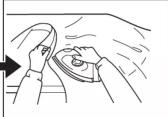
DURING IRONING
- When adjusting clothes, or not in use, place the iron on Power Base to recharge so that the selected temperature can be maintained.
● Temperature of iron will decrease if it is not put on its Power Base.
● While the iron is on the Power Base, you can continue to use the iron even if the light is on.
- If you feel the temperature is low, you can wait until the pilot lamp turns from on to off.
● After ironing, set the Dial knob to "MIN" and unplug the cord from the power outlet.
FOR SAUDI ARABIA
SPECIFICATION

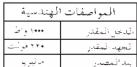
| Selector Level Setting | Selector Temperature °C |
| Acetate | Approximately 85 |
| Silk | Approximately 112 |
| Rayon | Approximately 140 |
| Wool | Approximately 165 |
| Cotton | Approximately 185 |
| Linen | Approximately 210 |
Operating Instructions
Electric Cordless Dry Iron
natural_image
White electric air conditioner with a circular head cover and metallic grille (no visible text or symbols)Before operating this iron, please read these instructions completely.
Approximate weight: 1.4kg
الوزن: ١٠ كيلوجرام
CAUTION
When using your iron, basic safety precautions should alawys be followed including the
following:
-
Read all instructions.
-
Use iron for its intended use. The iron must only be used with the stand provided.
-
To protect against a risk of electric shock, do not immerse the iron or it's Power Base in water of other liquids.
-
The iron should always be turned OFF before plugging or unplugging power base cord
from outlet. Never yank cord to disconnect from outlet; instead, grasp plug and pull to disconnect
-
Do not allow cord to touch hot surfaces. Let iron cool completely before storage.
-
Don't use the iron with the cord in tangled condition. The supply cord might be damaged soon.
-
If the supply cord is damaged, it must be replaced by a special cord or assembly
available from the manufacturer or it's service agent
- Closed supervision is necessary for appliance being used by or near children. Do not leave the iron unattended while connected to the power outlet or an impiring head.
leave the iron unattended while connected to the power outlet of an ironing board. Always position the iron carefully to prevent it from falling if the ironing board is
accidentally bumped or if the cord is pulled.
-
Burn can occur by touching hot metal parts or hot surface of the Power Base. (Figure A)
-
The iron must be used and rested on a stable surface.
-
When placing the iron on its stand, ensure that the surface on which the stand is placed
-
When placing the front on its stand, checks that the sentence on which the stand is placed is stable.
-
The iron is not to be used if it has been dropped, if there are visible signs of damage or if it is looking.
-
This appliance is not intended for use by persons (including children) with reduced
physical, sensory or mental capabilities, or lack of experience and knowledge, unless
they have been given supervision or instruction concerning use of the appliance by a person responsible for their safety.
- Children should be supervised to ensure that they do not play with the appliance.
SPECIAL INSTRUCTIONS
1 To avoid a circuit overload, do not operate another high wattage appliance on the same
circuit. 2. If an extension cord is necessary, a 13 ampere cord should be used. Corde rated with
- In an extension cord is necessary, it To ampere cord should be used. Cords tiled with less ampere may overheat. Care should be taken to arrange the Cord so that it cannot
be pulled or tripped over.
- Do not touch the shutter area while using the iron or while the Power Base is connected to the power outlet. (Figure B)
to the power solution (Figure 2)

natural_image
Line drawing of a hand holding a tool with a pen, no text or symbols presentB

natural_image
Line drawing of a hand holding a small object, possibly a tool or device, with no visible text or symbols.-5-
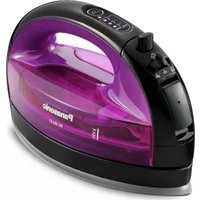
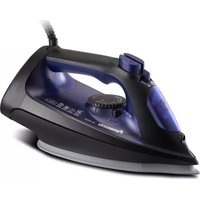
Brand : PANASONIC
Model : NI-100
Category : Iron