
NI-W450TS - Iron PANASONIC - Free user manual and instructions
Find the device manual for free NI-W450TS PANASONIC in PDF.


| Type | Steam/Dry Iron |
| Model Number | NI-W450TS |
| Brand | Panasonic |
| Power Source | 120 V ~ 60 Hz |
| Power Consumption | 12.5 A, 1500 W |
| Net Weight | 3.1 lb (1.4 kg) |
| Water Capacity | 7.7 oz (200 ml) |
| Soleplate Material | Aluminum (non-stick coating likely) |
| Dimensions (Approx.) | 12 x 5 x 6 inches (estimated) |
| Cord Length | Estimated 8 ft (not specified) |
| Steam Settings | Low, Medium, High (depending on temperature) |
| Spray Feature | Yes, pump button |
| Jet of Steam | Yes, pump button (use at Linen setting) |
| Vertical Steam | Yes, using Jet of Steam button |
| Self-Cleaning | Yes, flush mineral residue after each use |
| Auto Shut-Off | Yes, 3-way: 1 min horizontal, 10 min on heel |
| Anti-Drip System | No (only on NI-W810CS/W750TS) |
| Stay Clean Vents | No (only on NI-W810CS/W750TS) |
| Temperature Control | Dial with fabric settings (dots and symbols) |
| Indicator Light | Yes, thermostat operating indicator |
| Fabric Ironing Chart | Included in manual |
| Warranty | 1 year limited (USA/Puerto Rico) |
Frequently Asked Questions - NI-W450TS PANASONIC
User questions about NI-W450TS PANASONIC
0 question about this device. Answer the ones you know or ask your own.
Ask a new question about this device
Download the instructions for your Iron in PDF format for free! Find your manual NI-W450TS - PANASONIC and take your electronic device back in hand. On this page are published all the documents necessary for the use of your device. NI-W450TS by PANASONIC.
USER MANUAL NI-W450TS PANASONIC
Ironing is now simpler, more natural, and yes, quicker.

natural_image
Line drawing of a steam iron with labeled parts (no text or symbols beyond branding)NI-W810CS
CONFORMS TO UL STD. 1005 CERTIFIED TO CSA STD. C22.2 NO.81
HOW TO FILL WITH WATER----6
HOW TO USE AS A STEAM IRON 6-7
HOW TO USE AS A DRY IRON----7
HOW TO USE THE "SPRAY" FEATURE ----8
HOW TO USE THE "JET OF STEAM" FEATURE--8-9
HOW TO USE THE "VERTICAL STEAM"
FEATURE----9
SELF-CLEANING 9-10
STAY CLEAN VENTS 10
ANTI-DRIP SYSTEM----10
ELECTRONIC 3-WAY AUTO
SHUT-OFF FUNCTION 10
Maintenance
HOW TO CARE FOR YOUR IRON ----11
General Information
SPECIFICATIONS 11
FABRIC IRONING CHART 12
LIMITED WARRANTY(U.S.A./Puerto Rico)----13-14
LIMITED WARRANTY(Canada)----15
Français
or visit us at http://www.panasonic.com/help
(U.S.A./Puerto Rico)
For assistance, please call : 905-624-5505 or visit us at http://www.panasonic.ca
(Canada)
Your safety and the safety of others are very important
We have provided important safety messages in this manual and on your appliance. Always read and obey all safety messages.

This is the safety alert symbol. It is used to alert you to potential hazards that can kill or injure you and others. The safety messages will follow the safety alert symbol and either the word "WARNING" or "CAUTION". These words mean:

WARNING
This describes issues which could cause death or serious injury.

CAUTION
This describes issues which could cause injury or damage your belongings.
The safety messages will tell you what the potential hazard is, how to reduce the chance of injury, and what can happen if the instructions are not followed.
Thank you for buying a Panasonic Iron
Your iron is an appliance to be used only for ironing fabrics on an ironing board.
IMPORTANT SAFETY INSTRUCTIONS
When using your iron, basic safety precautions should always be followed, including the following:
READ ALL INSTRUCTIONS BEFORE USING THE IRON

WARNING
To reduce the risk of burns, electric shock, fire, or injury to persons:
- Use the iron only for its intended purpose, for ironing fabrics on ironing board. To protect against burns or injury to persons, do not iron or steam fabrics while being worn on the body.
- To protect against the risk of electric shock, do not immerse the iron or cord in water or other liquids.
- The iron should always be turned to "Off" before plugging or unplugging from outlet. Never yank Cord to disconnect from outlet; instead, grasp Plug and pull to disconnect.
- Do not allow Cord to touch hot surfaces. Allow the iron to cool completely before storing.
-
Always disconnect iron from electrical outlet when filling or emptying water and when not in use.
-
To avoid the risk of electric shock, do not operate iron with a damaged Cord or if the iron has been dropped or damaged. Do not disassemble the iron. Incorrect reassembly can cause a risk of electric shock when the iron is used. For repair, take it to a qualified serviceman.
- Close supervision is necessary for this appliance to be used by or near children. Do not leave iron unattended while connected or on an ironing board.
- Burns can occur from touching hot metal parts, hot water, or steam. Use caution when turning the steam iron upside down. Hot water may leak from the iron.
- To protect against burns or injury to persons, do not direct steam toward the body when ironing or self-cleaning.
- The iron must be used and rested on a stable surface. When placing the iron on its Heel Rest, ensure that the surface on which the Heel Rest is placed is stable.
- Do not use the appliance with the Cord entangled. The supply Cord might be damaged as a result.
SPECIAL INSTRUCTIONS

WARNING
To reduce the risk of electric shock or fire:
- To avoid a circuit overload, do not operate another high wattage appliance on the same circuit.
- If an extension cord is absolutely necessary, use a cord rated a minimum of 13 amperes. Cords rated for less amperage may overheat and should not be used. Care should be taken to arrange the cord so that it cannot be accidentally pulled or tripped over.

CAUTION
To reduce the risk of personal injury and damage to your iron:
- Never use steam iron cleaning products in the iron, as they may damage working parts of the iron.
- Do not use water additives or substitute water such as linen or scented water in the steam iron. They can stain fabrics.
- If the Steam/Dry Selector is not in the Dry position after using, remaining water will move into the Soleplate and can result in burns at the next use of the iron.
- Don't use the Steam or Jet of Steam, while AC Cord is unplugged, water will remain inside the Soleplate which will cause staining.
Please do not use Steam or Jet of Steam while Temperature Selector Dial is set to "Off".
SAVE THESE INSTRUCTIONS
For proper use of your iron, read remaining safety cautions and operation instructions.
COMPONENTS IDENTIFICATION IDENTIFICATION DES COMPOSANTS
NI-W810CS/W750TS/W450TS

The Temperature Selector Dial of the Panasonic iron has words, dots and steam symbols.
a) The dots are symbols for 3 temperature ranges:
- Low Temperature
Medium Temperature
... High Temperature
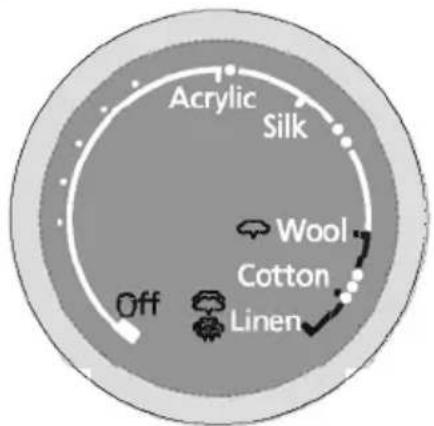
Some fabrics are labeled with these dots as a guide for selecting the proper ironing temperature setting.
For more detailed information, refer to page 12 of this instruction book.
b) The steam symbols are used for selecting steam settings. For further details, refer to page 6-10

As a guide to the Fabric Care Symbols, the following symbols are printed for your information.
Fabric Care Symbols

Washing

Bleaching
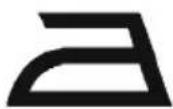
Ironing

Dry Cleaning
A symbol crossed out indicates that the article of clothing must not be subjected to the particular treatment.
EXAMPLE:(DO NOT BLEACH)

Before ironing, sort the garments according to the different heat settings required.
Iron fabrics that require a lower temperature first.
Do not touch plastic buttons with a hot iron because they may melt.
Be careful around zippers and similar items to prevent the Soleplate from being scratched.
HOW TO FILL WITH WATER

WARNING
Be sure the iron is unplugged from the electrical outlet before filling with water.
- Move the Steam/Dry Selector to the Dry position to avoid water leakage.
Open the Water Fill Opening. Hold the iron as shown and fill the iron with water up to "MAX" line (about 7.7 ounces/200ml). Use a cup for filling (see Note).
- Do not overfill. Check for the correct water fill level with the iron in the vertical position.
- Close the Water Fill Opening, or water will splash from Water Reservoir when ironing.

Note:
Most tap water can be used in this iron. If water is very hard, distilled or demineralized water should be used. Do not use water processed through home water softening systems because this water contains minerals that may be harmful to the iron. Do not use water additives or substitute water as linen or scented water in the steam iron. They can stain fabrics or damage the iron.
HOW TO USE AS A STEAM IRON
- Fill the iron as described in "HOW TO FILL WITH WATER".

CAUTION
Do not overfill the Water Reservoir. The steam will release through the vents when the iron is positioned vertically.
- Position the iron vertically and be sure the Temperature Selector Dial is set to "Off".
- Plug the AC Cord into the electrical outlet.
- Set the Temperature Selector Dial to the steam zone ("Wool" to "Linen").
- Preheat the iron until the indicator light goes out, usually after about 1-2 minutes. This light will go on and off while ironing to indicate the temperature chosen by the Temperature Selector Dial is being maintained.
- Hold the iron horizontally and move the Steam/Dry Selector into the steam position. Steam/Dry Selector is regulated as follows.
| Temperature Zone | Steam/Dry Selector Position | Recommendations | |
| "Wool" to "Linen" | 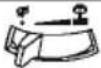 | Low Steam | This is recommended for thin or delicate fabrics. |
| ••• to "Linen" |  | Medium Steam | The Temperature is enough for normal steam generation. From this temperature you can select Low Steam, Medium Steam, according to the fabric. |
| "Linen" |  | High Steam | There you can select any amount of steam, including High Steam, for fabrics requiring a lot of steam (i.e. thick materials, items with stubborn wrinkles). |

- Whenever the iron is positioned vertically, the steaming action will stop.

CAUTION
Do not use the Steam/Dry Selector unless the iron is sufficiently hot to produce steam. Water will leak out through the vents instead.
Note:
While using, the Auto-Valve System will activate when the temperature of the soleplate's surface drops. At the same time, the steam will stop. It is not a sign of malfunction when you hear a clicking sound. (NI-W810CS/W750TS Only) The Thermostat Operating Indicator Light will go on, wait until the Thermostat Operating Indicator Light goes out.
HOW TO USE AS A DRY IRON
- Move the Steam/Dry Selector to the Dry position.
- Position the iron vertically, set the Temperature Selector Dial to "Off".
- Plug in the iron.
- Set the Temperature Selector Dial to the desired position.
(Refer to the FABRIC IRONING CHART on page 12) - Preheat the iron until the Indicator Light goes out, usually about 1-2 minutes.
HOW TO USE THE "SPRAY" FEATURE
Note:
Before using the spray feature, check the fabric label for ironing instructions. Some fabrics may become spotted or stained with moisture.
The spray feature is particularly helpful for removing stubborn wrinkles and where extra dampening is needed.
The spray may be used with steam or dry ironing.
-
Simply pump the Spray Mist Button when spray is desired. If the spray doesn't work immediately, keep pumping until it does.
-
To get a finer spray, pump the Button repeatedly. To get a more powerful spray, pump the Button slowly. For best results, use a quick, full stroke.

HOW TO USE THE "JET OF STEAM" FEATURE
The "Jet of Steam" feature provides extra steam which goes deep into the garment and is helpful for removing stubborn wrinkles. The "Jet of Steam" feature operates properly only in the "Linen" position of the Temperature Selector Dial when steam or dry ironing (If used at lower setting, water spotting will occur because the iron is not hot enough to change water to steam). If you have not used the "Jet of Steam" feature for a long time, it is necessary to clean the inside of the iron before using this feature on any clothes to be ironed. Simply test the "Jet of Steam" feature several times away from the ironing board and clothes to be ironed. This will prevent brown spotting or water spotting on the clothes.
-
Fill the iron as described in "HOW TO FILL WITH WATER".
-
Position the iron vertically and be sure the Temperature Selector Dial is set to "Off". Plug the AC Power Cord into the electrical outlet.
-
Set the Temperature Selector Dial to the "Linen" position.
-
Preheat the iron until the Indicator Light goes out, usually about 1-2 minutes.
-
Simply pump the "Jet of Steam Button" when steam is desired. Pump the "Jet of Steam Button" several times at the beginning of each ironing session.
-
Allow at least 2-5 seconds between uses of the "Jet of Steam Button" to prevent water spotting. Use a press cloth if necessary.

CAUTION
Do not use the "Jet of Steam Button" until the Thermostat Operating Indicator Light turns off after setting the Temperature Setting Dial to "Linen". Hot water may leak from the Soleplate and burns may result, and it may cause corrosion.
HOW TO USE THE "VERTICAL STEAM" FEATURE
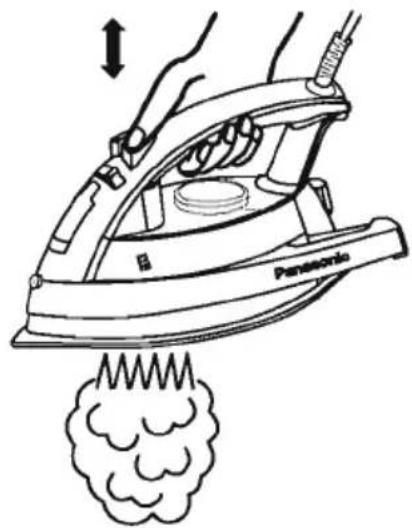
To get better results when using vertical steam, hang the garment on a clothes hanger. Curtains and drapes may also be steamed once they're hung. Hold the iron away from your body, close to but not touching the fabric. Pull the fabric tight with your free hand and pump the Vertical Steam Button (Jet of Steam Button) at 2-5 seconds intervals as you pass the iron over the wrinkled fabric.

natural_image
Line drawing of a hand using an electric iron to lift a cloud, with no text or symbols present.
WARNING
- Never iron clothes on the body or point your iron at anyone when steaming.
- Keep hands and body away from steam areas while using vertical steam feature.
SELF-CLEANING
With the self-cleaning feature you can flush out mineral residue from the steam generating chamber and the steam vents, refreshing your iron each time for a longer steaming life. It is very important to operate the self-cleaning feature after each steam ironing to prevent mineral accumulations from hardening.
-
Check water level. Water level should be over half full. When water level is less than half full, fill with water according to the instructions in "HOW TO FILL WITH WATER".
-
Preheat at "Linen" setting (for about 1-2 minutes). Make sure that the Steam/Dry Selector is in the Dry position.
-
Set the Dial to "Off" and remove the AC plug.
-
Hold the iron horizontally over the sink.
-
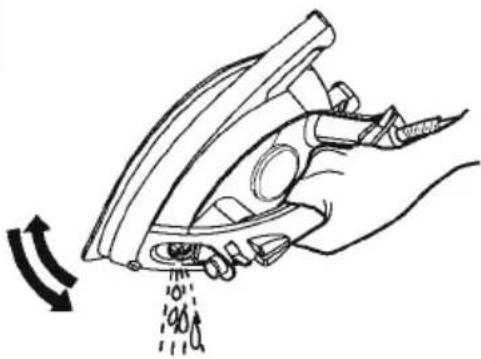
Pump the "Jet of Steam Button" quickly (at least 3 times per second) about 20-30 times.
-
While self-cleaning, tilt the iron up and down slowly to help clean the entire inside and let the water drip out of the soleplate vents.
-
Check that all water and steam have completely stopped coming out of the soleplate vents. After self-cleaning is finished, empty any remaining water from the Water Reservoir by turning the iron upside down.

natural_image
Line drawing of a hand using a Panasonic electric iron to lift a smoke plume (no text or symbols)-
Iron on a towel to remove any drops of water remaining on the bottom of iron.
-
Allow the iron to cool and store on its Heel Rest. Never store an iron on its Soleplate or with water in it.
-
If water still remains inside the Soleplate after self-cleaning operation, dry out the iron by setting the iron on the "Linen" setting, to vaporize the remaining water. After the iron is dry, follow the instructions under "AFTER EACH USE".
STAY CLEAN VENTS (NI-W810CS/W750TS Only)
The built-in Anti Calcium System (Calc Cut) in the Water Reservoir continuously reduces scale build up in the vaporizing chamber of the iron.
This system makes it possible to use the steam function for a long period of time and prevents steam vents from clogging.
ANTI-DRIP SYSTEM (AUTOMATIC WATER SEAL) (NI-W810CS/W750TS Only)
This model has an Anti-Drip System. When the temperature of the Soleplate's surface drops below 238° F(115°C), the valve for the vaporizing chamber in the iron automatically closes and stops the water from flowing. This prevents hot unvaporized water from spewing out from the soleplate when the iron has cooled down. With this System, it is unnecessary for you to wait until the inside of the vaporizing chamber dries completely when you store the iron.
NOTE: It is not a sign of malfunction when you hear a clicking sound.
This sound can be heard whenever this system is activated.
ELECTRONIC 3-WAY AUTO SHUT-OFF FUNCTION

WARNING
The Auto Shut-Off feature (or setting the thermostat to "Off") is not intended to take the place of unplugging the cord. Disconnect the electric iron when not in use! Even though the iron is unplugged, the soleplate is still hot. Be sure to rest the iron on its heel, away from fabric.
- When the iron is not moved with its Soleplate facing down or on its side for approx. 1 minute, the iron will automatically shut off power to the heater.
- When the iron is not moved on its Heel Rest for approx. 10 minutes, the iron will automatically shut off power to the heater.
- To resume ironing and turn the iron back on, simply move the iron in any manner. If the iron has been left in the auto shut off mode for more than 10 minutes. Allow the iron to reheat until the Indicator Light goes out.
NOTE: The Auto Shut-Off System works regardless of position of the Temperature Selector Dial.
HOW TO CARE FOR YOUR IRON
AFTER EACH USE
- Set the Temperature Selector Dial to "Off".
- Turn the iron off and unplug.
- Empty the iron immediately after using.
Do not store the iron with water in it.
- Move the Steam/Dry Selector into the Dry position.
If the Steam/Dry Selector is not in the Dry position after using, remaining
water will move into the Soleplate and damage the Soleplate and
may result in burns during the next initial use of the iron.
- Wait until the iron has cooled before storing it, and always set it on the Heel Rest to protect the Soleplate from scratches, corrosion or stains.
natural_image
Hand holding a hair iron with a brush, emitting powder from a surface (no text or symbols visible)
natural_image
Technical line drawing of a mechanical device with no visible text or symbolsOUTSIDE SURFACE OF IRON
After unplugging and cooling the iron, simply wipe off with a damp cloth and if necessary, use a mild detergent.
NEVER USE ANY HARSH CLEANERS.
SOLEPLATE
Starch and other residue may be easily removed from the Soleplate with a damp cloth. To avoid scratching the finish never use a metallic pad to clean the Soleplate, and never place the iron on a rough surface.
If synthetics are ironed at too high a temperature, not only is the fabric usually ruined, but the iron Soleplate is often covered with the melted remains of the synthetic fabric.
The best way to remove synthetic residue from the Soleplate is to heat the iron and to iron over an old cotton cloth.

CAUTION
Never use steam iron cleaners in the iron, since they may damage the working parts of the iron.
SPECIFICATIONS
| Model | NI-W810CS | NI-W750TS | NI-W450TS |
| Power Source | 120V~60 Hz | ||
| Power Consumption | 12.5 A, 1500 W | ||
| Net Weight | 3.1 lb (1.4 kg) | ||
PANASONIC CONSUMER ELECTRONICS COMPANY
DIVISION OF PANASONIC CORPORATION OF
NORTH AMERICA
One Panasonic Way
Secaucus, New Jersey 07094
Panasonic Electric Iron
One Year Limited Warranty
This warranty is valid only for the U.S.A. and Puerto Rico.
Limited Warranty Coverage
Panasonic Consumer Electronics Company (referred to as "the warrantor") will repair or replace this product with a new or a refurbished product, free of charge, in the U.S.A. and Puerto Rico for one (1) year from the date of the original purchase in the event of a defect in materials or workmanship.
For assistance in the continental U.S.A. and Puerto Rico in obtaining repairs please ship the product to:
Panasonic Service and Technology Company
Exchange Center
4900 George McVay Drive
Suite B Door #12
McAllen, TX 78503
panacare@us.panasonic.com
If repair is needed, during the warranty period, the purchaser will be required to furnish a sales receipt/ proof of the original purchase date, amount paid and place of purchase.
Also, the purchaser will be responsible for shipping the unit to the above address. This warranty is extended only to the original purchaser.
When shipping the unit, carefully pack and send it prepaid, adequately insured and preferably in the original carton. Include a letter detailing the complaint and provide a daytime phone number where you can be reached.
Limited Warranty Limits and Exclusions
This Limited Warranty ONLY COVERS failures due to defects in materials or workmanship, and DOES NOT COVER normal wear and tear or cosmetic damage. The Limited Warranty ALSO DOES NOT COVER damages which occurred in shipment, or failures which are caused by products not supplied by the warrantor, or failures which result from accidents, misuse, abuse, neglect, mishandling, misapplication, alteration, faulty installation, set-up adjustments, misadjustment of consumer controls, improper maintenance, power line surge, lightning damage, modification, introduction of sand, humidity or liquids, commercial use such as hotel, office, restaurant, or other business or rental use of the product, or serviced by anyone other than an authorized service center, or damage that is attributable to acts of God.
THERE ARE NO EXPRESS WARRANTIES EXCEPT AS LISTED UNDER "LIMITED WARRANTY COVERAGE". THE WARRANTOR IS NOT LIABLE FOR INCIDENTAL OR CONSEQUENTIAL DAMAGES RESULTING FROM THE USE OF THIS PRODUCT, OR ARISING OUT OF ANY BREACH OF THIS LIMITED WARRANTY. (As examples, this excludes damages for lost time, cost of having someone remove or re-install an installed unit if applicable, travel to and from the servicer, loss of or damage to media or images, data or other memory or recorded content. The items listed are not exclusive, but are for illustration only.) ALL EXPRESS AND IMPLIED WARRANTIES, INCLUDING THE LIMITED WARRANTY OF MERCHANTABILITY, ARE LIMITED TO THE PERIOD OF THE LIMITED WARRANTY.
Some states do not allow the exclusion or limitation of incidental or consequential damages, or limitations on how long an implied Limited Warranty lasts, so the exclusions may not apply to you.
This Limited Warranty gives you specific legal rights and you may also have other rights which vary from state to state. If a problem with this product develops during or after the Limited Warranty period, you may contact your dealer or an authorized service center. If the problem is not handled to your satisfaction, then write to the warrantor's Consumer Affairs Department at the addresses listed for the warrantor.
PARTS AND SERVICE, WHICH ARE NOT COVERED BY THIS LIMITED WARRANTY, ARE YOUR RESPONSIBILITY.
If you ship the product
Carefully pack and send it prepaid, adequately insured and preferably in the original carton. Attach a postage-affixed letter, detailing the complaint, to the outside of the carton.
DO NOT send the product to the Executive or Regional Sales offices. They are NOT equipped to make repairs.
Customer's Record
Retain this warranty card along with a copy of your purchase receipt for future reference.
Model No.
Serial No.

Date of Purchase
Dealer's Name
Dealer's Address
Customer Services Directory (United States and Puerto Rico)
Obtain Product Information and Operating Assistance; locate your nearest Dealer or Service Center; purchase Parts and Accessories; or make Customer Service and Literature requests by visiting our Web Site at:
http://www.panasonic.com/help
or, contact us via the web at:
http://www.panasonic.com/contactinfo
You may also contact us directly at: 1-800-211-PANA (1-800-211-7262), Monday-Friday 9am to 9pm: Saturday- Sunday 10am to 7pm. EST.
TTY users (hearing or speech impaired users) can call 1-877-833-8855.
Accessory Purchases (United States and Puerto Rico)
Purchase Parts, Accessories and Instruction Books online for all Panasonic Products by visiting our Web Site at:
http://www.pstc.panasonic.com
or, send your request by E-mail to:
npcparts@panasonic.com
You may also contact us directly at: 1-800-332-5368 (Phone) 1-800-237-9080 (Fax Only) (Monday-Friday 9am to 9pm, EST.) Panasonic Service and Technology Company 20421 84 th Avenue South, Kent, WA 98032 (We Accept Visa, MasterCard, Discover Card, American Express, and Personal Checks.)
TTY users (hearing or speech impaired users) can call 1-866-605-1277.
- Maintenance
- General Information
- Français
- Your safety and the safety of others are very important
- WARNING
- CAUTION
- Thank you for buying a Panasonic Iron
- IMPORTANT SAFETY INSTRUCTIONS
- SPECIAL INSTRUCTIONS
- SAVE THESE INSTRUCTIONS
- COMPONENTS IDENTIFICATION IDENTIFICATION DES COMPOSANTS
- HOW TO FILL WITH WATER
- Note:
- HOW TO USE AS A STEAM IRON
- HOW TO USE AS A DRY IRON
- HOW TO USE THE "SPRAY" FEATURE
- HOW TO USE THE "JET OF STEAM" FEATURE
- HOW TO USE THE "VERTICAL STEAM" FEATURE
- SELF-CLEANING
- STAY CLEAN VENTS (NI-W810CS/W750TS Only)
- ANTI-DRIP SYSTEM (AUTOMATIC WATER SEAL) (NI-W810CS/W750TS Only)
- ELECTRONIC 3-WAY AUTO SHUT-OFF FUNCTION
- HOW TO CARE FOR YOUR IRON
- AFTER EACH USE
- OUTSIDE SURFACE OF IRON
- SOLEPLATE
- PANASONIC CONSUMER ELECTRONICS COMPANY
- DIVISION OF PANASONIC CORPORATION OF
- NORTH AMERICA
- One Panasonic Way
- Secaucus, New Jersey 07094
- Panasonic Electric Iron
- One Year Limited Warranty
- Limited Warranty Limits and Exclusions
- If you ship the product
- Customer's Record
- Customer Services Directory (United States and Puerto Rico)
- Accessory Purchases (United States and Puerto Rico)
Brand : PANASONIC
Model : NI-W450TS
Category : Iron