LBS008A - Network switch Black Box - Free user manual and instructions
Find the device manual for free LBS008A Black Box in PDF.


| Product Type | 8-Port USB-Powered Fast Ethernet Switch |
| Ports | 8 RJ-45 10/100 Mbps ports with Auto MDI/MDI-X |
| Standards | IEEE 802.3 10BASE-T, IEEE 802.3u 100BASE-TX, IEEE 802.3x flow control |
| Transmission Method | Store and Forward |
| Buffer Memory | 68K bits |
| MAC Address Table | 1K |
| Filtering/Forwarding Rate | 100-Mbps port: 148,800 pps; 10-Mbps port: 14,880 pps |
| Power | 7.5 VDC, 0.8 A, 4 watts max; via included power adapter or USB cable |
| Dimensions (H x W x L) | 0.8 x 2.4 x 3.1 inches (2.0 x 6.2 x 7.9 cm) |
| Weight | 0.4 lb (0.2 kg) |
| Temperature Range (Operating) | 32 to 131°F (0 to 55°C) |
| Temperature Range (Storage) | -4 to 194°F (-20 to 90°C) |
| Relative Humidity | 10 to 90%, noncondensing |
| Certifications | FCC Class B, CE |
| LED Indicators | 1 Power LED, 8 LINK/ACT LEDs |
| Key Features | Auto-negotiation 10/100 Mbps, full/half-duplex auto-detection, dedicated 200 Mbps bandwidth, non-blocking full wire-speed forwarding, plug-and-play installation |
| What's Included | Switch, power adapter, USB cable, user manual |
| Customer Support | 24/7 free technical support: 724-746-5500 or info@blackbox.com |
Frequently Asked Questions - LBS008A Black Box
User questions about LBS008A Black Box
0 question about this device. Answer the ones you know or ask your own.
Ask a new question about this device
Download the instructions for your Network switch in PDF format for free! Find your manual LBS008A - Black Box and take your electronic device back in hand. On this page are published all the documents necessary for the use of your device. LBS008A by Black Box.
USER MANUAL LBS008A Black Box
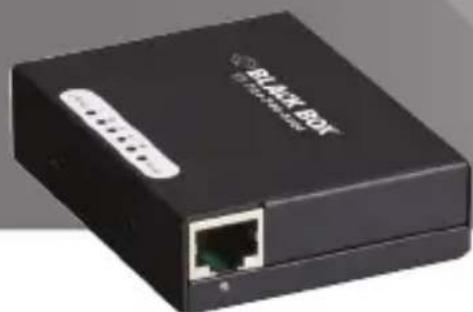
5- and 8-Port USB-Powered 10/100 Switches
Provides five or eight 10-/100-Mbps ports.
Perfect for small to medium workgroups.
natural_image
Black wireless router device with network port and ports (no visible text or symbols)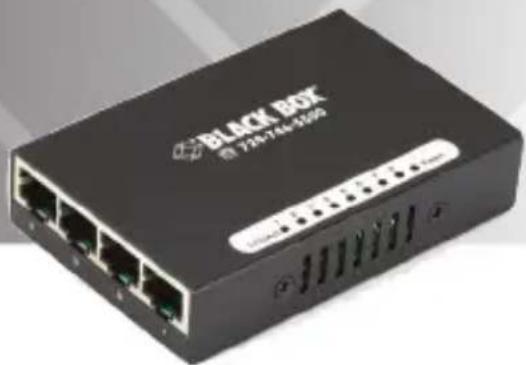
natural_image
Black Box network device with four Ethernet ports and indicator lights (no readable text or symbols beyond branding)Customer Support Information
Order toll-free in the U.S.: Call 877-877-BBOX (outside U.S. call 724-746-5500) • FREE technical support 24 hours a day, 7 days a week: Call 724-746-5500 or fax 724-746-0746 • Mailing address: Black Box Corporation, 1000 Park Drive, Lawrence, PA 15055-1018 Web site: www.blackbox.com • E-mail: info@blackbox.com
FEDERAL COMMUNICATIONS COMMISSION AND INDUSTRY CANADA RADIO FREQUENCY INTERFERENCE STATEMENTS
Class B Digital Device. This equipment has been tested and found to comply with the limits for a Class B computing device pursuant to Part 15 of the FCC Rules. These limits are designed to provide reasonable protection against harmful interference in a residential installation. However, there is no guarantee that interference will not occur in a particular installation. This equipment generates, uses, and can radiate radio frequency energy, and, if not installed and used in accordance with the instructions, may cause harmful interference to radio communications. If this equipment does cause harmful interference to radio or telephone reception, which can be determined by turning the equipment off and on, the user is encouraged to try to correct the interference by one of the following measures:
- Reorient or relocate the receiving antenna.
- Increase the separation between the equipment and receiver.
- Connect the equipment into an outlet on a circuit different from that to which the receiver is connected.
- Consult an experienced radio/TV technician for help.
Caution:
Changes or modifications not expressly approved by the party responsible for compliance could void the user's authority to operate the equipment.
To meet FCC requirements, shielded cables and power cords are required to connect this device to a personal computer or other Class B certified device.
This digital apparatus does not exceed the Class B limits for radio noise emission from digital apparatus set out in the Radio Interference Regulation of Industry Canada.
2.1 Introduction 7
2.2 Features....7
2.3 What's Included....7
2.4 Hardware Description 8
2.4.1 Front Panel....8
2.4.2 Back Panel 9
- Connecting the Switch....10
- LED Indicators 11
Trademarks Used in this Manual
Black Box and the Double Diamond logo are registered trademarks of BB Technologies, Inc.
Any other trademarks mentioned in this manual are acknowledged to be the property of the trademark owners.
1. Specifications
Buffer Memory: LBS005A: 12K bits; LBS008A: 68K bits
Certifications: FCC Class B, CE
Filtering/Forwarding Rates: 100-Mbps port: 148,800 pps; 10-Mbps port: 14,880 pps
MAC Address: LBS005A: 2K; LBS008A: 1K
Standards: IEEE 802.3 10BASE-T, IEEE 802.3u 100BASE-TX, IEEE 802.3x flow control
Transmission Media: 10BASE-T CAT3/4/5 UTP/STP; 100BASE-TX CAT5 UTP/STP
Transmission Method: Store and Forward
Connectors: LBS005A: (5) RJ-45, (1) barrel connector for power; LBS008A: (8) RJ-45, (1) barrel connector for power
Indicators: LBS005A: (6) LEDs: (5) LINK/ACT, (1) Power; LBS008A: (9) LEDs: (8) LINK/ACT, (1) Power
Temperature Tolerance: Operating: 32 to 131° F (0 to 55° C); Storage: -4 to 194° F (-20 to 90° C)
Relative Humidity: 10 to 90%, noncondensing
Power: 7.5-VDC power supply, 0.8 amps, 4 watts maximum or through provided USB cable
Size: 0.8"H x 2.4"W x 3.1"L (2.0 x 6.2 x 7.9 cm)
Weight: LBS005A: 0.35 lb. (0.16 kg); LBS008A: 0.4 lb. (0.2 kg)
2. Overview
2.1 Introduction
The 5-/8-Port USB-Powered Fast Ethernet Switch provides five or eight 10/100 Mbps ports.
The pocket-sized switch is easy to install. It's ideal for small to medium workgroups, and you can install it where space is limited.
Plus, the switch supports USB port-powered operation, so you can use it in rooms that have limited power outlets.
2.2 Features
- Autonegotiates speed between 10 and 100 Mbps.
• Housed in a small, metal case. - Automatically learns networking configurations.
- Automatically detects full-/half-duplex modes for any port.
- Provides dedicated 200-Mbps bandwidth.
- Uses store-and-forward switching methods.
- Offers IEEE 802.x flow control for full-duplex and backpressure flow control for half-duplex.
- Includes non-blocking and non-head-of-line blocking full-wire-speed forwarding.
- Provides Auto MDI/MDI-X function for any port, so you don't need crossover cables.
- Easy to install, just plug-and-play.
2.3 What's Included
Your package should include the following items. If anything is missing or damaged, contact Black Box Technical Support at 724-746-5500 or info@blackbox.com.
- Fast Ethernet switch
- Power adapter
- USB cable
- This user's manual
2.4 Hardware Description
2.4.1 Front Panel
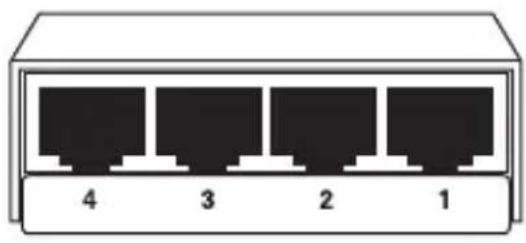
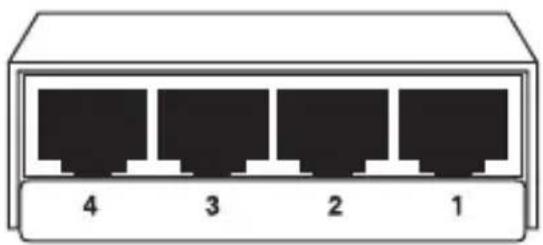
Figures 2-1 and 2-2 show the front panel of the switches. Table 2-1 describes their components.
natural_image
Diagram of four Ethernet ports labeled 1 to 4, shown in a rectangular container (no text or symbols beyond port numbers)Figure 2-1. LBS005A front panel.
natural_image
Diagram of four Ethernet ports labeled 1 to 4, shown in a rectangular container (no text or symbols beyond port numbers)Figure 2-2. LBS008A front panel.
Table 2-1. LBS005A and LBS008A front-panel components.
Number
Component
Description
1-4 RJ-45 connectors Links to 10-/100-Mbps devices.
2.4.2 Back Panel
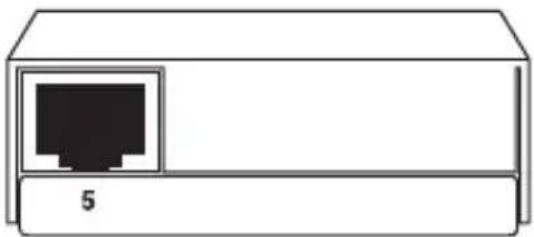
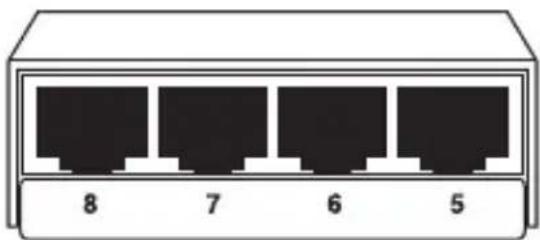
Figures 2-3 and 2-4 show the back panel of the switches. Tables 2-2 and 2-3 describe their components.
natural_image
Simple line drawing of a device with a black internal port and a label '5' on the base (no text or symbols on the device itself)Figure 2-3. LBS005A back panel.
natural_image
Diagram of four Ethernet ports labeled 5, 6, 7, and 8 (no text or symbols on the diagram itself)Figure 2-4. LBS008A back panel.
Table 2-2. LBS005A back-panel components.
Number Component Description
5 RJ-45 connector Links to a 10-/100-Mbps device.
Table 2-3. LBS008A back-panel components.
Number Component Description
5, 6, 7, 8 RJ-45 connectors Link to a 10-/100-Mbps device
3. Connecting the Switch
This switch features Auto MDI/MDI-X, so it's easy to link to another switch without crossover cable.
4. LED Indicators
Table 4-1 describes the LED indicators' functions. Figure 4-1 illustrates the LED panels on the top of the switches.
Table 4-1. LED descriptions.
| LED | Status | Operation |
Power On Power is on.
Off Power is off.
LINK/ACT On Port is connected.
Off Port is not connected.
Flashing Data is being transmitted or received.

LBS008A
Figure 4-1. LED panels on the switches.
Black Box Tech Support: FREE! Live. 24/7.
Tech support the way it should be.

natural_image
Close-up portrait of a smiling man holding a headset (no visible text or symbols)Great tech support is just 60 seconds away at 724-746-5500 or blackbox.com.

BLACK BOX®
About Black Box
Black Box Network Services is your source for an extensive range of networking and infrastructure products. You'll find everything from cabinets and racks and power and surge protection products to media converters and Ethernet switches all supported by free, live 24/7 Tech support available in 60 seconds or less.
© Copyright 2014. All rights reserved.
LBS005A, rev. 3
Resources
Cabinets and Racks
Retrofitting with passive water cooling at the rack level.
Extending the Life of Your Data Center
Selecting cooling systems for IT equipment cabinets is not always as simple as it might seem.
Six Things to Know When Cooling IT Equipment Cabinets
Cables
What's in the ANSI/TIA 1179 standard.
ANSI/TIA 1179 Healthcare Infrastructure Standard
Buyer beware: If the price seems too good to be true, it is.
Counterfeit cable: The dangers, risks, and how to spot it.
Using CAT 6A in 10-GBe networks.
CAT 6A F/UTP vs. UTP: What You Need to Know
When is fiber the ideal choice for your network?
Fiber Optic Technology
Key cabling infrastructure standards.
Structured Cabling Organizations and Standards
Carts and Storage
12 Questions to Ask When Choosing a Tablet and Laptop Cart
E-Learning Device Storage
Communications Solutions
10 Tips for Securing a Strong ROI.
Voicemail to Unified Communications
Compliance Solutions
The key to protecting data in motion.
Group Encryption
Digital Signage and Multimedia
Deliver the right message at the right time. A Beginner's Guide to Digital Signage
7 Questions You to Need to Ask when Choosing a Signage System. Deliver real-time communications, including emergency messaging, to students, faculty, and staff. Choosing the Right Digital Signage System
Best practices for creating high-value, compelling content that delivers extraordinary results. Digital Signage Content 101
Why your school or university needs digital signage and how to implement it. Digital Signage in Education
Digital Signage and Multimedia (Continued)
Deliver real-time communications—including emergency messaging—to students, teachers, and staff. Digital Signage for K–12
Everything you need to ask when planning and evaluating digital signage. The Roadmap to Digital Signage Success
Falling victim to these common mistakes can cost you both time and money. Seven Pitfalls to Avoid When Planning Digital Signage
Industrial
Connect industrial equipment to your network by using USB. Bridging the Gap: USB Converters
Learn about system configuration, cabling selection, transient protection, software, and device selection. The Elements of an RS-422 and RS-485 System
When is fiber the ideal choice for your network? Fiber Optic Technology
Understanding Power Needs for Industrial Control Devices Industrial Power Solutions
Run wireless even in extreme environments. Industrial Wireless
Resources
Interface and Protocol Converters
Connect industrial equipment to your network by using USB.
Bridging the Gap: USB Converters
Learn about system configuration, cabling selection, transient protection, software, and device selection.
The Elements of an RS-422 and RS-485 System
Go beyond the five-meter USB distance limitation with USB extenders! Read How to extend USB and break the five-meter barrier.
Extending the Benefits of USB
KVM
An overview of extension and switching technologies in high-performance KVM environments.
HD Video and Peripheral Matrix Switching and Extension
Get secure local KVM console access and secure remote IP server access.
Security with the ServSwitch Wizard IP
Use this transparent and reliable switching technology to avoid the limitations of traditional emulations.
USB True Emulation for KVM Switches
Networking
Eliminate the need to buy and install expensive network equipment by using wireless Ethernet extension.
5 Questions You Need to Ask When Choosing Wireless Ethernet Extenders
Integrate fiber optic cabling to add speed, distance, and cost savings.
Media Converters
Add low-voltage devices and network equipment in industrial environments without running power.
Power over Ethernet in Industrial Applications
Is your network ready?
Tablets in Education
Common network mistakes that cost money, cause downtime, and create frustration.
Top 10 Network Mistakes
Take these ten steps to ensure wireless success: Ten Commandments of Wireless Communications white paper. Wireless Communications
Run wireless even in extreme environments. Industrial Wireless
Wireless Networking: wireless standards, architecture, security and more white paper. A basic overview of standards, installation, and security. Wireless Networking
Network Security
The key to protecting data in motion. Group Encryption
Physical Security
See why it's just as important as software-based security. Physical Network Security
Power
Understand the power needs for industrial control devices. Industrial Power Solutions
Understanding the risks to your network and how to choose the right solution. Power Protection
Add low-voltage devices and network equipment in industrial environments without running power.
Power over Ethernet in Industrial Applications
Testers and Tools
See how industrial-strength Ethernet has come of age. Ethernet in Harsh Environments
Learn about the top three growth drivers for fiber networks: greater bandwidth needs, increased storage demands, and the transition to higher network speeds. Improve the Quality of Fiber Installations with Extended Fiber Certification
Meet the need for implementation speed without sacrificing accuracy. Proven Techniques and Best Practices for Managing Infrastructure Changes
Resources
Move your private networks in premises and campus environments towards high-speed applications.
Testing Today's High-Speed Multimode Fiber Infrastructure
Use easy-to-install, standardized, plug-and-play technology.
Troubleshooting Your Industrial Network
Be sure to complete this step when installing a new local area network segment.
Validate LAN Installations for Optimal Service Delivery
Wireless
Ten Commandments of Wireless Communications white paper. Take these ten steps to ensure wireless success.
Wireless Communications
Run wireless even in extreme environments.
Industrial Wireless
Is your network ready?
Tablets in Education
A basic overview of standards, installation, and security.
Wireless Networking
- FEDERAL COMMUNICATIONS COMMISSION AND INDUSTRY CANADA RADIO FREQUENCY INTERFERENCE STATEMENTS
- Caution:
- Trademarks Used in this Manual
- Specifications
- Overview
- Introduction
- Features
- What's Included
- Hardware Description
- Front Panel
- Back Panel
- Connecting the Switch
- LED Indicators
- Black Box Tech Support: FREE! Live. 24/7.
- BLACK BOX®
- About Black Box
- Resources
- Digital Signage and Multimedia
- Digital Signage and Multimedia (Continued)
- Industrial
- KVM
- Networking
- Network Security
- Physical Security
- Power
- Testers and Tools
- Wireless
Brand : Black Box
Model : LBS008A
Category : Network switch