
Odin FX - Effects machine ColorKey - Free user manual and instructions
Find the device manual for free Odin FX ColorKey in PDF.


| Product Type | LED Effect Machine |
| Brand | ColorKey |
| Model | Odin FX |
| Dimensions (approx.) | 12 x 10 x 8 inches |
| Weight | 5.5 lbs |
| Power Supply | AC 100-240V, 50/60Hz |
| Power Consumption | 50W |
| Light Source | RGB LEDs |
| Control Modes | DMX512, Sound-Active, Master/Slave, Standalone |
| DMX Channels | 4 or 7 selectable |
| Coverage Angle | 120° beam angle |
| Strobe Rate | 0-20 Hz |
| Housing Material | Aluminum alloy |
| Cooling System | Fan cooled |
| Mounting Options | Floor stand or truss clamp |
| Included Accessories | Power cable, user manual, safety cable |
| Maintenance | Wipe with dry cloth; avoid moisture |
| Safety Certifications | CE, RoHS |
| Spare Parts Availability | Contact ColorKey support |
| Warranty | 2 years limited |
Frequently Asked Questions - Odin FX ColorKey
User questions about Odin FX ColorKey
0 question about this device. Answer the ones you know or ask your own.
Ask a new question about this device
Download the instructions for your Effects machine in PDF format for free! Find your manual Odin FX - ColorKey and take your electronic device back in hand. On this page are published all the documents necessary for the use of your device. Odin FX by ColorKey.
USER MANUAL Odin FX ColorKey
natural_image
Hexagonal pattern composed of eight colored hexagons (red, blue, black, yellow, green, cyan, white) within a black border (no text or symbols)ColorKey
creative lighting

natural_image
Line drawing of a portable electronic device with a grid-patterned front panel and mounting bracket (no text or symbols)Odin FX
CKU-1060
USER MANUAL
Table of Contents
INTRODUCTION....3
SAFETY 3
SERVICE & SUPPORT .... 3
DISPLAY OPERATION....4
MENU GUIDE .... 5
DMX VALUES....5
SETUP & CONNECTIONS ...... 6
TROUBLESHOOTING 6
TECHNICAL INFORMATION ....7
Please read these instructions carefully before use. Operating this fixture according to these instructions is important to avoid any possible damage or accidents caused by misuse.
Introduction
Package Contents
- Odin FX
- Power Cord
- User Manual
Safety
Caution! Opening this unit voids warranty. Contact ColorKey for any service requests.
Warning! To avoid electrical shock, be sure to disconnect power before any service or when moving or setting up the fixture.
Caution! Avoid direct eye exposure with the fixture when on.
- This fixture is for indoor use only.
- This fixture must be installed a minimum distance of 5 meters (16'4") away from any lighted objects.
- Do not install or operate this fixture near flammable materials.
- This device must be installed, operated, and maintained by a qualified professional.
- Please check if the voltage is in accordance with the rated power before installing.
- Do not operate this fixture if the power cord has been damaged. Turn off fixture and replace with a power cord of similar rating.
Service & Support
Your ColorKey product includes a 1-year warranty. For technical support or to register your product, please visit https://www.colorkeyled.com/support/
You can also reach us by phone Monday thru Friday, 8:30am – 5pm PST at (818) 578-4030.
Display Operation
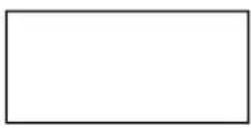


MENU

UP

DOWN ENTER
MENU: Access the menu/Scroll through menu options
UP: Scroll through menu selection or increase parameter
DOWN: Scroll through menu selection or parameters decrease
ENTER: Open/Select the current menu option
Menu Guide
| Menu Item | Values | Function |
| A001 | 1-512 | Set DMX Address (001 to 512) |
| A1 | 1-9 | Red, Slow to Fast |
| A2 | 1-9 | Green, Slow to Fast |
| A3 | 1-9 | Blue, Slow to Fast |
| A4 | 1-9 | White, Slow to Fast |
| A5 | 1-9 | Color Change |
| A6 | 1-9 | Multi-Color Change |
| A7 | 1-9 | Multi-Color Fade |
| A8 | 1-9 | Strobe, Slow to Fast |
| S1 | 1-9 | Sound, Slow to Fast |
| S2 | 1-9 | Sound, Multi-Color Slow to Fast |
DMX Values
8 channels mode
| CH | Value | Function |
| 1 | 0-255 | Dimmer |
| 2 | 0-255 | Red |
| 3 | 0-255 | Green |
| 4 | 0-255 | Blue |
| 5 | 0-255 | White |
| 6 | 0-255 | Strobe |
| 7 | 0-255 | Motor Rotation |
| 8 | 3-255 | Auto Programs |
Setup & Connections
① Wired DMX Cable Connections
Use a DMX to cable to connect to the in/out sockets on the bottom of the light for use with a cabled connection for DMX 512 control.

Troubleshooting
| Problem | Solutions |
| No DMX control | Confirm cable is connected securely to both fixture and controllerConfirm fixture is in DMX mode set to Menu setting (A0) |
| Fixture does not respond to sound | Make sure the fixture is in Sound Active mode (S1) (S2) |
Technical Information
• 2x10W RGBW 4-in-1 CREE LEDs
• DMX Channel Modes: 8 channels
• Control modes: DMX 512, Sound Active, Stand Alone
- Lamp rated life: >50000 Hours
• Working temperature: up to 40irc C
• Power consumption: 30W
• Power supply: AC220-240V;50-60Hz
• Product size: 7.1 x 6.1 x 5.8 in
- Net Weight: 3.1lbs
Please note: As we continue to work towards improving our products and your experience as a user, we recommend that you check our website periodically for updates to user manuals and specifications at www.ColorKeyLED.com or you may contact us directly at info@colorkeyled.com.
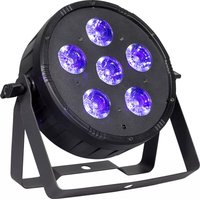
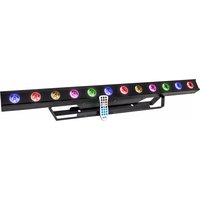
Brand : ColorKey
Model : Odin FX
Category : Effects machine