REX1 - Extendeur AV Simplified MFG - Free user manual and instructions
Find the device manual for free REX1 Simplified MFG in PDF.


| Product Type | AV Extender |
| Brand | Simplified MFG |
| Model | REX1 |
| Dimensions (approx) | 80 x 60 x 25 mm |
| Weight (approx) | 50 g |
| Power Supply | USB 5V DC or 5V DC adapter (not included) |
| Maximum Resolution | 1080p Full HD |
| Supported Formats | HDMI, DVI (via adapter) |
| Transmission Distance | Up to 30 meters via CAT5e/6 |
| Input Interface | HDMI Female |
| Output Interface | RJ45 (Ethernet) |
| Receiver Unit | Included (RJ45 to HDMI) |
| LED Indicators | Power and Link status |
| Operating Temperature | 0°C to 45°C |
| Storage Temperature | -20°C to 60°C |
| Humidity | 10% to 85% non-condensing |
| Material | ABS plastic |
| Maintenance | Clean with a soft, dry cloth |
| Safety | Keep away from water and heat sources |
| Spare Parts | Not applicable (non-serviceable) |
| Warranty | 1 year limited |
Frequently Asked Questions - REX1 Simplified MFG
User questions about REX1 Simplified MFG
0 question about this device. Answer the ones you know or ask your own.
Ask a new question about this device
Download the instructions for your Extendeur AV in PDF format for free! Find your manual REX1 - Simplified MFG and take your electronic device back in hand. On this page are published all the documents necessary for the use of your device. REX1 by Simplified MFG.
USER MANUAL REX1 Simplified MFG
natural_image
Two black wireless network devices with ports and connectors, shown from different angles (no visible text or symbols)User Manual
VER 1.0
Thank you for purchasing the REX2 Extender
The REX2 is a HDMI 1.4b 4K Extender set designed to provide years of reliable service. Please keep this manual as a reference.
Surge protection device recommended
The external supply is very robust, but a surge device is always good insurance in electrically active areas where the power grid is unreliable. If connected to satellite or cable boxes, the HDSURGE is recommended to prevent surges through the HDMI cable.
Table of Contents
- Introduction......1
- Features....1
- Package Contents......2
- Specifications....2
- Operation Controls and Functions....4
5.1 Transmitter Panel....4
5.2 Receiver Panel....5
5.3 IR Pin Definition....6 - Application Example....7
- Warranty....8
- Contact....9
1. Introduction
The REX2 Extender can extend a 1080p AV signal up to 70m (232ft) and a 4K 30hz. signal up to 40m (131ft). The REX2 is compact and robust making it an excellent 1080p extender with the ability to also support 4K@30Hz. Applications would be 1080p video consoles, STB's, cameras, and DVRs. Other applications could be 4K 30Hz streamers and Blu-Ray Players.
2. Features
- Compact Design
• IR Pass-through from display back to TX
• Supports HDR10/HDR10+/DolbyVision
• Supports up to 4K 230Hz.
CAT6: 230ft/70m for 1080p, 131ft/40m for 4K30
CAT5E: 197ft/60m for 1080p, 115ft/35m for 4K30 - Loop out allows cascading or intercepting of signal
• EDID can be attained from RX or Loop out
3. Package Contents
1 × HDMI Transmitter
1 × HDMI Receiver
1 × IR Blaster Cable
1 × IR Receiver Cable
2 × 5V/1A DC Power Adapter
1 × User Manual
- Specifications
| Technical | |
| HDMI Compliance | HDMI 1.4 |
| HDCP Compliance | HDCP 1.4 |
| Video Bandwidth | 10.2Gbps |
| Video Resolution | Up to 4K@30Hz |
| Audio Support | Up to 7.1CH HD audio |
| Input TMDS Signal | 3.3 volts |
| Input DDC Signal | 5.0 volts/P-P |
| ESD Protection | Human Body model:+/- 8 kV (air-gap discharge)+/- 4 kV (contact discharge) |
| Connection | |
| Transmitter | Input: 1 x HDMI Type A [19-pin female]Outputs:1 x HDMI Type A [19-pin female]1 x IR OUT [3.5mm Stereo Mini jack]1 x CAT OUT [RJ45, 8-pin female] |
| Receiver | Inputs: 1x IR IN [3.5mm Stereo Mini jack]1x CAT IN [RJ45, 8-pin female]Output: 1x HDMI Type A [19-pin female] |
| Mechanical | |
| Housing | Metal Enclosure |
| Color | Black |
| Dimensions | 79.5mm (3.125") [W] x 69mm (2.75") [D] x 16.5mm (0.65") [H] |
| Weight | Transmitter: 132g (4.65 oz.), Receiver: 130g (4.6 oz.) |
| Power Supply | 5V/1A DC |
| Power Consumption | Transmitter: 1.86W, Receiver: 0.87W |
| Operation Temperature | 32 - 104°F / 0 - 40°C |
| Storage temperature | -4 - 140°F / -20 - 60°C |
| Relative Humidity | 20 - 90% RH (no condensation) |
5. Operation Controls and Functions
5.1 Transmitter Panel
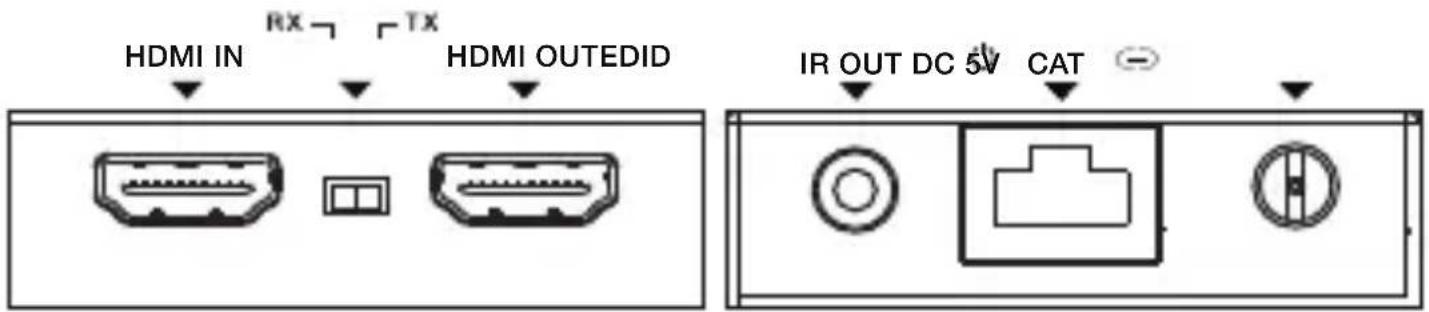
| No. | Name | Function Description |
| 1 | HDMI IN | HDMI signal input port. Connect to HDMI source device. |
| 2 | EDID Switch | The switch is used for selecting EDID: Switch to the right position, the extender will copy HDMI loop out display EDID information to signal source. Switch to the left position, the extender will copy Receiver display EDID to signal source. |
| 3 | HDMI OUT | HDMI signal loop out port. Connect to HDMI display device such as HDTV. |
| 4 IR OUT | Connect to IR blaster cable, the IR signal is from the IR IN port of the receiver. | |
| 5 Power LED | When the transmitter is powered on, the LED will be Illuminated. | |
| 6 | CAT | CAT output port. Connect to the CAT input port of the receiver with CAT5E/6 cable. |
| 7 | Link LED | When the transmitter is connected to HDMI source, the LED will be illuminated. |
| 8 | DC 5V | DC 5V power supply port. |
5.2 Receiver Panel

| No. | Name | Function Description |
| 1 | HDMI OUT | HDMI signal output port. Connect to HDMI display device such as HDTV. |
| 2 IR IN | Connect to IR receiver cable, the IR signal will emit to the IR OUT port of the transmitter. | |
| 3 Power LED | When the receiver is powered on, the LED will be on. | |
| 4 | CAT | CAT input port. Connect to the CAToutput port of the transmitter with CAT5E/6 cable. |
| 5 | Link LED | When the receiver is connected to HDMI source, the LED will be on. |
| 6 | DC 5V | DC 5V power supply port. |
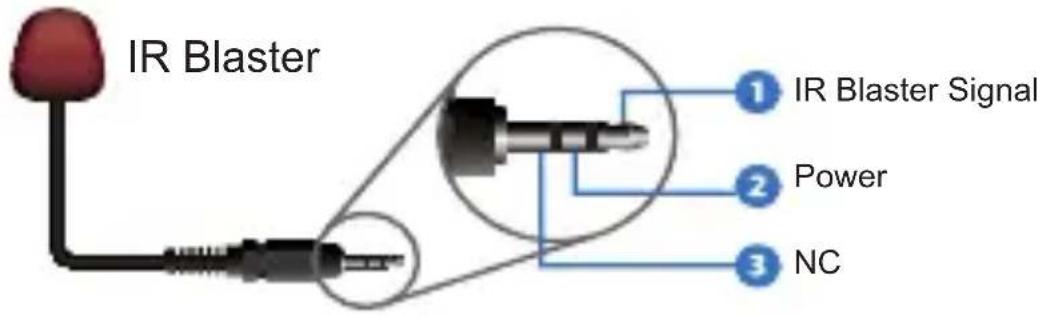
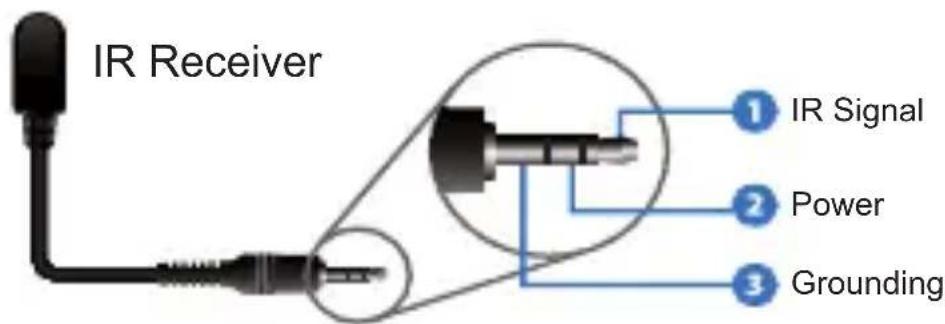
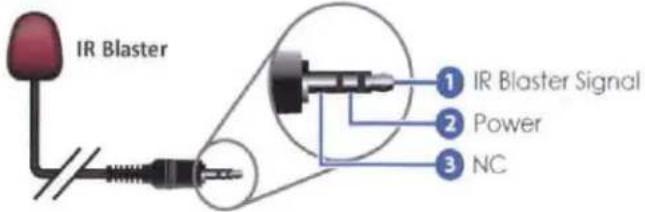
5.3 IR Pin Definition
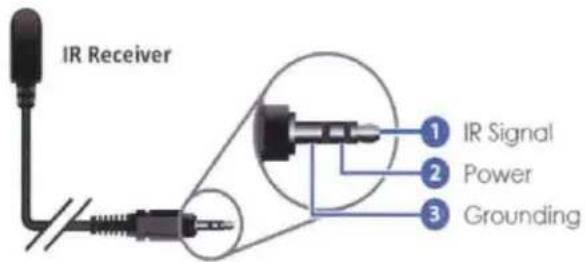
IR Receiver and Blaster pin's definition is as below:
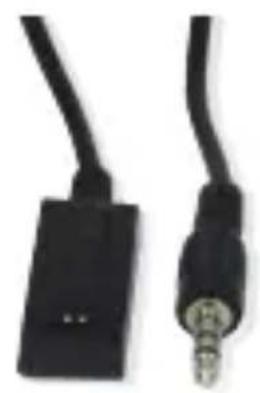
natural_image
Close-up of two black cables with a metallic connector, no visible text or symbolsIR RECEIVER

natural_image
Two black cables with connectors, one dark and one light, against a white background (no text or symbols visible)IR BLASTER
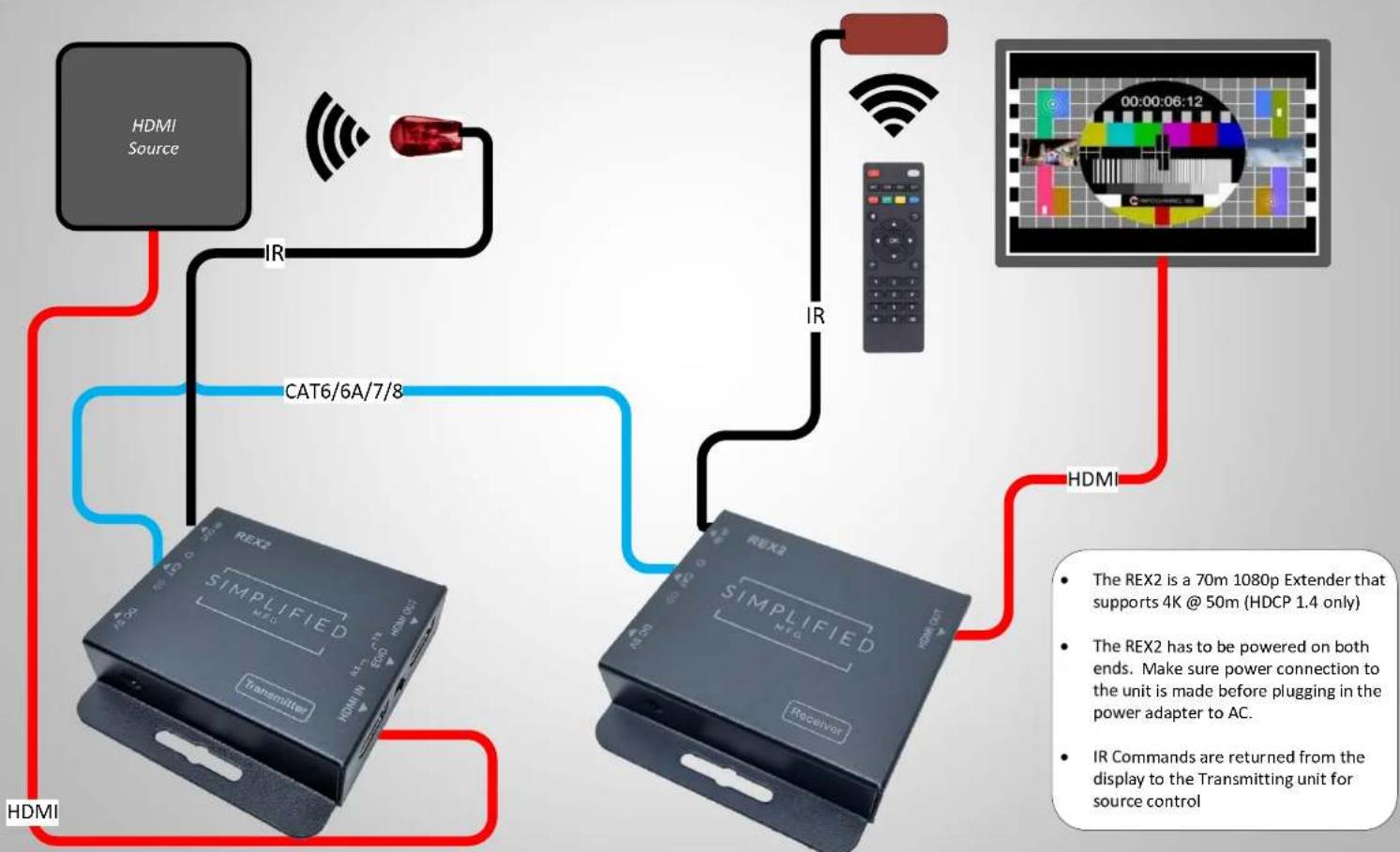
6. Application Example
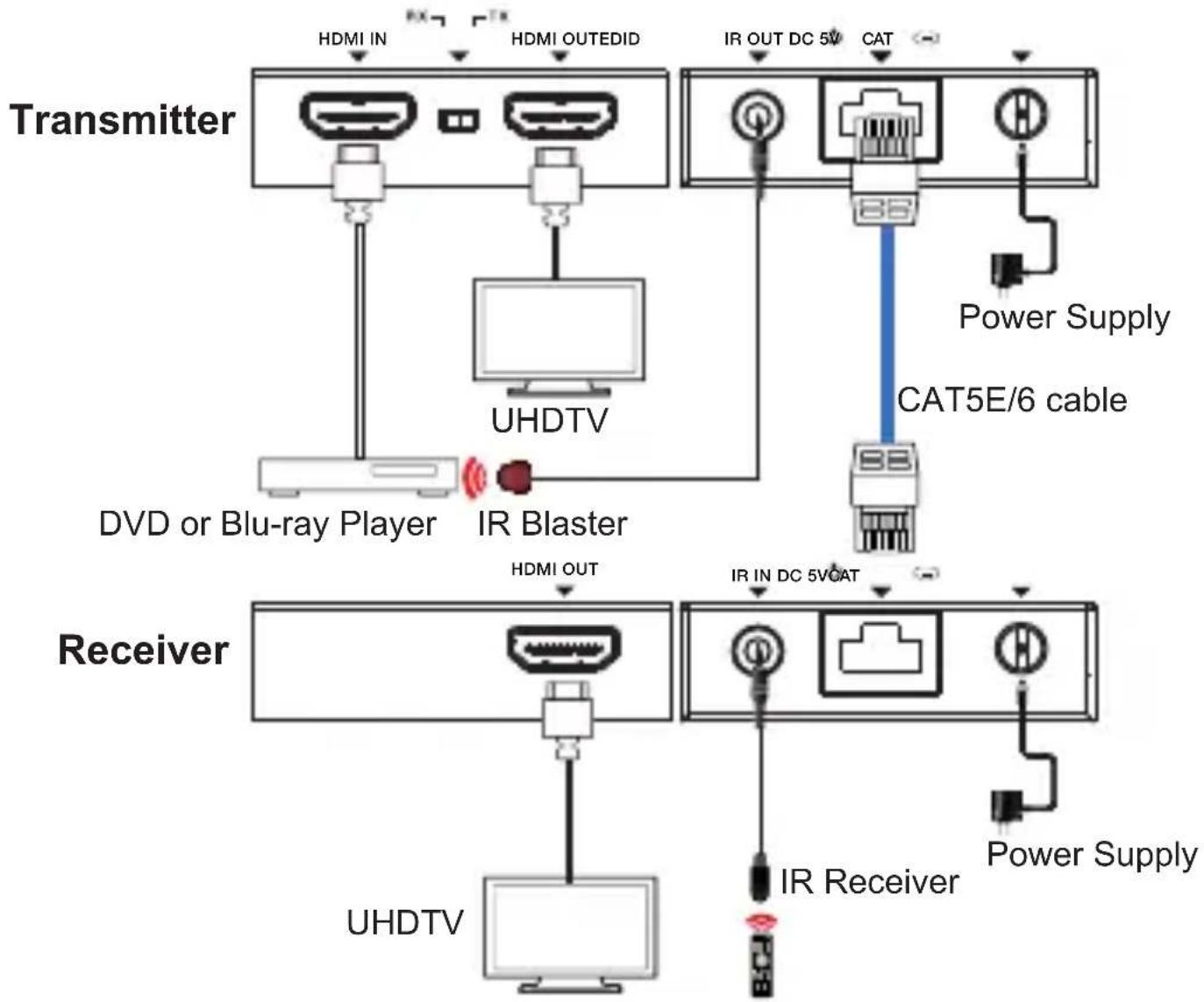

The terms HDMI and HDMI High-Definition Multimedia interface, and the HDMI Logo are trademarks or registered trademarks of HDMI Licensing LLC in the United States and other countries.
7. Warranty
Should you feel that this product does not function adequately due to defects in materials or workmanship, we (referred to as "the warrantor") will, for the length of the period indicated below (starting from the original date of the purchase) either a) repair the product with new or refurbished parts. Or b) Replace the product with new or refurbished product. All Simplified MFG products are covered by a 3-year PARTS and LABOR warranty. During this period there will be no charge for unit repair, replacement of unit components or replacement of the product if deemed necessary. The decision to repair or replace is made by the warrantor. The purchaser must mail in the product during the warranty period. This limited warranty only covers the product purchased as new and is extended to the original purchaser only. It is non-transferrable to subsequent owners, even during the warranty period. A purchase receipt or other proof of purchase date is required for the limited warranty service.
8. Contact
Sales and tech support;
P. 833-HDMI-411 (833-436-4411)
E. info@simplifiedmfg.com

Simplified MFG • 550 W Baseline Rd Ste 102-121 • Mesa, AZ 85210
REX1 HDMI Extender over single 50m/164ft UTP Cables with IR Control
Thank you for purchasing this device
The Simplified MFG REX1 is designed to provide years of reliable service. At Simplified MFG, we want the experience with this device to be the best possible and are committed to helping achieve that experience.
Surge protection device recommended
This product contains sensitive electrical components that may be damaged by electrical spikes, surges, electric shock, lightning strikes, etc. Use of surge protection such as the HDSURGE and other systems is highly recommended to protect and extend the life of your equipment.
INTRODUCTION
The REX1 is a HDMI Extender over Single Cat5e/6 with IR extends high definition Audio/Video signals and IR, at a distance of up to 164ft/50m over a single Cat5e/6 cable. Features EDID management, which allows and encourages source and display "handshake" for seamless integration. Deep color video, DTS-HD or Dolby TrueHD audio is supported and compatible with the extender. In addition, the extender is also equipped with IR pass-through which allows for source control.
The REX1 extender includes two units: a transmitting unit and a receiving unit. The transmitting unit is used to capture the HDMI input with IR carries the signals via one cost effective Cat5e/6 cable. The receiving unit is responsible for equalizing the transmitted HDMI signal. The extender offers the most convenient solution for HDMI extension over a single Cat5e/6 with long distance capability, and is the perfect solution for a 1080p application.
FEATURES
- Allows HDMI Audio/Video and IR signals to be transmitted over a single Cat5e/6 cable.
• Support copy EDID from receiver display or loop out display. - Allows for cascading via additional HDMI loop out port.
• Support Power over cable function. - Transmission Range: Extends 1080p resolution up to 164ft/50m over a single Cat5e or Cat6 cable.
• Works with 1080p HDMI and HDCP 1.4 compliant devices. - Compact design for an easy and flexible installation.
SPECIFICATIONS
Video Bandwidth: Single-link 165Mhz [4.95Gbps]
Video Support: 480i/480p/720p/1080i/1080p @60
Audio Support: Surround Sound (up to 7.1 ch) or stereo digital audio
Transmission Range: HD [1080p 24-bit color] - up to 50m [164ft]
Input TMDS Signal: 3.3 volts
Input DDC Signal: 5.0 volts/P-P
ESD Protection: Human Body model: +/- 8 kV (air-gap discharge)
+/- 4 kV (contact discharge)
HDMI connector: Type A 19 pin female
RJ-45 connector: WE/SS 8P8C
3.5mm connector: (TX and RX) IR Receiver/IR Blaster
MECHANICAL SPECS
Housing: Metal enclosure
Power Supply: (1) 5V1A DC
Power consumption: 1.5 watts (TX); 1.0 watts (RX)
Operation temperature: 32\~104 °F
Storage temperature: -4 \~140 °F
Relative humidity: 20\~90 % RH (no condensation)
Package Contents:
-
HDMI Transmitter 1pcs
-
HDMI Receiver 1pcs
-
Wideband IR Tx device 1pcs
-
Wideband IR Rx device 1pcs
-
5V1A DC Power Supply 1pcs
-
Product Manual 1pcs
PANEL DESCRIPTIONS
Transmitting unit
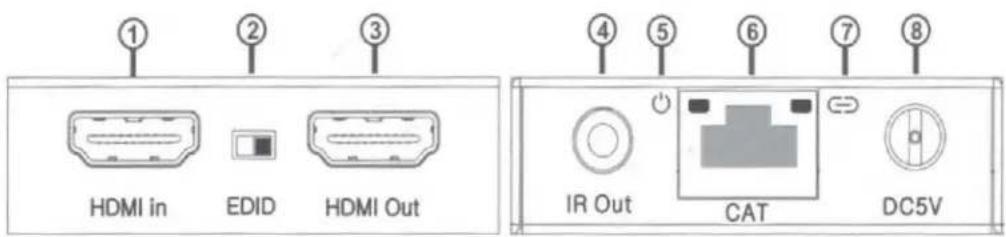
① HDMI in: This is where you connect the HDMI output of your source equipment such as DVD/Blu-ray players or Set-Top-Box with an HDMI cable.
② EDID: Copy EDID function, switch to right position, the extender will copy HDMI loop out display EDID information to source. Switch to left position, the extender will copy receiver display EDID to source.
③ HDMI out: This is a loop out connection essentially it is a built-in splitter. This is suitable for "intercepting" a HDMI cable as well.
④ IR out: Connect the IR Blaster device included in the package for IR signal transmission. Pace the IR blaster in direct line-of-sight of the equipment to be controlled.
⑤ Power LED: This LED will illuminate when the device is connected with power supply.
⑥ CAT: Connection for the CAT5E/6 cable to link the Rx and Tx devices.
⑦ Link LED: This LED will illuminate when the device is connected to HDMI source.
⑧ DC 5V: Connect from 5V DC power supply into the unit and connect the adaptor to an AC outlet.
Receiver unit
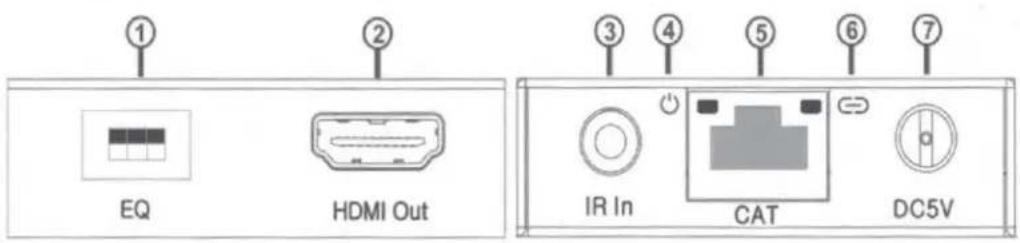
① EQ switch: HDMI Receiver equalizer switch for optimizing the Rx to the Cat5E/Cat6 cable length.
② HDMI out: This connection is for the HDMI cable that runs to your display such as an HDTV or projector.
③ IR in: Connect to the IR Receiver for IR signal reception. Ensure that remote being used is within the direct line-of-sight of the IR receiver.
④ Power LED: This LED will illuminate when the device is connected with power supply.
⑤ CAT: Connection for the CAT5E/6 cable to link the Rx and Tx devices.
⑥ Lock LED: This LED will illuminate when the HDMI signal from the transmitter is stable.
⑦ DC 5V: Connect from 5V DC power supply into the unit and connect the adaptor to an AC outlet. (For POC fuciton, the receiver does not need power supply).
RX Equalizer distance adjust
If you see flickering or blinking image on the display, adjust the EQ switch to improve the cable skew. MAX stands for the strongest HDMI signal level for the longest possible transmission length while MIN stands for the weakest HDMI signal level for short transmission length. Adjust the signal level from MIN to MAX until desired video quality is displayed.
| Recommended EQ settings | |
| Position | Cable Length |
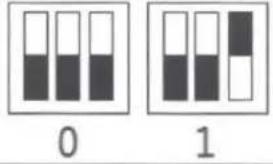 | under 15m (49.5ft) |
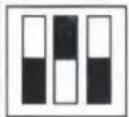 |  | 15-30m (49.5 ft - 99ft) |
| 2 | 3 | |
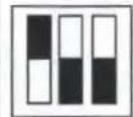 |  | 30-40m (99ft - 132ft) |
| 4 | 5 | |
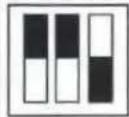 | 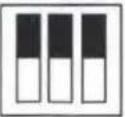 | 40-50m(132ft - 164ft) |
| 6 | 7 |
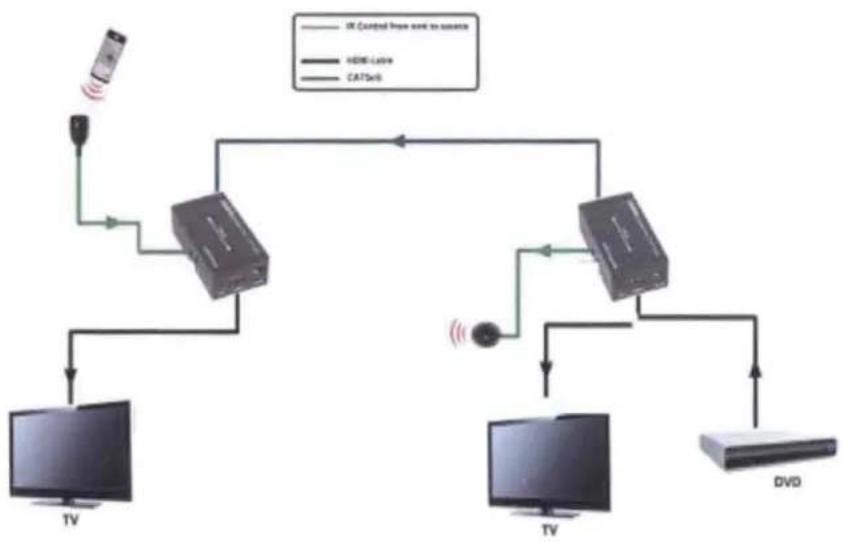
CONNECTION DIAGRAM
flowchart
graph TD
    A["TV"] --> B["MT3"]
    B --> C["HD1"]
    C --> D["MT4"]
    D --> E["HD2"]
    E --> F["TV"]
    G["Sat"] --> B
    H["Sat"] --> D
    I["Sat"] --> F
    J["Sat"] --> F
    K["Sat"] --> F
    L["Sat"] --> F
    M["Sat"] --> F
    N["Sat"] --> F
    O["Sat"] --> F
    P["Sat"] --> F
    Q["Sat"] --> F
    R["Sat"] --> F
    S["Sat"] --> F
    T["Sat"] --> F
    U["Sat"] --> F
    V["Sat"] --> F
    W["Sat"] --> F
    X["Sat"] --> F
    Y["Sat"] --> F
    Z["Sat"] --> F
    AA["Sat"] --> F
    AB["Sat"] --> F
    AC["Sat"] --> F
    AD["Sat"] --> F
    AE["Sat"] --> F
    AF["Sat"] --> F
    AG["Sat"] --> F
    AH["Sat"] --> F
    AI["Sat"] --> F
    AJ["Sat"] --> F
    AK["Sat"] --> F
    AL["Sat"] --> F
    AM["Sat"] --> F
    AN["Sat"] --> F
    AO["Sat"] --> F
    AP["Sat"] --> F
    AQ["Sat"] --> F
    AR["Sat"] --> F
    AS["Sat"] --> F
    AT["Sat"] --> F
    AU["Sat"] --> F
    AV["Sat"] --> F
    AW["Sat"] --> F
    AX["Sat"] --> F
    AY["Sat"] --> BZ["HD1"]
    AZ["HD1"] --> BA["HD2"]
    BB["HD2"] --> BC["HD3"]
    BD["HD3"] --> BE["HD4"]
    BF["HD4"] --> BG["HD5"]
    BH["HD5"] --> BI["HD6"]
    BJ["HD6"] --> BK["HD7"]
    BL["HD7"] --> BM["HD8"]
    BN["HD8"] --> BO["HD9"]
    BP["HD9"] --> BQ["HD10"]
    BR["HD10"] --> BS["HD11"]
    BT["HD11"] --> BU["HD12"]
    BV["HD12"] --> BW["HD13"]
    BX["HD13"] --> BY["HD14"]
    BZ --> Z
    BZ --> AA
    BZ --> AB
    BZ --> AC
    BZ --> AD
    BZ --> AE
    BZ --> AF
    BZ --> AG
- Connect a 1080p/720p/1080i source such as a Blu-Ray Player, game console, A/V Receiver, Cable or Satellite Receiver, etc. to the HDMI input on the Transmitting unit.
- Connect a 1080p/720p/1080i display such as an HDTV or HD Projector to the HDMI output on the Receiving unit.
- Connect a single Category 5e/6 up to 164ft/50m to the output of the Transmitting unit, and the other end to the input of the Receiving unit.
- For power, plug both the Transmitting unit and Receiving unit with the included power supplies.
- Power on each device in the same sequence (receiver and transmitter will already be powered when either unit is plugged in.)
At this point the display connected should display the source signal connected to the extender set. If no signal is being displayed, check the receiver EQ switch. If a display is having difficulty receiving a signal, see EDID section and perform EDID learning or access the display's menu and adjust the resolution (lowest to highest until signal is displayed). A 24 Hz vertical refresh rate may work better than 60 Hz or higher f there are cabling issues. Use the source remote at the receiver emitter to test IR functionality. If the IR remote function is not responding, check the emitters to ensure they are placed correctly and are plugged into the correct IR jacks on the Extender set receiving and transmitting units.
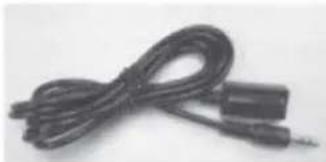
Wideband IR(30KHz---60KHz) introduction
natural_image
Coiled black cable with two connectors, no visible text or symbols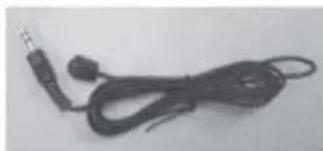
natural_image
Coiled black cable with two connectors, no visible text or symbolsIR BLASTER (TX)
To control the source: Plug IR Blaster into IR TX port of transmitter unit; place blaster in front of the IR eye of the source.
To control the display: Plug IR Blaster into IR TX port of receiver unit; place blaster in front of the IR eye of the display.
IR RECEIVER (RX)
To control the source: Plug IR Receiver into IR RX port of receiver unit; place receiver at or near display.
To control the display: Plug IR Receiver into IR RX port of transmitter unit; place receiver in position where it is able to receive remote signals.
Warranty
Should you feel your product does not function adequately due to defects in materials or workmanship, we (referred to as "the warrantor") will, for the length of the period indicated below (starting from the original date of purchase) either: a) Repair the product with new or refurbished parts. or b) Replace it with a new or refurbished product.
All Simplified MFG products are covered by a 3 year PARTS and LABOR warranty. During this period there will be no charge for unit repair, replacement of unit components or replacement of product if necessary. The decision to repair or replace will be made by the warrantor. The purchaser must mail-in the product during the warranty period. This limited warranty only covers the product purchased as new and is extended to the original purchaser only. It is non-transferable to subsequent owners, even during the warranty period. A purchase receipt or other proof of original purchase date is required for the limited warranty service.
- This Limited Warranty ONLY COVERS failures due to defects in materials or workmanship and DOES NOT COVER normal wear and tear or cosmetic damage. The limited warranty also DOES NOT COVER damage that occurs in shipment or failures caused by products not supplied by the warrantor, failures resulting from accident, misuse, abuse, neglect,
mishandling, misapplication, alteration, incorrect installation, set-up adjustment, implementation of/to consumer controls, improper maintenance, power line surge, lightening damage, modification, service by anyone other than a manufacturer-approved service center or factory authorized personnel, or damage attributable to acts of God.
- There are no express warranties except as listed under "limited warranty coverage." The warrantor is not liable for incidental or consequential damage resulting from the use of this product or arising out of any breach of this warranty. For example: damages for lost time, the cost of having a person/persons remove or re-install previously installed equipment, travel to and from service location, loss of or damage to media, images, data or other recorded/stored content. The items listed here are not exclusive, but are for illustration only. Parts and service not covered by this limited warranty are not the responsibility of the warrantor and should be considered the responsibility of the individual.
Simplified MFG Publication Disclaimer
The material contained in this document consists of information that is the sole property of Simplified MFG. This document is intended to provide information to allow interfacing to the relevant Simplified MFG equipment by third party products. Simplified MFG IS NOT RESPONSIBLE FOR MALFUNCTIONS AND/OR THE IN-OPERABILITY WHICH MAY BE CAUSED BY THE APPLICATION OF THIS INFORMATION, WHETHER EXPECTED OR NOT. Simplified MFG reserves the right to change software, control codes and specifications without notice. Simplified MFG will not be liable for any use of this information or any changes it may make to those products. The use of this information constitutes an agreement by the user to these limitations and exclusions.
Contact
Sales and Tech Support
P 1-844-821-5455
E info@simplifiedmfg.com
E tech@simplifiedmfg.com
REV12.31.2016
SIMPLIFIED
MFG
REX2 Quick Start Guide
flowchart
graph TD
    A["HDMI Source"] -->|IR| B["Switch"]
    B --> C["IR"]
    C --> D["Monitor"]
    D --> E["00:00:06:12 Screen"]
    E --> F["HDMI"]
    F --> G["SIMPLIFIED MFG"]
    G --> H["Transmitter"]
    H --> I["HDMI"]
    I --> J["TRANSMittel"]
    J --> K["TRANSMittel"]
    K --> L["TRANSMittel"]
    L --> M["TRANSMittel"]
    M --> N["TRANSMittel"]
    N --> O["TRANSMittel"]
    O --> P["HDMI"]
    P --> Q["SIMPLIFIED MFG"]
    Q --> R["Transmitter"]
    R --> S["HDMI"]
    S --> T["TRANSMittel"]
    T --> U["TRANSMittel"]
    U --> V["HDMI"]
    V --> W["SIMPLIFIED MFG"]
    W --> X["Transmitter"]
    X --> Y["HDMI"]
    Y --> Z["SIMPLIFIED MFG"]
    Z --> AA["Transmitter"]
    AA --> AB["HDMI"]
    AB --> AC["SIMPLIFIED MFG"]
    AC --> AD["Transmitter"]
    AD --> AE["HDMI"]
    AE --> AF["SIMPLIFIED MFG"]
    AF --> AG["Transmitter"]
    AG --> AH["HDMI"]
Simplified MFG • 550 W Baseline Road Ste 102-121 • Mesa, AZ 85210 • www.simplifiedmfg.com • 833-HDMI-411 (436-4411)
REX2
4K HDMI 2.0a/b over
Category Cable Extender Kit
natural_image
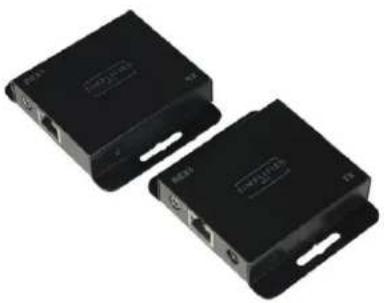
Two black electronic devices with ports and connectors, no visible text or symbols on the devices themselves.The REX2 is a HDMI 2.0a/b 4K Extender set that supports HDR and DolbyVision™ @24/25/30Hz. Perfect for most streaming boxes. Small size makes it easy to place behind displays. 1 Way IR kit is included and sends IR from the display end to the transmission end. Aggressively priced kit for 4K applications
Features:
• HDMI 2.0a/b (Hybrid)
• Supports HDR and DolbyVision™
• Supports all HD Audio Formats
- Small size for easy placement
- HDMI loop through
• LED Indicators for Input, Power, & Link
- 50m [4K @ 24/25/30Hz.]
• 3-Year Warranty
SIMPLIFIED
MFG
Specifications:
| Technical | |
| HDMI Compliance | HDMI 2.0a/b [10.2Gbps, supports HDR & DolbyVisionTM |
| HDCP Compliance | HDCP 2.2 and HDCP 1.4 |
| Video Bandwidth | 10.2 Gbps |
| Video Resolutions | up to 4K2K@50/60Hz(YUV4:4:4),4K2K@30Hz,1080P@120Hz, and 1080P 3D@60Hz |
| Color Space RGB, YCbCr 4:4:4, YCbCr 4:2:2 | |
| Color Depth | 10-bit, 12-bit |
| HDMI Audio Formats(Pass-through) | LPCM 2/5.1/7.1CH, Dolby Digital, DTS 5.1, Dolby Digital+, Dolby TrueHD, DTS-HD Master Audio, Dolby Atmos, DTS:X |
| ESD Protection | Human body model — ±8kV (air-gap discharge) & ±4kV(contact discharge) |
| Connections | |
| Inputs | TX: 1x HDMI Type A [19-pin female]1x Locking PowerRX: 1x RJ45 Input1 Power connection [12V]1x 3.5mm mini jack for IR |
| Outputs | TX: 1x RJ45 Output1x 3.5mm mini jack for IR1x HDMI Type A [19-pin female]RX: 1x HDMI Type A [19-pin female] |
| Mechanical | |
| Housing Metal Enclosure | |
| Color | TX White, RX Black |
| Dimensions [RX] | 60mm [W] x 60mm [D] x 17mm [H], 2.375" x 2.375"x .67" |
| Weight [RX] 90g 93.7oz.0 | |
| Power Supply | Input: AC100 - 240V 50/60HzOutput: DC 5V/1A (US/EU standards, CE/FCC/UL certified) |
| Power Consumption | 2.5W (Max) |
| Operation Temperature | 32 - 104°F / 0 - 40°C |
| Storage Temperature | -4 - 140°F / -20 - 60°C |
| Relative Humidity | 20 - 90% RH (no condensation) |
- Thank you for purchasing the REX2 Extender
- Surge protection device recommended
- Table of Contents
- Introduction
- Features
- Package Contents
- Operation Controls and Functions
- Transmitter Panel
- Receiver Panel
- IR Pin Definition
- Application Example
- Warranty
- Contact
- REX1 HDMI Extender over single 50m/164ft UTP Cables with IR Control
- Thank you for purchasing this device
- INTRODUCTION
- FEATURES
- SPECIFICATIONS
- Package Contents:
- PANEL DESCRIPTIONS
- Transmitting unit
- RX Equalizer distance adjust
- Wideband IR(30KHz---60KHz) introduction
- IR BLASTER (TX)
- IR RECEIVER (RX)
- Warranty
- Simplified MFG Publication Disclaimer
- Contact
- SIMPLIFIED
- REX2
- Features:
Brand : Simplified MFG
Model : REX1
Category : Extendeur AV