REX2 - AV Extender Simplified MFG - Free user manual and instructions
Find the device manual for free REX2 Simplified MFG in PDF.


| Product Type | HDMI Extender (Transmitter & Receiver Set) |
| Model | REX2 |
| Brand | Simplified MFG |
| HDMI Compliance | HDMI 1.4b |
| HDCP Compliance | HDCP 1.4 |
| Video Bandwidth | 10.2 Gbps |
| Max Resolution | 4K@30Hz (4:4:4), 1080p@120Hz, 1080p 3D@60Hz |
| Max Extension Distance (CAT6) | 1080p: 70m (230ft), 4K30: 40m (131ft) |
| Max Extension Distance (CAT5E) | 1080p: 60m (197ft), 4K30: 35m (115ft) |
| Audio Support | Up to 7.1CH HD audio (LPCM, Dolby Digital, DTS, etc.) |
| HDR Support | HDR10, HDR10+, Dolby Vision |
| IR Pass-through | From receiver to transmitter (1-way IR kit included) |
| EDID Management | EDID switch: select between HDMI loop out or receiver display |
| Loop Out | HDMI loop out on transmitter for cascading or local monitoring |
| Connectors (Transmitter) | 1x HDMI IN, 1x HDMI OUT (loop), 1x CAT OUT (RJ45), 1x IR OUT (3.5mm), DC 5V |
| Connectors (Receiver) | 1x CAT IN (RJ45), 1x HDMI OUT, 1x IR IN (3.5mm), DC 5V |
| Housing Material | Metal enclosure |
| Color | Black |
| Dimensions (Transmitter) | 79.5 x 69 x 16.5 mm (3.125 x 2.75 x 0.65 in) |
| Dimensions (Receiver) | 79.5 x 69 x 16.5 mm (3.125 x 2.75 x 0.65 in) approx. |
| Weight | Transmitter: 132g (4.65 oz), Receiver: 130g (4.6 oz) |
| Power Supply | 5V/1A DC (2x adapters included) |
| Power Consumption | Transmitter: 1.86W, Receiver: 0.87W |
| Warranty | 3-year parts and labor |
| Package Contents | 1x Transmitter, 1x Receiver, 1x IR Blaster Cable, 1x IR Receiver Cable, 2x 5V/1A DC Adapters, User Manual |
Frequently Asked Questions - REX2 Simplified MFG
User questions about REX2 Simplified MFG
0 question about this device. Answer the ones you know or ask your own.
Ask a new question about this device
Download the instructions for your AV Extender in PDF format for free! Find your manual REX2 - Simplified MFG and take your electronic device back in hand. On this page are published all the documents necessary for the use of your device. REX2 by Simplified MFG.
USER MANUAL REX2 Simplified MFG
natural_image
Two black wireless network devices with ports and connectors, shown from different angles (no visible text or symbols)User Manual
VER 1.0
Thank you for purchasing the REX2 Extender
The REX2 is a HDMI 1.4b 4K Extender set designed to provide years of reliable service. Please keep this manual as a reference.
Surge protection device recommended
The external supply is very robust, but a surge device is always good insurance in electrically active areas where the power grid is unreliable. If connected to satellite or cable boxes, the HDSURGE is recommended to prevent surges through the HDMI cable.
Table of Contents
- Introduction......1
- Features....1
- Package Contents......2
- Specifications....2
- Operation Controls and Functions....4
5.1 Transmitter Panel....4
5.2 Receiver Panel....5
5.3 IR Pin Definition....6 - Application Example......7
- Warranty....8
- Contact....9
1. Introduction
The REX2 Extender can extend a 1080p AV signal up to 70m (232ft) and a 4K 30hz. signal up to 40m (131ft). The REX2 is compact and robust making it an excellent 1080p extender with the ability to also support 4K@30Hz. Applications would be 1080p video consoles, STB's, cameras, and DVRs. Other applications could be 4K 30Hz streamers and Blu-Ray Players.
2. Features
- Compact Design
- IR Pass-through from display back to TX
• Supports HDR10/HDR10+/DolbyVision
• Supports up to 4K 230Hz.
CAT6: 230ft/70m for 1080p, 131ft/40m for 4K30
CAT5E: 197ft/60m for 1080p, 115ft/35m for 4K30 - Loop out allows cascading or intercepting of signal
• EDID can be attained from RX or Loop out
3. Package Contents
1 × HDMI Transmitter
1 × HDMI Receiver
1 × IR Blaster Cable
1 × IR Receiver Cable
2 × 5V/1A DC Power Adapter
1 × User Manual
- Specifications
| Technical | |
| HDMI Compliance | HDMI 1.4 |
| HDCP Compliance | HDCP 1.4 |
| Video Bandwidth | 10.2Gbps |
| Video Resolution | Up to 4K@30Hz |
| Audio Support | Up to 7.1CH HD audio |
| Input TMDS Signal | 3.3 volts |
| Input DDC Signal | 5.0 volts/P-P |
| ESD Protection | Human Body model:+/- 8 kV (air-gap discharge)+/- 4 kV (contact discharge) |
| Connection | |
| Transmitter | Input: 1 x HDMI Type A [19-pin female]Outputs:1 x HDMI Type A [19-pin female]1 x IR OUT [3.5mm Stereo Mini jack]1 x CAT OUT [RJ45, 8-pin female] |
| Receiver | Inputs: 1x IR IN [3.5mm Stereo Mini jack]1x CAT IN [RJ45, 8-pin female]Output: 1x HDMI Type A [19-pin female] |
| Mechanical | |
| Housing | Metal Enclosure |
| Color | Black |
| Dimensions | 79.5mm (3.125") [W] x 69mm (2.75") [D] x 16.5mm (0.65") [H] |
| Weight | Transmitter: 132g (4.65 oz.), Receiver: 130g (4.6 oz.) |
| Power Supply | 5V/1A DC |
| Power Consumption | Transmitter: 1.86W, Receiver: 0.87W |
| Operation Temperature | 32 - 104°F / 0 - 40°C |
| Storage temperature | -4 - 140°F / -20 - 60°C |
| Relative Humidity | 20 - 90% RH (no condensation) |
5. Operation Controls and Functions
5.1 Transmitter Panel
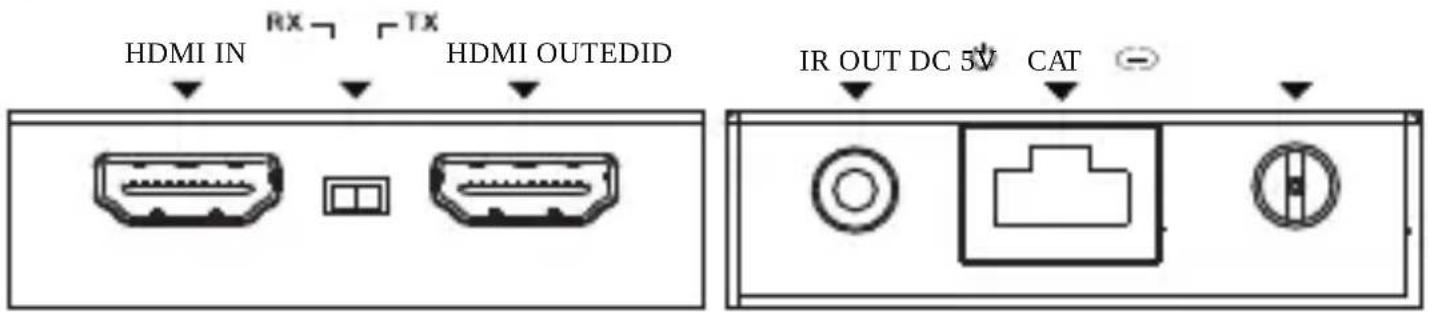
| No. | Name | Function Description |
| 1 | HDMI IN | HDMI signal input port. Connect to HDMI source device. |
| 2 | EDID Switch | The switch is used for selecting EDID: Switch to the right position, the extender will copy HDMI loop out display EDID information to signal source. Switch to the left position, the extender will copy Receiver display EDID to signal source. |
| 3 | HDMI OUT | HDMI signal loop out port. Connect to HDMI display device such as HDTV. |
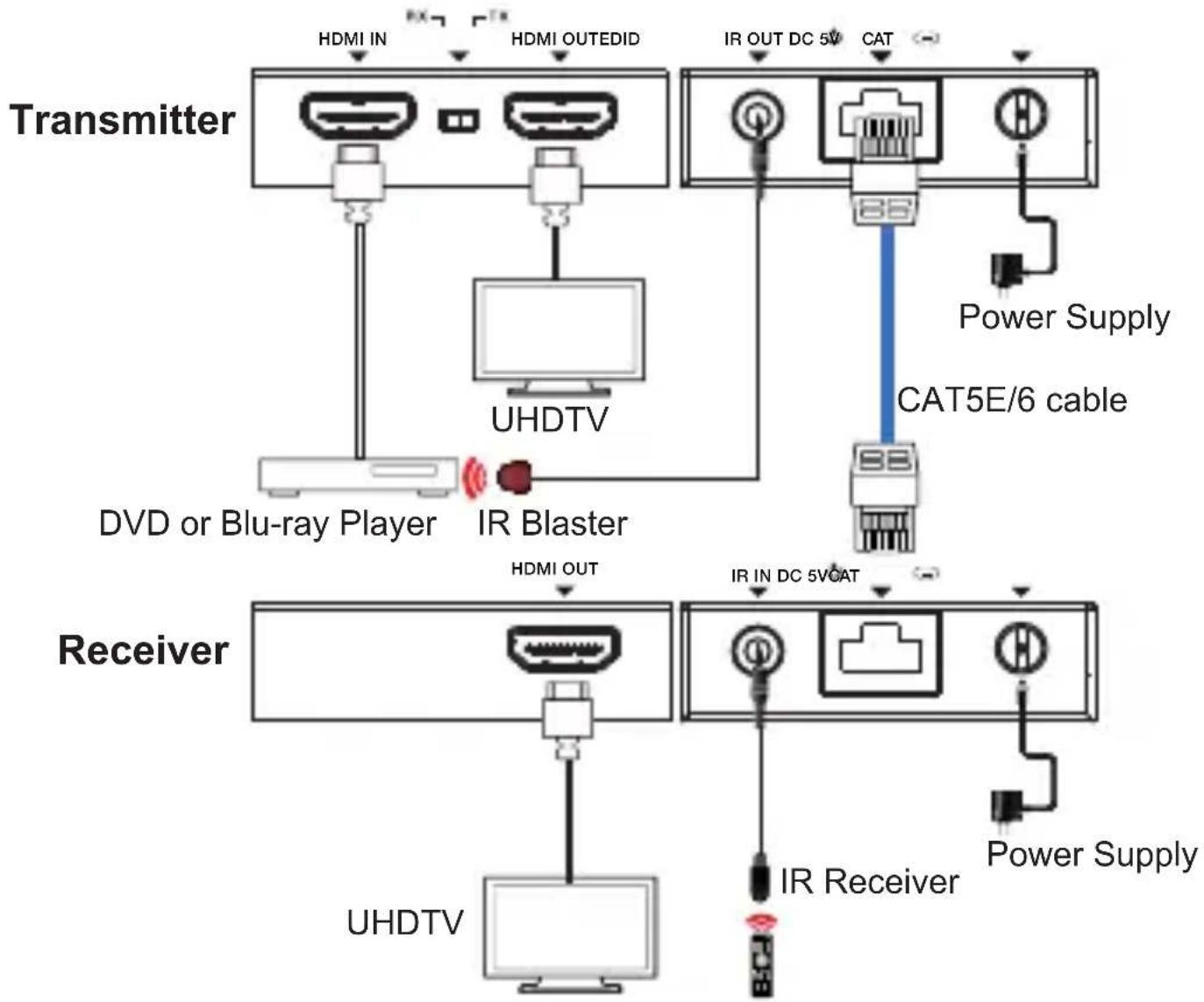
| 4 IR OUT | Connect to IR blaster cable, the IR signal is from the IR IN port of the receiver. | |
| 5 Power LED | When the transmitter is powered on, the LED will be Illuminated. | |
| 6 | CAT | CAT output port. Connect to the CAT input port of the receiver with CAT5E/6 cable. |
| 7 | Link LED | When the transmitter is connected to HDMI source, the LED will be illuminated. |
| 8 | DC 5V | DC 5V power supply port. |
5.2 Receiver Panel

| No. | Name | Function Description |
| 1 | HDMI OUT | HDMI signal output port. Connect to HDMI display device such as HDTV. |
| 2 IR IN | Connect to IR receiver cable, the IR signal will emit to the IR OUT port of the transmitter. | |
| 3 Power LED | When the receiver is powered on, the LED will be on. | |
| 4 | CAT | CAT input port. Connect to the CAToutput port of the transmitter with CAT5E/6 cable. |
| 5 | Link LED | When the receiver is connected to HDMI source, the LED will be on. |
| 6 | DC 5V | DC 5V power supply port. |
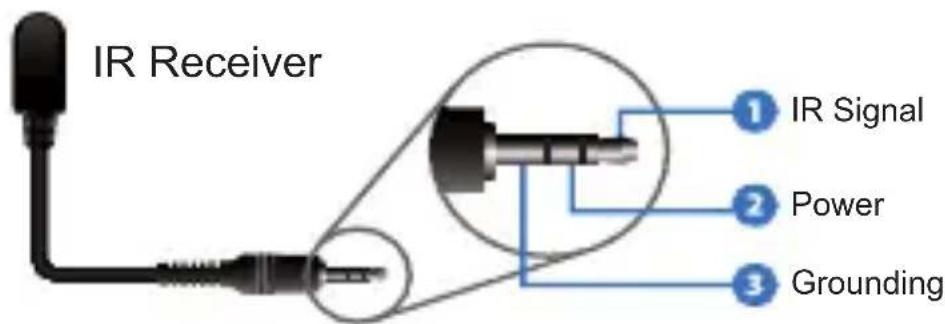
5.3 IR Pin Definition
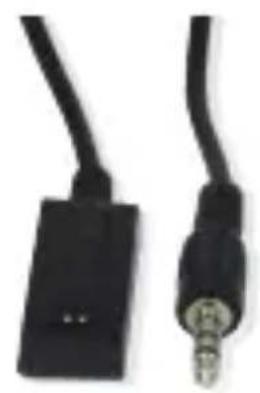
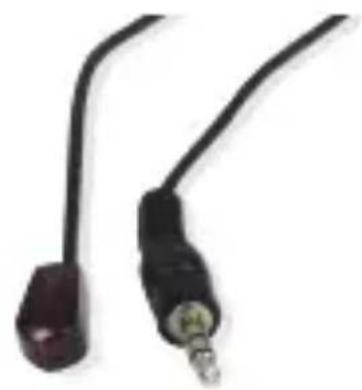
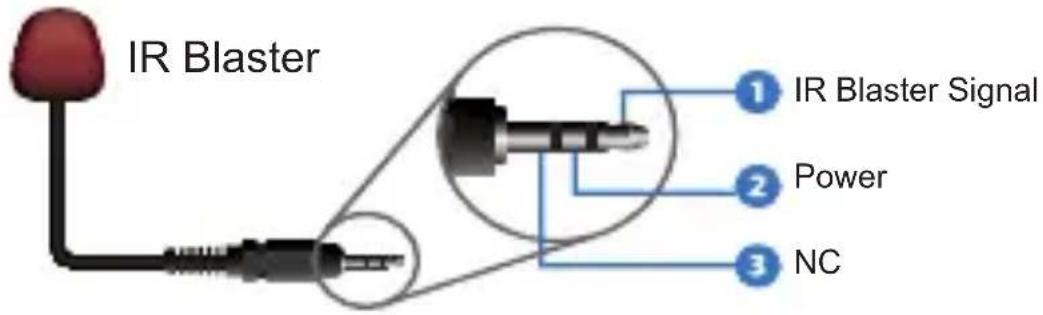
IR Receiver and Blaster pin's definition is as below:
natural_image
Close-up of two black cables with a metallic connector, no visible text or symbolsIR RECEIVER
natural_image
Two black cables with connectors, one open and one closed, against a white background (no text or symbols visible)IR BLASTER
6. Application Example

The terms HDMI and HDMI High-Definition Multimedia interface, and the HDMI Logo are trademarks or registered trademarks of HDMI Licensing LLC in the United States and other countries.
7. Warranty
Should you feel that this product does not function adequately due to defects in materials or workmanship, we (referred to as "the warrantor") will, for the length of the period indicated below (starting from the original date of the purchase) either a) repair the product with new or refurbished parts. Or b) Replace the product with new or refurbished product. All Simplified MFG products are covered by a 3-year PARTS and LABOR warranty. During this period there will be no charge for unit repair, replacement of unit components or replacement of the product if deemed necessary. The decision to repair or replace is made by the warrantor. The purchaser must mail in the product during the warranty period. This limited warranty only covers the product purchased as new and is extended to the original purchaser only. It is non-transferrable to subsequent owners, even during the warranty period. A purchase receipt or other proof of purchase date is required for the limited warranty service.
8. Contact
Sales and tech support;
P. 833-HDMI-411 (833-436-4411)
E. info@simplifiedmfg.com

Simplified MFG • 550 W Baseline Rd Ste 102-121 • Mesa, AZ 85210
SIMPLIFIED
MFG
REX2 Quick Start Guide
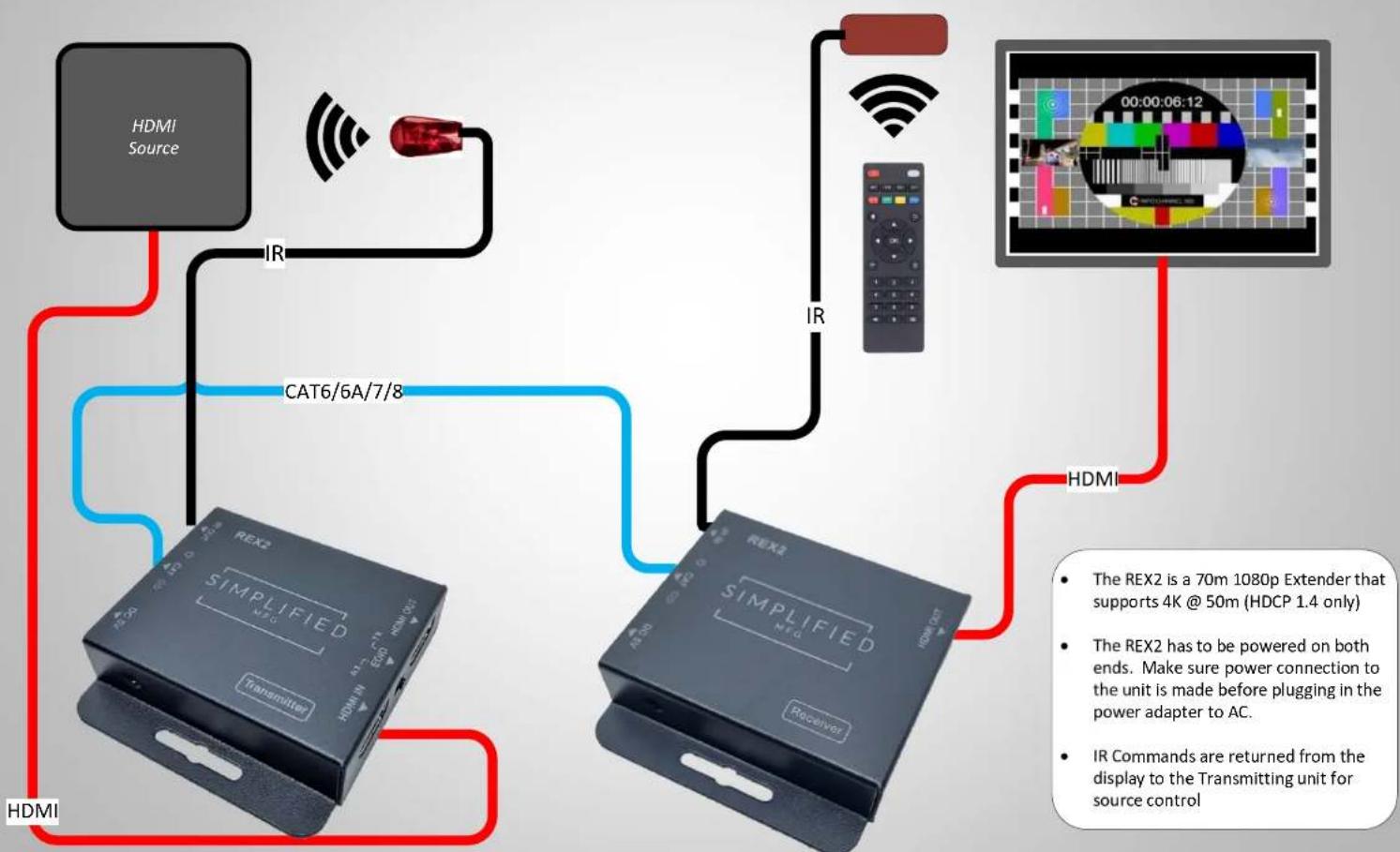
flowchart
graph TD
    A["HDMI Source"] -->|IR| B["SIMPLIFIED MFD"]
    B -->|CAT6/6A/7/8| C["Transmitter"]
    C --> D["HDMI"]
    D -->|IR| E["Receiver"]
    E --> F["HDMI"]
    F --> G["Television Screen"]
    style A fill:#f9f,stroke:#333
    style B fill:#ccf,stroke:#333
    style C fill:#cfc,stroke:#333
    style D fill:#fcc,stroke:#333
    style E fill:#cff,stroke:#333
    style F fill:#ffc,stroke:#333
    style G fill:#fcc,stroke:#333
Simplified MFG • 550 W Baseline Road Ste 102-121 • Mesa, AZ 85210 • www.simplifiedmfg.com • 833-HDMI-411 (436-4411)
SIMPLIFIED
MFG
How to use and trouble shoot Simplified MFG Extenders
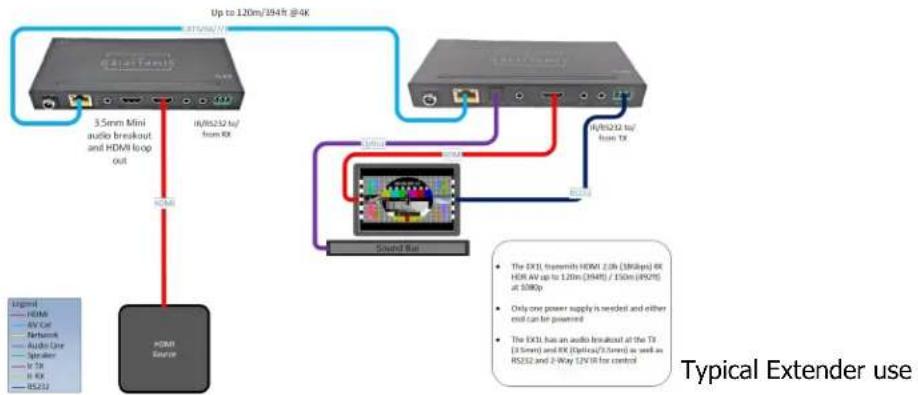
At the TX end:
Is everything connected (Cat, HDMI, Power etc)?
Is the HDMI cable in the HDMI input of the TX? We often use a loop out, make sure the input is not in this port.
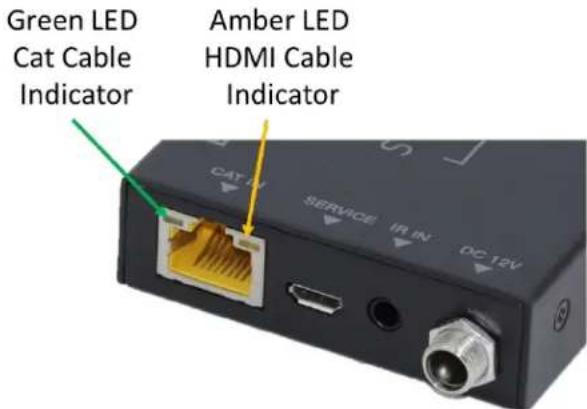
What are the lights where the Cat cable plugs into doing?
Is the Green Lit Solid?
Yes, good! Flashing or off the category cable is poor. This can be the termination (check the manual for wiring termination), poor wire, or interference from being run poorly
Is the Amber Lit Solid?
Yes good! Flashing slowly means no HDCP, off means no signal at HDMI port(s)
At the RX end:
Is the Green Lit Solid?
Yes, good! Flashing or off the category cable is poor. This can be the termination (check the manual for wiring termination), poor wire, or interference from being run poorly
Is the Amber Lit Solid?
Yes good! Flashing slowly means no HDCP, off means no signal at HDMI port(s)
Other Techniques:
Make the circuit simpler. Move the source near the display or the display near the source and see if it works with a short HDMI cable. You can use this to verify the HDMI cables work as well. Add components until the system fails.
Use a known working run of category cable across the floor and see if behavior changes.
It is often the case that the display's setting can cause odd/poor behavior. Consult the display's tech resources. Also, it is possible we have seen the issue and may have a tech paper on this.
Not a bad idea to keep the following on your service vehicle:
• Test source like an AppleTV or signal generator
• Known working HDMI cables
- Known working terminated Category cable
- SP12S splitter for clocking issues, etc.
REX2
4K HDMI 2.0a/b over
Category Cable Extender Kit
natural_image
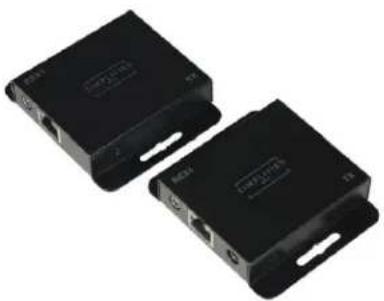
Two black wireless network devices with ports and connectors, no visible text or symbolsThe REX2 is a HDMI 2.0a 4K Extender set that supports HDR @24/25/30Hz. This is a more capable version of the REX1. Applications are; 4K cameras/NVR/DVR where HDCP2.2 is not used and as a far more robust version of the REX1 for 1080p applications (longer distance more throughput) Small size makes it easy to place behind displays. 1 Way IR kit is included and sends IR from the display end to the transmission end.
Features:
- HDMI 2.0a
• Supports HDR
• Supports all HD Audio Formats - Small size for easy placement
- HDMI loop through
• LED Indicators for Input, Power, & Link - 50m [4K @ 24/25/30Hz.]
• 3-Year Warranty
SIMPLIFIED
MFG
Specifications:
| Technical | |
| HDMI Compliance | HDMI 2.0a [10.2Gbps, supports HDR] |
| HDCP Compliance | HDCP 1.4 |
| Video Bandwidth | 10.2 Gbps |
| Video Resolutions | up to 4K2K@50/60Hz(YUV4:4:4),4K2K@30Hz,1080P@120Hz, and 1080P 3D@60Hz |
| Color Space RGB, YCbCr 4:4:4, YCbCr 4:2:2 | |
| Color Depth | 10-bit, 12-bit |
| HDMI Audio Formats(Pass-through) | LPCM 2/5.1/7.1CH, Dolby Digital, DTS 5.1, Dolby Digital+, Dolby TrueHD, DTS-HD Master Audio, Dolby Atmos, DTS:X |
| ESD Protection | Human body model — ±8kV (air-gap discharge) & ±4kV(contact discharge) |
| Connections | |
| Inputs | TX: 1x HDMI Type A [19-pin female]1x Locking PowerRX: 1x RJ45 Input1 Power connection [12V]1x 3.5mm mini jack for IR |
| Outputs | TX: 1x RJ45 Output1x 3.5mm mini jack for IR1x HDMI Type A [19-pin female]RX: 1x HDMI Type A [19-pin female] |
| Mechanical | |
| Housing Metal Enclosure | |
| Color Black | |
| Dimensions [RX] | 60mm [W] x 60mm [D] x 17mm [H], 2.375" x 2.375"x .67" |
| Weight [RX] 90g 3 | 17 Oz. |
| Power Supply | Input: AC100 - 240V 50/60HzOutput: DC 5V/1A (US/EU standards, CE/FCC/UL certified) |
| Power Consumption | 2.5W (Max) |
| Operation Temperature | 32 - 104°F / 0 - 40°C |
| Storage Temperature | -4 - 140°F / -20 - 60°C |
| Relative Humidity | 20 - 90% RH (no condensation) |
- Thank you for purchasing the REX2 Extender
- Surge protection device recommended
- Table of Contents
- Introduction
- Features
- Package Contents
- Operation Controls and Functions
- Transmitter Panel
- Receiver Panel
- IR Pin Definition
- Application Example
- Warranty
- Contact
- SIMPLIFIED
- How to use and trouble shoot Simplified MFG Extenders
- At the TX end:
- Is the Green Lit Solid?
- Is the Amber Lit Solid?
- At the RX end:
- Other Techniques:
- REX2
- Features:
Brand : Simplified MFG
Model : REX2
Category : AV Extender