SBS Wireless Controller - Controller

Wireless Controller - Controller SBS - Free user manual and instructions

Find the device manual for free Wireless Controller SBS in PDF.

📄 20 pages English EN Download 💬 AI Question 10 questions ⚙️ Specs
Notice SBS Wireless Controller - page 1
Pick your language and provide your email: we'll send you a specifically translated version.
Product Type Wireless Game Controller
Brand SBS
Model Wireless Controller
Connectivity Bluetooth 5.0
Compatibility PC, Android, iOS, Nintendo Switch
Dimensions 155 x 105 x 60 mm
Weight 200 g
Battery Type Rechargeable Lithium-ion
Battery Capacity 600 mAh
Charging Time 2-3 hours
Battery Life Up to 10 hours
Wireless Range Up to 10 meters
Input Voltage 5V DC via USB-C
Buttons ABXY, D-pad, triggers, bumpers, joysticks, start, select, home
Vibration Dual motor haptic feedback
Motion Control 6-axis gyroscope
Material ABS plastic with rubberized grips
Cleaning Wipe with a soft, dry cloth. Do not use liquids.
Safety Keep away from water and extreme temperatures.
Spare Parts Replacement batteries, joystick caps, charging cables (available separately)
Repairability User-replaceable battery and joystick modules
Warranty 12 months
Package Contents 1x Wireless Controller, 1x USB-C charging cable, 1x User Manual

Frequently Asked Questions - Wireless Controller SBS

How do I pair the SBS Wireless Controller with my PC?
Press and hold the Home button until the LED flashes. Go to Bluetooth settings on your PC, select 'SBS Controller' and click pair.
What is the battery life of the controller?
The controller offers up to 10 hours of gameplay on a full charge, depending on usage.
How do I charge the controller?
Connect the included USB-C cable to the controller and a power source. The LED will turn red while charging and go off when full.
Is the controller compatible with Nintendo Switch?
Yes, it works with Nintendo Switch in pro controller mode. Pair via Bluetooth or use the USB-C connection.
Can I use the controller while it's charging?
Yes, you can use it in wired mode while charging via USB-C.
How do I reset the controller if it freezes?
Press and hold the Home button and Start button for 5 seconds until the LED turns off. Then turn it back on.
Does the controller have motion controls?
Yes, it features a 6-axis gyroscope for motion-sensitive gameplay.
How do I clean the controller?
Use a soft, dry cloth to wipe the surface. Do not use water, alcohol, or abrasive cleaners.
Can I replace the battery myself?
Yes, the battery is user-replaceable. Open the battery compartment with a screwdriver and replace with a compatible 600mAh Li-ion battery.
Why is the controller not connecting to my device?
Ensure the controller is charged and in pairing mode (LED flashing). Check that Bluetooth is enabled on your device and no other controllers are connected.

User questions about Wireless Controller SBS

0 question about this device. Answer the ones you know or ask your own.

Ask a new question about this device

The email remains private: it is only used to notify you if someone responds to your question.

No questions yet. Be the first to ask one.

Download the instructions for your Controller in PDF format for free! Find your manual Wireless Controller - SBS and take your electronic device back in hand. On this page are published all the documents necessary for the use of your device. Wireless Controller by SBS.

USER MANUAL Wireless Controller SBS

TEREMCONTROL

Wireless Controller

For Smartphone iOS / Android

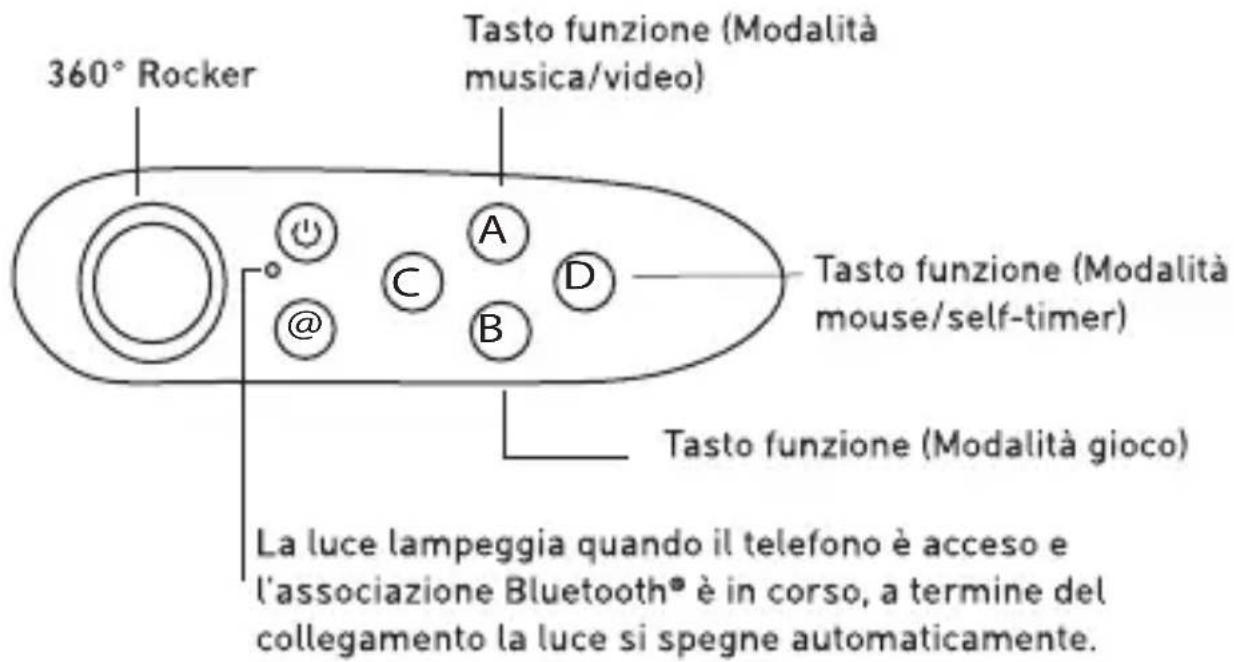
360° Rocker Function Key (Game Mode) @ Power button C Function Switch key B A D Function Key (Music/Video Mode) Function Key (Mouse/Self-Timer Mode)

For other languages please contact us at info@sbsmobile.com.

UK User Manual 4

Function switch key (when switch function, press and hold @ first and then press any key of A/B/D).

MOUSE MODE (DEFAULT)

Mouse Raise Volume Confirm Down Volume Exit

GAME MODE

In some game, controls could be different.

Direction Jump Shoot C A B D @ @

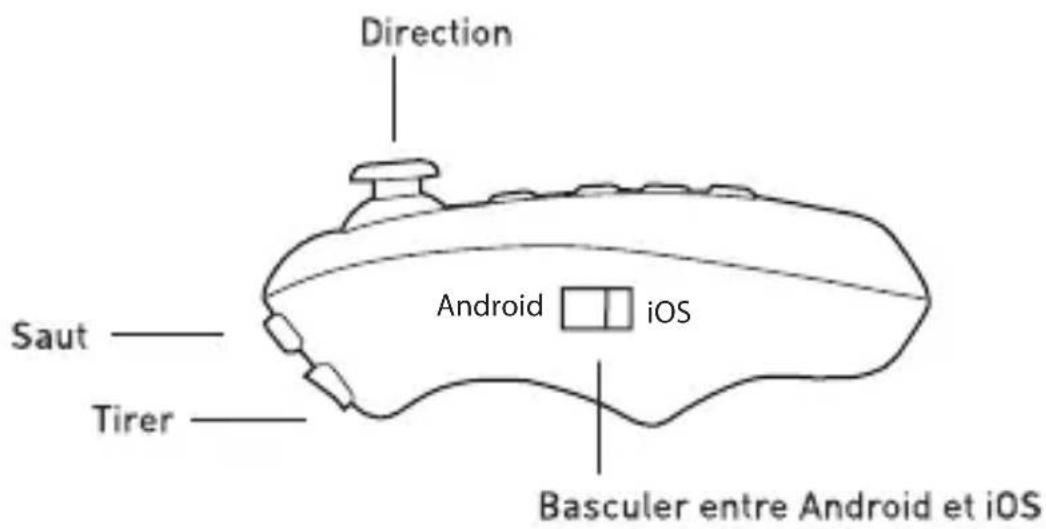
Direction Android iOS Jump Shoot Switch between Android and iOS

ISTRUZIONI

FUNZIONI DI BASE
Direction Saut @ C A D Tirer

Direction Saut ———— Tirer ———— Android □ iOS Basculer entre Android et iOS

ES GUÍA DE USUARIO

FUNCIÓN BÁSICA
QR code image containing encoded data, no visible human-readable text

sbsmobile.com

Table of contents Click a title to access it
Manual assistant
Powered by Anthropic
Waiting for your message
Product information

Brand : SBS

Model : Wireless Controller

Category : Controller