Runner IZ-7003 - Scale Izzy - Free user manual and instructions
Find the device manual for free Runner IZ-7003 Izzy in PDF.


| Product Type | Digital bathroom scale |
| Model | Runner IZ-7003 |
| Brand | Izzy |
| Dimensions | 30 x 30 x 2.5 cm (11.8 x 11.8 x 1 in) |
| Weight Capacity | 180 kg (396 lbs) |
| Graduation | 100 g (0.2 lbs) |
| Power Supply | 2 x CR2032 lithium batteries (included) |
| Display | LCD, 4 digits |
| Units | kg, lbs, st |
| Auto On | Step-on activation |
| Auto Off | After 10 seconds of inactivity |
| Low Battery Indicator | Yes |
| Overload Indicator | Yes |
| Platform Material | Tempered glass |
| Non-Slip Feet | Yes |
| Cleaning | Wipe with damp cloth; do not immerse |
| Safety | Use on hard, flat surface; avoid impact |
| Spare Parts Available | Batteries (CR2032) only |
| Warranty | 2 years limited |
| Country of Origin | China |
Frequently Asked Questions - Runner IZ-7003 Izzy
User questions about Runner IZ-7003 Izzy
0 question about this device. Answer the ones you know or ask your own.
Ask a new question about this device
Download the instructions for your Scale in PDF format for free! Find your manual Runner IZ-7003 - Izzy and take your electronic device back in hand. On this page are published all the documents necessary for the use of your device. Runner IZ-7003 by Izzy.
USER MANUAL Runner IZ-7003 Izzy
natural_image
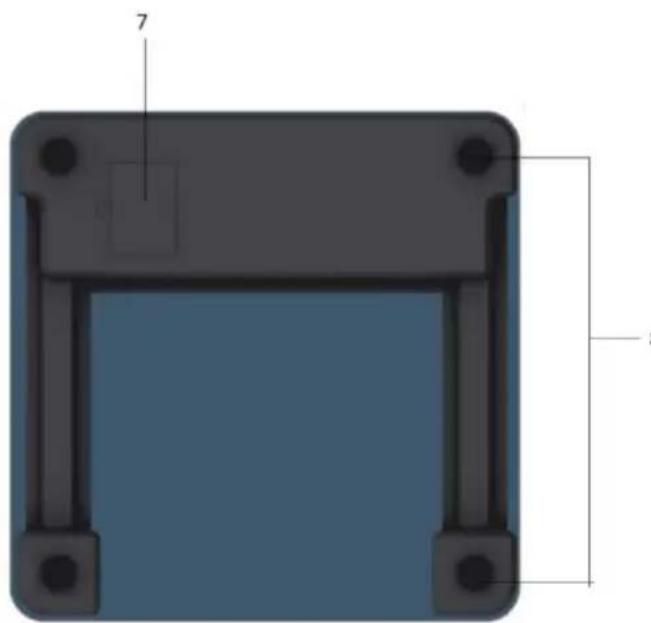
3D diagram of a rectangular frame with black corners and a blue interior, labeled with dimensions 7 and 8 (no text or symbols beyond labels)Thank you for having chosen an appliance from the IZZY range.
Safety interlocks

Please read these instructions carefully before using the appliance and save them for future reference. Please keep the sales receipt for guarantee purposes (pls see below “Guarantee and Customer Service”) Any use which does not conform to the instructions will absolve IZZY from any liability.
- The bathroom scale is intended for indoor use. Do not use it outdoors.
- The bathroom scale is intended only for domestic use. Any other use will cancel the warranty.
- Never use the scale for any other use than indicated.
- Your scale is electronic and thus its function may be influenced by temperature variations or by its movement.
- The scale must be placed on a flat, stable, smooth, and sheltered area. Always place the scale on a sheltered area when in use as air movement and may affect its accuracy.
- Do not overload the scale by exceeding the maximum weighing capacity of 180kg/396lb/28st:lb as this may damage the weighing sensor.
- Do not expose the scale to any high electro-magnetic fields such as a cordless portable phone, computer, microwave etc. as this will interfere with the functioning and accuracy of the scale.
CAUTION: The scale should not be used by people with pacemaker.
CAUTION: Metal implants may affect measurements.
- Do not use excessive force when pressing the touch pads and never use a sharp object to operate them.
- Do not subject the scale to excessive force.
- Do not stand the scale near an oven or other direct source of heat.
-
Do not operate or stand the scale in places with high humidity, where it may get wet.
-
Never use highly corrosive or abstractive cleaning agents. Never use metal scouring pads for cleaning.
- Do not move the bath scale when in operation.
- Do not touch the bath scale with wet or damp hands.
- In case of a possible damage, do not attempt to repair the scale by yourself. Please contact one of the authorized BENRUBI service centers.
- Any repair made by an unauthorized BENRUBI Service Center CANCELS THE GUARANTEE.
- Any misuse of the device cancels the warranty.
- The appliance conforms to EU directive 2014/30/EU on Electromagnetic Compatibility.
SAVE THESE INSTRUCTIONS
Parts of the Appliance
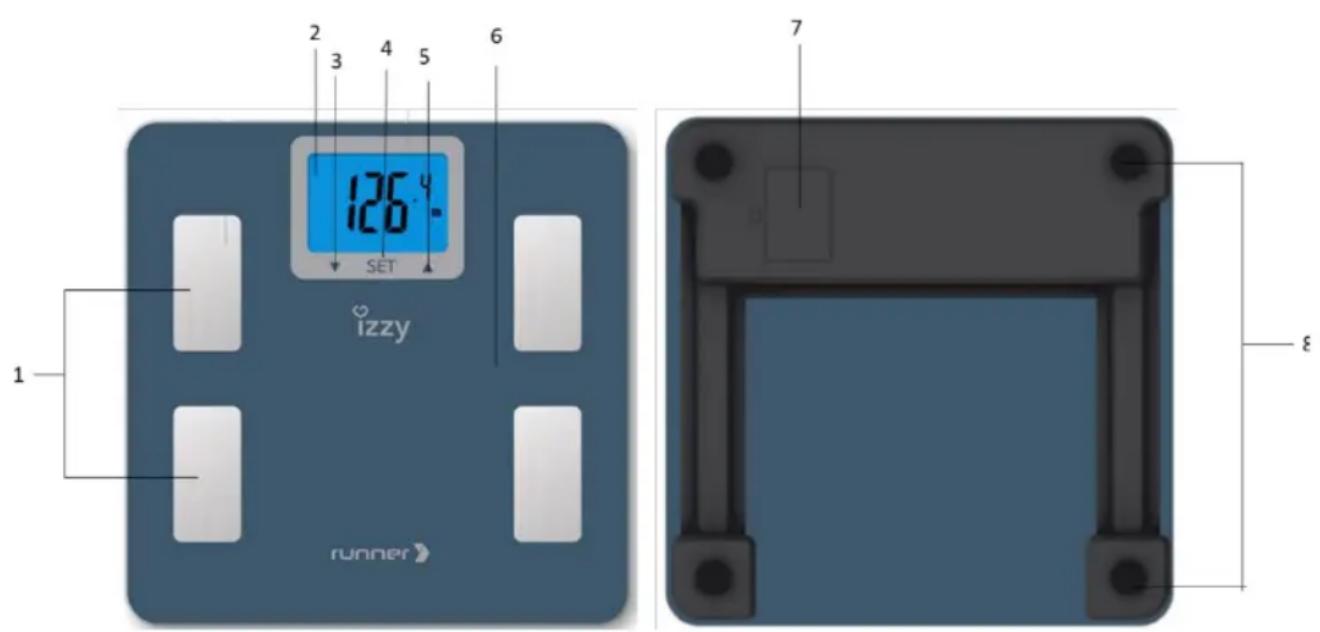
- S/S metal strips
- LCD screen with lighting
- Touch key down
- Touch key SET (Power, menu selection, menu confirmation)
- Touch key up
- Platform
- Batteries Cover/compartment
- Anti-slip feet
Batteries' Installation & Replacement
- Make sure you connect the batteries with the correct polarity.
- If the scale is not going to be used for a long time, remove the batteries
Batteries installation:
- Unclip the battery cover (7) on the underside of the scale by pushing the clip inwards and then lifting off. Place the batteries inside the battery compartment (7), connecting them to the appropriate polarity.
- Clip the battery cover (7) back into place.
Note: During use, if the battery symbol "LO" appears on the LCD screen, it means that battery power is low and the batteries should be replaced.
Batteries replacement:
- Unclip the battery cover (7) on the underside of the scale by pushing the clip inwards and then lifting off. Remove the old batteries and fit the replacement (3xAAA),
- Clip the battery cover (5) back into place
Disposal of the old batteries:
Please refer to section for the correct disposal of the product.
Using the Appliance
Always place the scale on a dry and flat surface prior to weighing.
- Place the scale on a flat, steady and dry surface.
-
There are two ways to turn on the scale, by tapping the platform or by touching the SET (4) button till "0.0" appears in the display (2).
-
Press keys (3) and (5) simultaneously and set the desired unit of measurement Kg/Lb/St:Lb.
-
Place your feet on the platform (6) without shoes and socks. Place your feet in the same place each time and balance your body. Remember to stay still. Your weight will be displayed automatically.
Note: Make sure your feet are on the sensors (1).
- Get down of the scale. The display will remain for 10 seconds.
Notes:
- The scale will read "O-Ld" if it is trying to weigh above its capacity.
- The maximum weight that can be weighed is 180kg/396lb/28st:lb.
- For accurate results, make the measurement at the same time (eg. 19:00-21:00 every night)
- If you do not follow the above steps, your weight measurement will not be accurate.
- When "0.0" is displayed, the scale remains open for 10 seconds. Then, the scale closes automatically to protect the battery life.
Using the Appliance – BMI Function
- It has a high precision sensor for better measurement.
• Memory up to 10 measurements (1-10).
Always place the scale on a dry and flat surface prior to weighing.
- Place the scale on a flat, steady and dry surface.
- There are two ways to turn on the scale, by tapping the platform or by touching the SET (4) button till "0.0" appears in the display (2).
- Press keys (8) and (5) simultaneously and set the desired unit of measurement Kg/Lb/St:Lb.
- Press "SET" (4) and press (8) or (5) buttons to select in which position to enter your personal data (1-10). Press once again the SET button (4) to confirm.
- Press (3) or (5) buttons to select the height (80-220cm). Press once again the SET button (4) to confirm.
- Press “▲” (3) or “▼” (5) to select year of birth (1920-2014). “Age” will be displayed on the bottom left of the screen (2) and “Y” on the upper right. When setting the year of birth, press the “SET” key (4) again to confirm.
- Press “(3) or “” (5) to enter the month of birth (1-12). “Age” will be displayed on the bottom left of the screen (2) and “M” on the upper right. When setting the month of birth, press the “SET” key (4) again to confirm.
- Press “(3) or “” (5) to enter the date of birth (1-31). Age” will be displayed on the bottom left of the screen (2) and “D” on the upper right. When setting the date of birth, press the “SET” key (4) again to confirm.
- Press “▲(3) or “” (5) to enter gender and activity category. At the top of the screen,
the following symbols will appear: (male), (female), (male-able),
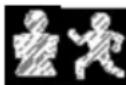
(female-athlete). Press "SET" (4) to select your gender and activity category.
- Press “(3) or “”(5) to enter the sport activity level (a1-a5). Refer to the table below to select the correct level.
| Display | Sport activity level |
| a1 | No sport activity |
| a2 | Little sport activity |
| a3 | Medium sport activity |
| a4 | Intense sport activity |
| a5 | Heavy sport activity |
When setting the level of sport activity, press the "SET" (4) key again to confirm.
- When you complete the above steps, the information you have entered will be displayed on the screen (2) in sequence: Age, height, level of sports activity.
- When "0.0" appears on the screen, step on the scale without shoes and socks and remain still. When your weight appears, get off the scale.
Note: Make sure your feet are on the metal strips (1).
- The measurements will be displayed in sequence: Fat percentage (FAT) (%), Hydration percentage (WATER) (%), Muscle mass percentage (MUSCLE) (%) and Body Mass Index (BMI).
* The ratings are repeated twice - The scale remains open for 10 seconds.
Repeat Measurements
The measurements can be repeated in 2 ways:
Automatic user identification
- Place the scale on a flat, steady and dry surface.
- Place your feet on the platform (6). The scale will be activated automatically.
- If the weight change of your weight compared to the last time is within ± 2 kg, the scale recognizes the user and automatically weighs and analyzes the measurements.
Note: If 2 or more users have the same weight, the balance does not have the ability to identify the user.
- When the analysis is completed, step of the scale. The display (2) will show the following measurements: User number (1-10), the weight that the user has at the time of weighing, the weight s/he had the previous time s/he weighed, the weight difference, the fat percentage (FAT) (%), the hydration percentage (WATER) (%), the muscle mass percentage (MUSCLE) (%) and the Body Mass Index (BMI).
\* The ratings are repeated twice
- The scale remains open for 10 seconds.
Repeat measurements without automatic recognition:
- Place the scale on a flat, steady and dry surface.
- Press "SET" (4) and press (5) or (5) buttons to select the position you have entered your personal data (1-10). The data you have entered will appear in sequence on the screen.
- When "0.0" appears on the display, place your feet on the platform (6).
- The scale starts the analysis of the data. When the analysis is completed, step of the scale. The display (2) will show the measurements in sequence: the weight that user had the previous time s/he weighed, the weight difference, the fat percentage (FAT) (%), the hydration percentage (WATER) (%), the muscle mass percentage (MUSCLE) (%) and the Body Mass Index (BMI)
\* The ratings are repeated twice
- The scale remains open for 10 seconds.
Tips for the Analysis Scale
The measurements displayed are indicative. Consult your doctor if you are on a diet or exercise.
- The scale should not be used by people with pacemaker.
- Metal implants may affect measurements.
- Place the appliance on a stable and dry surface when not in use. Do not storage anything on the appliance in any case.
-
Do not place the scale on a wet, very hot or too cold surface.
-
Do not use the bath scale on the carpet.
- For accurate weight measurement, distribute your weight evenly on the appliance and stand still. Remember to place your feet on the same spot each time you are weighing yourself.
- The weight indication may be influenced by the clothes you are wearing or by the fact that you may have eaten before measurement.
- Do not weigh with wet feet. The platform may get slip.
- In case you want to observe your weight accurately for a long time period, it is important each time to weigh yourself at the same time, without having clothes on and without moving the electronic bath scale to different place.
Parameter Reference
Body fat rate
| Age | Female | ||||
| Body fat rate | |||||
| Under-fat | Healthy- | Healthy+ | Overfat | Obese | |
| 10-17 | <20% | 18-20% | 18-28% | 28-33% | >33% |
| 18-39 | 5-20% | 20-27% | 27-34% | 34-39% | >39% |
| 40-59 | 5-21% | 21-28% | 28-35% | 35-40% | >40% |
| >60 | 5-22% | 22-29% | 29-36% | 36-41% | >41% |
| Age | Male | ||||
| Body fat rate | |||||
| Under-fat | Healthy- | Healthy+ | Overfat | Obese | |
| 10-17 | <15% | 15-17% | 15-21% | 21-26% | >26% |
| 18-39 | 5-10% | 10-16% | 16-21% | 21-26% | >26% |
| 40-59 | 5-11% | 11-17% | 17-22% | 22-27% | >27% |
| >60 | 5-13% | 13-19% | 19-24% | 24-29% | >29% |
Body hydration rate
| Age | Male | Female | Description |
| <30 | 66.0-60.5% | 66.0-59.9% | Optimal hydration |
| 60.4-57.1% | 59.8-56.4% | Slight dehydration | |
| 57.0-53.6% | 56.3%-53.0% | Moderate dehydration | |
| 53.5-50.2% | 52.9%-48.6% | Dehydration | |
| 50.1-37.8% | 48.5-37.8% | Severe dehydration | |
| >30 | 66.0-59.1% | 66.0-55.0% | Optimal hydration |
| 59.0-55.7% | 54.9-51.6% | Slight dehydration | |
| 55.6-52.3% | 51.5-48.1% | Moderate dehydration | |
| 52.2-48.8% | 48.0-44.7% | Dehydration | |
| 48.7-37.8% | 44.6-37.8% | Severe dehydration |
Normal muscle rates
| Muscle rate | ||
| Male | Female | |
| Muscle mass percentage | >34% | >40% |
Body Mass Index (BMI) values
| Body Mass Index (BMI) | Description |
| <18,5 | Underweight |
| 18,5 – 24,9 | Normal |
| 25-29,9 | Overweight |
| 30-35,9 | Obese |
| 36-39,9 | Severely obese |
| >40 | Very severely obese |
Care and Cleaning
- Do not immerse the electronic bath scale into water or any other liquid. Do not wet it with water or any other liquid.
- The Glass platform may be pretty slippery when wet, thus please make sure both the glass your feet are dry before using.
- Please use soft tissue with alcohol or glass cleaner to clean the surface if it is dirty. No soap or other chemicals. Keep it away from water, heat and extreme coldness.
• Always protect the appliance from high temperatures and/or strong sunshine. - Never use chemical or abrasive cleaners for cleaning the appliance.
- Handle your scale with care; do not drop it or jump on it.
- Do not step on the scale with shoes. This may cause damage of the glass platform.
Technical Characteristics
Model: Bathroom scale RUNNER
Max weight: 180kg/396lb/28st:lb
Graduation: 100g / 0.2lb
Operating temperature: 5°C – 40°C
Batteries: 3xAAA (1.5V each) - included
Safe Appliance Disposal
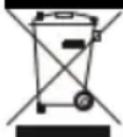
At the end of its working life, the product must not be disposed of as urban waste. It must be taken to a special local authority differentiated waste collection centre or to a dealer providing this service. Disposing of a household device separately avoids possible negative consequences for the environment and health deriving from inappropriate disposal and enables the constituent materials to be recovered to obtain significant savings in energy and resources.
As a reminder of the need to dispose of household devices separately, the product is marked with a crossed-out wheeled dustbin.
Guarantee & Customer Service
- BENRUBI Company guarantees its products for any manufacturing defect or defective materials for a period of two (2) years from the date of purchase or delivery by presenting purchase receipt. If your product malfunctions or you find any defects, please revert to the retail location you have purchased it from or contact an authorized BENRUBI Service Centre. To find the nearest authorized BENRUBI Service Centre, visit our website www.benrubi.gr. It is in the discretion of BENRUBI Company to replace or repair the defective product.
- The warranty does not cover damages resulting from normal wear, breakage, improper installation or maintenance of the product, mishandling, abnormal working conditions, failure to implement the instructions, conversion or repair of the product by an unauthorized technician who does not belong to the BENRUBI Service Centers.
Also, the warranty does not cover the following indicative factors:
• Stains, discoloration or scratches.
- Burns due to exposure to heat or flame.
- Damage from thermal shock (sudden temperature change).
FOR MORE INFORMATION CONTACT:
(NEW) H. BENRUBI & FILS SA
27 Aghiou Thoma str, GR15124
Maroussi - Athens
Tel. / Customer Support: 210 6156400
e-mail: benrubi-sda@benrubi.gr


- Safety interlocks
- SAVE THESE INSTRUCTIONS
- Batteries' Installation & Replacement
- Batteries installation:
- Batteries replacement:
- Disposal of the old batteries:
- Using the Appliance
- Always place the scale on a dry and flat surface prior to weighing.
- Note: Make sure your feet are on the sensors (1).
- Notes:
- Using the Appliance – BMI Function
- Repeat Measurements
- The measurements can be repeated in 2 ways:
- Automatic user identification
- Note: If 2 or more users have the same weight, the balance does not have the ability to identify the user.
- \* The ratings are repeated twice
- Repeat measurements without automatic recognition:
- Tips for the Analysis Scale
- The measurements displayed are indicative. Consult your doctor if you are on a diet or exercise.
- Parameter Reference
- Care and Cleaning
- Technical Characteristics
- Safe Appliance Disposal
- Guarantee & Customer Service
Brand : Izzy
Model : Runner IZ-7003
Category : Scale