
34-002 - Uncategorized IDEAL - Free user manual and instructions
Find the device manual for free 34-002 IDEAL in PDF.


| Product Type | Uncategorized Device |
| Brand | IDEAL |
| Model | 34-002 |
| Dimensions (L x W x H) | 6.0 x 3.0 x 1.0 in |
| Weight | 0.5 lbs |
| Power Source | 2 x AAA batteries (not included) |
| Display | LCD screen with backlight |
| Operating Temperature | 32°F to 104°F (0°C to 40°C) |
| Main Functions | Measurement, data logging, auto-off |
| Material | ABS plastic |
| Cleaning | Wipe with soft dry cloth; do not use liquids |
| Storage | Dry place at room temperature |
| Safety | Keep away from water, heat sources, and direct sunlight |
| Spare Parts | Battery compartment cover, stand (if applicable) |
| Warranty | 1 year limited manufacturer warranty |
Frequently Asked Questions - 34-002 IDEAL
User questions about 34-002 IDEAL
0 question about this device. Answer the ones you know or ask your own.
Ask a new question about this device
Download the instructions for your Uncategorized in PDF format for free! Find your manual 34-002 - IDEAL and take your electronic device back in hand. On this page are published all the documents necessary for the use of your device. 34-002 by IDEAL.
USER MANUAL 34-002 IDEAL
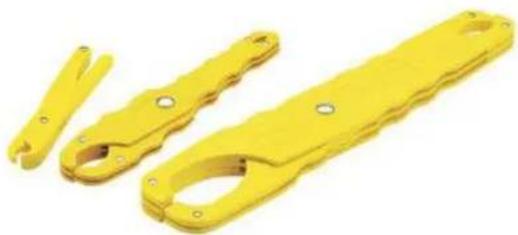
Safe-T-Grip Fuse Puller
natural_image
Three yellow plastic mechanical components with holes and slots, shown against a white background (no text or symbols visible)Features
Medium Puller for 0 to 100A/250V and 600V 1/2 inch to 1 inch diameter fuses
7-1/2 inches long
Handy and convenient for removing or replacing cartridge-type fuses
Three sizes handle fuses ranging from 0 to 600A
Fully insulated, high dielectric, glass filled polypropylene construction
Notched handles provide safe, no-slip grip
Clearly marked amperage ranges
Models
| Description Catalog # | |
| Safe-T-Grip Fuse Puller 34-002 |
Brand : IDEAL
Model : 34-002
Category : Uncategorized