
MAC6502BLED-4PK - Loudspeaker Bazooka - Free user manual and instructions
Find the device manual for free MAC6502BLED-4PK Bazooka in PDF.


| Product Type | Portable Bluetooth Speaker with LED Lights |
| Model | MAC6502BLED-4PK |
| Brand | Bazooka |
| Dimensions (Approx.) | 10 x 10 x 25 cm (3.9 x 3.9 x 9.8 in) |
| Weight (Approx.) | 1.2 kg (2.6 lbs) |
| Power Source | Rechargeable Lithium-ion battery via USB-C |
| Battery Life | Up to 10 hours at moderate volume |
| Charging Time | Approx. 3 hours |
| Bluetooth Version | 5.0 |
| Wireless Range | Up to 10 meters (33 ft) |
| Audio Input | Bluetooth, AUX 3.5mm |
| LED Lighting Modes | Multiple color cycling and rhythm sync modes |
| Controls | Power, Volume+/-, Play/Pause, LED mode, Built-in microphone |
| Speaker Configuration | Full-range driver with passive radiator |
| Frequency Response | 80 Hz – 20 kHz |
| Rated Power | 2 x 10W (stereo) |
| Water Resistance | IPX5 (splash resistant) |
| Maintenance & Cleaning | Wipe with a soft, dry cloth. Do not use abrasive cleaners. |
| Safety | Do not expose to extreme temperatures or moisture. Keep away from children. |
| Spare Parts & Reparability | Contact authorized service center for replacement parts. |
Frequently Asked Questions - MAC6502BLED-4PK Bazooka
User questions about MAC6502BLED-4PK Bazooka
0 question about this device. Answer the ones you know or ask your own.
Ask a new question about this device
Download the instructions for your Loudspeaker in PDF format for free! Find your manual MAC6502BLED-4PK - Bazooka and take your electronic device back in hand. On this page are published all the documents necessary for the use of your device. MAC6502BLED-4PK by Bazooka.
USER MANUAL MAC6502BLED-4PK Bazooka
- Card Type Remote
- Ultra Slim Design
- Demo Mode
- 1to1 Remote Paired
- Auto Save Function
Control Method
| Turn on/turn off | |
| MODE+/MODE- | Switch to dynamic mode |
| SPEED+/SPEED- | Adjust dynamic playing speed |
| COLOR+/COLOR- | Switch to static mode |
| BRIGHT+/BRIGHT- | Adjust static color brightness |
| DEMO | Loop play dynamic modes |
| 7 static mode(17 key telecontroller choice) | Switch to 7 static mode |
Installing
1. Power Supply
This unit accepts DC 5V to 24V power supply. The inner polepolarity is positive and sleeve is negative. Please select proper power supply according to the LED application.
2. LED Output
This unit support common anode connection LED products. The mark "▲" indicates the common connection node. The peak output
current is 4A per channel, please reduce load if main unit is overheating.
CAUTION! Do not short circuit the LED output, this may lead to permanent damage!
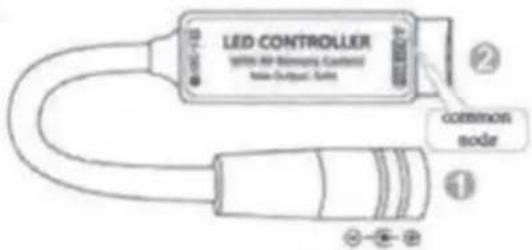
3. Remote Controll
Please pull out the insulate part before using. The RF wireless remote signal can pass through barrier, so it is not necessary to aim at the main unit when operate. for proper receiving remote signal, do not install the main unit in closed metal parts. The remote battery is 3V CR2025 type, please only replace with same type battery.
Specification
| Dynamic mode | 29 modes |
| Static Color | 20 colors |
| PWM Grade | 256 levels |
| Brightness Grade | 5 levels |
| Speed Grade | 10 levels |
| Demo mode | Yes |
| Working Voltage | DC 5-24V |
| Output Current | 3-way,peak 4A per channel |
| Remote frequency | 433.92MHz |
| Remote distance | >30m at open area |
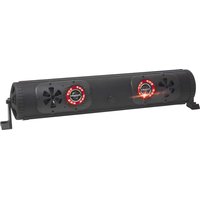
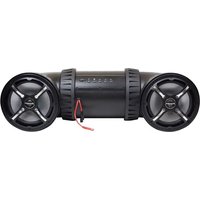
Brand : Bazooka
Model : MAC6502BLED-4PK
Category : Loudspeaker