
ZHS415 - Kitchen scale Zephir - Free user manual and instructions
Find the device manual for free ZHS415 Zephir in PDF.


| Product Type | Digital Kitchen Scale |
| Brand | Zephir |
| Model | ZHS415 |
| Weight Capacity | 5 kg (11 lbs) |
| Precision | 1 g (0.1 oz) |
| Units of Measurement | g, kg, oz, lb, ml, fl.oz |
| Display | LCD screen with backlight |
| Tare Function | Yes, subtract container weight |
| Auto Off | Yes, after 2 minutes of inactivity |
| Power Supply | 2 x AAA batteries (not included) |
| Platform Material | Tempered glass |
| Housing Material | ABS plastic |
| Dimensions (L x W x H) | 20 x 15 x 2 cm |
| Weight | 350 g |
| Overload Indicator | Yes |
| Low Battery Indicator | Yes |
| Cleaning Instructions | Wipe with a damp cloth; do not immerse in water |
| Safety Instructions | Use on a flat, stable surface; do not overload |
| Intended Use | Domestic kitchen use only |
Frequently Asked Questions - ZHS415 Zephir
User questions about ZHS415 Zephir
0 question about this device. Answer the ones you know or ask your own.
Ask a new question about this device
Download the instructions for your Kitchen scale in PDF format for free! Find your manual ZHS415 - Zephir and take your electronic device back in hand. On this page are published all the documents necessary for the use of your device. ZHS415 by Zephir.
USER MANUAL ZHS415 Zephir
natural_image
Digital kitchen scale with digital display showing 0.00, no visible text or symbols on the device itself.MANUALE D'ISTRUZIONI
natural_image
Simple line drawing of a two-pin electronic component (no text or symbols)PRECAUTIONS / CLEANING METHOD
WARNING: THIS PRODUCT IS NOT INTENDED TO GO IN TOUCH WITH FOODS.
- Keep all packaging (plastic bags, foam, screws) out of the reach of children or persons with reduced physical or mental capabilities, as this could compromise their safety.
- Clean the balance with a soft, slightly damp (not wet)
- Do not immerse the scale directly into the water. The unit is not waterproof.
- Place on a firm, level surface. Do not place on a carpet.
- Do not drop or strike the balance and avoid any damage.
- The balance is a precision instrument, treat it accordingly.
- Maintain the balance in a cool, dry place.
- If the scale does not turn on, check the battery status, should be replaced.
- This product is intended for domestic use only, not for commercial use.
BATTERIES PRECAUTIONS
Batteries must not be exposed to heat sources such as heat, sun or similar sources;
Remove batteries if they start to heat up or you know you do not use the unit for a long period
- The batteries must be installed correctly into the battery compartment;
- When you remove the battery because at the end of life or damaged Dispose of batteries according to national regulations and below.
- In case of loss of battery fluid, remove all batteries, preventing any leakage from coming into contact with skin or clothing. If fluid from the battery comes into contact with skin or clothing, wash the skin with water immediately. Before inserting new batteries, thoroughly clean the battery compartment with a damp paper towel, or follow the battery manufacturer's recommendations for cleaning.
- Danger of explosion if battery is replaced by an incorrect type. Use only batteries and replace with the same size and type;
Improper use of batteries may cause leakage, overheating or esplosione. Tale
fluid is corrosive and may be toxic. May cause chemical burns to skin and eyes, and is harmful to ingest. CAUTION:
- Keep batteries out of the reach of children.
- Do not heat, open, puncture, mutilate, or dispose of batteries in fire.
- Do not mix old and new batteries or batteries of different types
- Do not place metal objects that can come into contact with the battery terminals and thus can heat up and / or cause burns.
FEATURES
- Different graduation indication:
0.2g - 200g d = 0.1g / 0.005oz
200g - 500g d= 0.5g / 0.02g
500g - 2000g(3000g) d = 1g / 0.05g - Low battery power / Overload indication
- With high precision strain gauge sensor
- With tare function
- Auto off
TO INSTALL OR REPLACE BATTERY
The battery type of scale depends on the product store. Find the battery type of your scale according to the following pictures, then install and replace battery as described.
- 1x3V CR2032 lithium battery (included). Remove isolation sheet before use;
- 2x1.5V (AA/AAA) batteries (excluded). Remove package foil before use.

Open the battery case cover at the bottom of scale.
A. Take out the used battery with the aid of a sharp object, as shown in picture.
B. Install the new battery by putting one of the battery beneath the battery baffle and then pressing down the other side (The positive pole should be upward).
Open the battery case cover at the bottom of scale.
A. Take out the used battery with the aid of a sharp object if needed.
B. Install the new battery by putting one of the battery down first and then pressing down the other side (Please observe the polarity).
DISPLAY

A. Place the scale on a solid and flat surface.
B. Place bowl (if used) on the scale before turning on the scale.
C. Press "ON/OFF" button to enter weighing mode.
D. Start weighing until LCD shows "0.0g".
E. Load weighing objects on to start weighing, LCD will show the weight reading.
F. Press "ON/OFF" to turn off.
ZERO OR TARE FUNCTION
To weigh different loads consecutively without removing loads from the scale. Put first load on the scale, get weight reading. Press "Z/T" button to reset the LCD reading "0" before adding next load. You can repeat this operation.
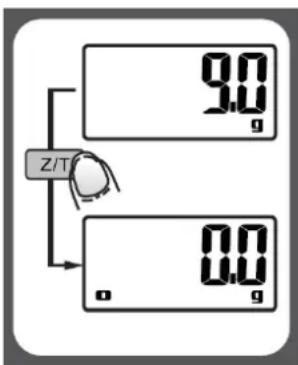
■ Condition 1: "ZERO" function
When total sum of all loads on scale <= 4% of scale's max weight capacity. (4%=80g when capacity is 2000g; 200g when capacity is 5000g)
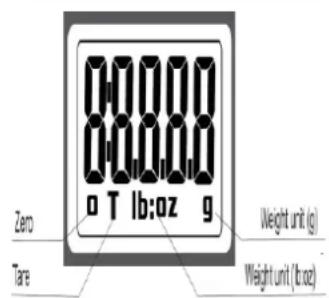
LCD will show “---” or “0.0g” each time “Z/T” button is touched. “---” means that the process about waiting for zero and stable. LCD will show “0.0g” after scale is stable. Meanwhile, an icon “0” on lower left corner of LCD means “ZERO” function is active. Capacity remains unchanged.

■ Condition 2: "TARE" function
When total sum of all loads on scale <= 4% of scale's max weight capacity. (4%=80g when capacity is 2000g; 200g when capacity is 5000g)
LCD will show “---” or “0.0g” each time “Z/T” button is touched. “---” means that the process about waiting for zero and stable. LCD will show “0.0g” after scale is stable. Meanwhile, an icon “T” on lower left corner of LCD means “TARE” function is active. The capacity of scale = Max capacity total weight of loads.
Under condition 2:
You can check the total weight of loads once "Z/T" is pressed. If you are proceed to weight, LCD will show "0.0" once "Z/T" is pressed again.
UNIT CONVERSION

natural_image
Simple line drawing of a two-pin electronic component (no text or symbols)In the rear side of the scale, you can find a unit conversion button as shown in picture.
If the scale is with both unit system of Metric (g) or Imperial (lb:oz), press this button at the bottom of the scale, or "UNIT" button to convert between two systems.
AUTO SHUT OFF
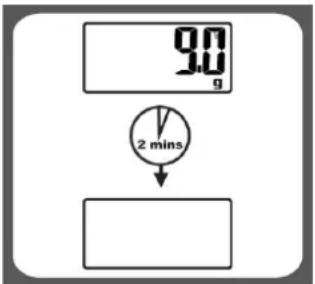
Auto show off occurs if no operation or shows the same weight reading for 2 minutes.
MANUAL SHUT OFF
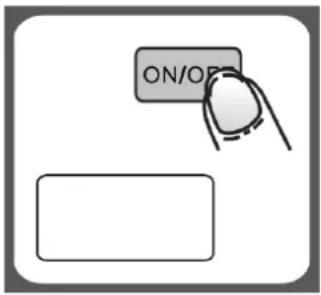
To maximize battery life, please press again "ON/OFF" button to turn off the scale after use.
WARNING INDICATORS
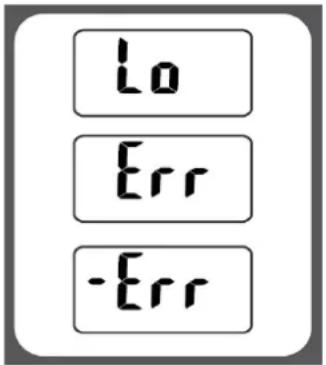
- Replace new battery.
- Scale overload. Remove item to avoid damage. Max weight capacity is indicated on the scale.
- Negative overload. Negative weight is out of range.
www.uniorservice.com
WESTIM S.p.A.
Via Roberto Bracco 42/E
00137, Roma
Tel. 06 8720311
Italiano

Disposal of old electrical & electronic equipment (Applicable in the European Union and other European countries with separate collection systems)
This symbol on the product or in its packaging indicates that this product shall not be treated as household waste. Instead it shall be handed over to the applicable collection point for the recycling of electrical and electronic equipment. By ensuring this product is disposed of correctly, you will help prevent potential negative consequences for the environment and human health, which could otherwise be caused by inappropriate waste handling of this product. The recycling of materials will help to conserve natural resources. For more detailed information about recycling of this product, please contact your local city office, your household waste disposal service or the shop where you purchased the product.
Français


- PRECAUTIONS / CLEANING METHOD
- WARNING: THIS PRODUCT IS NOT INTENDED TO GO IN TOUCH WITH FOODS.
- BATTERIES PRECAUTIONS
- FEATURES
- TO INSTALL OR REPLACE BATTERY
- DISPLAY
- ZERO OR TARE FUNCTION
- ■ Condition 1: "ZERO" function
- ■ Condition 2: "TARE" function
- UNIT CONVERSION
- AUTO SHUT OFF
- MANUAL SHUT OFF
- WARNING INDICATORS
- Italiano
- Français
Brand : Zephir
Model : ZHS415
Category : Kitchen scale