
XP-ER800N - CD Player AIWA - Free user manual and instructions
Find the device manual for free XP-ER800N AIWA in PDF.


| Product Type | Portable CD Player |
| Brand | Aiwa |
| Model | XP-ER800N |
| Dimensions (approx.) | 130 x 130 x 20 mm |
| Weight (approx.) | 200 g |
| Power Supply | AA batteries (2x) or AC adapter |
| Playback Media | CD, CD-R, CD-RW |
| Audio Output | Stereo headphones jack |
| Anti-Shock Protection | Yes (e.g., 10 seconds) |
| Programmable Play | Up to 20 tracks |
| Repeat Modes | 1, All, Random |
| Battery Life (approx.) | 10 hours |
| Lens Cleaning | Use a dry camera lens cloth; avoid liquids |
| Storage | Keep in a dry place, avoid dust |
| Safety | Do not expose to water; use only specified batteries |
| Spare Parts | Batteries, headphones, AC adapter |
| Repairability | Laser pickup replacement possible by technician |
| Accessories Included | Stereo headphones, AC adapter, carrying pouch (optional) |
Frequently Asked Questions - XP-ER800N AIWA
User questions about XP-ER800N AIWA
0 question about this device. Answer the ones you know or ask your own.
Ask a new question about this device
Download the instructions for your CD Player in PDF format for free! Find your manual XP-ER800N - AIWA and take your electronic device back in hand. On this page are published all the documents necessary for the use of your device. XP-ER800N by AIWA.
USER MANUAL XP-ER800N AIWA
TV/WB/FM/AM Portable CD Player
Operating Instructions

XP-ER800N
Sony Corporation ©2003 Printed in China
For assistance and information
visit us on the internet at
www.us.aiwa.com
call toll free 1-800-BUY-AIWA
(United States only)
http://www.aiwa.com/
CD player (front)
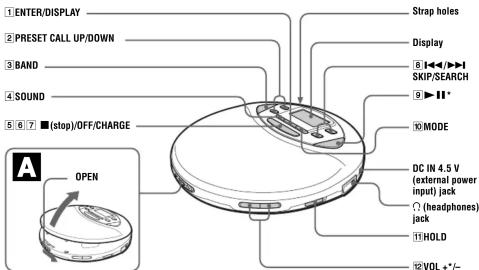
*The button has a tactile dot.
Display
Track number/PRESET number

B

Open the battery compartment lid.

Insert the end first (for both batteries).
C
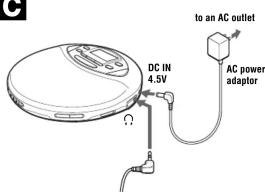
Headphones
D

WARNING
To prevent fire or shock hazard, do not expose the unit to rain or moisture.
Do not install the appliance in a confined space, such as a bookcase or built-in cabinet.
To prevent fire, do not cover the ventilation of the apparatus with newspapers, tablecloths, curtains, etc. And don't place lighted candles on the apparatus.
To prevent fire or shock hazard, do not place objects filled with liquids, such as vases, on the apparatus.
CAUTION
The use of optical instruments with this product will increase eye hazard.
Certain countries may regulate disposal of the battery used to power this product. Please consult with your local authority.
CAUTION
- INVISIBLE LASER RADIATION WHEN OPEN - DO NOT STARE INTO BEAM OR VIEW DIRECTLY WITH OPTICAL INSTRUMENT
The validity of the CE marking is restricted to only those countries where it is legally enforced, mainly in the countries EEA (European Economic Area).
Owner's Record
The model number and the serial number are located at the rear of the CD player. Record the serial number in the space provided below. Refer to these numbers whenever you call upon your Aiwa dealer regarding this product. Model No. XP-ER800N
Serial No.
For the customers in the USA
This equipment has been tested and found to comply with the limits for a Class B digital device, pursuant to Part 15 of the FCC Rules. These limits are designed to provide reasonable protection against harmful interference in a residential installation. This equipment generates, uses, and can radiate radio frequency energy and, if not installed and used in accordance with the instructions, may cause harmful interference to radio communications. However, there is no guarantee that interference will not occur in a particular installation. If this equipment does cause harmful interference to radio or television reception, which can be determined by turning the equipment off and on, the user is encouraged to try to correct the interference by one or more of the following measures:
- Increase the separation between the equipment and receiver - Connect the equipment into an outlet on a circuit different from that to which the receiver is connected. - Consult the dealer or an experienced radio/TV technician for help
You are cautioned that any changes or modifications not expressly approved in this manual could void your
Declaration of Conformity
Trade Name: AIWA Model No.: XP-ER800N Responsible Party: Sony Electronics Inc. Address: 680 Kinderkamack Road, Oradell, NJ 07649 USA Telephone No.: 201 020 6073
This device complies with Part 15 of the FCC Rules. Operation is subject to the following two conditions: (1) This device may not cause harmful interference, and (2) this device must accept any interference received, including interference that may cause undesired operation.
Power Sources
To use the batteries (B)
Use only the following batteries for your CD player:
Dry batteries
• LR6 (size AA) alkaline batteries (not supplied)
Rechargeable batteries
Charge the rechargeable batteries before using them for the first time. • Commercially-available size AA Ni-MH rechargeable battery capacity of 12.5MWh, 750 kW
To insert the batteries
1 Open the battery compartment lid on the rear of your CD player.
2 Insert two batteries by matching the to the diagram in the battery compartment and close the lid until it clicks into place.
3 When using the rechargeable batteries, connect the commercially-available AC power adaptor to the DC IN 4.5V jack of your CD player and an AC outlet, then press ■/OFF/CHARGE while the CD player is turned off to start charging.
The CD player charges the batteries. The "CHG" indicator turns on in the display and the indicator sections of 1772 light up in succession. When the batteries are completely charged, the "CHG" and 1771 indicators get turned off.
If you press ■/OFF/CHARGE after the charge has already been completed, the 📄 indicator flashes and "Full" appears in the display.
4 Disconnect the AC power adaptor.
Battery life\* (approx. hours)
(When the CD player is used on a flat and stable place.) Playing time varies depending on how the CD player is used
E•A•S•S E•A•S•S Radio
Two Sony alkaline 38 32 58
batteries LR6 (SG)
(produced in Japan)
* Measured value by the standard of JEITA (Japan Electronics and Information Technology Industries Association).
To check the remaining power of the batteries
You can check it in the display.
Replace the batteries when "☐" flashes
Lo batt*
3.7
Notes
• The indicator sections of currently shows the
remaining battery power. One section does not always
• Depending on operating conditions, the indicator
sections of 1 , may increase or decrease.
Notes on using the dry batteries
- Be sure to remove the AC power adaptor. - When the batteries are depleted, replace both batteries with new ones.
Notes on the rechargeable batteries
• To keep the original battery capacity for a long time, charge the batteries only when they are completely depleted.
- If the battery is new or has not been used for a long time, it may not be charged completely until you charge and discharge it several times.
- When carrying the rechargeable batteries, use the battery carrying case supplied with the rechargeable batteries to prevent unexpected heat. If the rechargeable batteries and the metallic objects get contacted, heat or fire may occur due to a short circuit.
When to replace the rechargeable
batteries If the battery life becomes shorter by about half, replace the batteries with new rechargeable batteries.
To use the AC power adaptor (☐)
1 Connect the commercially-available AC power adaptor whose rated output is 4.5 V DC, 500 mA, to an AC outlet.
Playing a CD
To insert a CD
1 Slide OPEN to open the lid (A)
2 Fit the CD to the pivot, then close the lid (D).
Notes
• This CD player can play discs recorded in the Compact Disc Digital Audio (Audio CD) format.
- This CD player can play CD-Rs/CD-RWs recorded in the Compact Disc Digital Audio (Audio CD) format, but playback capability may vary depending on the quality of the disc and the condition of the recording device.
- This product is designed to play back discs that conform to the Compact Disc (CD) standard. Recently, various music discs encoded with copyright protection technologies are marketed by some record companies. Please be aware that among those discs, there are some that do not conform to the CD standard
and may not be playable by this product.
To operate the CD player
Button/Switch and its Function/Operation
① ENTER/DISPLAY
Press to check the remaining time on the CD and the number of tracks left. Also press to enter the selected track for the PGM play.
2 PRESET CALL UP/DOWN
Press to select the preset station you want.
3BAND
Press to turn on the radio. Press also to change the
band.
Use to emphasize the bass-boosted sound. Press
repeatedly to select DSL or DSL
DSL enhances more than DSL
5 (stop)
Press to stop playing.
6OFF
Press to turn off the radio
7 CHARGE
Press to start charging.
For CD player: Press ◀◀ or ▶▶ once to find the beginning of the current/next track. Press ◀◀ or ▶▶ repeatedly to find the beginning of the previous/succeeding tracks. Press and hold ◀◀ or ▶▶ to go backward/forward quickly.
For radio: Press to tune in the station you want.
9▶Ⅲ (play/pause) Press to start play. Press again to pause play. To play from the first track, press for 2 seconds or more while the CD player is stopped.
Button/Switch and its Function/Operation
10 MODE For CD player: Press repeatedly until the play mode
you want appears in the disp
“1”: Single play
"SHUF": Shuffle play
"PGM": PGM (program) play
To repeat the play mode you selected, press and hold
until → appears.
For radio. Press until 31 disappears from the display to improve the receiving condition on E
11 HOLD
Use to lock the controls to prevent accidental button presses.
12 VOL +
Press to adjust the volume.
(No text)
* If the sound is distorted when using the SOUND function,
turn down the volume.
To protect against sound skipping
The E·A·S·S function has been developed to provide excellent protection against sound skipping during many active uses.
1 Insert a disc and wait until the display goes off.
2 While holding MODE press ▶II
3 Press MODE to select the E•A•S•S mode
When you select "E•A•S•S", the E•A•S•S function is enhanced compared to "E•A•S•S ♩".
To walk with the CD player and enjoy high quality CD sound using the E·A·S·S function, select "E·A·S·S" While taking harder exercises, it is recommended that you set it to "E·A·S·S."
4 Press ENTER/DISPLAY
Note
Sound may skip:
– if the CD player receives stronger continuous shock than expected
- if a dirty or scratched CD is played or
hen using poor-quality CD-Rs/CD-RWs or if there is a
obesein with the recording device of application software
Checking the remaining time on the CD
You can check the remaining time on the CD and the number of racks left using ENTER/DISPLAY.
1 Press ENTER/DISPLAY
Each time you press the button, the display changes as
follows:

*Not displayed during the Single play and Shuffle play.
To remove the CD
Remove the CD while pressing the pivot.

To turn off the operation beep sound
You can turn off the beep sound that is heard from your headphones when you operate your CD player.
1 Remove the power source (AC power adaptor, dry batteries) from the CD player, and wait for about 3 seconds.
2 Connect the power source while pressing ■/OFF/CHARGE.
To turn on the beep sound
Remove the power source, wait for about 3 seconds, and then connect the power source without pressing ■/OFF/CHARGE.
Playing tracks in your
favorite order (PGM play)
You can program the CD player to play up to 24 tracks in your favorite order.
1 During playback, press MODE repeatedly until
"PGM" flashes.
2 Press ◀◀◀ or ▶▶▶ to select a track.
3 Press ENTER/DISPLAY to enter the selected track "00" appears and the playing order increases by one.
4 Repeat steps 2 and 3 to select the tracks in your favorite order.
5 Press and hold ENTER/DISPLAY until the PGM play starts.
To check the program
During programming, press ENTER/DISPLAY repeatedly before step 5. Each time you press ENTER/DISPLAY, the track number appears.
Note
- When you finish entering the 24th track in step 3, the first selected track appears in the display. - During the PGM play, you cannot check the program.
To cancel PGM play
During programming or PGM play, press MODE once so that "PGM" disappears.
(Continue to the reverse side)
Listening to the radio
1 Press BAND to turn on the radio.
2 Press BAND until the band you want appears.
Each time you press the button, the display changes as follows:
→ FM → AM → TV → WB
3 Press ◀◀◀ or ▶▶▶ on the CD player to tune in the station you want and adjust the volume.
Tuning mode and Preset mode When the preset number appears in the display, the CD player is in the preset mode and you can use PRESET CALL UP/DOWN to select the preset number.
To enter the tuning mode, press ◀◀◀ or ▶▶◀ to make the preset number disappear from the display and to tune in the station.
To turn off the radio Press ■/OFF/CHARGE.
Note
During radio reception, the power is turned off automatically if no operation is made for about 2.5 hours since the last operation.
To tune in the station quickly Press and hold ◀◀◀ or ▶▶◀ on the CD player in step 3 until the frequency digits begin to change in the display. The CD player automatically scans the radio frequencies and stops when it finds a clear station.
To improve broadcast reception For TV/WB/FM, extend the headphones cord.
Headphones
For AM, reorient the CD player itself.


Note
Keep the headphones connected to the jack of the CD player. The headphones cord works as the FM/TV/WB antenna.
If it is hard to hear the FM broadcast Press MODE until "ST" disappears from the display. Under the normal conditions, press MODE until "ST" appears in the display.
Presetting radio stations automatically
You can preset up to 30 stations in total for FM and AM. 1 Press BAND to turn on the radio.
2 Press and hold ENTER/DISPLAY until searching starts.
The CD player starts to scan the radio frequencies on FM and AM, and the received stations are memorized. "bUSy" appears for about 4 seconds when all the received stations are memorized or when 30 stations are memorized.
Skipping the tuned station while the scanning is paused.
When a station is tuned in, scanning pauses and the tuned station is heard for 5 seconds. Press ▶▶▶ to skip the station while the scanning is paused.
Note
- Stations cannot be stored on TV and WB. - When broadcast signals are very weak, stations cannot be preset automatically. Preset them manually.
Presetting radio stations manually
You can preset up to 30 stations in total for FM and AM. 1 Press BAND to turn on the radio.
2 Press BAND to select the band.
3 Press ◀◀◀ or ▶▶◀ on the CD player to tune in the station you want
4 Press ENTER/DISPLAY. "PRESET" appears in the display.
To preset another station, repeat steps 3 and 4.
Changing the presetting
1 Press PRESET CALL UP or DOWN to select the preset number you want to change.
2 Press and hold down ENTER/DISPLAY until the preset number flashes.
3 While the preset number is flashing, press ◀◀◀ or ▶▶◀ to tune in the station you want to memorized on that preset number.
4 Press ENTER/DISPLAY.
If the flashing stops, repeat from step 2.
Erasing a preset station
Press ■/OFF/CHARGE after step 2 in “Changing the presetting” above. “bUSy” appears for about 4 seconds, and the selected preset station is erased from the memory. The preset number decreased by one for the stored stations whose preset number are larger than that of the just-erased station.
Note
• Stations cannot be stored on TV and WB.
- When "P-Full" appears during presetting, you cannot preset any more stations.
Playing preset radio stations
1 Press BAND to select the band.
2 Press PRESET CALL UP/DOWN to tune in a stored station.
Changing the tuning interval
When using the CD player abroad, change the AM tuning interval, if necessary.
1 Press ■/OFF/CHARGE to turn off the CD player, if it is turned on.
2 While holding MODE, hold BAND for about 3 seconds.
3 Press MODE to select the AM tuning interval. 9 kHz area: Asia and Europe
10 kHz area: the U.S.A., Canada and South America
4 Press ENTER/DISPLAY. "bUSy" appears for seconds, and the tuning interval is changed.
Notes
After changing the tuning interval, you need to preset radio stations again.
Precautions
On safety
- Should any solid objects or liquid fall into the CD player, unplug it and have it checked by qualified personnel before operating it any further.
• Do not put any foreign objects in the DC IN 4.5 V (external power input) jack.
On power sources
- When you are not using the CD player for a long time, disconnect all power sources from the CD player.
On AC power adaptor
- Use the commercially-available AC power adaptor whose rated output is 4.5 V DC, 500 mA. Do not use any other AC power adaptor. It may cause a malfunction.
Polarity of the plug

- Do not touch the AC power adaptor with wet hands. - Connect the AC power adaptor to an easily accessible AC outlet. Should you notice an abnormality in the AC power adaptor, disconnect it from the AC outlet immediately. - Do not install the AC power adaptor in a confined space, such as a bookcase or built-in cabinet. - To prevent fire or shock hazard, do not place objects filled with liquids, such as vases, on the AC power adaptor.
On rechargeable batteries and dry batteries
- Do not charge the dry batteries
- Do not throw the batteries into fire. - Do not carry the batteries with coins or other metallic objects. It can generate heat if the positive and negative terminals of the battery are accidentally contacted by a metallic object.
- Do not mix rechargeable batteries with dry batteries.
- Do not mix new batteries with old ones. - Do not use different types of batteries together.
- When the batteries are not to be used for a long time, remove them.
- If battery leakage occurs, wipe off any deposit in the battery compartment, and install new batteries. In case the deposit adheres to you, wash it off thoroughly.
On the CD player
- Keep the lens on the CD player clean and do not touch it. If you do so, the lens may be damaged and the CD player will not operate properly.
- Do not put any heavy object on top of the CD player. The CD player and the CD may be damaged.
- Do not leave the CD player in a location near heat sources, or in a place subject to direct sunlight, excessive dust or sand, moisture, rain, mechanical shock, unleveled surface, or in a car with its wind closed.
- If the CD player causes interference to the radio or television reception, turn off the CD player or move it away from the radio or television.
• Discs with non-standard shapes (e.g., heart, square, star) cannot be played on this CD player. Attempting to do so may damage the CD player. Do not use such discs.
Note on moisture condensation
If the CD player is suddenly moved from a cold place to a warm place, it may result in moisture condensation on the pickup lens and malfunction or playback difficulties. Should this occur, leave the CD player for a few hours, then try playback again.
On headphones/earphones
Road safety
Do not use headphones/earphones while driving, cycling, or operating any motorized vehicle. It may create a traffic hazard and is illegal in some areas. It can also be potentially dangerous to play your headsets at high volume while walking, especially at pedestrian crossings. You should exercise extreme caution or discontinue use in potentially hazardous situations.
Preventing hearing damage
Avoid using headphones/earphones at high volume. Hearing experts advise against continuous, loud and extended play. If you experience a ringing in your ears, reduce volume or discontinue use.
Consideration for others
Keep the volume at a moderate level. This will allow you to hear outside sounds and to be considerate to the people around you.
Maintenance
To clean the casing
Use a soft cloth slightly moistened in water or a mild detergent solution. Do not use alcohol, benzine or thinner.
To clean the plugs
If the plugs become dirty, there is no audio or noise is heard. Clean them with a dry soft cloth periodically.
Troubleshooting
Should any problem persist after you have made these checks, consult your nearest Aiwa dealer.
"Hold" appears in the display when you press a button, and the CD does not play.
→ The buttons are locked. Slide HOLD back.
The battery compartment lid is detached by an accidental drop, excessive force, etc.
→ Attach it as illustrated below,

Specifications
System
Compact disc digital audio system
Laser diode properties
Material: GaAlAs Wavelength: λ = 780 nm
Wavelength: = 750 mm Emission duration: Continuous
Laser output: Less than 44.6 W (This output is the value measured at a distance of 200mm from the objective lens surface on the optical pick-up block with 7mm aperture.)
Frequency range
10 kHz step:
TV: 2 - 13 ch WB (weather band): 1 - 7 ch
FM: 87.5 - 108.0 MHz
AM: 530 - 1 710 kHz
9 kHz step:
1V: 2 - 15 ch WB (weather band): 1 - 7 ch
FM: 87.5 - 108.0 MHz
AM: 531 - 1 602 kHz
Power requirements
- Two LR6 (size AA) batteries (not supplied): 3 V DC
- AC power adaptor (DC IN 4.5 V jack): 120 V, 60 Hz - Two Ni-MH rechargeable batteries (size AA, 700
mAh): 2.4 V DC
Dimensions (w/h/d) (without projecting parts and controls)
Approx. 136.0 × 20.4 × 139.0 mm (5 % × 13% × 5 % in.)
Mass (excluding accessories)
Approx. 200 g (7 oz)
Operating temperature
5^ - 35^ (41^ - 95^)
Design and specifications are subject to change without
notice.
Supplied Accessories
Headphones (1)
This warranty is valid only in the United States.
- TV/WB/FM/AM Portable CD Player
- WARNING
- CAUTION
- Owner's Record
- For the customers in the USA
- Declaration of Conformity
- Power Sources
- To use the batteries (B)
- Dry batteries
- Rechargeable batteries
- To insert the batteries
- Battery life\* (approx. hours)
- Two Sony alkaline 38 32 58
- (produced in Japan)
- To check the remaining power of the batteries
- Notes
- Notes on using the dry batteries
- Notes on the rechargeable batteries
- When to replace the rechargeable
- To use the AC power adaptor (☐)
- Playing a CD
- To insert a CD
- and may not be playable by this product.
- To operate the CD player
- Button/Switch and its Function/Operation
- To protect against sound skipping
- Note
- Checking the remaining time on the CD
- To remove the CD
- To turn off the operation beep sound
- To turn on the beep sound
- Playing tracks in your
- favorite order (PGM play)
- To check the program
- To cancel PGM play
- Listening to the radio
- Headphones
- Presetting radio stations automatically
- Skipping the tuned station while the scanning is paused.
- Presetting radio stations manually
- Changing the presetting
- Erasing a preset station
- Playing preset radio stations
- Changing the tuning interval
- Precautions
- On safety
- On power sources
- On AC power adaptor
- Polarity of the plug
- On rechargeable batteries and dry batteries
- On the CD player
- Note on moisture condensation
- On headphones/earphones
- Road safety
- Preventing hearing damage
- Consideration for others
- Maintenance
- To clean the casing
- To clean the plugs
- Troubleshooting
- Specifications
- System
- Laser diode properties
- Frequency range
- Power requirements
- Supplied Accessories
Brand : AIWA
Model : XP-ER800N
Category : CD Player