
XP-SR311 - CD Player AIWA - Free user manual and instructions
Find the device manual for free XP-SR311 AIWA in PDF.


| Product Type | Portable CD Player |
| Model | XP-SR311 |
| Brand | Aiwa |
| Playback Media | Audio CDs, CD-R, CD-RW |
| Anti-Shock Protection | Yes, 40 seconds |
| Playback Modes | Normal, Repeat, Random, Program |
| Audio Output | Headphone jack (3.5mm), Line out |
| Power Source | 2 AA batteries or AC adapter (DC 4.5V) |
| Battery Life | Approx. 8 hours (alkaline) |
| Dimensions (W x D x H) | 130 x 130 x 20 mm |
| Weight (without batteries) | 200 g |
| Display | LCD track number and time |
| Controls | Play/Pause, Stop, Skip, Volume, Hold |
| Hold Switch | Prevents accidental operation |
| Accessories Included | AC adapter, headphones, user manual |
| Maintenance | Clean lens with soft cloth; avoid moisture |
| Safety | Do not disassemble; keep away from liquids |
| Repair & Spare Parts | Contact authorized service centers |
Frequently Asked Questions - XP-SR311 AIWA
User questions about XP-SR311 AIWA
0 question about this device. Answer the ones you know or ask your own.
Ask a new question about this device
Download the instructions for your CD Player in PDF format for free! Find your manual XP-SR311 - AIWA and take your electronic device back in hand. On this page are published all the documents necessary for the use of your device. XP-SR311 by AIWA.
USER MANUAL XP-SR311 AIWA
To maintain good performance

For safety

Note on listening with the headphones
Note on condensation

If an erroneous operation occurs
P is ■TOP/OFF/CHARGE! √ √ √ √ √ √ √ √ √ √ √ √ √ √ √ √ √ √ √ √ √ √ √ √ √ √ √ √ √ √ √ √ √ √ √ √ √ √ √ √ √ √ √ √ √ √ √ √ √ √ ∞
USING ON DRY CELL BATTERIES → A
1 Set the dial to the OPEN position to open the disc compartment, then open the battery compartment.
2Insert two size AA (LR6) alkaline batteries with the + and - marks correctly aligned. After battery insertion, close the battery compartment firmly.
3 Close the disc compartment tightly and set the dial to the LOCK position.
Battery replacement

Battery life (using alkaline batteries LR6)
| F m - 1ft EA Batt | |
| 48 App - y. 20 - u# | |
| 12 OFF App - y. 15 - u# |
Balt: t-ma, a. pin n-1-1, t-no-f
If the cover of the battery compartment comes off → B
Note
Close the battery compartment firmly, or the compact disc may be damaged.
Note
Close the battery compartment firmly, or the compact disc may be damaged.
Note on dry cell batteries
Mak u it at + q. - mak a i a n
D-η-t mγ η:ff:η t pδ-i balt:δ,-η:-,balt:√r aŋ:
p: i, th: k-1: k-1: a kg. - y p-o-no n : : a y
it bati, app t aik it m, tak it m apat.
a n-1 n_0 balt e , m , n m+ p , n n_0 be balt
If u. ask + mlt ball: 1, p-ir - yr + m,
USING ON RECHARGEABLE BATTERIES → C

1 Insert the rechargeable batteries with the ⊕ and ⊖ marks correctly aligned.
2Connect the AC adaptor.

3Keep ■ STOP/OFF/CHARGE pressed for about 1 second to start charging.

Time to recharge the batteries
H

natural_image
Hand turning a circular component with a knob, no text or symbols visibleDSL
P 39 D#L+ - π - p √: fus- q . q . . :p: bas .
DSL: D-pp bar -mp a z-.
DSL: Dip base set -η, imp a z.
DSL : N- m20 - q .
Connecting the headphones → F
Pu—ui it: ubb: ap q. —qq jit is upp j, p a.p-q j k. r: PHONE/LINE O T | a.k.
Inserting a disc → G
1Set the dial to the OPEN position to open the disc compartment.
2Place a disc in the center with the label side facing up.
3Close the disc compartment tightly and set the dial to the LOCK position.
To remove the disc → H
Set the HOLD switch to RESUME.
RESUME app: a, a - u a ta1 pa ba-k + m i p-n i f - u + pp. pa ba-k b p n y ■ TOP/OFF/CHARGE To cancel resume play: iH HOLD √ iH - OFF.
Note
Ré um: pa ma la at ap n lab ut 30 - g b b, - b a, - t + pp p n. Ré um: pa ma n - t p a l : l u + pp a t h : a l 30 - m g - l r i n a a k. Ré um: pa b q , - u p h l t - mpa tm l. Lift : q l - u n - ll, - u m: pa (n - l b q , - q l t e a , b s u + o t r : HOLD / k - OFF b i - q q , p .
Random play → L
Press PLAY MODE in standby mode to display (RNDM).
To cancel random play, p do PLA MODE# to b m . RNDM pa k a + RNDM.
Note
- u, qn - i ba k + p - ■ i a k b p o n j, ◀◀ , un j, a m pa . - u, qn - b - ◀ + n - i a k - p a l , un j, a m pa .
Repeat play → L
P is PLA MODE, um, pa bakt, : :1: p at pa a + - p
Tuning in to a station → M
1Press TUNER ON/BAND repeatedly to select AM or FM.
2 Press TUNING + (▶▶I) or - (I◀◀) to tune in to a station.
After listening, p 30 ■TOP/OFF/CHARGE+ tuŋ-ff: a.
For quick tuning
K: p T NING + (▶▶) - (▶◀) p s o + ab-ul 1e - n .
For better reception → N
FM: F → a.p-n → .in +no a it → FM a tinn a. K→p → ttn AM: Tun it → q-t- n, it → ps-t-n → k→, s→ k → bδ i → pt-n
To listen to an FM stereo broadcasting
a1q 1.95ial-9.9512.4T 8.65+ .ST It 1 FMe 1.20.9 a 6.ak q . + 1. p 6 MONOAT. 4T ui q . it 2.9 b-1a.9 m7 au a but + 1.9 b- u
Note
D: p + p + t : - m pat m + u n a - p + n . F : buit n o / b : a + at . F : p . f u n - if aut ma - a - p + at n o ma , all : 180 m ut + m + a + p + at n u n a - p + n .
O

P

1

2

3

Q

R
S

AM steps → O
Ra, b-a; a+; a-; if-; q-t; u-m; a-y; a. k; a-y; n. ll; q-l; p-n; i-l; q-l; q-l. Fe, q-l; ta+; +10 kHz; t-p-n AM. AMt; t-p; a-y; +9 kHz; t-l; AM; TEP; t-l-n; t-mn; s-l;
mpa; m+11-9 kHz.
l-l; AMt; t-p; k-a-y; t-at-n e-l al-up; t-a::a-
Presetting stations → P
u p up+ + ta- 30 ta-n-n AM q FM.
1Press TUNER ON/BAND repeatedly to select AM or FM.
2 Press TUNING + (▶▶) or − (◀◀) to tune in to a station.
3Press ENTER to preset the station.
aP a h umb
To preset more stations, -p:at 1-p 2 q . 3.
Listening to preset stations → Q
1Press TUNER ON/BAND repeatedly to select AM or FM.
2 Press PRESET CALL ∧/∨ repeatedly to select the preset number.
After listening, p ☐ TOP/OFF/CHARGE-1u—if: a.
Changing the presetting
1 Press PRESET CALL ∧/∨ repeatedly to select the preset number you wish to change.
2Keep ENTER pressed for 1 or more seconds until the preset number and the frequency flash.
3 While the preset number is flashing, press TUNING + (▶▶▶) or - (▶◀◀) to tune in to a station.
4 Press ENTER to preset the station on the selected preset number.
If the flashing stops, p:all p- u i-m t-p 2.
Erasing the presettings one by one
P is ■TOP/OFF/CHARGE at i p 2 n C a m, it p s in "ab. Eat p e in tat n e a . A it s in m , up b - n q , it p e in umb a i j st .
Erasing all of the presetting
K-p ENTER p 1,1 p 2 T NER ON/BAND 1 1 1 u 1 p 1 u mb 1 a 1 a 1
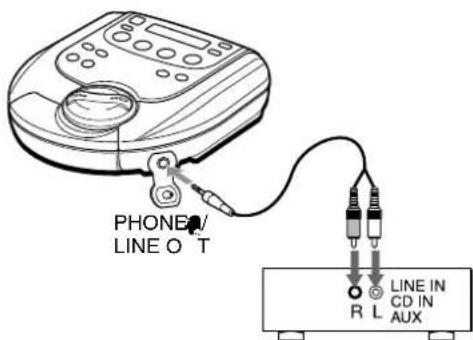
CONNECTING TO AN EXTERNAL UNIT → R
a- mm a a a ab - n + p y a 3.50 t m p y a-n h q l p-n p y a l k q Cnn - k l t m - p y + t P H O N E / L I N E O T a-k - f l t q t q - n q l t p-n p y + t q a-y n put t m a - f l t q t a q l.
Note
Tun—iif: p- √: | b-it q b+ √: -qq +q. DO NOT—qq +q +q PHONO pue—| q amp i √(|t a bu tn p-q → u a z -amp i √). A. o it √ um-q DqL-n # e q t.
MAINTENANCE
To clean the lens → S
11it: 1e b-m, 1, it: pa: √ e kp-n-1pa. lllt: -u, a it: 1e n-1 + 1e mqn. T-m: + pai, e, je: a a-m: a n-e-b √ /b u! a+ b: (a) (m+ -e n pa i, e, it n-j-l b u-l i, n-e b) m: b-b-m, it: n-e g T-m: n-e-pn, e, a-a-n-e/ab pp-n, n-e-zq-n-u-n. p-j-l-i-mi: n-i + it z. Liao: zq-n-u-n mn: a a,a ab.
Note
Tak: a n-1 j-1 muk - u-n-n is /ab, f k-u + (n-t i q 1 q a a a m g. P s n y t-1 i-n o f it is /ab-u a k-b a k h j mo .
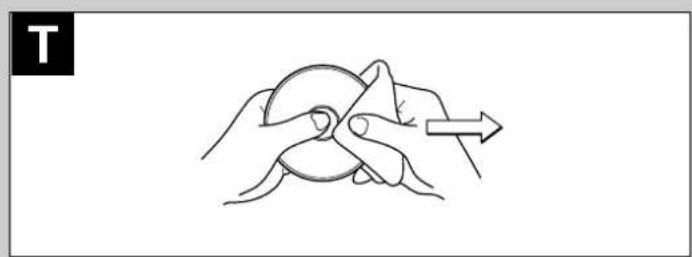
To clean the discs → T
B: p a n, / p:lt : p + m:lt : n + ut / a. / lt a: a n - it. Aft: p a n, + :lt : p + n + a .
SPECIFICATIONS
Tracking system 3-b-a _m a
Laser pickup m n u a :

natural_image
Illustration of hands holding a circular object with an arrow indicating direction (no text or symbols)SPECIFICATIONS
Tracking system 3-b-a _m a
Laser pickup
D/A conversion 4-1 m ^3 - , a m pn n , . . . ia f i : +1-bt DAC
Frequency response20 - 20,000 Hz (47 k
Output PHONE/LINE O T a-k(1-4 mn -a-k)
Frequency range AM: 530/531 kHz - 1,710/1,602 kHz
$$ (1 0 \mathrm{kHz} / 9 \mathrm{kHz} \text { l - p }) $$
$$ \mathrm{FM}: 8 7. 5 - 1 0 8 \mathrm{MHz} $$
Maximum output 12 m + 12 m (16- at 1 kHz)
$$ 5 0 0 \mathrm{m} ^ {- 1} (4 7 \mathrm{k} \cdot \text { m } \quad \text { a i } 1 \mathrm{kHz}) $$
Power supply DC 3: a n,1f-2 z AA (LR6) a kan :
$$ b a t: \delta $$
$$ D C 2. 4 \text { m } a = m m ^ {2} a a. a a b $$
$$ \text { a } \cdot \text { ab bait } $$
$$ A G - u \text { 单 } \text { 个 } \text { 个 } \text { 个 } \text { 个 } \text { 个 } \text { 个 } \text { 个 } \text { 个 } \text { 个 } \text { 个 } \text { 个 } \text { 个 } \text { 个 } \tag {1} $$
$$ a, a p $$
Maximum outside dimensions
$$ 1 3 2 (\text { }) \times 3 2. 5 (\mathrm{H}) \times 1 4 1 (\mathrm{D}) \mathrm{mm}, 5 ^ {1 / 4} \times 1 ^ {5 / 1 6} $$
$$ \times 5 ^ {5} / \text { a } \text { n }. (\text { y } \cdot \text { u } \text { n }, \text { p } - 1, \text { n }, \text { p } \text { a } \text { s } \text { a } \text { s } \text { a } \text { s } $$
$$ - 1 - 2) $$
Weight App-y. 280, (9.8-z.) y u n batt
Accessories AC a, api- AC-D603 (1)
$$ \text { a. } \beta_ {n} \text { (1) } $$
$$ \mathrm{Ca} \eta_ {j} \cdot a = (1) $$
AC adaptor AC-D603Rat pul: AC 120, 60 Hz
$$ \begin{array}{l} \text { F } \ni p _ {- 1} ^ {\prime} f _ {a t - n} a. \Rightarrow i n a a p p: a q ^ {\prime} \div l t e q: a \ni u b. \end{array} $$
- To maintain good performance
- For safety
- Note on listening with the headphones
- Note on condensation
- If an erroneous operation occurs
- USING ON DRY CELL BATTERIES → A
- Battery replacement
- Battery life (using alkaline batteries LR6)
- If the cover of the battery compartment comes off → B
- Note
- Note on dry cell batteries
- USING ON RECHARGEABLE BATTERIES → C
- DSL
- Connecting the headphones → F
- Inserting a disc → G
- To remove the disc → H
- Random play → L
- AM steps → O
- mpa; m+11-9 kHz.
- l-l; AMt; t-p; k-a-y; t-at-n e-l al-up; t-a::a-
- Presetting stations → P
- Listening to preset stations → Q
- Changing the presetting
- Erasing the presettings one by one
- Erasing all of the presetting
- CONNECTING TO AN EXTERNAL UNIT → R
- MAINTENANCE
- To clean the lens → S
- To clean the discs → T
- SPECIFICATIONS
Brand : AIWA
Model : XP-SR311
Category : CD Player