BSMBB500M - Mouse BUFFALO - Free user manual and instructions
Find the device manual for free BSMBB500M BUFFALO in PDF.


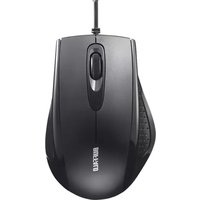
| Product Type | Wired Optical Mouse |
| Model | BSMBB500M |
| Brand | Buffalo |
| Connectivity | USB 2.0 |
| Cable Length | 1.5 m |
| Dimensions (L x W x H) | 100 x 60 x 35 mm |
| Weight | 80 g |
| Power Source | USB bus power |
| Number of Buttons | 3 (Left, Right, Scroll wheel) |
| Scroll Wheel | Yes, clickable |
| Resolution (DPI) | 1000 DPI |
| Sensor Type | Optical |
| Compatible Operating Systems | Windows, macOS, Linux |
| Plug and Play | Yes, no driver required |
| Material | Plastic |
| Color | Black (typical) |
| Maintenance | Clean with a dry, soft cloth |
| Safety Precautions | Do not expose to liquids or extreme temperatures |
| Repairability | Not user-serviceable; contact support for issues |
| Warranty | 1 year limited warranty |
Frequently Asked Questions - BSMBB500M BUFFALO
User questions about BSMBB500M BUFFALO
0 question about this device. Answer the ones you know or ask your own.
Ask a new question about this device
Download the instructions for your Mouse in PDF format for free! Find your manual BSMBB500M - BUFFALO and take your electronic device back in hand. On this page are published all the documents necessary for the use of your device. BSMBB500M by BUFFALO.
USER MANUAL BSMBB500M BUFFALO
The 17th edition of the 18th edition of the 19th edition of the 20th edition of the 21st edition of the 22nd edition of the 23rd edition of the 24th edition of the 25th edition of the 26th edition of the 27th edition of the 28th edition of the 29th edition of the 30th edition of the 31st edition of the 32nd edition of the 33rd edition of the 34th edition of the 35th edition of the 36th edition of the 37th edition of the 38th edition of the 39th edition of the 40th edition of the 41st edition of the 42nd edition of the 43rd edition of the 44th edition of the 45th edition of the 46th edition of the 47st edition of the 48th edition of the 49th edition of the 50th edition of the 51st edition of the 52nd edition of the 53rd edition of the 54th edition of the 55th edition of the 56th edition of the 57st edition of the 58th edition of the 59th edition of the 60th edition of the 61st edition of the 62nd edition of the 63rd edition of the 64th edition of the 65th edition of the 66th edition of the 67st edition of the 68th edition of the 69th edition of the 70th edition of the 71st edition of the 72nd edition of the 73rd edition of the 74th edition of the 75th edition of the 76th edition of the 77st edition of the 78th edition of the 79th edition of the 80th edition of the 81st edition of the 82nd edition of the 83rd edition of the 84th edition of the 85th edition of the 86th edition of the 87st edition of the 88th edition of the 89th edition of the 90th edition of the 91st edition of the 92nd edition of the 93rd edition of the 94th edition of the 95th edition of the 96th edition of the 97st edition of the 98th edition of the 99th edition of the 100th edition
2
に関する注意
[Unreadable due to severe distortion and noise]
[Unreadable due to severe distortion and noise]
We provide several and one in the signed entry in
Kapacca m.
Japan