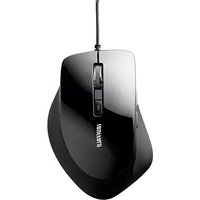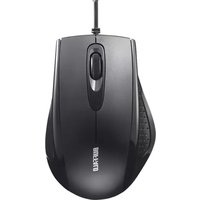
BUFFALO BSMRU050BK - Mouse

BSMRU050BK - Mouse BUFFALO - Free user manual and instructions

Find the device manual for free BSMRU050BK BUFFALO in PDF.

📄 2 pages English EN Download 💬 AI Question 10 questions ⚙️ Specs
Notice BUFFALO BSMRU050BK - page 1
Pick your language and provide your email: we'll send you a specifically translated version.
Product Type Wired Mouse
Model Number BSMRU050BK
Brand Buffalo
Color Black
Connectivity USB Wired
Interface USB Type-A
Sensor Type Optical
Resolution 1000 DPI
Number of Buttons 3 (Left, Right, Scroll Wheel)
Scroll Wheel Yes
Cable Length 1.5 m
Dimensions (L x W x H) 115 x 60 x 35 mm
Weight 100 g
Power Source USB Bus Power
Compatible Operating Systems Windows, macOS, Linux (Support only for Japanese OS)
Warranty 1 year limited
Country of Origin Japan
Maintenance Wipe with a dry cloth; avoid liquids
Spare Parts Not available separately
Safety Use only with USB compliant devices

Frequently Asked Questions - BSMRU050BK BUFFALO

What is the DPI of the Buffalo BSMRU050BK mouse?
The mouse has a fixed resolution of 1000 DPI, suitable for standard office and browsing tasks.
Is the BSMRU050BK mouse compatible with Windows 10?
Yes, it works with Windows 10, but note that official support is only provided for Japanese OS. It should function on other languages as a standard HID mouse.
Does this mouse require batteries?
No, it is a wired mouse powered directly via the USB connection. No batteries are needed.
How do I clean the Buffalo mouse?
Unplug the mouse and wipe the exterior with a soft dry cloth. Do not use liquids or abrasive cleaners.
What is the cable length of the BSMRU050BK?
The USB cable is approximately 1.5 meters long, providing a comfortable reach from your computer.
Is the mouse suitable for gaming?
This is a basic optical mouse with 3 buttons and 1000 DPI, designed for general use. It is not optimized for gaming.
My mouse cursor is not moving smoothly. What can I do?
Try cleaning the sensor lens with a dry cloth, ensure the mouse is on a non-reflective surface, and test on a different USB port.
Does the mouse have a scroll wheel?
Yes, it includes a standard scroll wheel that also functions as a middle button when pressed.
Can I use this mouse with a Mac?
It is compatible with macOS as a standard USB mouse, but Buffalo only provides support for Japanese OS environments.
What should I do if the mouse is not detected?
Check the USB connection, try another port or computer. Ensure the cable is not damaged. If the issue persists, contact Buffalo support (Japanese only).

User questions about BSMRU050BK BUFFALO

0 question about this device. Answer the ones you know or ask your own.

Ask a new question about this device

The email remains private: it is only used to notify you if someone responds to your question.

No questions yet. Be the first to ask one.

Download the instructions for your Mouse in PDF format for free! Find your manual BSMRU050BK - BUFFALO and take your electronic device back in hand. On this page are published all the documents necessary for the use of your device. BSMRU050BK by BUFFALO.

USER MANUAL BSMRU050BK BUFFALO

We provide technical and customer support only to Japanese OS. We provide technical and customer support only in Japanese language. We provide technical and customer support only for use in Japan.
Manual assistant
Powered by Anthropic
Waiting for your message
Product information

Brand : BUFFALO

Model : BSMRU050BK

Category : Mouse