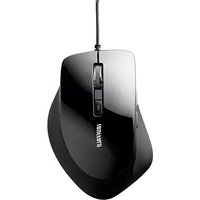
BSMBU23S - Mouse BUFFALO - Free user manual and instructions
Find the device manual for free BSMBU23S BUFFALO in PDF.


Pick your language and provide your email: we'll send you a specifically translated version.
| Product Type | Wired Optical Mouse |
| Model | BSMBU23S |
| Brand | Buffalo |
| Connection Type | USB 2.0 |
| Cable Length | 1.5 m |
| Number of Buttons | 3 (Left, Right, Middle) |
| Scroll Wheel | Yes |
| Resolution | 1000 DPI |
| Sensor Type | Optical |
| Dimensions (L x W x H) | 120 x 65 x 38 mm |
| Weight | 95 g |
| Power Source | USB Bus-Powered |
| Compatibility | Windows, macOS, Linux |
| Color | Black |
| Operating Temperature | 0°C to 40°C |
| Storage Temperature | -20°C to 60°C |
| Warranty | 2 years |
| Maintenance | Clean with dry cloth; avoid liquids |
| Safety Precautions | Do not disassemble; keep away from moisture |
Frequently Asked Questions - BSMBU23S BUFFALO
How do I connect the Buffalo BSMBU23S mouse to my computer?
Simply plug the USB cable into an available USB port on your computer. The mouse should be automatically recognized by the operating system without requiring additional drivers.
Is the mouse compatible with macOS?
Yes, the Buffalo BSMBU23S is compatible with Windows, macOS, and most Linux distributions. It works as a plug-and-play device.
How do I clean the mouse?
Unplug the mouse before cleaning. Use a soft, dry cloth to wipe the exterior. For stubborn dirt, slightly dampen the cloth with water. Do not use harsh chemicals or immerse the mouse in any liquid.
What should I do if the cursor jumps or moves erratically?
First, clean the optical sensor on the bottom of the mouse with a dry cloth. Ensure you are using the mouse on a flat, non-reflective surface. If problems persist, try a different USB port or restart your computer.
Does this mouse require batteries?
No, the Buffalo BSMBU23S is a wired mouse that draws power directly from the USB port. It does not require batteries.
Can I adjust the DPI or sensitivity?
This model has a fixed DPI of 1000 and does not include hardware DPI switching. You can adjust pointer speed in your operating system's mouse settings.
Is the mouse left-handed compatible?
The Buffalo BSMBU23S has an ambidextrous design, making it suitable for both left- and right-handed users. However, there are no side buttons, so it works equally for both.
What is the cable length?
The cable length is approximately 1.5 meters (4.9 feet).
How do I troubleshoot if the mouse is not detected?
Try connecting the mouse to a different USB port. Test the mouse on another computer to determine if the issue is with the mouse or the computer. If it still does not work, the cable may be damaged.
Where can I find the driver or software for this mouse?
The Buffalo BSMBU23S does not require any specific driver; it uses the standard HID driver built into your operating system. No additional software is needed.
User questions about BSMBU23S BUFFALO
0 question about this device. Answer the ones you know or ask your own.
Ask a new question about this device
No questions yet. Be the first to ask one.
Download the instructions for your Mouse in PDF format for free! Find your manual BSMBU23S - BUFFALO and take your electronic device back in hand. On this page are published all the documents necessary for the use of your device. BSMBU23S by BUFFALO.
USER MANUAL BSMBU23S BUFFALO
The Ground Truth image displays a single, solid horizontal line. According to Rule 2 (UNDERSCORE & LINE RULES), if the GT contains lines used for stylistic emphasis or as background (like ruled paper), the OCR result must ignore them. The line in the GT is clearly a stylistic or background line, not a placeholder for text. Therefore, the OCR should not have output any underscores. Outputting \`\_\_\_\_\` constitutes an error under Rule 2, as it hallucinates placeholder symbols where none are semantically intended. Hence, the OCR result is inconsistent with the Ground Truth.
保証書
Table of contents
Click a title to access it
- The Ground Truth image displays a single, solid horizontal line. According to Rule 2 (UNDERSCORE & LINE RULES), if the GT contains lines used for stylistic emphasis or as background (like ruled paper), the OCR result must ignore them. The line in the GT is clearly a stylistic or background line, not a placeholder for text. Therefore, the OCR should not have output any underscores. Outputting \`\_\_\_\_\` constitutes an error under Rule 2, as it hallucinates placeholder symbols where none are semantically intended. Hence, the OCR result is inconsistent with the Ground Truth.
- 保証書
Manual assistant
Powered by Anthropic
Waiting for your message
Product information
Brand : BUFFALO
Model : BSMBU23S
Category : Mouse