
PSPL03 - Sound level meter Pyle - Free user manual and instructions
Find the device manual for free PSPL03 Pyle in PDF.


| Product Type | Sound Level Meter |
| Brand | Pyle |
| Model | PSPL03 |
| Frequency Range | 31.5 Hz – 4 kHz |
| Measuring Level Range | 40 – 130 dB |
| Frequency Weighting | A |
| Microphone | 1/2 inch electret condenser microphone |
| Display | LCD |
| Resolution | 0.1 dB |
| Accuracy | ±1.5 dB (at reference conditions) |
| Functions | MAX/MIN, Data Hold, Over Range Indication, Auto Power Off |
| Auto Power Off | Approx. 15 minutes of inactivity |
| Power Supply | 9V battery (NEDA 1604 or equivalent) |
| Battery Life | Approx. 50 hours (typical) |
| Weight | 107 g (including battery) |
| Dimensions | Approx. 200 × 60 × 30 mm |
| Operating Temperature | 0°C to 40°C (32°F to 104°F) |
| Operating Humidity | ≤ 90% RH |
| Altitude | Up to 2000 m |
| Safety | For indoor use only; avoid dust, moisture, and extreme temperatures |
| Maintenance | Wipe with a damp cloth; do not use abrasives or solvents |
| Included Accessories | Windscreen, 9V battery, user manual |
Frequently Asked Questions - PSPL03 Pyle
User questions about PSPL03 Pyle
0 question about this device. Answer the ones you know or ask your own.
Ask a new question about this device
Download the instructions for your Sound level meter in PDF format for free! Find your manual PSPL03 - Pyle and take your electronic device back in hand. On this page are published all the documents necessary for the use of your device. PSPL03 by Pyle.
USER MANUAL PSPL03 Pyle
PSPL03 Sound Level Meter

www.pyleaudio.com
I ⚠SafetSafety information
Read the following safety information carefully before
attempting to operate or service the meter.
Use the meter only as specifi protection provided by th
- Environment conditions
conditions
| 1 | Altitude | up | to 2000 | meter |
| 2 | Relatively | humidity | 90 | |
| 3 | Operation | Ambient | 0~4 |
- Maintenance & Clearing ring
&
| 1 | Repairs only be | or performed | servicing | by the | qu on |
| 2 | Periodically abrasives | or | wipe solvents |
II. GeneralDescription
Description
| Thank you follow This measurement Industrial environments.● Ranges 31.5Hz ● Display ● With | you get the Sound | for the manual Level | using most | To ensure that from carefully Meter requirements offices | |
| from 4 KHz. 0.1dB equivalent A weight | |||||
III. Specifications
Frequency range : 31.5Hz\~ 4 KHz
Measuring level range : 4 0\~130dB
Frequency weighting : A
Microphone : 1/2 inch electret condenser microphone
Display : LCD
Digital
display
Resolution:
Display
weighting
ranges
: 60-130dB
[Non-Text]
: + 1.5dB
: “ O
Accuracy
Alarm
function
range
Auto
power
off
approx.
Power
supply
NEDA
life
: About
^o F)
temperature
humidity
temperature ^°C ( 14
humidity
tF)
140
:
Dimensions
pack
107
g(
N/W
)
manual.
IV. Name and Function functions
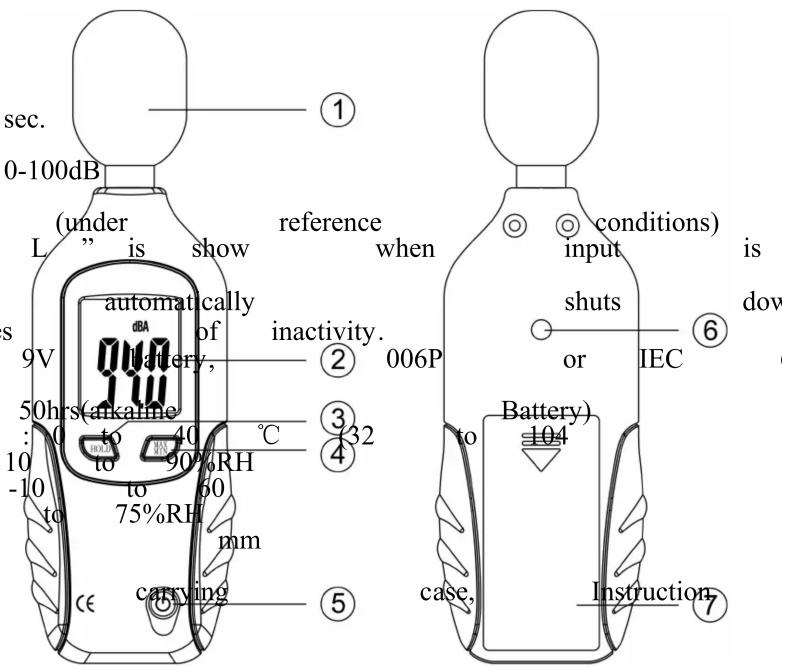
1) Windscreen
If you operate at wind speed over 10m/sec, please put protective accessories in front of the microphone.
2) Display

| The minimum seconds,the | MAX/MIN | 1 evel meter | button of sounds. will be |
| 5) On/Off | button |
V. Measurement Preparation
| (1) | Battery | loading | ||
| Remove | the | battery | cover | |
| Battery. | ||||
| (2) | Battery | Replacement | ||
| When voltage, be replaced | the BAT” | batteries. “with new | voltage If it app one. | |
SYMBOL
LCD
MAX
O VER
dBA
HOLD
BAT
FUNCTION
| 3 | digits | |
| Maximum/MNimun | ||
| Over | ||
| unit | ||
| Keep | ||
| Low-Battery | ||
FUNCTION
Value
and
the reading
VI. Operating PatisITIONS
| (1) | Wind additional | blowing | across noise. |
| extraneous Once | using the | instrument | |
| must to | mount | the windscreen | |
| signals. | |||
| (2) | To achieve cable that eliminated. | to separate effect | accurate the Micro of unexpected |
| (3) Calibrate was not in use for a long environment. | |||
| (4) and Do hold not the store Button or operate to tu and high humidity in the environment the reading | |||
| (5) Keep microphone dry |
| (6) Please humidity | take the environment. | battery |
3)"HOOIbDton
| Data | Hold |
| data | hold |
| The | hold |
4) ""MAXAMIN" buttonMIN" button
VII. Measurement
1 Open battery cover and install a 9-volt battery in the battery compartment.
| 2 Hold point pressure | the the level | instrument microphone will be | comfortably at the displayed. | in hand noise | or fix source, | ||
| 3 When show | MAX the maximum (maximum) | mode and minimum | is chosen. reading | The on the | |||
| 4 When freezes momentarily | HOLD the to (data to activate) | hold in the or to (display. to exit) | is chosen. The Press the HOLD | HOLD function | |||
| 5 Turn when | OFF not in use. | instrument and remove | remove | ||||
Brand : Pyle
Model : PSPL03
Category : Sound level meter