Headbones - Headphones Damson - Free user manual and instructions
Find the device manual for free Headbones Damson in PDF.


| Product Type | Bone Conduction Headphones |
| Brand | Damson |
| Model | Headbones |
| Dimensions | Approx. 13.5 x 4.5 x 1.5 cm |
| Weight | 30 g |
| Battery Type | Rechargeable Lithium-ion |
| Battery Life | Up to 6 hours of playback |
| Charging Time | Approx. 1.5 hours |
| Connectivity | Bluetooth 5.0 |
| Wireless Range | Up to 10 meters |
| Water Resistance | IPX4 (sweat and splash resistant) |
| Controls | Multifunction button, volume rocker |
| Microphone | Built-in for hands-free calls |
| Ear coupling | Open-ear (bone conduction) |
| Driver Type | Bone conduction transducer |
| Frequency Response | 20 Hz – 20 kHz |
| Impedance | 16 ohms |
| Cleaning Instructions | Wipe with a damp cloth; avoid water ingress |
| Safety Warnings | Do not use at high volume for extended periods |
| Spare Parts | Ear hooks and charging cable available |
| Repairability | Limited; battery replacement by professional recommended |
Frequently Asked Questions - Headbones Damson
User questions about Headbones Damson
0 question about this device. Answer the ones you know or ask your own.
Ask a new question about this device
Download the instructions for your Headphones in PDF format for free! Find your manual Headbones - Damson and take your electronic device back in hand. On this page are published all the documents necessary for the use of your device. Headbones by Damson.
USER MANUAL Headbones Damson

For support visit: www.damsonaudio.com/support
For warranty information visit: www.damsonaudio.com/warranty
CAUTION Risk of explosion if the battery is replaced by an incorrect type. Always dispose of used batteries safely. Do not burn or throw in trash. Use authorised battery recycling where possible.

- How to wear:
The Headbones should sit just on your cheek bone, in front of your ears, keeping your ears free.
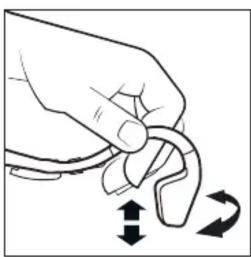
- Adjust to fit:
Place your thumb and forefinger on the "flexi-fit" arms and mould to the most comfortable fit.

- Power / Pairing:
To power up, press 'call' for 3 seconds or 5 seconds to pair. Alternatively, use the 'Aux In' for wired connection.

- Hear everything:
After pairing, hit play on your smart device, or gently press the 'call' button to play music.
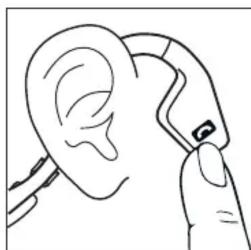
- Call function:
When receiving a phone call, press the call button to answer. After, press call to play music.

- Voice Calls:
Press the call button for 2-3 seconds to activate Siri or Google Voice for handsfree dialling.

- Aux Out -
Hear Nothing Else:
Insert any pair of 3.5mm headphones into the line out to block off external sound.

- Water resistance:
Headbones should withstand sweating or a heavy rain storm. Suitable for extreme sports.
FCC
FCC ID: 2AA9Y-DAHB01
Warning: Changes or modifications to this unit not expressly approved by the party responsible for compliance could void the user's authority to operate the equipment.
NOTE: This equipment has been tested and found to comply with the limits for a Class B digital device, pursuant to Part 15 of the FCC Rules. These limits are designed to provide reasonable protection against harmful interference in a residential installation. This equipment generates, uses and can radiate radio frequency energy and, if not installed and used in accordance with the instructions, may cause harmful interference to radio communications.
However, there is no guarantee that interference will not occur in a particular installation. If this equipment does cause harmful interference to radio or television reception, which can be determined by turning the equipment off and on, the user is encouraged to try to correct the interference by one or more of the following measures:
• Reorient or relocate the receiving antenna.
- Increase the separation between the equipment and receiver.
- Connect the equipment into an outlet on a circuit different from that to which the receiver is connected.
- Consult the dealer or an experienced radio/TV technician for help.
Brand : Damson
Model : Headbones
Category : Headphones