Oyster - Loudspeaker Damson - Free user manual and instructions
Find the device manual for free Oyster Damson in PDF.


| Product Type | Wireless Speaker |
| Model | Oyster |
| Brand | Damson |
| Dimensions (Approx.) | 200 x 100 x 80 mm |
| Weight (Approx.) | 1.2 kg |
| Power Source | Rechargeable Lithium-ion Battery |
| Battery Life (Approx.) | 12 hours |
| Charging Time (Approx.) | 3 hours |
| Connectivity | Bluetooth 5.0 |
| Wireless Range | Up to 10 meters |
| Frequency Response | 60 Hz - 20 kHz |
| Speaker Configuration | Full-range driver + Passive radiator |
| Power Output | 20W RMS |
| Controls | Power, Volume +/-, Play/Pause, Bluetooth pairing button |
| Audio Input | 3.5mm AUX |
| Water Resistance | IPX5 (splash-proof) |
| Compatibility | Smartphones, tablets, laptops |
| Maintenance | Wipe with a soft dry cloth |
| Safety Warnings | Do not expose to extreme heat or moisture |
| Package Contents | Speaker, USB charging cable, AUX cable, user manual |
Frequently Asked Questions - Oyster Damson
User questions about Oyster Damson
0 question about this device. Answer the ones you know or ask your own.
Ask a new question about this device
Download the instructions for your Loudspeaker in PDF format for free! Find your manual Oyster - Damson and take your electronic device back in hand. On this page are published all the documents necessary for the use of your device. Oyster by Damson.
USER MANUAL Oyster Damson

International Power Adaptor Kit
D: International Power Adaptor Kit
F: International Power Adaptor Kit
IT: International Power Adaptor Kit
ES: International Power Adaptor Kit
P: International Power Adaptor Kit

3.5mm - 3.5mm cable

Protective Pouch
D: Schutztasche
F: étui de protection
IT: custodia protettiva
ES: bolsa protectora
P: bolsa de protecção

Quick StartGuide
D: benutzerhandbuch
F: Guide de L'utilisateur
IT: Guida Utente
ES: instrucciones
P: guia do usuário

Charge
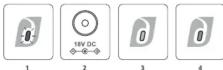
1 When Flashing RED, OYSTER requires charging.
2 Insert the DC jack into the rear of your OYSTER.
3 A YELLOW Light indicates OYSTER is charging.
4 A GREEN light indicates that OYSTER is charged.
Power, Pair & Play
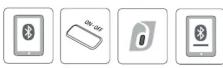
1 Activate Bluetooth on the device you wish to connect. 2 Press the ON-OFF button to switch on your OYSTER. 3 The BLUE light will illuminate. Your device will connect automatically. 4 When connected, OYSTER will appear in your device list and you are ready to PLAY. You can only pair to one device at the same time. Warning: Playing music at loud volumes can damage your hearing. Please listen responsibly
Line In
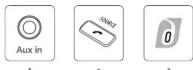
1 Insert the 3.5mm cable supplied into the rear of the device you are connecting and the other end into the AUX IN at the rear of OYSTER. Press 2 SOURCE until the LED indicator turns 3 WHITE.
Receiving a Call
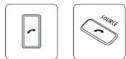
You can accept an incoming the call 1 using your OYSTER by pressing the 2 button. Press the 2 button to hang up.

Charge
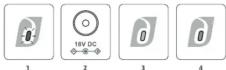
1 When Flashing RED, OYSTER requires charging.
2 Insert the DC jack into the rear of your OYSTER.
3 A YELLOW Light indicates OYSTER is charging.
4 A GREEN light indicates that OYSTER is charged.
Power, Pair & Play
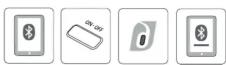
1 Activate Bluetooth on the device you wish to connect. 2 Press the ON-OFF button to switch on your OYSTER. 3 The BLUE light will illuminate. Your device will connect automatically. 4 When connected, OYSTER will appear in your device list and you are ready to PLAY. You can only pair to one device at the same time. Warning: Playing music at loud times can damage your hearing. Please listen responsibly
Line In

1 Insert the 3.5mm cable supplied into the rear of the device you are connecting and the other end into the AUX IN at the rear of OYSTER.
Press 2 SOURCE until the LED indicator turns 3 WHITE.
Receiving a Call

You can accept an incoming the call 1 using your OYSTER by pressing the 2 button. Press the 2 button to hang up.

Charge

1 When Flashing RED, OYSTER requires charging.
2 Insert the DC jack into the rear of your OYSTER.
3 A YELLOW Light indicates OYSTER is charging.
4 A GREEN light indicates that OYSTER is charged.
Power, Pair & Play

1 Activate Bluetooth on the device you wish to connect. 2 Press the ON-OFF button to switch on your OYSTER. 3 The BLUE light will illuminate. Your device will connect automatically. 4 When connected, OYSTER will appear in your voice list and you are ready to PLAY. You can only pair to one device at the same time. Warning: Playing music at loud times can damage your hearing. Please listen responsibly
Line In
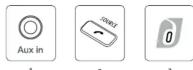
1 Insert the 3.5mm cable supplied into the rear of the device you are connecting and the other end into the AUX IN at the rear of OYSTER.
Press 2 SOURCE until the LED indicator turns 3 WHITE.
Receiving a Call
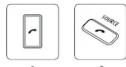
You can accept an incoming the call 1 using your OYSTER by pressing the 2 button. Press the 2 button to hang up

Charge

1 When Flashing RED, OYSTER requires charging.
2 Insert the DC jack into the rear of your OYSTER.
3 A YELLOW Light indicates OYSTER is charging.
4 A GREEN light indicates that OYSTER is charged.
Power, Pair & Play

1 Activate Bluetooth on the device you wish to connect.
2 Press the ON-OFF button to switch on your OYSTER.
3 The BLUE light will illuminate. Your device will connect automatically. 4 When connected, OYSTER will appear in your device list and you are ready to PLAY. You can only pair to one device at the same time. Warning: Playing music at loud volumes can damage your hearing. Please listen responsibly
Line In

1 Insert the 3.5mm cable supplied into the rear of the device you are connecting and the other end into the AUX IN at the rear of OYSTER.
Press 2 SOURCE until the LED indicator turns 3. WHITE.
Receiving a Call
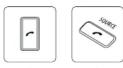
You can accept an incoming the call 1 using your OYSTER by pressing the 2 button. Press the 2 button to hang up.

Charge
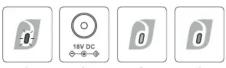
1 When Flashing RED, OYSTER requires charging.
2 Insert the DC jack into the rear of your OYSTER.
3 A YELLOW Light indicates OYSTER is charging.
4 A GREEN light indicates that OYSTER is charged.
Power, Pair & Play
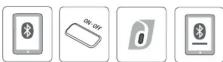
1 Activate Bluetooth on the device you wish to connect
2 Press the ON-OFF button to switch on your OYSTER. 3 The BLUE light will illuminate. Your device will connect automatically. 4 When connected, OYSTER will appear in your device list and you are ready to PLAY. You can only pair to one device at the same time. Warning: Playing music at loud volumes can damage your hearing. Please listen responsibly.
Line In
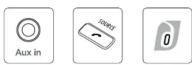
1 Insert the 3.5mm cable supplied into the rear of the device you are connecting and the other end into the AUX IN at the rear of OYSTER.
Press 2 SOURCE until the LED indicator turns 3. WHITE.
Receiving a Call

You can accept an incoming the call 1 using your OYSTER by pressing the 2 button. Press the 2 button to hang up.

Charge
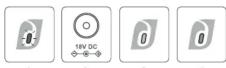
1 When Flashing RED, OYSTER requires charging.
2 Insert the DC jack into the rear of your OYSTER.
3 A YELLOW Light indicates OYSTER is charging.
4 A GREEN light indicates that OYSTER is charged.
Power, Pair & Play

1 Activate Bluetooth on the device you wish to connect
2 Press the ON-OFF button to switch on your OYSTER.
3 The BLUE light will illuminate. Your device will connect automatically. 4 When connected, OYSTER will appear in your device list and you are ready to PLAY. You can only pair to one device at the same time. Warning: Playing music at loud volumes can damage your hearing. Please listen responsibly.
Line In

1 Insert the 3.5mm cable supplied into the rear of the device you are connecting and the other end into the AUX IN at the rear of OYSTER.
Press 2 SOURCE until the LED indicator turns 3. WHITE.
Receiving a Call

You can accept an incoming the call 1 using your OYSTER by pressing the 2 button. Press the 2 button to hang up.
Instruction Manual
For the full instruction manual please visit www.damsonaudio.com/support/oyster-instructions
3D Sound
For advice on how best to position your OYSTER, please visit www.damsonaudio.com/support/oyster-3dsound
Accessories
A range of Accessories are available through stockists or online at www.damsonaudio.com/oyster-accessories. The speaker covers can be changed - personalise your Oyster with different colour grilles.
Warranty
For warranty information, please visit www.damsonaudio.com/oyster-warranty

damson

A4 folded
User Guide Draft 3
Brand : Damson
Model : Oyster
Category : Loudspeaker