
CM0600KTR - Washing machine Profilo - Free user manual and instructions
Find the device manual for free CM0600KTR Profilo in PDF.


Pick your language and provide your email: we'll send you a specifically translated version.
| Product Type | Free-standing washing machine |
| Brand | Profilo |
| Model | CM0600KTR |
| Energy Class | A+++ |
| Capacity | 6 kg |
| Maximum Spin Speed | 1200 rpm |
| Dimensions (H x W x D) | 85 x 60 x 54 cm |
| Weight | 62 kg |
| Power Supply | 220-240 V, 50 Hz |
| Water Connection | Cold water only |
| Noise Level (Wash/Spin) | 58 dB / 76 dB |
| Programs | Cotton, Synthetics, Delicates, Wool, Quick Wash, Rinse, Spin, Drain |
| Display Type | LED |
| Control Type | Electronic with rotary dial |
| Delay Start | Up to 24 hours |
| Child Lock | Yes |
| Water Consumption per Cycle | 45 L |
| Annual Energy Consumption | 176 kWh |
| Safety Features | Overflow protection, unbalanced load detection, door lock |
| Maintenance | Clean filter monthly, descale every 3 months |
| Spare Parts Availability | Door seal, belt, pump filter, control board available |
| Repairability Index | 7.2 / 10 |
Frequently Asked Questions - CM0600KTR Profilo
How do I install the washing machine?
Remove all transport bolts and packing materials. Connect the water inlet hose to a cold water tap (3/4 inch thread). Insert the drain hose into a standpipe or sink outlet. Level the machine by adjusting the feet, then plug into a grounded outlet. Refer to the manual for detailed steps.
What detergent should I use?
Use a low-suds detergent suitable for automatic washing machines. For best results, choose a detergent that matches your water hardness. Avoid using too much detergent to prevent oversudsing.
How do I clean the filter?
Turn off and unplug the machine. Open the filter access panel (bottom right). Place a towel to catch water. Unscrew the filter cap, remove lint and debris, rinse under running water, then reinstall. Clean monthly.
Why is my washing machine not spinning?
Possible causes: unbalanced load, pump filter clogged, drain hose kinked, or door not fully closed. Check the load distribution, clean the filter, and ensure the hose is straight. If problem persists, contact service.
What does the error code E10 mean?
Error E10 indicates a water supply issue. Check that the water tap is fully open, the inlet hose is not kinked, and the water pressure is adequate. Also ensure the inlet filter is clean.
Can I wash a duvet in this machine?
Yes, but only if the duvet is machine-washable and does not exceed 6 kg capacity. Use the delicate or duvet program if available, and reduce spin speed to avoid damage.
How do I use the delay start function?
Select your desired wash program. Press the Delay Start button repeatedly to set the delay time (1-24 hours). Close the door and press Start. The machine will begin washing after the delay.
Why is water leaking from the door?
Check if the door is properly closed and the seal is clean. Inspect the door seal for tears or debris. Also ensure the drain hose is not obstructed. If leaking continues, replace the door seal.
What maintenance is required?
Monthly: clean the pump filter and wipe the door seal. Every 3 months: run a drum cleaning cycle or use a descaler. Also check the water inlet filter periodically.
Where can I find spare parts?
Authorized parts retailers or online spare parts stores. Use the model number (CM0600KTR) to search. Common parts: door seal, belt, pump, control module.
User questions about CM0600KTR Profilo
0 question about this device. Answer the ones you know or ask your own.
Ask a new question about this device
No questions yet. Be the first to ask one.
Download the instructions for your Washing machine in PDF format for free! Find your manual CM0600KTR - Profilo and take your electronic device back in hand. On this page are published all the documents necessary for the use of your device. CM0600KTR by Profilo.
USER MANUAL CM0600KTR Profilo
natural_image
Line drawing of a front-loading washing machine with control panel and buttons (no text or symbols)ÇamaşırMakinesi
İçindekiler


natural_image
Diagram showing pipe fittings and valve assembly with directional arrows (no text or labels)
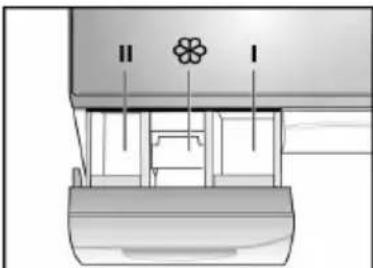
natural_image
Technical diagram of a mechanical assembly with labeled components (II and I), no readable text or symbols present.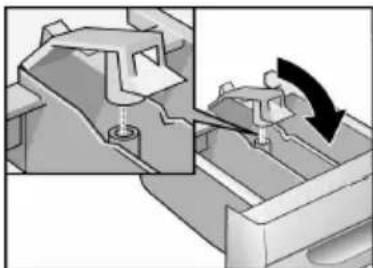
natural_image
Mechanical assembly diagram showing a clamping mechanism with a rotating arrow (no text or symbols)
natural_image
Illustration of a faucet being adjusted for a valve, showing the process with an arrow indicating rotation (no text or symbols present)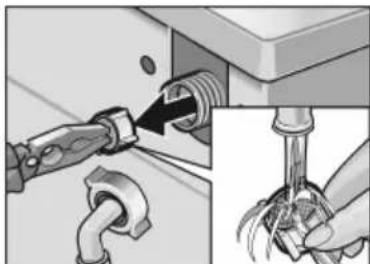
natural_image
Mechanical assembly diagram showing pipe connection and tool insertion (no text or symbols)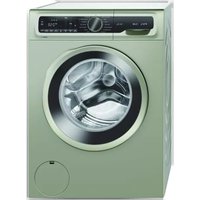

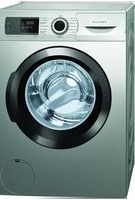
Table of contents
Click a title to access it
Manual assistant
Powered by Anthropic
Waiting for your message
Product information
Brand : Profilo
Model : CM0600KTR
Category : Washing machine