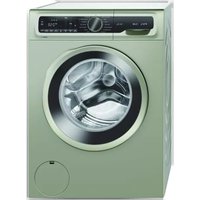
CGA242XVTR - Washing machine Profilo - Free user manual and instructions
Find the device manual for free CGA242XVTR Profilo in PDF.


Pick your language and provide your email: we'll send you a specifically translated version.
| Product Type | Freestanding washing machine |
| Model | CGA242XVTR |
| Brand | Profilo |
| Energy Class | A+++ |
| Rated Capacity | 8 kg |
| Maximum Spin Speed | 1200 rpm |
| Number of Programs | 15 |
| Noise Level (Wash) | 56 dB(A) |
| Noise Level (Spin) | 75 dB(A) |
| Dimensions (H x W x D) | 85 x 60 x 60 cm |
| Weight | 70 kg |
| Power Supply | 230 V ~ 50 Hz |
| Power Consumption per Cycle | 0.85 kWh |
| Water Consumption per Cycle | 48 L |
| Annual Energy Consumption | 170 kWh/year |
| Annual Water Consumption | 9600 L/year |
| Installation Type | Freestanding |
| Drum Material | Stainless steel |
| Control Type | Electronic |
| Display | LED |
| Child Lock | Yes |
| Delay Start | Up to 24 hours |
| Spin Adjustment | Yes |
| Temperature Adjustment | Yes |
Frequently Asked Questions - CGA242XVTR Profilo
How to install the washing machine correctly?
Ensure the machine is on a level and sturdy surface. Remove all transport bolts and secure hoses. Connect to a water supply with a pressure of 1-10 bar and a proper drain.
What does error code E10 mean?
Error E10 indicates a water supply issue. Check that the water tap is fully open, the inlet hose is not kinked, and the mesh filter in the inlet valve is clean.
How to clean the detergent drawer?
Remove the drawer by pressing the release lever. Rinse it under warm water, using a soft brush. Clean the drawer housing with a damp cloth. Reinstall after drying.
How to clean the drain filter?
Unplug the machine and open the filter cover (usually bottom right). Place a tray, unscrew the filter, remove any debris, and screw it back. Ensure the door seal is clean.
Why is the machine not spinning properly?
Common causes: unbalanced load, excess detergent causing oversudsing, or a clogged drain pump filter. Redistribute laundry and run a spin-only cycle.
How to use the delay start function?
Select your program, then press the Delay Start button repeatedly to set the desired time (e.g., 3, 6, 9 hours). Press Start to activate. The machine will finish at that time.
What is the maximum load for the cotton program?
The cotton program can handle a maximum load of 8 kg. Overloading may reduce washing efficiency and cause vibration.
How to activate the child lock?
Press and hold the Child Lock button (or a combination of buttons) for 3 seconds until a lock icon appears on the display. Repeat to deactivate.
The machine is vibrating excessively. What can I do?
Check that the machine is leveled by adjusting the feet. Ensure transport bolts are removed. Avoid washing heavy items like rugs alone.
How to descale the washing machine?
Run an empty hot cycle (90°C) with a descaling agent or a cup of white vinegar. Repeat every few months to maintain performance.
User questions about CGA242XVTR Profilo
0 question about this device. Answer the ones you know or ask your own.
Ask a new question about this device
No questions yet. Be the first to ask one.
Download the instructions for your Washing machine in PDF format for free! Find your manual CGA242XVTR - Profilo and take your electronic device back in hand. On this page are published all the documents necessary for the use of your device. CGA242XVTR by Profilo.
USER MANUAL CGA242XVTR Profilo
natural_image
Blue background with a circle of twelve yellow stars, representing the European Union flag (no text or symbols beyond the stars)ENERG
енергия · ενεργεια

CGA242XVTR
PROFiLO

bar
| Category | Value | |---|---| | A+++ | 10 | | A++ | 15 | | A+ | 20 | | A | 25 | | B | 30 | | C | 35 | | D | 40 |ENERJÍ


Table of contents
Click a title to access it
Manual assistant
Powered by Anthropic
Waiting for your message
Product information
Brand : Profilo
Model : CGA242XVTR
Category : Washing machine