HZ-8595 - Sphygmomanometer Optimum - Free user manual and instructions
Find the device manual for free HZ-8595 Optimum in PDF.


| Product Type | Automatic Upper Arm Blood Pressure Monitor |
| Model | HZ-8595 |
| Brand | Optimum |
| Dimensions (approx.) | 15 x 10 x 8 cm (5.9 x 3.9 x 3.1 in) |
| Weight (approx.) | 300 g (10.6 oz) without batteries |
| Power Supply | 4 x AAA batteries (not included) or USB-C power adapter (5V, 1A) |
| Measurement Method | Oscillometric |
| Measurement Range | Systolic: 60-260 mmHg, Diastolic: 30-200 mmHg, Pulse: 40-180 bpm |
| Accuracy | Blood pressure: ±3 mmHg, Pulse: ±5% |
| Memory Capacity | 2 x 120 readings for 2 users + 1 guest mode |
| Key Features | WHO classification indicator, irregular heartbeat detection, large backlit LCD display |
| Cuff Size | Standard: 22-36 cm arm circumference (optional large cuff 32-45 cm) |
| Operating Conditions | 10°C to 40°C, 30% to 85% relative humidity |
| Storage Conditions | -20°C to 55°C, 10% to 95% relative humidity |
| Battery Life | Approximately 300 measurements with new batteries |
| Auto-Off | After 1 minute of inactivity |
| Safety Notices | Not for use on infants, consult physician if irregular heartbeat detected |
| Cleaning & Maintenance | Clean with a soft dry cloth; avoid solvents |
| Spare Parts & Repairability | Cuff and tubing available separately; do not attempt to repair the monitor yourself |
| Certifications | CE, FDA clearance |
Frequently Asked Questions - HZ-8595 Optimum
User questions about HZ-8595 Optimum
0 question about this device. Answer the ones you know or ask your own.
Ask a new question about this device
Download the instructions for your Sphygmomanometer in PDF format for free! Find your manual HZ-8595 - Optimum and take your electronic device back in hand. On this page are published all the documents necessary for the use of your device. HZ-8595 by Optimum.
USER MANUAL HZ-8595 Optimum
UK Operating Instructions 19
INSTRUKCJA OBSŁUGI GWARANCJA
KARTA GWARANCYJNA
NR ......
No.3 Jinping Street, Ya An Road
NankaiDistrict
Tianjin 300190, China
1 Four Seasons Terrace West Drayton
Middlesex, London
UB7 9GG, United Kingdom
WARUNKI 24 MIESIECZNEJ GWARANCJI
natural_image
Simple line drawing of a cable with a connector and a dashed box (no text or symbols)Automatic Electronic Blood Pressure Meter HZ-8595 Operating Instructions
UK
IMPORTANT INFORMATION
NORMAL BLOOD PRESSURE FLUCTUATION
All physical activity, excitement, stress, eating, drinking, smoking, body posture and many other activities or factors (including taking a blood pressure measurement) will influence blood pressure value. Because of this, it is mostly unusual to obtain identical multiple blood pressure readings.
Blood pressure fluctuates continually ---- day and night. The highest value usually appears in the daytime and lowest one usually at midnight. Typically, the value begins to increase at around 3:00AM, and reaches to highest level in the daytime while most people are awake and active.
Considering the above information, it is recommended that you measure your blood pressure at approximately the same time each day.
Too frequent measurements may cause injury due to blood flow interference, please always relax a minimum of 1 to 1.5 minutes between measurements to allow the blood circulation in your arm to recover. It is rare that you obtain identical blood pressure readings each time.
INTENDED USE
Fully Automatic Electronic Sphygmomanometer is for use by medical professionals or at home and is a non-invasive blood pressure measurement system intended to measure the diastolic and systolic blood pressures and pulse rate of an adult individual by using a non-
invasive technique in which an inflatable cuff is wrapped around the upper arm. The cuff circumference is limited to 22cm-48cm (approx. 8 21/32"\~18 29/32").
CONTRAINDICATION
It is inappropriate for people with serious arrhythmia to use this Electronic Sphygmomanometer.
PRODUCT DESCRIPTION
Based on Oscillometric methodology and silicon integrated pressure sensor, blood pressure and pulse rate can be measured automatically and non-invasively. The LCD display will show blood pressure and pulse rate. The most recent 60 measurements can be stored in the memory with date and time stamp. The voice function will ease the operation. The Electronic Sphygmomanometers corresponds to the below standards: IEC 60601-1:2005/EN 60601-1:2006/AC:2010 (Medical electrical equipment -- Part 1: General requirements for basic safety and essential performance), EN 1060-1: 1995 + A1: 2002 + A2: 2009 (Non-invasive sphygmomanometers - Part 1: General requirements), EN 1060-3: 1997 + A1: 2005 + A2: 2009 (Non-invasive sphygmomanometers - Part 3: Supplementary requirements for electro-mechanical blood pressure measuring systems), ANSI/AAMI SP-10:2002+A1:2003+A2:2006.
Name of Each Part

SPECIFICATIONS
- Product name: Blood Pressure Monitor
- Model: HZ-8595
- Classification: Internally powered, Type BF applied part, IPX0, No AP or APG, Continuous operation
- Machine size: Approx. 150mm×120mm×65mm (5 29/32" x 4 23/32" x 2 9/16")
- Cuff circumference: 22cm-30cm (8 21/32"-11 13/16"), 30cm-42cm (11 13/16"-16 17/32") (Optional), 42cm-48cm (16 17/32"-18 29/32") (Optional)
-
Weight: Approx. 345g (12 5/32oz.) (exclude batteries)
-
Measuring method: Oscillometric method, automatic inflation and measurement
- Memory volume: 60 times with time and date stamp
- Power source: DC:6V 600mA, batteries: 4 ×1.5V SIZE AA
- Measurement range:
Cuff pressure: 0-300mmHg
Systolic: 60-260mmHg
Diastolic: 40-199mmHg
Pulse rate: 40-180 beats/minute
- Accuracy:
Pressure: ±3mmHg
Pulse rate: ±5% - Environmental temperature for operation: 5°C\~40°C(41°F\~104°F)
- Environmental humidity for operation: ≤90%RH
- Environmental temperature for storage and transport: -20^ 55^(-4^ 131^)
- Environmental humidity for storage and transport: ≤95%RH
- Environmental pressure: 80kPa-105kPa
- Battery life: Approx 300 times.
- A list of all components belonging to the pressure measuring system, including accessories: Pump, Valve, LCD, Cuff, Sensor
Note: These specifications are subject to change without notice.
NOTICE
- Read all of the information in the operation guide and any other literature in the box before operating the unit.
- Stay still, calm and rest for 5 minutes before blood pressure measurement.
- The cuff should be placed at the same level as your heart.
- During measurement, neither speak nor move your body and arm.
-
Measuring on same arm for each measurement.
-
Please always relax at least 1 or 1.5 minutes between measurements to allow the blood circulation in your arm to recover. Prolonged over-inflation (cuff pressure exceed 300 mmHg or maintained above 15 mmHg for longer than 3 minutes) of the bladder may cause ecchymoma of your arm.
- Consult your physician if you have any doubt about below cases:
1) The application of the cuff over a wound or inflammation diseases;
2) The application of the cuff on any limb where intravascular access or therapy, or an arterio-venous (A-V) shunt, is present;
3) The application of the cuff on the arm on the side of a mastectomy;
4) Simultaneously used with other monitoring medical equipments on the same limb;
5) Need to check the blood circulation of the user.
- This Electronic Sphygmomanometers is designed for adults and should never be used on infants or young children. Consult your physician or other health care professionals before use on older children.
- Do not use this unit in a moving vehicle, This may result in erroneous measurement.
- Blood pressure measurements determined by this monitor are equivalent to those obtained by a trained observer using the cuff/stethoscope auscultation method, within the limits prescribed by the American National Standard Institute, Electronic or automated sphygmomanometers.
-
Information regarding potential electromagnetic or other interference between the blood pressure monitor and other devices together with advice regarding avoidance of such interference please see part ELECTROMAGNETIC COMPATIBILITY INFORMATION.
-
If Irregular Heartbeat (IHB) brought by common arrhythmias is detected in the procedure of blood pressure measurement, a signal of ♥ will be displayed. Under this condition, the Electronic Sphygmomanometers can keep function, but the results may not be accurate, it's suggested that you consult with your physician for accurate assessment.
There are 2 conditions under which the signal of IHB will be displayed:
1) The coefficient of variation (CV) of pulse period >25%.
2) The difference of adjacent pulse period≥0.14s, and the number of such pulse takes more than 53 percentage of the total number of pulse.
- Please do not use the cuff other than supplied by the manufacturer, otherwise it may bring biocompatible hazard and might result in measurement error.
- The monitor might not meet its performance specifications or cause safety hazard if stored or used outside the specified temperature and humidity ranges in specifications.
- Please do not share the cuff with other infective person to avoid cross-infection.
- Medical AC adapter which output is DC 6.0V 600mA and complied with IEC 60601-1/EN 60601-1/UL 60601-1 and IEC 60601-1-2/EN 60601-1-2/UL 60601-1-2 is suitable for this monitor. Please note that the monitor jack size: hole 5.5mm , center pin 2.0mm . Please pay attention to polarity.
- This equipment has been tested and found to comply with the limits for a Class B digital device, pursuant to part 15 of the FCC Rules. These limits are designed to provide reasonable protection against harmful interference in a residential installation. This equipment generates, uses and can radiate radio frequency energy and, if not installed and used in accordance with the instructions, may cause harmful interference to radio
communications. However, there is no guarantee that interference will not occur in a particular installation. If this equipment does cause harmful interference to radio or television reception, which can be determined by turning the equipment off and on, the user is encouraged to try to correct the interference by one or more of the following measures:
- Reorient or relocate the receiving antenna.
- Increase the separation between the equipment and receiver.
- Connect the equipment into an outlet on a circuit different from that to which the receiver is connected.
-
Consult the dealer or an experienced radio/TV technician for help.
-
This blood pressure monitor is verified by auscultatory method. It is recommended that you check annex B of ANSI/AAMI SP-10:2002+A1:2003+A2:2006 for details of verification method if you need.
SETUP AND OPERATING PROCEDURES
1. BATTERY LOADING
a. Open battery cover at the back of the monitor.
b. Load four "AA" size batteries. Please pay attention to polarity.
c. Close the battery cover.
When LCD shows battery symbol, replace all batteries with new ones.
Rechargeable batteries are not suitable for this monitor. Remove the batteries if the monitor will not be used for a month or more to avoid relevant damage of battery leakage.
Avoid the battery fluid to get in your eyes. If it should get in your eyes, immediately rinse with plenty of clean water and contact a physician.
2. CLOCK AND DATE ADJUSTMENT
a. Once you install the battery or turn off the monitor, it will enter Clock Mode, and LCD will display time and date.
b. While the monitor is in Clock Mode, press the "S" and "M" button simultaneously for two seconds, the month will blink at first. Press the button "S" repeatedly, the day, hour and minute will blink in turn. While the number is blinking, press the button "M" to increase the number. Keep on pressing the button "M", the number will increase fast.


c. You can turn off the monitor by pressing "S" button when the minute is blinking, then the time and date is confirmed.
d. The monitor will turn off automatically after 1 minute of no operation with the time and date unchanged.
e. Once you change the batteries, you should readjust the time and date.
3. VOICE SETTING
a. Voice language setting: In clock mode, you can select the voice language by keeping on press the button "M". Now LCD blink "L0", "L1", "L2" ... "Ln" (n means the number of language) circularly. "L0" represents closing voice function, "L1" represents language 1, "L2" represents language 2,..., "Ln" represents language n, and so on. You can select the wanted language by releasing button "M" when display the corresponding language code.

b. If the number of language is only one, LCD will twinkle "ON" and "--" circularly. Here "ON" represents opening the voice function and "--" represents closing the voice function.
c. Voice volume setting: Once you have selected a language, keeping on pressing the button "M" again. A column of bar will appear on the left side of the LCD. The higher the bars, the louder the volume. Release button "M" at your desirable volume for confirmation.

4. CONNECTING THE CUFF TO THE MONITOR
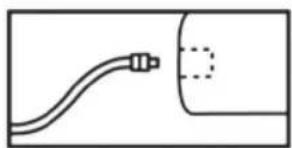
Insert the cuff tubing connector into the socket in the left side of the monitor. Make certain that the connector is completely inserted to avoid air leakage during blood pressure measurements.
natural_image
Simple line drawing of a cable with a connector, no text or symbols presentAvoid compression or restriction of the connection tubing during measurement, which may cause inflation error, or harmful injury due to continuous cuff pressure.
5. APPLYING THE CUFF
a. Pulling the cuff end through the medal loop (the cuff is packaged like this already), turn it outward (away from your body) and tighten it and close the Velcro fastener.
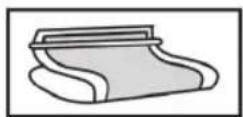
b. Place the cuff around a bare arm 1-2cm above the elbow joint.
c. While seated, place palm upside in front of you on a flat surface such as a desk or table. Position the air tube in the middle of your arm in line with your middle finger.
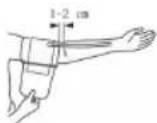
d. The cuff should fit comfortably, yet snugly around your arm. You should be able to insert one finger between your arm and the cuff.
Note:
- Please refer to the cuff circumference range in "SPECIFICATIONS" to make sure that the appropriate cuff is used.
- Measuring on same arm each time.
- Do not move your arm, body, or the monitor and do not move the rubber tube during measurement.
- Stay quiet, calm for 5 minutes before blood pressure measurement.
- Please keep the cuff clean. If the cuff becomes dirty, remove it from the monitor and clear it by hand in a mild detergent, then rinse it thoroughly in cold water.
Never dry the cuff in clothes dryer or iron it. Clean the cuff after the usage of every 200 times is recommended.
6. BODY POSTURE DURING MEASUREMENT
Sitting Comfortably Measurement

a. Be seated with your feet flat on the floor, and don't cross your legs.
b. Place palm upside in front of you on a flat surface such as a desk or table.
c. The middle of the cuff should be at the level of the right atrium of the heart.
Lying Down Measurement

a. Lie on your back.
b. Place your arm straight along your side with your palm upside.
c. The cuff should be placed at the same level as your heart.
a. After applying the cuff and your body is in a comfortable position, press the "S" button. A beep is heard and all display characters are shown for self-test. You can check the LCD display according to the right picture. Please contact the service center if segment is missing.

b. If the monitor has stored results, the LCD will momentarily display the most recent one. If no result has been stored, zero will appear on LCD.
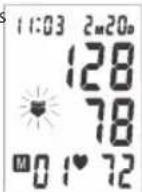

c. If the voice function is switched on, the monitor will speak out measurement tips.
d. Then the monitor inflates the cuff until sufficient pressure has built up for a measurement. Then the monitor slowly releases air from the cuff and carries out the measurement. Finally the blood pressure and pulse rate will be calculated and displayed on the LCD screen. The blood pressure clas-

sification indicator and Irregular heartbeat symbol (if any) will blink on the screen. If the voice function is on, it will announce
the measurement result. The result will be automatically stored in the monitor.
e. After measurement, the monitor will turn off automatically after 1 minute of no operation. Alternatively, you can press the "S" button to turn off the monitor manually.
f. During measurement, you can press the "S" button to turn off the monitor manually.
Note: Please consult a health care professional for interpretation of pressure measurements.
8. DISPLAYING STORED RESULTS
a. In Clock Mode, press "M" button, the last result will be displayed with date and time. Irregular heartbeat symbol (if any) and the
indicator of blood pressure classification will blink at the same time. Press "M" button repeatedly to review the results measured previously.

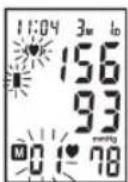
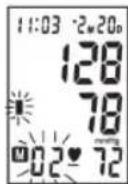
b. If the voice function is on, the monitor will announce each result in the memory.
c. When displaying the stored results, the monitor will turn off automatically after 2 minutes of no operation. You can also press the button "S" to turn off the monitor manually.
9. DELETING MEASUREMENTS FROM THE MEMORY
When any result is displaying, keeping on pressing button "M" for three seconds, all results will be deleted after three "beep". Press the button "M" or "S", the monitor will turn off.

10. ASSESSING HIGH BLOOD PRESSURE FOR ADULTS
The following guidelines for assessing high blood pressure (without regard to age or gender) have been established by the World Health Organization (WHO). Please note that other factors (e.g. diabetes, obesity, smoking, etc.) need to be taken into consideration. Consult with your physician for accurate assessment, and never change your treatment by yourself.
Classification of blood pressure for adults

bar_stacked
| Hypertension Category | Diastolic (mmHg) | Systolic (mmHg) | | :--- | :--- | :--- | | Severe Hypertension | 80-110 | 180 | | Moderate Hypertension | 80-110 | 160 | | Mild Hypertension | 80-110 | 140 | | High-normal BP | 80-110 | 130 | | Normal BP | 80-110 | 120 || Blood pressure Classification | SBP mmHg | DBP mmHg | Color indicator |
| Optimal < 120 < 80 green | |||
| Normal 120-129 80-84 green | |||
| High-Normal 130-139 85-89 green | |||
| Stage 1 Hypertension 140-159 90-99 yellow | |||
| Stage 2 Hypertension 160-179 100-109 orange | |||
| Stage 3 Hypertension ≥ 180 ≥110 red |
Note: It is not intended to provide a basis of any type of rush toward emergency conditions/diagnosis based on the color scheme and that the color scheme is meant only to discriminate between the different levels of blood pressure.
Ecology – Environmental Protection
The "crossed-out trash bin" symbol on electrical equipment or packaging indicates that the device cannot be treated as general household waste and should not be disposed of into containers for such waste.

Obsolete or broken-down electrical device should be delivered to special designated collection points, organized by local public administration, whose purpose is to collect recyclable electrical equipment. This way, each household helps reduce possible negative effects influencing natural environment and allows the reclaiming of materials which the product is made of.
Weight: 345g

Caution
This appliance is not intended for use by persons (including children) with reduced physical, sensory or mental capabilities, or lack of experience and knowledge, unless they have been given supervision or instruction concerning use of the appliance by a person responsible for their safety.
Children should be supervised to ensure that they do not play with the appliance.
Troubleshooting
| PROBLEM POSSIBLE CAUSE SOLUTION | ||
| LCD display shows battery symbol Low Battery Change all the batteries | ||
| LCD Display shows "EE" | Arm or blood pressure monitor was moved during testing | Re-test taking care to not move your arm or the blood pressure monitor |
| The cuff does not inflate properly or pressure falls quickly during testing | Make certain the rubber tube is fully inserted into the blood pressure monitor | |
| Irregular heartbeat (arrhythmia) | It is inappropriate for people with serious arrhythmia to use this blood pressure monitor. | |
| The cuff was not properly applied or the rubber tube was bent or pressed. | Review the cuff applying and testing sections of the instructions and re-test | |
| LCD Display shows abnormal result | The cuff position was not correct or it was not properly tightened | Apply the cuff correctly and try again |
| Body posture was not correct during testing | Review the body posture and testing sections of the instructions and re-test. | |
| Speaking, arm or body movement, angry, excited or nervous during testing | Re-test when calm and without speaking or moving during the test | |
| No response when you press button or load battery | Incorrect operation, or strong electromagnetic interference | Take out batteries for five minutes, and then reinstall all batteries. |
Note: If you cannot resolve the problem, you can contact factory or its designated service department.
MAINTENANCE
-
Do not drop this monitor or subject it to strong impact.
-
Avoid high temperature and solarization. Do not immerse the monitor in water as this will result in damage to the monitor.
-
If this monitor is stored near freezing, allow it to acclimate to room temperature before use.
-
Do not attempt to disassemble this monitor.
-
If you do not use the monitor for a long time, please remove the batteries.
-
It is recommended the performance should be checked every 2 years or after repair. Please contact the service center.
-
Clean the monitor with a dry, soft cloth or a soft cloth squeezed well after moistened with water, diluted disinfectant alcohol, or diluted detergent.
-
No component can be maintained by user in the monitor. The circuit diagrams, component part lists, descriptions, calibration instructions, or other information which will assist the user's appropriately qualified technical personnel to repair those parts of equipment which are designated repairable can be supplied.
-
The monitor can maintain the safety and performance characteristics for a minimum of 10,000 measurements or three years, and the cuff can maintain the performance characteristics for a minimum of 1000 measurements.
-
It is recommended the cuff should be disinfected 2 times every week if needed (For example, in hospital or in clinique). Wipe the inner side (the side contacts skin) of the cuff by a soft cloth squeezed after moistened with Ethyl alcohol (75-90%), then dry the cuff by airing.
EXPLANATION OF SYMBOLS ON UNIT

Symbol for" THE OPERATION GUIDE MUST BE READ". (The sign background colour: blue. The sign graphical symbol: white)

Symbol for "WARNING".
Symbol for "TYPE BF APPLIED PARTS".
(The cuff is type BF applied part).

Symbol for "ENVIRONMENT PROTECTION - Waste electrical products should not be disposed of with household waste. Please recycle where facilities exist. Check with your local Authority or retailer for recycling advice".

Symbol for "MANUFACTURER".

Symbol for "COMPILES WITH MDD93/42/EEC REQUIREMENTS".

Symbol for "DATE OF MANUFACTURE".

Symbol for "EUROPEAN REPRESENTATION".

Symbol for "Polarity of d.c. power connector".

Symbol for "SERIAL NUMBER".

Symbol for "KEEP DRY".
ELECTROMAGNETIC COMPATIBILITY INFORMATION
Table 1
For all ME EQUIPMENT and ME SYSTEMS
| Guidance and manufacture's declaration - electromagnetic emissions | |||
| The HZ-8595 is intended for use in the electromagnetic environment specified below.The customer or the user of the HZ-8595 should assure that it is used in such an environment | |||
| Emissions test Compliance Electromagnetic environment - guidance | |||
| RF emissions CISPR 11 | Group 1 | The HZ-8595 uses RF energy only for its internal function. Therefore, its RF emissions are very low and are not likely to cause any interference in nearby electronic equipment. | |
| RF emissions CISPR 11 | Class B | The HZ-8595 is suitable for use in all establishments other than domestic and those directly connected to the public low-voltage power supply network that supplies buildings used for domestic purposes. | |
| Harmonic emissionsIEC 61000-3-2 | Not applicable | ||
| Voltage fluctuations/flicker emissions IEC 61000-3-3 | Not applicable | ||
| Table 2For all ME EQUIPMENT and ME SYSTEMS | |||
| Guidance and manufacturer's declaration - electromagnetic immunity | |||
| The HZ-8595 is intended for use in the electromagnetic environment specified below. The customer or the user of the HZ-8595 should assure that it is used in such an environment. | |||
| IMMUNITY test IEC 60601 | test level Compliance level Electromagnetic environment - guidance | ||
| Electrostatic discharge (ESD)IEC 61000-4-2 | ±6 kV contact±8 kV air | ±6 kV contact±8 kV air | Floors should be wood, concrete or ceramic tile. If floors are covered with synthetic material, the relative humidity should be at least 30%. |
| Power frequency(50/60 Hz)magnetic fieldIEC 61000-4-8 | 3 A/m 3 A/m Power frequency | magnetic fields | should be at levels characteristic of a typical location in a typical commercial or hospital environment. |
| Table 3For ME EQUIPMENT and ME SYSTEMS that are not LIFE-SUPPORTING | |||
| Guidance and manufacturer's declaration - electromagnetic immunity | |||
| The HZ-8595 is intended for use in the electromagnetic environment specified below. The customer or the user of the HZ-8595 should assure that it is used in such an environment. | |||
| IMMUNITY test IEC 60601test level Compliance level Electromagnetic environment - guidance | |||
| Radiated RFIEC 61000-4-3 | 3 V/m 80 MHz to 2.5 GHz | 3 V/m | Portable and mobile RF communications equipment should be used no closer to any part of the HZ-8595, including cables, than the recommended separation distance calculated from the equation applicable to the frequency of the transmitter. Recommended separation distance: d = 1.2 80 MHz to 800 MHz d = 2.3 800 MHz to 2,5 GHzWhere P is the maximum output power rating of the transmitter in watts (W) according to the transmitter manufacturer and d is the recommended separation distance in meters (m). Field strengths from fixed RF transmitters, as determined by an electromagnetic site survey.ashould be less than the compliance level in each frequency range.bInterference may occur in the vicinity of equipment marked with the following symbol: |
| NOTE 1 At 80 MHz and 800 MHz, the higher frequency range applies.NOTE 2 These guidelines may not apply in all situations. Electromagnetic propagation is affected by absorption and reflection from structures, objects and people.a. Field strengths from fixed transmitters, such as base stations for radio (cellular/cordless) telephones and land mobile radios, amateur radio, AM and FM radio broadcast and TV broadcast cannot be predicted theoretically with accuracy. To assess the electromagnetic environment due to fixed RF transmitters, an electromagnetic site survey should be considered. If the measured field strength in the location in which the HZ-8595 is used exceeds the applicable RF compliance level above, the HZ-8595 should be observed to verify normal operation. If abnormal performance is observed, additional measures may be necessary, such as re-orienting or relocating the HZ-8595.b. Over the frequency range 150 kHz to 80 MHz, field strengths should be less than 3 V/m. | |||
| Table 4For ME EQUIPMENT and ME SYSTEMS that are not LIFE-SUPPORTING | |||
| Recommended separation distances between portable and mobile RF communications equipment and the HZ-8595 | |||
| The HZ-8595 is intended for use in an electromagnetic environment in which radiated RF disturbances are controlled. The customer or the user of the HZ-8595 can help prevent electromagnetic interference by maintaining a minimum distance between portable and mobile RF communications equipment (transmitters) and the HZ-8595 as recommended below, according to the maximum output power of the communications equipment. | |||
| Rated maximum output power of transmitter W | Separation distance according to frequency of transmitter m | ||
| 150 kHz to 80 MHz 80 MHz d = 1.2√P | Hz to 800 MHz 800 MHz to 2.5 GHz d = 1.2√P | d = 2.3√P | |
| 0,01 0.12 0.12 0.23 | |||
| 0,1 0.38 0.38 0.73 | |||
| 1 1.2 1.2 2.3 | |||
| 10 3.8 3.8 7.3 | |||
| 100 12 12 23 | |||
| For transmitters rated at a maximum output power not listed above, the recommended separation distance d in meters (m) can be determined using the equation applicable to the frequency of the transmitter, where P is the maximum output power rating of the transmitter in watts (W) according to the transmitter manufacturer.NOTE 1 At 80 MHz and 800 MHz, the separation distance for the higher frequency range applies.NOTE 2 These guidelines may not apply in all situations. Electromagnetic propagation is affected by absorption and reflection from structures, objects and people. | |||
- KARTA GWARANCYJNA
- WARUNKI 24 MIESIECZNEJ GWARANCJI
- Automatic Electronic Blood Pressure Meter HZ-8595 Operating Instructions
- IMPORTANT INFORMATION
- NORMAL BLOOD PRESSURE FLUCTUATION
- INTENDED USE
- CONTRAINDICATION
- PRODUCT DESCRIPTION
- Name of Each Part
- SPECIFICATIONS
- NOTICE
- SETUP AND OPERATING PROCEDURES
- BATTERY LOADING
- CLOCK AND DATE ADJUSTMENT
- VOICE SETTING
- CONNECTING THE CUFF TO THE MONITOR
- APPLYING THE CUFF
- Note:
- BODY POSTURE DURING MEASUREMENT
- Sitting Comfortably Measurement
- Lying Down Measurement
- DISPLAYING STORED RESULTS
- DELETING MEASUREMENTS FROM THE MEMORY
- ASSESSING HIGH BLOOD PRESSURE FOR ADULTS
- Ecology – Environmental Protection
- Caution
- MAINTENANCE
- EXPLANATION OF SYMBOLS ON UNIT
- ELECTROMAGNETIC COMPATIBILITY INFORMATION
Brand : Optimum
Model : HZ-8595
Category : Sphygmomanometer