
BMC100 - Camera Brinno - Free user manual and instructions
Find the device manual for free BMC100 Brinno in PDF.


| Product Type | Time-lapse Camera |
| Model | BMC100 |
| Image Sensor | 5 Megapixel CMOS |
| Maximum Video Resolution | 1920 x 1080 (Full HD) |
| Time-lapse Intervals | 0.5s, 1s, 2s, 5s, 10s, 30s, 1 min, 5 min, 10 min, 30 min, 60 min |
| Field of View | 116° wide angle |
| Power Source | 2x AA batteries (Alkaline or Lithium) or USB 5V adapter |
| Battery Life | Up to 30 days (2x AA Lithium, 1 photo per minute) |
| Storage | MicroSD card up to 32GB (Class 10 recommended) |
| File Format | JPEG images, AVI video |
| Dimensions | 2.6 x 2.4 x 1.4 inches (66 x 61 x 36 mm) |
| Weight | 3.2 oz (91 g) without batteries |
| Mounting | 1/4-20 tripod screw, adhesive pad, strap |
| Water Resistance | IPX4 splash proof |
| Operating Temperature | 32°F to 113°F (0°C to 45°C) |
| Motion Detection | PIR sensor with adjustable sensitivity |
| LED Indicators | Power, recording, motion trigger |
| Maintenance | Clean lens with soft cloth; replace batteries as needed |
| Safety | Keep away from water; use only recommended batteries |
| Repairability | Not user-serviceable; contact Brinno support |
Frequently Asked Questions - BMC100 Brinno
User questions about BMC100 Brinno
0 question about this device. Answer the ones you know or ask your own.
Ask a new question about this device
Download the instructions for your Camera in PDF format for free! Find your manual BMC100 - Brinno and take your electronic device back in hand. On this page are published all the documents necessary for the use of your device. BMC100 by Brinno.
USER MANUAL BMC100 Brinno
While recording, hold the "OK" button until the LCD light turns on and shows the text "Processing", it means the camera is processing file closing. When completed the processing it will display the text "Ready" This indicates the recording session is complete.
Remove the SD card from the camera, and insert it into your computer or laptop to enjoy your amazing Time Lapse Videos!
Technical Specification
Capture Time
Capture 1\~4 frames per second. (Depends on SD card speed)
Detection Distance
4 meters (13 feet)
Detection Angle
90^

7F, No.75, Zhou Zi St., Taipei City11493, Taiwan Phone: +886-2-8751-0306 Fax: +886-2-8751-0549 customerservice@brinno.com www.brinno.com Made in Taiwan
301-0054-00 EN A1
TimeLapse
BMC100-Motion Activated Camera


natural_image
Exterior view of a Brinno-branded security camera with mounted lens and mounting bracket (no text or symbols on device body)Quick Guide
www.brinno.com
brinno brilliant innovation
Motion Activated Camera BMC100
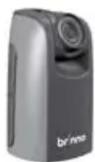
① TimeLapse Camera (TLC200 f1.2)

② Motion Sensor (ATM100)

③ Camera Wall Mount (AWM100)
BMC100 - Installation
STEP 1.
Install the AWM100.
A By sticker (smooth surface)
Clean up the flat surface, be sure there is no dust on the surface. Remove the sticker seal, paste on the wall for at least 24 hours.
or


B By screw (brick)
Use the screw to fix on the wall.

natural_image
Line drawing of a faucet handle assembly (no text or symbols)STEP 2.
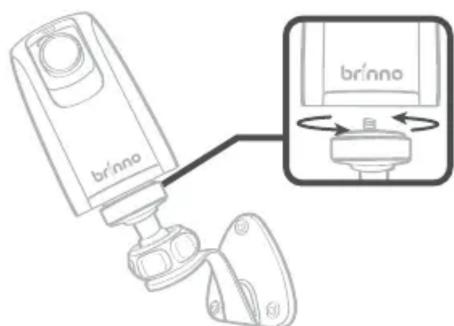
Install the TLC200 f1.2 .
STEP 3.

natural_image
Diagram showing a device with a USB port connected to a camera module via cable (no text or symbols present)Install the ATM100.
STEP 4. Start Recording
1

2
Set up screen

-
Switch ON.
-
The LCD will show set up screen.
Note - Overwrite Mode
The camera will be automatically activated overwrite mode once Motion Sensor (ATM100) is plug in camera, you can go to camera setting menu to change if necessary.

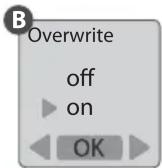
A Press MENU, select the Overwrite Mode.
B Choose on or off to set up overwrite mode.
3

→
Preview screen

→
Preview screen

- Press OK twice to the recording process.




Brand : Brinno
Model : BMC100
Category : Camera