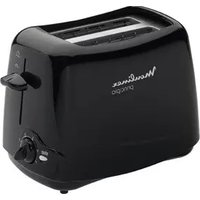
Principio TT1102 - Toaster MOULINEX - Free user manual and instructions
Find the device manual for free Principio TT1102 MOULINEX in PDF.


Pick your language and provide your email: we'll send you a specifically translated version.
| Product type | Toaster |
| Brand | Moulinex |
| Model | Principio TT1102 |
| Dimensions (approx.) | 30 x 20 x 20 cm |
| Weight (approx.) | 1.0 kg |
| Power rating | 850 W |
| Voltage | 220-240 V |
| Frequency | 50/60 Hz |
| Number of slots | 2 |
| Browning control | Adjustable browning level |
| Functions | Cancel, Reheat, Defrost |
| Auto shut-off | Yes |
| Crumb tray | Removable, easy to clean |
| Cord length (approx.) | 0.8 m |
| Material | Plastic and metal |
| Cleaning | Unplug and wipe with damp cloth; empty crumb tray |
| Safety features | Non-slip feet, cool-touch exterior |
| Spare parts | Crumb tray, heating elements available |
| Warranty | 2 years |
| Country of origin | China |
Frequently Asked Questions - Principio TT1102 MOULINEX
How do I set the browning level on my Principio TT1102?
Turn the browning control dial to your desired setting. Lower numbers produce lighter toast, higher numbers darker toast. Start with a medium setting and adjust as needed.
Can I cancel the toasting cycle mid-way?
Yes, press the Cancel button to stop toasting at any time. The lever will pop up automatically.
What does the Reheat function do?
The Reheat function warms already toasted bread without further browning. Place the toast in the slots, lower the lever, and press Reheat.
How do I use the Defrost function?
For frozen bread, lower the lever and press the Defrost button. The toaster will extend the cycle to properly thaw and toast the bread.
Why is my toast not popping up?
Ensure the bread is not too thick. If the toast gets stuck, unplug the toaster and gently shake it. Do not use metal objects to remove stuck toast.
How do I clean my toaster?
Unplug the toaster and let it cool. Remove the crumb tray, empty it, and wash with warm soapy water. Wipe the exterior with a damp cloth. Do not immerse in water.
Can I toast bagels or thick bread?
Yes, but ensure the bread fits freely in the slots. For bagels, place cut side facing inside. Avoid jamming oversized items.
What does the auto shut-off feature do?
The toaster automatically turns off if it detects a malfunction or if the toast is stuck, preventing overheating and fire hazards.
Where can I find spare parts?
Spare parts like crumb trays and heating elements are available from Moulinex authorized service centers or online retailers. Check the user manual for part numbers.
How long is the warranty?
The Moulinex Principio TT1102 typically comes with a 2-year warranty. Keep your proof of purchase for service requests.
User questions about Principio TT1102 MOULINEX
0 question about this device. Answer the ones you know or ask your own.
Ask a new question about this device
No questions yet. Be the first to ask one.
Download the instructions for your Toaster in PDF format for free! Find your manual Principio TT1102 - MOULINEX and take your electronic device back in hand. On this page are published all the documents necessary for the use of your device. Principio TT1102 by MOULINEX.
USER MANUAL Principio TT1102 MOULINEX
natural_image
Line drawing of a Monlinex standard toaster with handle and front panel (no text or symbols on body)
1

natural_image
Two schematic diagrams showing a device with an upward arrow, no text or symbols present
natural_image
Illustration of hands pressing down on a document with an upward arrow (no text or symbols)
natural_image
Illustration of a hand holding a pen, writing on paper (no text or symbols visible)


natural_image
Illustration of a steamer with a crossed blade, no text or symbols present
2. Toasting

natural_image
Line drawing of two different types of toaster covers (no text or symbols)
natural_image
Illustration of a hand pressing a piece of bread on a flat surface (no text or symbols)

natural_image
Illustration of a hand holding a tool with a downward arrow indicating motion (no text or symbols)
natural_image
Illustration of a person pressing down with steam rising, no text or symbols present

natural_image
Illustration of a hand pulling a cable with an arrow indicating upward motion (no text or symbols)3
STOP


natural_image
Illustration of a steaming hot dog with an upward arrow indicating warming (no text or symbols)4. Cleaning


natural_image
Illustration of a hand holding a small object with a pen, partially enclosed in a pipe (no text or symbols visible)
natural_image
Diagram showing a hand pressing a button into a container with granular material, no text or symbols present
natural_image
Hand holding a tool over a trash bin filled with granular material (no text or symbols visible)
natural_image
Hand holding a mechanical component with an arrow indicating direction (no text or symbols)
natural_image
Technical line drawing of a mechanical component with no visible text or symbols5


natural_image
Illustration of a vase with a crossed arrow indicating compression or compression, no text or symbols present
natural_image
Illustration of steaming food items under a wavy roof with a cross symbol (no text or symbols present)
natural_image
Illustration of a hand holding a knife over a striped surface (no text or symbols)
natural_image
Illustration of a container with a cross mark and downward arrow, partially covered by a striped surface (no text or symbols)
natural_image
Illustration of a mechanical device with a tool and gear, no visible text or symbols
natural_image
Abstract illustration of a stylized airplane with wings and stripes, no text or symbols present
natural_image
Simple line drawing of a computer mouse with a crossed black mark on the screen (no text or symbols)