Rocbit FXKT - External hard drive Rocstor - Free user manual and instructions
Find the device manual for free Rocbit FXKT Rocstor in PDF.


| Product Type | External Hard Drive |
| Brand | Rocstor |
| Model | Rocbit FXKT |
| Capacity | 1 TB (estimated) |
| Interface | USB 3.0 (compatible with USB 2.0) |
| Form Factor | 2.5 inch portable |
| Dimensions (L x W x H) | 120 x 80 x 15 mm (approximate) |
| Weight | 150 g (approximate) |
| Power Supply | USB bus powered (no external adapter required) |
| Color | Black |
| Operating Systems Supported | Windows, macOS |
| Data Transfer Rate | Up to 5 Gbps (USB 3.0) |
| Security | No hardware encryption (software encryption may be used) |
| Maintenance | Keep dry and away from heat sources; clean with soft cloth |
| Spare Parts & Repairability | Not user-serviceable; contact Rocstor support |
| Package Contents | Hard drive, USB cable, quick start guide (estimated) |
| Warranty | 1 year limited warranty (typical) |
| Manufacturer | Rocstor |
Frequently Asked Questions - Rocbit FXKT Rocstor
User questions about Rocbit FXKT Rocstor
0 question about this device. Answer the ones you know or ask your own.
Ask a new question about this device
Download the instructions for your External hard drive in PDF format for free! Find your manual Rocbit FXKT - Rocstor and take your electronic device back in hand. On this page are published all the documents necessary for the use of your device. Rocbit FXKT by Rocstor.
USER MANUAL Rocbit FXKT Rocstor
USB 2.0 Encrypted Hard Drive
Quick Installation Guide
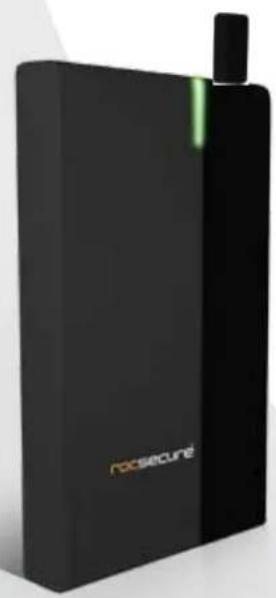
natural_image
Exterior view of a black RoSecure device with green accent and black top (no text or symbols on body)Contents
ROCBIT FX
Key Token (x2)
USB Cable Carrying Case
Quick Installation Guide
Minimum System Requirements
Mac Users
Hardware:
- USB (1.1 or 2.0) port(s).
- PowerPC or Intel processor
• Mac OS 9, X, Leopard or Snow Leopard
Min. recommended memory: 512 MB RAM
PC Users
Hardware:
- USB (1.1 or 2.0) port
• Microsoft Windows 2000, Me, XP, Vista, or Windows 7
Min. recommended memory: 512 MB RAM
Connecting the Drive
- Turn ON your computer and wait until it fully boots up to load all programs
- Insert the digital key (key-token) in the back of the Rocbit device for authentication First.
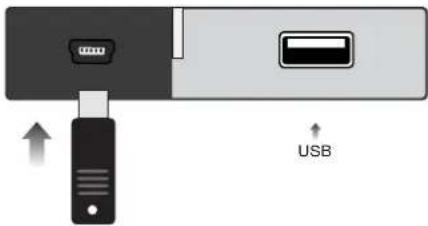
- Using the two ends of the USB "Y" cable, connect them to the USB ports of your computer (or via Power Hub that is connected to your computer) and the other end to the USB port in the Rocbit FXKT.
After a few seconds, the light will turn blue and a Rocstor HD icon will show on "My Computer" folder under the Windows OS.
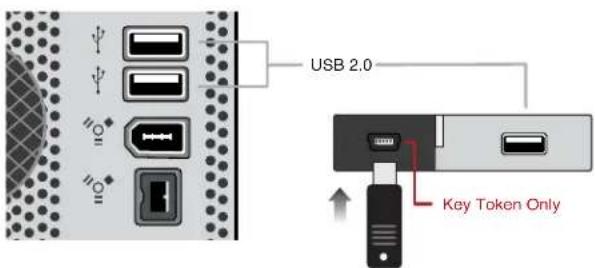
NOTE: For security reasons REMOVE (and store in safe place) the Key-token once access to the data is granted. As long as the Rocbit device is ON, the data is accessible. At this stage, the Rocbit device acts as any other standard external drive in the market. Once the drive is powered OFF you are required to insert the key-token and repeat the procedures for authentication again.
- The Hard drive is preformatted for Plug-and-Play operation. After a few seconds, a Rocstor HD icon will show on "My Computer" folder under the Windows OS. Under the Mac OS, the Rocport HD will appear on the "Desktop."
- Click (double click) on the Rocstor HD icon to access the drive.
You may also refer to the Rocstor website to view or download a full version of the Rocbit FXKT manual. www.ROCSTOR.com
General Notices
- Consistently make multiple backup copies of your data for your protection. Hard disk drives are subject to failure at any time.
- Rocstorage, Inc. shall not be held liable for loss of data or the restoration or recovery of data on the device. Please see complete Limited Warranty Information in the User's Manual or on the Rocstor website (www.rocstor.com) for further details.
Capacity Disclaimer
Actual accessible hard drive capacity will indicate up to 10% lower than stated under different Operating Systems and formatting. Therefore, a 500GB capacity drive may show up as a 450GB drive (approximately.)
Warranty Period
The Limited warranty period for FXKT hard drives is two years for parts and labor.
Technical Support / RMA
Tel: (888) 877-7716 (USA and Canada)
Tel: +1 (818) 449-2000 (Domestic and Internationals)
Hours: 9:00 am - 5:00 pm PST, Mon - Fri (excluding holidays)
Email: support@Rocstor.com
Trademarks Acknowledgements
© 2010, Rocstor, Rocsecure and Rocpower are registered trademarks of Rocstorage, Inc. Rocpro, Rocport, Rocbit, are the trademarks of Rocstorage, Inc. "store your future", "secure your future" and "power your future" are the slogan marks of Rocstorage, Inc. Apple, the Apple logo, Mac, Power Macintosh, FireWire, and Mac Pro, Leopard ... are trademarks of Apple Computer, Inc. Microsoft, MS-DOS, Windows CE, Windows NT, Windows 98, Soft Windows, Vista ... are registered trademarks of Microsoft Corporation. All other names are trademarks of their respective companies in the United States and other countries. © 2000 - 2010

Designed/assembled/integrated in the U.S.A. using domestic and/or foreign components. Enclosure (without hard drive) is made in China
Specifications, terms, warranties, descriptions, product and services herein are subject to change without notice.
Ver.04271
Brand : Rocstor
Model : Rocbit FXKT
Category : External hard drive