
Airhawk A5 - External hard drive Rocstor - Free user manual and instructions
Find the device manual for free Airhawk A5 Rocstor in PDF.


| Product Type | External Hard Drive |
| Brand | Rocstor |
| Model | Airhawk A5 |
| Interface | USB 3.0 (backward compatible with USB 2.0) |
| Storage Capacity | Available in 500GB, 1TB, 2TB variants |
| Form Factor | 2.5-inch portable |
| Dimensions (L x W x H) | 115 x 78 x 15 mm |
| Weight | Approx. 150 g |
| Power Supply | Bus-powered via USB |
| Data Transfer Rate | Up to 5 Gbps (USB 3.0) |
| Operating System Support | Windows, macOS, Linux |
| Plug and Play | Yes, no driver installation required |
| Encryption | Hardware encryption available (AES 256-bit) on select models |
| Shock Resistance | Built-in shock protection with rubber bumper |
| Operating Temperature | 0°C to 45°C |
| Storage Temperature | -20°C to 65°C |
| Maintenance | Keep away from magnetic fields, moisture, and extreme temperatures |
| Cleaning | Wipe with a soft, dry cloth; do not use liquid cleaners |
| Safety | Regularly backup data; avoid physical shocks |
| Spare Parts | Replacement USB cable available from Rocstor |
| Repairability | Not user-serviceable; contact Rocstor for service |
Frequently Asked Questions - Airhawk A5 Rocstor
User questions about Airhawk A5 Rocstor
0 question about this device. Answer the ones you know or ask your own.
Ask a new question about this device
Download the instructions for your External hard drive in PDF format for free! Find your manual Airhawk A5 - Rocstor and take your electronic device back in hand. On this page are published all the documents necessary for the use of your device. Airhawk A5 by Rocstor.
USER MANUAL Airhawk A5 Rocstor
natural_image
Abstract black and white geometric logo with a red dot (no text or symbols)AIRHAWK
A76
User6M>nu>16
TABLE OF CONTENTS
IMPORTANT NOTICES 4
- S>fety Notices 4
- Gener>I Notices
• C>p>city Discl>imer 4
• C>re >nd H>ndling 4
GENERAL 6
- Introduction 6
- Box Contents 6
• Minimum System Requirements 7 - Connectors >nd Airh>wk re>r view 7
QUICK INSTALLATION 8
- How to Connect the Interf>ce C>bles - Connecting the Drive 8
• C>ble Types: FireWire 400 >nd USB 9
INSTALLING YOUR +RIVE 10
Airh>wk >s >boot>ble device 10
• Disconnecting <our Drive 10
○ PC 10
○ M>c 11
- Reform>tting <our Drive 11
○ Reform>tting vi> PC (Window b>sed computers) 11
○ Reform>tting vi> M>c 11
- Import>nt Note 11
How to D>isy-Ch>in through FireWire ports to your Airh>wk Drive >t one time ____ 12
PARTITIONING AN+ FORMATTING THE AIRHAWK +RIVE ON A MAC OS 13
W>rning 13
- Import>nt Notes 13
- Instructions for P>rtitioning >nd Form>tting from FAT 32 to HFS+ ____ 14
PARTITIONING & FORMATTING the AIRHAWK +rive on WIN+OWS 2000, XP and VISTA
W>rning 20
- Import>nt Notes 20
- Different w>ys to get to the Control P>nel 21
- Instructions upon re>ching the Control P>nel 23
- Instructions for P>rtitioning >nd Form>tting from FAT 32 to NTFS 24
TROUBLESHOOTING 31
- Troubleshooting for Macintosh computers 31
- Troubleshooting for PC Windows b>sed computers 33
KNOWLE+GE BASE 35
Airh>wk Unique Fe>tures 35
• Specifications 35
- Introduction to Interf>ces (ports) >nd C>bles 36
○ FireWire (IEEE 1394) 36
USB (Univers>I Seri>I Bus) 38
○ Comp>rison Ch>rt 39
• Introduction to Form>tting 40
○ File Alloc>tion T>ble (FAT) >nd FAT 32 40
○ HFS Plus or HFS+ 41
LIMITE+ WARRANTY 42
TECHNICAL SUPPORT 45
ACKNOWLEDGEMENTS 46
- Tr>dem>rks 46
• Copyrights 46
CONTACT INFORMATION 47
• Corpor>te He>dqu>rters 47
- Technic>I Support / Return Authorization>tion "RMA" 47
- S>les Info 47
Safety Notices
- The w>rr>nty is void if >n un>authorized person >ttempts >nd/or rep>irs the h>rd disk drive.
- Re>d >ll M>nu>ls >nd instructions c>refully before using the device.
- Do not spill >ny liquid or insert >ny object into the device.
- Use the device within the specific>tons indic>ted, including but not limited to+ power requirements, temper>ture, humidity, sunlight >nd m>gnetism from other devices such >s computers >nd televisions.
- Ple>se visit the Rocstor website, www.rocstor.com for further inform>tion concerning specific>tions >nd use of the device.
General Notices
- Consistently m>ke multiple b>ckup copies of your d>t> for your protection. H>rd disk drives >re subject to f>ilure >t >ny time.
- Rocstor>ge, Inc. sh>ll not be held li>ble for loss of d>t> or the restor>tion or recovery of d>t> on the device. Ple>se view complete Limited W>rr>nty Inform>tion in this m>nu>I or on the Rocstor website (www.rocstor.com) for further det>ils.
Capacity +isclaimer
Actu>I >ccessible h>rd drive c>p>city will indic>te up to 10% lower th>n st>ted under different Oper>ting Systems >nd form>tting.
The stor>ge volume is me>sured in tot>l bytes before form>tting. References to round numbers of gig>bytes or ter>bytes >re >n >pproxim>tion only. For ex>mple, > disk drive l>beled >s h>ving 500GB (gig>bytes) h>s sp>ce for >pproxim>tely 500,000,000,000 bytes before form>tting. After form>tting, the drive c>p>city is reduced by >bout 5% to 10% depending on the oper>ting system >nd form>tting used.
Care and Handling
The following instructions concern the proper c>re >nd h>ndling of Airh>wk Drives. Ple>se t>ke > moment to review these instructions.
- As with >ny stor>ge solution, it is recommended th>t>ll d>t> be b>cked up regul>rly.
- Ensure th>t you follow the proper remov>I procedure to disconnect the Airh>wk drive.
- Do not move or disconnect this device from your computer while it is re>ding or writing d>t>. This m>y c>use d>m>ge to the Airh>wk drive.
- Do not pl>ce this device ne>r > he>t source or expose it to direct fl>me.
- Do not pl>ce the device ne>r >ny equipment gener>ting strong electrom>gnetic fields. Exposure to strong electrom>gnetic fields m>y c>use the device to m>lfunction or d>t> to be corrupted.
- Do not drop or c>use shock to your Airh>wk drive.
- Do not spill >ny liquid or insert >ny object into the device.
6
- Do6not6>ttempt6to6©is>ssemble6>n©6service6the6Airh>wk6©rive6@uring6the6w>rr>nty6perio©.666
- Ple>se6re>@6the6S>"ety6{otices6>n@6Limite@6W>rr>nty6in"orm>tion6in6this6*>nu>l6>n@6on6666666the6Rocstor6website6(www.rocstor.com)6"or6"urther6@et>ils.66
6
6


Introduction
AIRHAWK - FireWire 400 >nd USB (1.1/2.0)
The AIRHAWK pocket drives deliver exception>1 perform>nce >nd reli>bility. Designed >nd engineered to meet the needs of >dem>nding mobile d>t>stor>ge m>rket, the AIRHAWK 2.5" extern>I h>rd drives >re comp>tible with both Windows® >nd M>cintosh® environments.
AIRHAWK A7 - "These drives >re both bus-powered >nd boot>ble." The new AIRHAWK pocket drives cont>in >f>st, high c>p>city 2.5" SATA drive mech>nism, with up to 480 Mbits/sec tr>nsfer speed >nd multiple interf>ces in >stylish c>se for therm>l efficiency >nd silent oper>tion.

natural_image
Black rectangular device with a logo and 'roscor' text, no readable text or symbols beyond the brand name.The first design of its kind, the AIRHAWK sets > new st>nd>rd for unprecedented design, qu>lity, vers>tility >nd c>p>bility th>t will s>tisfy the most sophistic>ted >udience. With its distinct touch >nd crisp >ngul>r design, the enclosure h>s the >ppe>r>nce >nd feel of > sp>ce vehicle bec>use of its re-entr>nt tri>ngles, corner reflectors >nd pl>tform >lignments. The Airh>wk pocket drives c>n be pl>ced on either side.
Choose Rocstor drives >nd "store your future"
Box Contents
- Airh>wk, extern>l h>rd disk drive
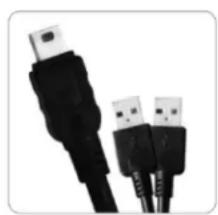
- USB "<" c>ble
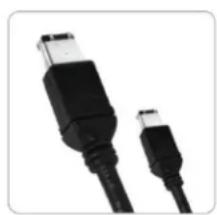
- 6-pin to 6-pin FireWire 400 (1394>) c>ble
- Quick Inst>ll>tion user Guide
• Comprehensive m>nu>| on CD - C>rrying c>se

natural_image
Black rectangular electronic device with a rounded body and small indicator lights (no visible text or symbols)AIRHAWK A9
natural_image
Close-up of two black USB connectors with metallic leads, isolated on white background (no text or symbols)FireWire 400 Cable
natural_image
Close-up of two black USB connectors with metallic leads (no text or symbols visible)USB Cable

natural_image
Simple black diamond shape on white background (no text or symbols)Carrying Case

Quick Installation Guide
Minimum System Requirements:
Mac Users:
Window Users:
Hardware: FireWire 400 or USB (1.1 or 2.0) port(s.)
Mac: PowerPC or Intel processor running M>c OS 9, X, Leop>rd, Snow Leop>rd
Recommended memory: 512 MB RAM
Hardware: FireWire 400 or USB (1.1 or 2.0) port(s.)
Operating Systems: Microsoft Windows 2000, Me, XP, Vist>, Windows 7
Recommended memory: 512 MB RAM
Connectors
• FireWire 400 (I%% 1394>) port x2
- USB 2.0 port x1

QUICK INSTALLATION
How to Connect the Interface Cables - Connecting the +rive
-
Turn ON your computer >nd w>it until it fully boots up to lo>d >ll progr>ms.
-
Using only one interf>ce c>ble >t > time, select the interf>ce port you wish to use on your computer.
When using FireWire, connect one end of the FireWire 400 c>ble to the >ppropri>te FireWire 400 (1394>) port of your computer >nd then the other end to the FireWire port in the Airh>wk A5. When using USB, connect two ends of the USB "<" c>ble to the USB ports of your computer (or vi> Power Hub th>t is connected to your computer) >nd then the other end to the USB port in the Airh>wk A5. Upon connection, > Blue light on the Airh>wk drive will turn ON.

-
The H>rd drive is preform>tted for Plug->nd-Pl>y oper>tion. After > few seconds > Rocstor HD icon will show on "My Computer" folder under the Windows OS. Under the M>c OS, the Rocstor HD icon will >ppe>r on the "Desktop."
-
Click (double click) on the Rocstor HD icon to >ccess the drive.
*
Cable Types:

FireWire 400 (IEEE 1394a) 6-Pin FireWire 400 connector
- Fire Wire 400 c>n tr>nsfer d>t> between devices >t 40C Mbits/s

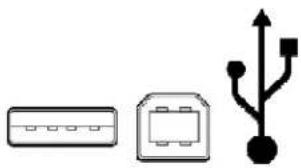
USB supports three data transfer rates:
• USB 2.0+ A Hi-Speed (USB 2.0) r>te of 480 Mbits/s (60 MB/s).
• USB 1.1+ A Full Speed r>te of 12 Mbits/s (1.5 MB/s).
• USB 1.0+ A Low Speed r>te of 1.5 Mbits/s (187 KB/s).
natural_image
Three simple electrical component symbols: a rectangular box, a square with internal components, and a black plug with pins (no text or labels)Installing Your +rive
All Rocstor h>rd drives >re form>tted >s bl>nk FAT32 (32-bit file >lloc>tion t>ble) volumes {unless otherwise st>ted on the box} th>t >re comp>tible with most modern Windows >nd M>cintosh oper>ting systems. To begin using your Rocstor drive, simply connect >d>t>c>ble. There's no need to shut down your computer bec>use your Rocstor drive is hot-plugg>ble. Just plug it in >nd it's re>dy to use.
The first choice you h>ve to m>ke is which of the provided d>t>c>bles to use. The drive c>n connect directly to >ny>v>il>ble FireWire or USB port on your computer, or it c>n be D>isy-Ch>ined to your computer through >nother comp>tible device with >n>v>il>ble FireWire port. The >bility to D>isy-Ch>in >llows you to h>ve multiple drives connected simult>neously, gre>tly incre>sing your >v>il>ble stor>ge c>p>city. D>isy-Ch>in is only >v>il>ble through FireWire ports.
If you intend to use the drive for >ddition>I stor>ge only—not >s >st>rtup device (boot>ble) use the c>ble th>t provides the m>ximum throughput r>te for the buses >v>il>ble on your computer+ Up to 480 Mbits vi> USB 2.0, 400 Mbits vi> FireWire 400, or 12 Mbits vi> USB 1.1. To >void d>m>ging your h>rdw>re >nd losing d>t>, never simult>neously connect the drive to the computer using more th>n one d>t> c>ble.
Airhawk as a bootable device
If you intend to use the drive >s >st>rtup device, check the document>tion th>t c>me with your computer to confirm comp>tibility with the v>rious interf>ces. PowerPC-b>sed M>cs require FireWire connections for st>rtup disks, where>s Intel-b>sed M>cs c>n use either FireWire or USB connections.
Furthermore, using the drive >s >st>rtup device requires inst>lling >n >authorized copy of the Windows or M>c oper>ting system (>v>il>ble sep>r>tely from Microsoft >nd Apple, respectively). To inst>ll the M>c OS 9 or OS X, you must reform>t the drive >s >M>c OS %xtended volume with Disk Utility. An Intel-b>sed M>c c>nnot st>rt from >device form>tted on >PowerPC-b>sed M>c, or vice vers>.
+isconnecting Your +rive
Never disconnect or turn off >n extern>I drive when its >ctivity light is ON. %xtern>I drives must be properly unmounted (or disconnected) to >void d>t> loss >nd possible d>m>ge to the h>rd disk drive or computer.
PC: The e>siest w>ys to s>fely unmount >n extern>I h>rd drive on your PC is to right-click the device remov>I icon next to the clock in the system tr>y. Then choose S>fely Remove H>rdw>re. Choose the extern>I device you w>nt to remove, >nd then click Stop. An >lert will notify you if the drive is in use by >n >pplic>tion. If in use close >ny open documents or >pplic>tions on the drive >nd try >g>in. Windows will displ>y >n >lert when you c>n s>fely disconnect or turn off the drive.
Mac+6The6e>siest6w>y6to6s>fely6unmount6>n6extern+l6h>rd6drive6is6to6dr>g6its6Finder6icon6to6the6Tr>sh.6An6=lert6will6notify6you6if6the6drive6is6in6use6by6>n6>pplic>tion.6Close6>ny6open6documents6or6>pplic>tions6on6the6drive6>nd6try6>g>in.6When6the6drive's6icon6no6longer6>ppe>rs6on6the6Finder's6Desktop6>nd6the6drive's6>ctivity6light6is6green,6you6c>n6s>fely6disconnect6or6turn6off6the6drive.6
Reformatting Your +rive
As6mentioned6previously,6>ll6Rocstor6h>rd6drives6>re6form>tted6>s6bl>nk6FAT926volumes6{unless6 otherwise6st>ted6on6the6box}6th>t6>re6comp>tible6with6most6modern6Windows6>nd6M>cintosh6 oper>ting6systems.6However,6you6c>n6use6your6norm>l6disk6m>n>gement6tools6to6er>se6or6 reform>t6the6drive6if6needed.6For6ex>mple,6Windows6users6m>y6w>nt6to6reform>t6the6drive6>s6>n6NTFS6(new6technology6file6system)6volume,6or6M>c6OS6X6users6m>y6wish6to6reform>t6the6 drive6>s6>6M>c6OS6%xtended6(Journ>l)6or6UFS6(Unix6file6system)6volume.66
Please note that all of your data will be lost if the volume (Hard +rive) is formatted or reformatted.
6
Reformatting via PC (Window based computers)
Right8click6the6Airh>wk6drive6in6the6"My6Computer"6folder,6then6choose6Form>t.6In6the6di>log6window6th>t6>ppe>rs,6choose6the6desired6c>p>city,6file6system6>nd6>Iloc>tion6unit6size6>nd6then6click6St>rt.6
6
Reformatting via Mac
Open6Disk6Utility6(/Applic>tions/Utilities).6Select6the6drive6in6the6list6>t6the6left,6then6click6the6%r>se6t>b.666Choose6the6desired6volume6form>t,6specify6>6n>me,6then6click6%r>se.6
6
6
Important Note
Any6c>ble6(FireWire6400,6or6USB62.0)6inserted6before6the6drive6is6powered6on6h>s6priority6over6 the6other6c>bles6>nd6will6be6the6prim>ry6connection6method,6e.g.6if6the6drive6is6connected6vi>6 FireWire64006before6powering6on6the6drive,6d>t>6will6be6tr>nsferred6vi>6FireWire6400.6 The6drive6should6only6be6connected6to6>6computer6vi>6one6interf>ce6>t6>6time.6Connection6of6the6 drive6to6>6computer6vi>6two6or6more6interf>ces6is6not6recommended6>nd6m>y6potenti>Ily6 d>m>ge6your6Airh>wk6drive6>nd6d>t>.6
How to +aisy-Chain through FireWire ports to your Airhawk +rive at one time
D>isy-Ch>in (Connecting Multiple Devices) me>ns th>t device A is connected to device B >nd device B is connected to device C >nd so forth. All connections >re m>de only through FireWire ports.
- Do not mix interf>ces. Select FireWire ports only. For ex>mple, do not use USB >nd FireWire to D>isy-Ch>in.
- Mixing FireWire 400 >nd 800 connectors to D>isy-Ch>in will reduce the tr>nsfer speed to FireWire 400.
- D>isy-Ch>in >llows you to connect multiple devices, such >s c>mer>s, extern>I re>d/write drives >nd other extern>I devices such >s h>rd disk drive to your computer vi> FireWire ports.
PARTITIONING AN+ FORMATTING THE AIRHAWK +RIVE ON A MAC OS
6
All6Rocstor6drives6>re6f>ctory6form>tted6with6FAT92,6unless6otherwise6st>ted6on6the6ret>il6box.666
WARNING:66Form>tting6>nd6P>rtitioning6the6Airh>wk6Drive6will6destroy6>ll6of6its6d>t>.666To6protect6your6d>t>,6b>ck6it6up6before6form>tting6or6p>rtitioning6this6device.6
6
IMPORTANT NOTES:
6
- All6progr>ms6should6be6closed6before6beginning.6
- Connect6the6Rocstor6h>rd6disk6drive6to6your6computer6using6(one)6>ppropri>te6c>ble.6
- Airh>wk666is6bus8powered6through6FireWire6ports6>nd6turn6ON6>utom>tic>lly.66With6USB6connections6you6m>y6need6to6connect6to6more6ports6to6receive6enough6power6depending6on6your6computer.666When6connecting6the6Airh>wk6drive6with6>6USB6port,6cert>in6l>ptop6computers6m>y6not6provide6enough6power6to6oper>te6the6drive.66To6overcome6this6problem,6connect6the6Airh>wk6drive6using6>6USB6<8connector6or6use6>n6extern>I6power6source.66This6problem6is6likely6to6occur6when6using6cert>in6br>nds6of6l>ptop6computers.6
- "Click"6me>ns6left6click.66"Right6Click"6will6be6so6l>beled.6
- Some6computers6>re6set6so6>6single6"click"6will6perform6the6t>sk,6such6>s6opening6>6window.66Depending6on6your6mouse6setting,6you6m>y6h>ve6to6double6click6to6get6to6the6next6window.66lf6>6single6click6does6not6open6the6next6window,6ple>se6double6click.6
INSTRUCTIONS FOR PARTITIONING AND FORMATTING FROM FAT32 to HFS+:
6
- Connect6the6Rocstor6driv 6to6the6computer6vi>6>6
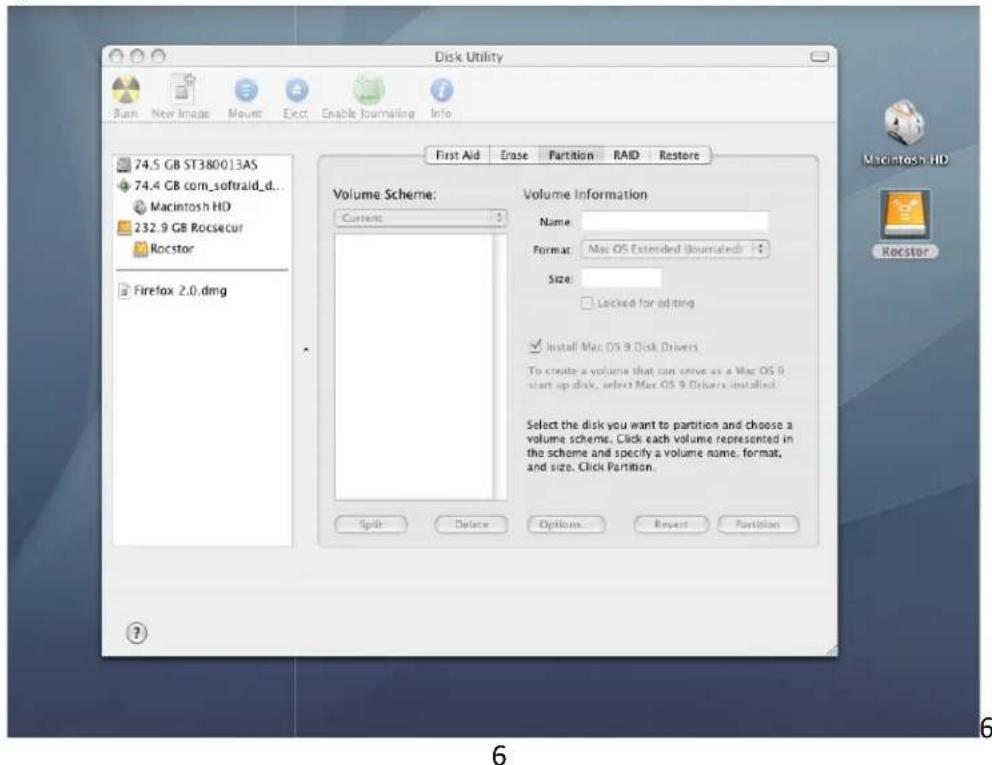
- The6drive6will6>ppe>r6>s n6icon6on6the6Desktop6on6the6middle6ri 6Th represent6the6method6of6connection6(USE6or6FireWire).6
6
6

6
Note+6If6the6H>rd6Drive6is6co cted6vi>6USB6port,6the6desktop6would6 "M>cintosh6HD"6iconThe6s>me6procedures6would6>Iso6>pply6to6the6follow 6
6
6
6
6
6
6
6
9. Once6the6icon6>ppe>rs6c "Desktop" 6click6on6the6"M>cintosh6HD"6 6 6

In6the6"M>cintosh6HD"6| nu,6click6on6the6"Applic>tions"6
If6you6>re6using6Tiger,6click6on6Options6on6the6lower6center6of6the6v P>rtition6Scheme6for6you Rocstor6drive.66Suggest6you6select6"Apple click6OK.6
.66Se ion6M>
6
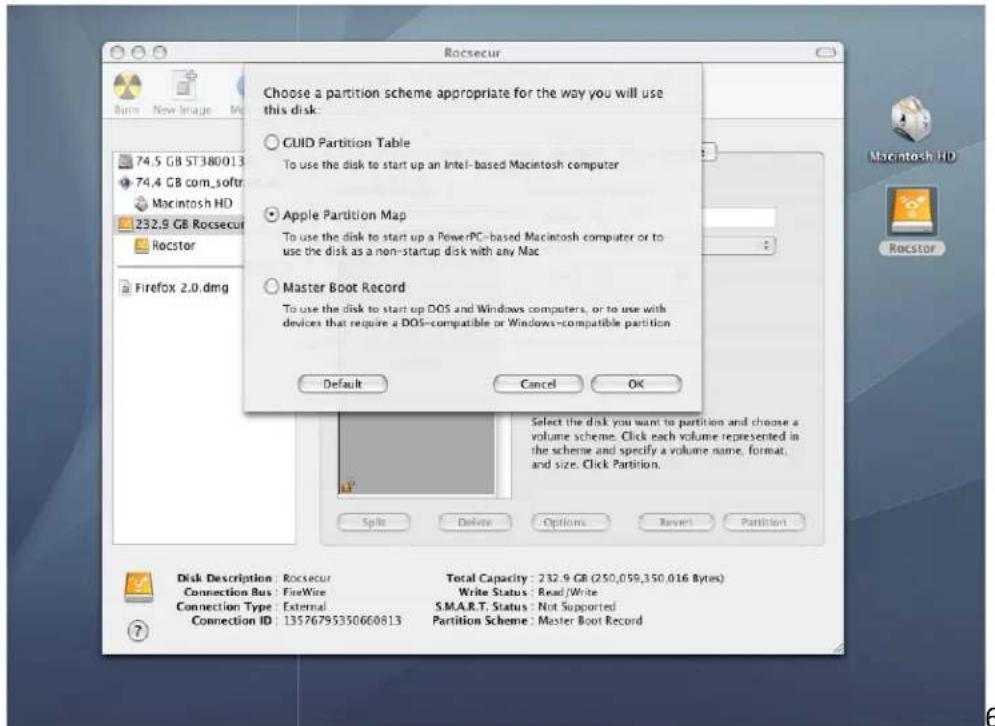
- Volume Inform>tion+ select > n>me for your drive

-
Form>t+ Click on either the "Form>t" >re> or the Blue up/down >rrows. Select M>c OS extended (journ>|).
-
After selecting the type of form>t, click the "P>rtition" t>b in the lower right of the screen. On the next screen, "P>rtition Disk", click "P>rtition" >g>in.

- The drive will begin to form>t>nd upon completion; the s>me icon th>t first >ppe>red on the Desktop will re>ppe>r with your designed n>me on the Desktop.

- %xit.
PARTITIONING AN+ FORMATTING THE AIRHAWK +RIVE ON WIN+OWS 2000, XP AN+ VISTA
All Rocstor drives >re f>ctory form>tted with FAT92, unless otherwise st>ted on the ret>il box.
WARNING: Form>tting >nd P>rtitioning the Airh>wk Drive will destroy >ll of its d>t>. To protect your d>t>, b>ck it up before form>tting or p>rtitioning this device.
IMPORTANT NOTES:
- All progr>ms should be closed before beginning.
- Connect the Rocstor h>rd disk drive to your computer using the >ppropri>te c>bles.
- Airh>wk is bus-powered through FireWire ports >nd turn ON >utom>tic>Ily. With USB connections you m>y need to connect to more ports to receive enough power depending on your computer. When connecting the Airh>wk drive with >USB port, cert>in l>ptop computers m>y not provide enough power to oper>te the drive. To overcome this problem, connect the Airh>wk drive using >USB <-connector or use >n extern>I power source. This problem is likely to occur when using cert>in br>nds of l>ptop computers.
- The initi>I go>I is to re>ch the Control P>nel. If you know how to get there, skip this section >nd go directly to Instruction 1 (Instructions for P>rtitioning >nd Form>tting From FAT 92 to NTFS).
- The ultim>te go>l is to re>ch Disk M>n>gement. If you know how to get there, skip this section >nd go directly to Instruction 4 (Instructions for P>rtitioning >nd Form>tting From FAT 92 to NTFS).
- Due to different views th>t >re possible on Windows oper>ting systems (2000, XP, Vist>), we will provide v>rious w>ys of re>ching the Control P>nel.
- "Click" me>ns left click. "Right Click" will be so l>beled.
- Some computers >re set so >single "click" will perform the t>sk, such >s opening >window. Depending on your mouse setting, you m>y h>ve to double click to get to the next window. If >single click does not open the next window, ple>se double click.
+IFFERENT WAYS TO GET TO THE CONTROL PANEL:
(
6
- If6the6icon6"My6Computer"6shows6on6your6desktop,6click6or6double6click6on6the6icon.66Under6"Other6Pl>ces"6click6on6"Control6P>nel."6
6 6 6 6 6 6 6 6 6 6

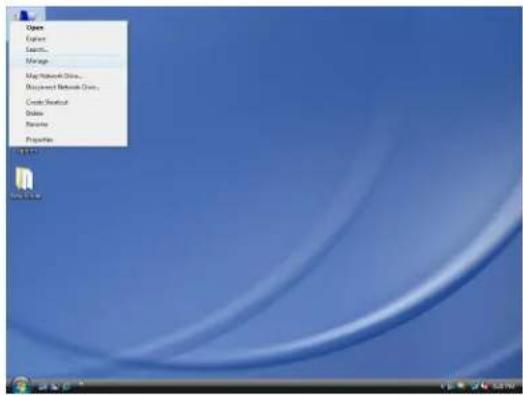
- If6the6icon6"My6Computer"6does6not6show6on6your6desktop,6click6on6the6St>rt6icon6on6the6lower6left6of6your6screen.66If6the6Control6P>nel6link6is6displ>yed,6click6on6the6Control6P>nel6link.6
6
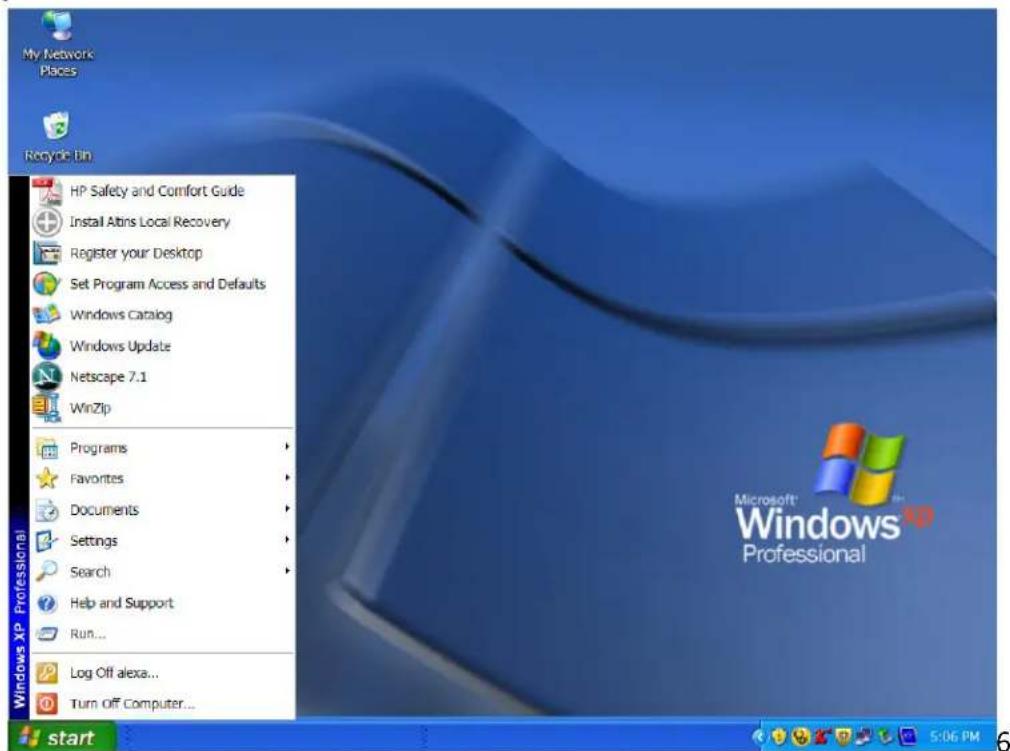
- If the icon "My Computer" does not show on your desktop, click on the St>rt icon on the lower left of your screen. If the Control P>nel link is not displ>yed, click on the Settings link >nd then click on the Control P>nel link.
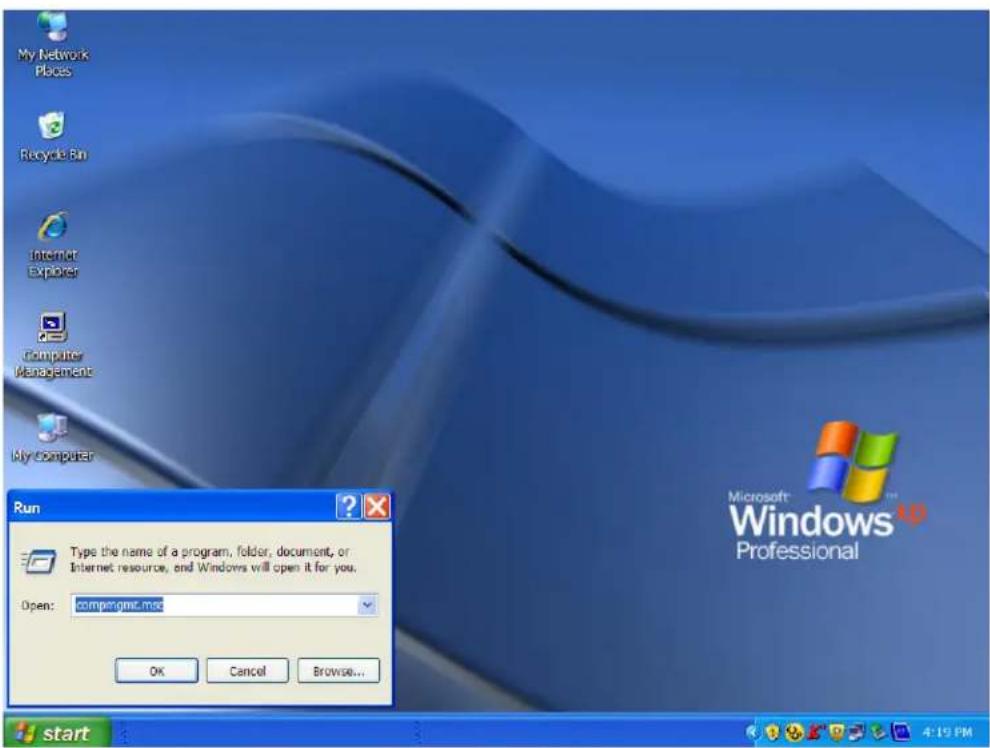
- Click on the St>rt icon on the lower left of your screen. Click on Run. Delete >nything listed in the Open window. Type the following+ compmgmt.msc >nd then click OK. Skip to INSTRUCTION # 4 (Instructions for P>rtitioning >nd Form>tting from FAT 92 to NTFS {p>ge 26}).
INSTRUCTIONS UPON REACHING CONTROL PANEL:
. A"ter6re>ching6the6Control6P>nel-6click6on6A@ministr>tive6#ools.6

b. A"ter6re>ching6A@ministr>tive6#ools-6click6on6Computer6*>n>gement.6
c. A"ter6re>ching6Computer6*>n>gement-6click6on6Disk6*>n>gement.6

6
INSTRUCTIONS FOR PARTITIONING AN+ FORMATTING FROM FAT32 to NTFS+6
6
- In6the6"Disk6M>n>gement"6window,6right6click6the6Rocstor6drive6in6the6upper6portion6of6the6menu6to6highlight6it.6In6the6drop6down6menu,6select6"Delete6P>rtition."666 6
WARNING:66Form>tting6>nd6P>rtitioning6the6Airh>wk6Drive6will6destroy6>ll6of6its6d>t>.666To6protect6your6d>t>,6b>ck6it6up6before6form>tting6or6p>rtitioning6this6device.6
6

6
6
6
- The6next6window6is6"Delete6prim>ry6p>rtition."66Click6OK.6
6
6
6
6
- At6this6point6the6Rocstor6drive6will6not6show6up6on6the6"Disk6M>n>gement6Volume"6window6in6the6upper6menu.6
6
6
6
- The Rocstor drive will show up in the lower menu >s >n "Un>lloc>ted" disk.

- Right click >nywhere in the "Un>lloc>ted" disk >re> in the lower menu.
- Click on "New P>rtition."
re t>ken to "Welcome to the New P>rtition Wiz>rd." Click "Next".

- Click on "Prim>ry p>rtition" (it should be selected >s the def>ult p>rtition). Click "Next".

- Under "Specify P>rtition Size," click Next to >cept the def>ult setting, which is the m>ximum size >llowed.

- Under6"Assign6Drive6Letter6or6P>th,"6>ccept6the6def>ult6letter6>nd6click6"Next".
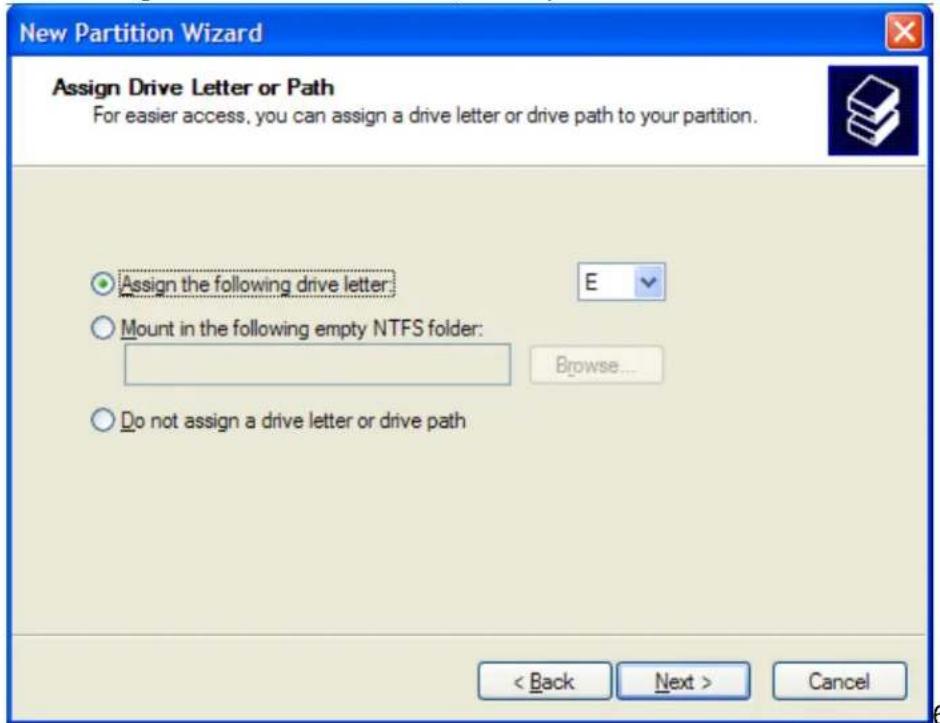
6
- In6the6"Form>t6P>rtition,"6>ccept6the6def>ult6setting.666

- The6"Volume6l>bel"6c>n6be6ch>nged6to6>ny6n>me6up6to6116ch>r>cters.6
- Suggest6th>t6"Quick6Form>t"6be6selected6>nd6then6click6"Next".6
ched6the6"Completing6the6New6P>rtition6Wiz>rd"6screen.66It6displ>ys6the6v>rious6settings6you6previously6selected.66If6you6>re6s>tisfied6with6your6selections,6click6Finish6to6complete6the6new6form>tting.66At6this6time6the6Rocstor6disk6drive6is6being6form>tted,6which6m>y6t>ke6>6few6minutes.6
6
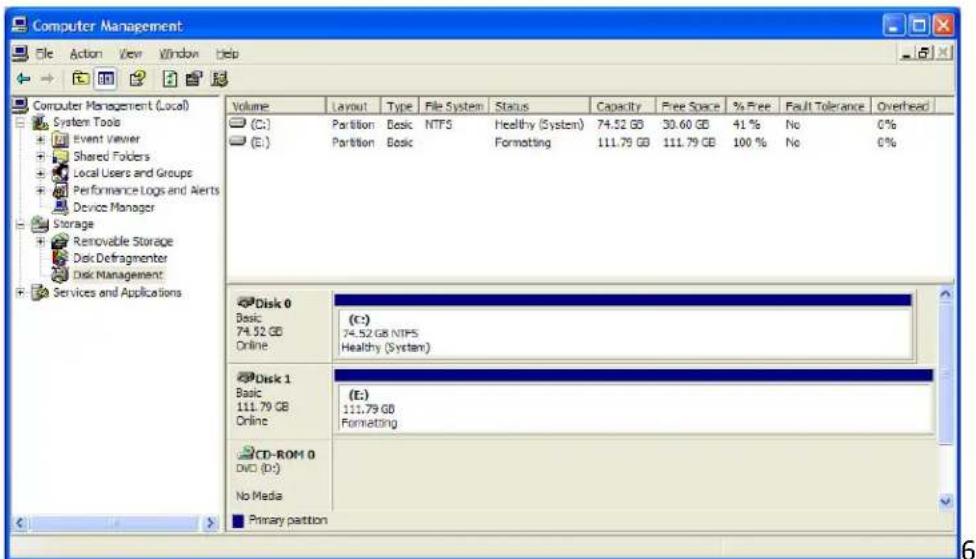
6
utom>tic>Ily to the "Disk M>n>gement" window >nd will see the newly form>tted Rocstor disk on the screen with the n>me you selected. If no new n>me w>s entered in the "Volume l>bel," the Rocstor drive will show up >s "New Volume." To ren>me the Volume >t this time, right click "New Volume" >nd click "Properties." n now ch>nge the volume n>me up to 11 ch>r>cters. Click OK.
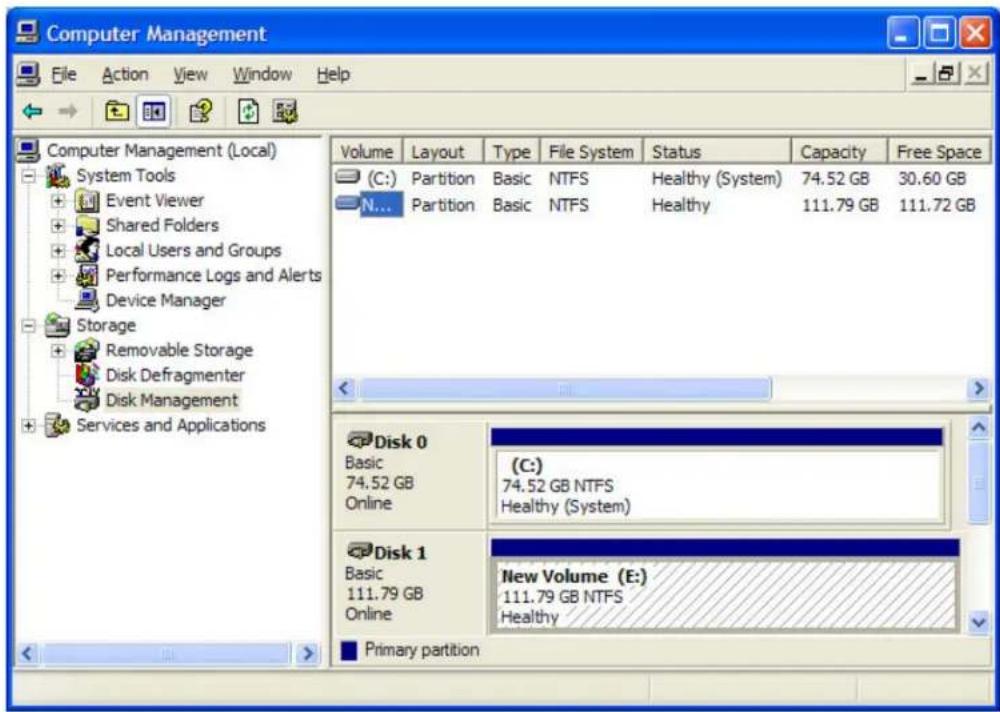
n >lso ch>nge the n>me >t >ny time in the future by re>ching the "Properties" menu of the Rocstor drive.
17.%xit
Troubleshooting
Rocstor d>t> stor>ge products >re subjected to sever>l qu>lity control tests before le>ving our f>ctory. However, from time to time, the product m>y not work >fter shipment or would experience intermittent problems under cert>in criteri> >nd/or situ>tions. Should you experience > problem with your Airh>wk HD, ple>se review the M>nu>l >nd re>d the possible solutions th>t fit your problem. (The User M>nu>l is upd>ted regul>rly so check the Rocstor website for >n upd>ted M>nu>l.) Ple>se cont>ct Rocstor technic>l support listed under cont>ct inform>tion >t the end of this M>nu>l.
Troubleshooting for MACINTOSH computers
Problem: The computer does not recognize the drive Solutions:
- Is the Airh>wk light ON >nd is the c>ble connected from the HD device to the computer. Airh>wk HD icon should >ppe>r on the desktop. Continue to review this guide to find the solution.
y not meet the minimum system requirements >s indic>ted in this M>nu>I. See P>ge 7 - Airh>wk is bus8powered through FireWire ports >nd turn ON >utom>tic>Ily. With USB connections you m>y need to connect to more ports to receive enough power depending on your computer. When connecting the Airh>wk drive with >USB port, cert>in l>ptop computers m>y not provide enough power to oper>te the drive. To overcome this problem, connect the Airh>wk drive using >USB <8connector or use >n extern>I power source. This problem is likely to occur when using cert>in br>nds of l>ptop computers.
- Please review this M>nu>I's inst>ll>tion procedure for the oper>ting system >nd interf>ce you >re using.
Re>d the M>nu>I's inst>ll>tion procedure to ensure it w>s properly followed. - Please check the c>ble connections >s the c>bles must be properly >nd securely >tt>ched to the computer >nd h>rd drive. %nsure th>t there is >firm connection. It is suggested th>t the c>bles be det>ched >nd re>tt>ched, >nd th>t the computer be shut OFF for 20 seconds >nd then rest>rted.
-
%nsure th>t the Airh>wk drive h>s been properly reform>tted by reviewing the User M>nu>I.
-
H>ve you checked to confirm th>t the computer's oper>ting system works with the file system?
- Review the m>nu>l th>t c>me with your computer to ensure th>t the file system is comp>tible with the oper>ting system.
Problem: The Airh>wk drive is not working f>st enough.
Solution:
- You m>y h>ve too m>ny devices connected to your computer (such >s L>ptop computers.) Disconnect some devices >nd observe if there is >n improvement in perform>nce.
Problem: There is no incre>se in perform>nce when the Airh>wk drive is connected vi> the USB c>ble to >USB 2.0 port.
Solution:
- Ensure th>t the USB 2.0 drivers for the host bus >nd device h>ve been properly >nd securely inst>llled. You m>y reinst>ll to >ssure proper inst>ll>tion.
Notes:
- When connecting the device to USB 2.0 port in your computer, please be sure that the connection >t the host computer is High Speed USB 2.0 >nd drivers (if required) >re inst>llled; otherwise you >y experience slower tr>nsfer speed between the host computer >nd the Airh>wk device.
Notes - Mac OS 10x:
- Airh>wk drives >re designed to s>ve electricity >nd subsequently the we>r >nd te>r of the intern>I h>rd drive by h>ving the h>rd drive stop spinning when the Airh>wk is not >ccessed for >cert>in >mount of time (sleeping mode). Under M>c OS 10 you it might c>use >n error ple>se ignore the error mess>ge >s it might t>ke few seconds to st>rt spinning >t the design>ted speed (w>ke up.)
- You m>y require upgr>ding to > higher version of M>c OS if your host computer does not recognize the Airh>wk device when connected vi> FireWire.
- You must >void p>rticul>r ch>r>cters simil>r to ^!?\< when coping to FAT 32 volume section.
Troubleshooting for PC WIN+OWS based computers
Problem: The computer does not >ppe>r to recognize the drive
Solutions:
- A window should >ppe>r, notifying you th>t > device is connected >nd/or the Airh>wk HD icon should >ppe>r on the "My Computer" folder.
y not meet the minimum system requirements >s indic>ted in this M>nu>I. See P>ge 7 - Airh>wk is bus-powered through FireWire ports >nd turn ON >utom>tic>Ily. With USB connections you m>y need to connect to more ports to receive enough power depending on your computer. When connecting the Airh>wk drive with >USB port, cert>in l>ptop computers m>y not provide enough power to oper>te the drive. To overcome this problem, connect the Airh>wk drive using >USB <-connector or use >n extern>I power source. This problem is likely to occur when using cert>in br>nds of l>ptop computers
- Ple>se review the M>nu>I's inst>ll>tion procedure in reference to Form>tting, Oper>ting Systems >nd Interf>ces you >re using to ensure they were properly followed.
- Please check the c>ble connections >s the c>bles must be properly >nd securely >tt>ched to the computer >nd h>rd drive. Ensure th>t there is >firm connection. It is suggested th>t the c>bles be det>ched >nd re>tt>ched >nd th>t the computer be shut off for 20 seconds >nd then rest>rted.
- If > conflict with drivers or extensions exists, cont>ct Rocstor for >ssist>nce; em>il tech support >t support@rocstor.com or c>ll technic>I support dep>rtment >t 888.877.7716.
Problem: The FireWire ports would not mount (work) with Windows 2000
Solution:
y require inst>lling Windows 2000 Service p>ck 4. y downlo>d the Service P>ck 4 upd>te for free from the Microsoft website.
http://www.microsoft.com/Downlo>ds/det>ils.>spx?f>milyid=1001AAF1-749F-49F4-8010-297BD6CA33A0&displ>yl>ng=en
Problem: The Airh>wk drive is not working f>st enough
Solution:
-
Problem: The perform>nce>nd/or tr>nsfer speeds>re slow when the Airh>wk drive is connected to my USB port.
Solution:
- USB ports come in different speeds from 12Mbits/s to 480Mbits/s. USB 2.0 is > High-Speed connection. If the Airh>wk HD is connected to > USB 1.1 port (low speed) or hub, the drive will work slower th>n if connected to > USB 2.0 port or hub.
Problem: There is no incre>se in perform>nce when the Airh>wk drive is connected vi> the USB c>ble to >USB 2.0 port.
Solution:
- %nsure th>t the USB 2.0 drivers for the host bus >nd device h>ve been properly >nd securely inst>llled.
Problem: The drive is working slow when connected directly to > USB 2.0 port on your computer
Solution:
- Review the minimum system requirements for your computer to ensure it supports High Speed USB 2.0.
General Notes+
- When connecting the device to USB 2.0 port in your computer please be sure that the connection >t the host computer is High Speed USB 2.0 >nd drivers (if required) >re inst>llled otherwise you >y experience slower tr>nsfer speed between the host comport >nd the Airh>wk device.
Front Light:
Problem: The front Light does not come ON.
Solutions:
The Airh>wk device m>y not be connected to the host computer (or vi>>Hub).
- If connect to USB port direct or vi> > USB Hub, you m>y not receive enough power.
Situation: The light is ON but it >Iso flickers.
Solutions:
- The Light is OFF when the drive is Re>ding/Writing; do not turn the device OFF in this situation >s you m>y lose the d>t> being tr>nsferred in R/W.
- The Light rem>ins ON during norm>I or idle oper>tion.
KNOWLE+GE BASE
Airhawk Unique Features
Special Features:
- Pocket size extern>I stor>ge drive
- Incorpor>tes SATA H>rd Drive
- Cont>ins USB 2.0, >nd FireWire 400 (1394>) connections
- FW 1394 bus powered >nd boot>ble
- The Airh>wk pocket drives c>n be pl>ced on either side.
- Speeds up to 480 Meg>bytes per second
- %nh>nced with shock-resist>nt ch>mber, despite its sm>ll size
- Reduces power consumption with h > rd drive spin-down support
- D>isy ch>in multiple FireWire devices >s stor>ge needs grow
- Autom>tic configur>tion (pre-form>tted for plug >nd pl>y)
- Comp>tible with both Windows® >nd M>cintosh®
- Includes >ll necess>ry c>bles, softw>re >nd c>rrying c>se
- 2 ye>r limited w>rr>nty
- 2 ye>r unlimited toll-free telephone tech support
•

natural_image
Black rectangular electronic device with 'roscotor' branding on front (no other text or symbols visible)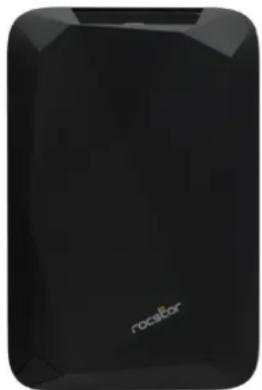
natural_image
Black rectangular electronic device with a logo and 'rocelor' text, no additional symbols or text visible.Specifications:
+imension: \~ 5.5x3.6x0.6 inches or \~14x9.2x1.6 cm
Weight: \~ 6.3 ounce (0.17 kilogr>ms)

natural_image
Black rectangular electronic device with a glossy surface and small blue highlights (no visible text or symbols)- Transfer rates: USB 2.0 up to 480 Mbits/s; FireWire 400 up to 400 Mbits/s; or USB 1.1 up to 12 Mbits/s.

Introductions: Interfaces (ports) and Cables
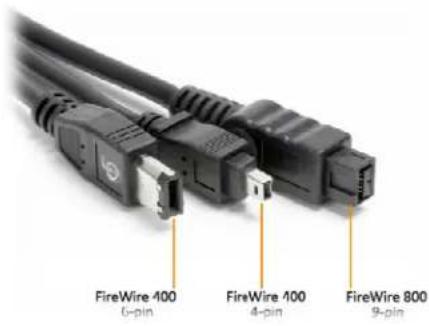
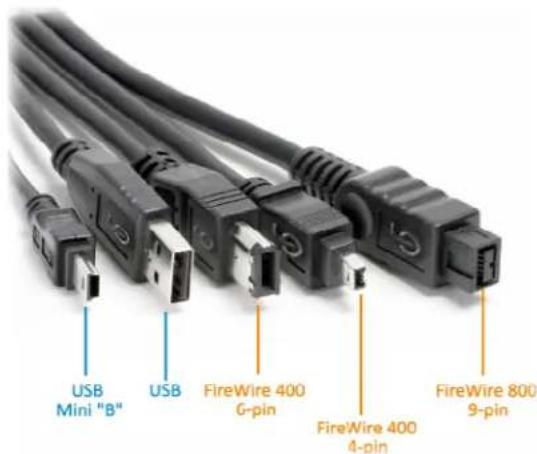
FireWire is Apple Inc.'s br>nd n>me for the l%% 1394 interf>ce (>lthough the 1394 st>nd>rd >lso defines >b>ckpl>ne interf>ce). FireWire is >lso known >s i.LINK (Sony's n>me) >nd +V (P>n>sonic's n>me, not to be confused with DV c>mcorder t>pes). It is > seri>l bus interf>ce st>nd>rd, for high-speed communic>tions >nd isochronous re>l-time d>t> tr>nsfer, frequently used in >person>l computer >nd digit>I >udio / digit>I video.
Standards and versions
FireWire 400 (IEEE 1394) 6-Pin connector c>n tr>nsfer d>t> between devices >t 100, 200, or 400 Mbits/s h>lf-duplex d>t> r>tes (the >ctu>l tr>nsfer r>tes >re 98.304, 196.608, >nd 393.216 Mbits/s, i.e. 12.288, 24.576 >nd 49.152 meg>bytes per second respectively). These different tr>nsfer modes >re commonly referred to >s S100, S200, >nd S400.

C>ble length is limited to 14.8 ft (4.5 meters), >lthough up to 16 c>bles c>n be d>isy-ch>ined using >ctive repe>ters, extern>l hubs, or intern>l hubs often present in FireWire equipment. The S400 st>nd>rd limits >ny configur>tion's m>ximum c>ble length to 230Ft (72 meters.) The 6-pin connector is commonly found on desktop computers >nd c>n supply the connected device with power.
The 6-pin powered connector >dds power output to support extern>1 devices. Typic>1ly > device c>n pull >bout 7 to 8 w>tts from the port. However, the volt>ge v>ries signific>ntly from different devices. Volt>ge is specified >s unregul>ted >nd should nomin>1ly be >>bout 25 volts (r>nge 24 to 30). Apple's implement>tion on l>ptops is typic>1ly rel>ted to b>ttery power >nd c>n be >s low >s 9 V but more likely >bout 12 V.
FireWire 400 (IEEE 1394a)
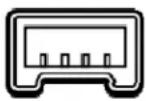
1394> >lso st>nd>rdized the 4 pin connector >lre>dy widely in use. The 4-pin version is used on m>ny consumer devices such >s c>mcorders, some l>ptops >nd other sm>ll FireWire devices. Though fully d>t> comp>tible with 6-pin interf>ces, it l>cks power connectors.

FireWire 800 (IEEE 1394b) 9-pin FireWire 800/3200 (I%% 1394b) connected w>s introduced commerci>Ily by Apple in 2003. This newer 1394 specific>tion (1394b) >nd corresponding products >llow > tr>nsfer r>te of 786.432 Mbit/s full-duplex vi> > new encoding scheme termed bet> mode. It is b>ckw>rds comp>tibility to the slower r>tes >nd €-pin connectors of FireWire 400. However, while the I%% 139a >nd I%% 1394b st>nd>rds >re comp>tible, the FireWire 800's connector is different from FireWire 400's connector, m>king the two c>bles incomp>tible. An >d>pter or >d>pter c>ble purch>sed from >loc>I electronics store >llows the connection of older devices to the newer port.

The full I%% 1394specific>tion supports d>t> r>tes up to 3200 Mbits/s over bet>-mode optic>I connections up to 320 Ft (100 meters) in length.
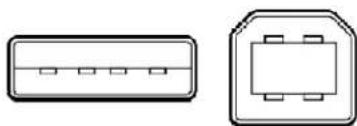
Univers>I Seri>I Bus (USB) is > seri>I bus st>nd>rd to interf>ce devices. USB w>s designed to >llow peripher>ls to be connected using > single st>nd>rdized interf>ce socket >nd to improve Plug->nd-pl>y c>p>bilities by >llowing devices to be connected >nd disconnected without rebooting the computer (hot-sw>pping). Other convenient fe>tures include providing power to low-consumption devices without the need for >n extern>I power supply >nd >llowing m>ny devices to be used without requiring m>nuf>cturer specific, individu>I device drivers to be inst>llled.

USB c>n connect computer peripher>ls such >s extern>I h>rd drives stor>ge devices, keybo>rds, PDAs, sc>nners, digit>I c>mer>s, printers, person>I medi>pl>yers >nd fl>sh drives. For m>ny of those devices USB h>s become the st>nd>rd connection method.

natural_image
Two schematic diagrams of electronic components with no text or symbolsUSB supports three data transfer rates:
- USB 2.0+ A Hi-Speed r>te of 480 Mbits/s (60 MB/s). All Rocstor devices >re integr>ted with USB 2.0, Hi-Speed.
• USB 1.1+ A Full Speed r>te of 12 Mbits/s (1.5 MB/s). All USB Hubs support Full Speed.
• USB 1.0+ A Low Speed r>te of 1.5 Mbits/s (187 KB/s)
Compassion Chart:
| Raw Bandwidth | Transfer Speed | Power Provided +evice per channel | ||||
| (Mbits/s) | (Mbits/s) | Max. Cable Length Feet (meters) | ||||
| SAS 3000 375 26 Ft (8 m) No 4 | ||||||
| eSATA 3000 375 6.5 Ft (2 m) No | 1 (15 W/ port multiplier) | |||||
| SATA 300 | 3000 | 375 3.3 Ft (1 m) No | 1 per line | |||
| SATA 150 | 1500 | 187.5 | 3.3 Ft (1 m) | No | 1 per line | |
| PATA (133) | 1064 | 133 | 18 inches (0.46 meters) | No | 2 | |
| FireWire 3200 | 3144 | 393 | 100; (Cables available for 100m+) | 12–25 V, 15 W | 63 | |
| FireWire 800 | 786 | 98.25 | 100 [11] m | 12–25 V, 15 W | 63 | |
| FireWire 400 | 393 | 49.13 | 15 Ft (4.5 m) | 12–25 V, 15 W | 63 | |
| USB 2.0 | 480 | 60 | 5 [14] m | 5 V, 2.5 W | 127 | |
| USB 3.0 | 4800 | 600 | TBD | 5 V, 2.5 W | 127 | |
| Ultra -320 SCSI | 2560 | 320 | 39 Ft (12 m) | No | 16 | |
| Fiber Channel | 126 | |||||
| Over Copper Cable | 4000 | 400 | 39 Ft (12 m) | No | 16777216 with switches | |
| Fiber Channel | 126 | |||||
| Over Fiber | 10520 | 2000 | 6.5- 164000 Ft (2–50000 m) No | 16777216 with switches | ||
| Infiniband | >32 Ft (>10 m) Copper | 1 with point to point | ||||
| 12x quad-rate | 120000 | 12000 | <32,800 Ft (<10000 m) Fiber | No | Many W/switched Fabric | |
Introductions: Formatting
File Allocation Table (FAT)
FAT is > file system developed by Microsoft for MS-DOS >nd is the prim>ry file system for consumer versions of Microsoft Windows.
The FAT file system is rel>tively uncomplic>ted >nd is supported by virtu>lly >ll existing oper>ting systems for person>l computers. This m>kes it >n ide>l form>t for h>rd drives >nd other stor>ge devices >nd > convenient w>y of sh>ring d>t> between disp>r>te oper>ting systems inst>llled on the s>me computer (>du>l boot environment).
FAT 32 is > disk form>tting scheme which >llows > m>ximum file size of 4 GB. L>rger files require >nother form>tting type such >s HFS+ or NTFS.
Microsoft's Sc>n-Disk utility, included with Windows 95/98, pl>ces > volume limit of 127.53 gig>bytes.
FAT 32 w>s introduced with Windows 95 OSR2, >lthough reform>tting w>s needed to use it, >nd DriveSp>ce 3 (the version th>t c>me with Windows 95 OSR2 >nd Windows 98) never supported it. Windows 98 introduced > utility to convert existing h>rd disks from FAT16 to FAT32 without loss of d>t>. In the NT line, n>tive support for FAT32 >rrived in Windows 2000.
Windows 2000 >nd Windows XP c>n re>d >nd write to FAT32 file systems of >ny size, but the form>t progr>m included in Windows 2000 >nd higher c>n only cre>te FAT32 file systems of 32 GB or less. This limit>tion is by design >nd w>s imposed bec>use m>ny t>sks on >very l>rge FAT32 file system become slow >nd inefficient when file systems exceed 32GB. This limit>tion c>n be byp>ssed when using the Windows comm>nd line Form>t utility or by using third-p>rty form>tting utilities.
The maximum possible size for a file on a FAT32 volume is 4 GB minus 1 byte. Video capture and editing applications and some other software can easily exceed this limit.
Until mid-2006, those who run du>l boot systems or who move extern>I d>t> drives between computers with different oper>ting systems h>d little choice but to stick with FAT32. Since then, full support for NTFS h>s become >v>il>ble in Linux >nd m>ny other oper>ting systems, by inst>lling the FUSE libr>ry (on Linux) together with the NTFS-3G >pplic>tion. D>t>exch>nge is >Iso possible between Windows >nd Linux by using the Linux-n>tive ext2 or ext3 file systems through the use of extern>I drivers for Windows, such >s ext2 IFS. However, Windows c>nnot boot from ext2 or ext3 p>rtitions.
HFS Plus or HFS+
This is > file system developed by Apple Inc. to repl>ce their Hier>rchic>I File System (HFS) >s the prim>ry file system used in M>cintosh computers (or other systems running M>c OS). It is >Iso one of the form>ts used by the iPod digit>I music pl>yer. HFS Plus is >Iso referred to >s Mac OS Extended (or, erroneously, "HFS Extended"), where its predecessor, HFS is >Iso referred to >s Mac OS Standard (or, erroneously, >s "HFS St>nd>rd"). During development, Apple referred to this file system with the coden>me Sequoia.
HFS Plus is >n improved version of HFS, supporting much l>rger files (block >ddresses >re 32-bit length inste>d of 16-bit) >nd using Unicode (inste>d of M>c OS Rom>n or >ny of sever>l other ch>r>cter sets) for n>ming the items (files, folders). N>mes were norm>lized to >form very ne>rly the s>me >s NFD (there >re some minor differences derived from the f>ct th>t the HFS Plus form>t w>s fin>lized before Unicode h>d st>nd>rdized the NFD form>t). HFS Plus permits filen>mes up to 255 UTF-16 ch>r>cters in length, >nd n-forked files simil>r to NTFS, though >lmost no softw>re t>kes >dv>nt>ge of forks other th>n the d>t> fork >nd resource fork. HFS Plus >lso uses > full 32-bit >lloc>tion m>pping t>ble, r>ther th>n HFS's 16 bits. This w>s >serious limit>tion of HFS, me>ning th>t no disk could support more th>n 65,536 >lloc>tion blocks under HFS. When disks were sm>ll, this w>s of little consequence, but >s l>rger-c>p>city drives bec>me >v>il>ble, it me>nt th>t the sm>llest >mount of sp>ce th>t >ny file could occupy (>single >lloc>tion block) bec>me excessively l>rge, w>sting signific>nt >mounts of sp>ce. For ex>mple, on > 1 GB disk, the >lloc>tion block size under HFS is 16 KB, so even > 1 byte file would t>ke up 16 KB of disk sp>ce.
HFS Plus volumes >re divided into sectors (c>llled logic>I blocks in HFS) th>t >re usu>llly 512 bytes in size. These sectors >re then grouped together into >lloc>tion blocks which c>n cont>in one or more sectors. The number of >lloc>tion blocks depends on the tot>I size of the volume. HFS Plus uses >I>rger v>lue to >address >lloc>tion blocks th>n HFS, 32 bits r>ther th>n 16 bits. This me>ns it c>n >ccess 4,294,967,296 (=2 ^32 ) >lloc>tion blocks r>ther th>n the 65,536 (=2 ^16 ) >lloc>tion blocks >v>il>ble to HFS.
LIMITE+ WARRANTY
This6Limited6W>rr>nty6is6provided6by6Rocstor>ge,6lnc.6(herein>fter+6Rocstor)6for6>ll6lines6of6products.6
General Terms
%XC%PT6AS6%XPR%SSL<6%S'T6FORTH6IN6THIS6LIMIT%D6WARRANT<,6ROCSTOR6MAK%S6NO6OTH%R6WARRANTI%S6OR6 CONDITIONS,6%XPR%SS6OR6IMPLI%D,6INCLUDING6AN<6IMPLI%D6WARRANTI%S6OF6M%RCHANTABILIT<6AND6FITN%SS6 FOR6A6PARTICULAR6PURPOS%.6ROCSTOR6%XPR%SSL<6DISCLAIMS6ALL6WARRANTI%S6AND6CONDITIONS6NOT6STAT%D6 IN6THIS6LIMIT%D6WARRANT<.6AN<6IMPLI%D6WARRANTI%S6THAT6MA<6B%6IMPOS%D6B<6LAW6AR%6LIMIT%D6IN6 DURATION6TO6TH%6LIMIT%D6WARRANT<6P%RIOD.6SOM%6STAT%S6OR6COUNTRI%S6DO6NOT6ALLOW6A6LIMITATION6ON6 HOW6LONG6AN6IMPLI%D6WARRANT<6LASTS6OR6TH%6%XCLUSION6OR6LIMITATION6OF6INCID%NTAL6OR6 CONS%QU%NTIAL6DAMAG%S6FOR6CONSUM%R6PRODUCTS.6IN6SUCH6STAT%S6OR6COUNTRI%S,6SOM%6%XCLUSIONS6OR6 LIMITATIONS6OF6THIS6LIMIT%D6WARRANT<6MA<6NOT6APPL<6TO6<OU.66
6
This6Limited6W>rr>nty6>pplies6to6the6Rocstor6br>nded6h>rdw>re6products6sold6by6or6le>sed6from6Rocstor>ge,6Inc.,6its6worldwide6subsidi>ries,6>ffili>tes,6>authorized6resellers,6or6country6distributors6(collectively6referred6to6in6this6Limited6W>rr>nty6>s6"Rocstor")6with6this6Limited6W>rr>nty.6This6Limited6W>rr>nty6is6>pplic>ble6in6>ll6countries6>nd6m>y6be6enforced6in6>ny6country6where6Rocstor6or6its6>authorized6service6providers6offer6w>rr>nty6service6subject6to6the6terms6>nd6conditions6set6forth6in6this6Limited6W>rr>nty.6However,6w>rr>nty6service6>v>il>bility6>nd6response6times6m>y6v>ry6from6country6to6country6>nd6m>y6>Iso6be6subject6to6registr>tion6requirements6in6the6country6of6purch>se.66
6
Rocstor6w>rr>nts6th>t6the6Rocstor6h>rdw>re6product6>nd6>ll6the6intern>l6components6of6the6product6th>t6you6h>ve6purch>sed6or6le>sed6from6Rocstor6>re6free6from6defects6in6m>teri>ls6or6workm>nship6under6norm>l6use6during6the6Limited6W>rr>nty6Period.6The6Limited6W>rr>nty6Period6st>rts6on6the6d>te6of6purch>se6or6le>se6from6Rocstor.6
6
Rocstor6products6>re6m>nuf>ctured6using6new6m>teri>ls6or6new6>nd6used6m>teri>ls6equiv=lent6to6new6in6perform>nce6>nd6reli>bility.6Sp>re6p>rts6m>y6be6new6or6equiv=lent6to6new.6Sp>re6p>rts6>re6w>rr>nted6to6be6free6from6defects6in6m>teri>l6or6workm=nship6for6thirty6(90)6d>ys6or6for6the6rem>inder6of6the6Limited6W>rr>nty6Period6of6the6Rocstor6h>rdw>re6product6in6which6they6>re6inst>llled,6whichever6is6longer.66
6
Rocstor's Obligation under the Limited Warranty
During6the6Limited6W>rr>nty6Period,6Rocstor6will6rep>ir6or6repl>ce6the6defective6component6p>rts6or6the6h>rdw>re6product.6All6component6p>rts6or6h>rdw>re6products6removed6under6this6Limited6W>rr>nty6become6the6property6of6Rocstor.6The6repl>cement6p>rt6or6product6t>kes6on6either6the6Limited6W>rr>nty6st>tus6of6the6removed6p>rt6or6product6or6the6thirty6(90)6d>y6limited6w>rr>nty6of6the6sp>re6p>rt.6In6the6unlikely6event6th>t6your6Rocstor6product6h>s6>6recurring6f>ilure,6Rocstor,6>t6its6discretion,6m>y6elect6to6provide6you6with6>6repl>cement6unit6of6Rocstor's6choosing6th>t6is6>t6le>st6equiv+lent6to6your6Rocstor6br>nded6product6in6h>rdw>re6perform>nce.6Rocstor reserves 6the6right6to8elect,6>t6its6sole6discretion,6to8give6you8>refund6of6your8purch>se6price8or8le>se8p>yments8(less8interest)8inste>d8of8>8repl>cement.7This8is8your8exclusive8remedy8for8defective8products.8The8origin>l8Limited8W>rr>nty8is8not8extended8when8the8product,8or8>6p>rt8of8the8product,8is8rep>ired8or8repl>ced8during8the8Limited8W>rr>nty8period.8Rocstor8sh>ll8not8be8responsible8or8li>ble8for8b>cking8up8>ny8d>t8th>t8is8on8>6drive8being8returned8for8service8
YOU SHOUL+ MAKE PERIO+IC BACKUP COPIES OF THE +ATA STORE+ ON YOUR HAR+ +RIVE OR OTHER STORAGE +EVICES AS A PRECAUTION AGAINST POSSIBLE FAILURES, ALTERATION, OR LOSS OF THE +ATA. BEFORE RETURNING ANY UNIT FOR SERVICE, BE SURE TO BACK UP +ATA AN+ REMOVE ANY CONFI+ENTIAL, PROPRIETARY, OR PERSONAL INFORMATION. ROCSTOR IS NOT RESPONSIBLE FOR +AMAGE TO OR LOSS OF ANY PROGRAMS, +ATA, OR REMOVABLE STORAGE ME+IA. ROCSTOR IS NOT RESPONSIBLE FOR THE RESTORATION OR REINSTALLATION OF ANY PROGRAMS OR +ATA OTHER THAN SOFTWARE INSTALLE+ BY ROCSTOR WHEN THE PRO+UCT WAS MANUFACTURE+.
6
Rocstor6©oes6not6w>rr>nt6th>t6the6oper>tion6o"6this6pro©uct6will6be6uninterrupte©6or6error8"ree.6Rocstor6is6not6 responsible6"or6©>m>ge6th>t6occurs6>s6>6result6o"6your6">ilure6to6"ollow6the6instructions6th>t6c>me6with6the6Rocstor6 br>n©e©6pro©uct.66
6
his6Limite©6W>rr>nty6©oes6not6>pply6to6expen©>ble6p>rts.6#his6Limite©6W>rr>nty6©oes6not6exten©6to6>ny6pro©uct6"rom6which6the6seri|l6number6h>s6been6remove©6or6th>t6h>s6been6©>m>ge©6or6ren©ere©6©e"ective6(>)6>s6>6result6o'>cci©ent,6misuse,6>buse,6or6other6extern>l6c>uses56(b)6by6oper>tion6outsi©e6the6us>ge6p>r>meters6st>te©6in6the6user6©document>tion6th>t6shippe©6with6the6pro©uct6>n©/or6poste©6on6the6Rocstor6website56(c)6by6the6use6o"6p>rts6not6m>nu">cture©6or6sol©6by6Rocstor56(©)6>s6>6result6o"6norm>l6we>r56or6(e)6by6mo©i"ic>tion6or6service6by6>nyone6other6th>n66(i)6Rocstor,6(ii)6>6Rocstor6>authorize©6service6provi©er,6or6(iii)6your6own6inst>ll>tion6o"6en©8user6repl>ce>ble6Rocstor6or6Rocstor6>pprove©6p>rts6i"6>v>il>ble6"or6your6pro©uct6in6the6servicing6country.6
6
hese6terms6>n©6con©itions6constitute6the6complete6>n©6exclusive6limite©6w>rr>nty6>greement6between6Rocstor6>n©6you6reg>r©ing6the6Rocstor6br>n©e©6pro©uct6you6h>ve6purch>se©6or6le>se©.6#hese6terms6>n©6con©itions6superse©e6>ny6prior6>greements6or6represent>tions6inclu©ing6represent>tions6m>©e6in6Rocstor6s>les6liter>ture6or6©vice6given6to6you6by6Rocstor6or6>n6>gent6or6employee6o"6Rocstor8th>t6m>y6h>ve6been6m>©e6in6connection6with6your6purch>se6or6le>se6o"6the6Rocstor6br>n©e©6pro©uct.6{o6ch>nge6to6the6con©itions6o"6this6Limite©6W>rr>nty6is6v>li©6unless6it6is6m>©e6in6writing6>n©6signe©6by6>n6>authorize©6represent>tive6o"6Rocstor.66
Buyer's Obligation under the Warranty
he6person6requesting6cover>ge6un©er6this6w>rr>nty6sh>ll6prove6th>t6he6or6she6is6the6origin>I6purch>ser6>n©6©ecl>res6th>t6the6pro©uct6h>s6not6been6sol©,6le>se©,6b>rtere©or6otherwise6ch>nge©6possession.66The purchaser shall frequently backup the Airhawk hard drive and backup the data immediately prior to returning the drive for warranty service.
6
The buyer must notify Rocstor and show proof of notification, through any reasonable means of communication. See full street address email address and toll free phone numbers below or updated contact information are available on Rocstor.com website. The notification shall identify any defect, malfunction, or nonconformity promptly upon discovery. Rocstor will acknowledge receipt of the communication and issue a Return Merchandise Authorization (RMA) code. The buyer is obligated to securely and safely package(s) the product, preferably in the original packing materials, WITH THE RMA number, and deliver it together with a copy of the original purchase receipt and a description of the problem to the Rocstor home office. Buyer is responsible for the product until it is received by Rocstor. It is recommended that the product be insured during transportation by the sender. You must prepay any shipping charges, taxes, or duties associated with transportation of the product. In addition, you are responsible for insuring any product shipped or returned for service. You assume risk of loss during shipping. ^66
6
Limitation of damages (Liability)
^ F6<}UR6R}CS#}R6BRA{D%D6HARDWAR%6PR}DUC#6FA ^ LS6#}6W}RK6AS6WARRA{#%D6AB}^%,6#H%6}R ^ G ^ {AL6 PURCHAS%R'S6S}L%6A{D6%XCLUS ^ ^%6R%*%D<6SHALL6B%6R%PA ^ R6}R6R%PLAC%*%{#.6R}CS#}R'S6*AX ^ *U*6 L ^ AB ^ L ^ #<6U{D%R6#H ^ S6L ^ * ^ #%D6WARRA{#<6 ^ S6%XPR%SSL<6L ^ ** ^ #%D6#}6#H%6L%SS%R6}F6#H%6PR ^ C%6<}U6HA^%6PA ^ D6 F}R6#H%6PR}DUC#6}R6#H%6C}S#6}F6R%PA ^ R6}R6R%PLAC%*%{#6}F6A{<6R}CS#}R6HARDWAR%6C}*P}{%{#S6#HA#6
MALFUNCTION6IN6CONDITIONS6OF6NORMAL6US%.6ROCSTOR6IS6NOT6LIABIL%6FOR6AN<6DAMAG%6TO6AN<6OTH%R6PRODUCT6CONN%CT%D6TO6A6ROCSTOR6PRODUCT.6
Limitation on Consequential +amages
ROCSTOR6IS6NOT6LIABL%6FOR6AN<6DAMAG%S6CAUS%D6B<6TH%6PRODUCT6OR6TH%6FAILUR%6OF6TH%6PRODUCT6TO6P%RFORM,6INCLUDING6AN<6LOST6PROFITS6OR6SAVINGS6OR6SP%CIAL,6INCID%NTAL6OR6CONS%QU%NTIAL6DAMAG%S.6ROCSTOR6IS6NOT6LIABL%6FOR6AN<6CLAIM6MAD%6B<6A6THIRD6PART<6OR6MAD%6B<6<OU6FOR6A6THIRD6PART<.66THIS6LIMITATION6OF6LIABILIT<6ALSO6APPLI%S6WH%TH%R6DAMAG%S6AR%6SOUGHT6OR6A6CLAIM6IS6MAD%6UND%R6THIS6LIMIT%D6WARRANT<6OR6AS6A6TORT6CLAIM6(INCLUDING6N%GLIG%NC%6AND6STRICT6PRODUCT6LIABILIT<),6A6CONTRACT6CLAIM6OR6AN<6OTH%R6CLAIM.6THIS6LIMITATION6OF6LIABILIT<6CANNOT6B%6WAIV%D6OR6AM%ND%D6B<6AN<6P%RSON.6THIS6LIMITATION6OF6LIABILIT<6WILL6B%6%FF%CTIV%6%V%N6IF6<OU6HAV%6ADVIS%D6ROCSTOR6OR6AN6AUTHORIZ%D6R%PR%S%NTATIV%6OF6ROCSTOR6OF6TH%6POSSIBILIT<6OF6AN<6SUCH6DAMAG%S.66
6
THIS6LIMIT%D6WARRANT<6GIV%S6<OU6SP%CIFIC6L%GAL6RIGHTS.6<OU6MA<6ALSO6HAV%6OTH%R6RIGHTS6THAT6MA<6VAR<6FROM6STAT%6TO6STAT%6OR6FROM6COUNTR<6TO6COUNTR<.6<OU6AR%6ADVIS%D6TO6CONSULT6APPLICABL%6STAT%6OR6COUNTR<6LAWS6FOR6A6FULL6D%T%RMINATION6OF6<OUR6RIGHTS.66
+isclaimer
We6>cept6no6li>bility6for6>ny6loss6of6d>t>,6d>m>ges6>nd6the6in>bility6of6Rocstor6products6to6work6with6>ny6third6p>rty6equipment.6Nor6c>n6Rocstor6>cept6>ny6li>bility6or6responsibility6for6softw>re6or6third6p>rty6h>rdw>re6products.6
6
Limited Warranty Period
The6limited6w>rr>nty6period6for6Airh>wk6is6two6(2)6
Types of Limited Warranty Service66
Carry-in Limited Warranty Service Available Monday - Friday6
Under6the6terms6of6c>rry8in6service,6you6m>y6be6required6to6deliver6your6Rocstor6product6to6the6Rocstor6Service6Center6or6>n6>authorized6service6loc>tion6for6w>rrnty6rep>ir.6
YOU SHOUL+ MAKE PERIO+IC BACKUP COPIES OF THE +ATA STORE+ ON YOUR HAR+ +RIVE OR OTHER STORAGE +EVICES AS A PRECAUTION AGAINST POSSIBLE FAILURES, ALTERATION OR LOSS OF THE +ATA. BEFORE RETURNING ANY UNIT FOR SERVICE, BE SURE TO BACK UP +ATA AN+ REMOVE ANY CONFI+ENTIAL, PROPRIETARY OR PERSONAL INFORMATION. ROCSTORAGE IS NOT RESPONSIBLE FOR +AMAGE TO OR LOSS OF ANY PROGRAMS, +ATA OR REMOVABLE STORAGE ME+IA. ROCSTORAGE IS NOT RESPONSIBLE FOR THE RESTORATION OR REINSTALLATION OF ANY PROGRAMS OR +ATA OTHER THAN SOFTWARE INSTALLE+ BY ROCSTORAGE WHEN THE PRO+UCT WAS MANUFACTURE+.
Rocstorage shall not be responsible or liable for backing up any data that is on a drive being returned for service. Expect that all data on the drive will be destroyed and not retrievable when returned for warranty service.
Rocstor Replaceable Parts Program66
Where >v>il>ble, the Rocstor Repl>ce>ble P>rts progr>m ships >pproved repl>cement p>rts directly to you to fulfill your w>rr>nty. This will s>ve consider>ble rep>ir time. After you c>ll the Rocstor Technic>I Support Center >t 888.877.8777 >repl>ce>ble p>rt c>n be sent directly to you. Once the p>rt >rrives, c>ll the Rocstor Technic>I Support Center. A technici>n will >ssist you over the phone to ensure th>t the inst>ll>tion is quick >nd e>sy.
Service Upgrades
Rocstor offers extr>cover>ge for your product. For inform>tion on service upgr>des, visit www.rocstor.com. Service upgr>des purch>sed in one country >re not tr>nsfer>ble to >nother country.
Capacity +isclaimer
Actu>I >ccessible h>rd drive c>p>city will indic>te up to 10% lower th>n st>ted under different Oper>ting Systems >nd form>tting.
The stor>ge volume is measured in total bytes before form>tting. References to round numbers of gig>bytes or ter>bytes >re >n >pproxim>tion only. For example, >disk drive I>beled >s h>ving 500GB (Gig>bytes) h>s sp>ce for >pproxim>tely 500,000,000 bytes before form>tting. After form>tting, the drive c>p>city is reduced by >bout 5% to 10% depending on the oper>ting system >nd form>tting used or "1GB = 1,000,000,000 bytes.
Options and Software
The Limited W>rr>nty terms >nd conditions for Rocstor options >re >s indic>ted in the Limited W>rr>nty >pplic>ble to Rocstor options. ROCSTOR DOES NOT WARRANT< SOFTWARE PRODUCTS, INCLUDING AN< SOFTWARE PRODUCTS OR THE OPERATING S<STEM PREINSTALLED B< ROCSTOR. Rocstor's only oblig>tions with respect to softw>re distributed by Rocstor under the Rocstor br>nd n>me >re set forth in the >pplic>ble end-user license or progr>m license >greement. Non-Rocstor h>rdw>re >nd softw>re products >re provided "AS IS" >nd without >ny W>rr>nty. However, non-Rocstor m>nuf>cturers, suppliers or publishers m>y provide their own w>rr>nties directly to you.
The d>t> stored in Rocstor >nd Rocsecure stor>ge product lines >re not gu>r>nteed by Rocstor (or the h>rd disk m>nuf>cturer.) We >re not responsible for >ny loss of d>t>. Alw>ys b>ck up d>t> regul>rly
TECHNICAL SUPPORT
Software Technical Support
Softw>re technic>I support is defined >s >ssist>nce with questions >nd issues >bout the softw>re th>t w>s either preinst>Iled by Rocstor on the Rocstor br>nded product or th>t w>s included with the Rocstor br>nded product >t the time of your purch>se or le>se of the product. Technic>I support for softw>re is >v>il>ble for the first ninety (90) d>ys from d>te of product purch>se or le>se.
WARNING: The individu>I user should t>ke c>re to determine prior to use whether this device is suit>ble, >dequ>te or s>fe for the use intended. Since individu>I >pplic>tions >re subject to gre>t v>ri>tion, the m>nuf>cturer "Rocstor" m>kes no represent>tion or w>rr>nty >s to the suit>bility or fitness of these devices for >ny specific >pplic>tion.
Technical Support
All Rocstor h>rd drives >re b>cked by free telephone technic>I support for two (2) ye>rs from the d>te of purch>se. Ple>se register your product with Rocstor. To register, fill in the Limited W>rr>nty Registr>tion form in the Support t>b >t www.rocstor.com.
Free telephone technic>I support is >v>il>ble weekd>ys from 9 AM until 6 PM P>cific St>nd>rd Time. Customers in the United St>tes >nd C>n>d> c>n c>ll toll-free+ (888) 877-8777; >ll others must c>ll (818) 449-2000.
When c>lling for support, ple>se h>ve the product's seri>I number (printed on the I>bel on the bottom of the drive) >nd system h>rdw>re inform>tion >v>il>ble.
Trademarks Acknowledgements
© 2010, Rocstor>ge, Inc; >knowledges the following tr>dem>rks for comp>ny n>mes or products mentioned within the Rocstor site, port>l p>ges >nd >rticles/text/m>nu>ls+
Rocstor, Rocsecure >nd Rocpower >re registered tr>dem>rks of Rocstor>ge, Inc. Rocpro, Airh>wk, Rocbit, Rocs>fe ... >re the tr>dem>rks of Rocstor>ge, Inc. "store your future", "secure your future" >nd "power your future" >re the slog>n m>rks of Rocstor>ge, Inc.
Apple, the Apple logo, M>c, Power M>cintosh, FireWire, >nd M>c Pro, Leop>rd ... >re tr>dem>rks of Apple Computer, Inc. in the United St>tes >nd other countries.
Microsoft, MS-DOS, Windows C%, Windows NT, Windows 98, Soft Windows, Vist>, Windows 7 ... >re registered tr>dem>rks of Microsoft Corporation in the United States >nd other countries.
Intel, It>nium, Pentium XXX, Celeron, >nd Xeon MMX ... >re registered U.S. tr>dem>rks of Intel Corpor>tion or its subsidi>ries in the United St>tes >nd other countries.
This product is (m>y >Iso be) integr>ted with SATA h>rd drives from the following m>nuf>ctures+Se>g>te, S>msung, Western Digit>I, Hit>chi, Toshiba>, Fujitsu ...
All other n>mes >re tr>dem>rks of their respective comp>nies.
Rocstor wishes to >cknowledge the use of t>bles, ch>rts, gr>phs >nd texts from the Wikipedia> website.
© 2000 - 2010
Copyrights
© 2010 Rocstor>ge, Inc. This M>nu>l is protected by United St>tes copyright l>w >nd m>y not be reproduced, distributed, tr>nsmitted, displ>yed, published or bro>dc>st without the prior written permission of Rocstor>ge, Inc.

Assembled/designed/integr>ted in U.S.A. using domestic >nd / or foreign components.
Contact Information
Corporate Headquarters
8130 Remmet Avenue
C>nog>P>rk, CA 91304-4129
Office: +1 (818) 449-2000
F>x: +1 (818) 884-8777
Em>il: info@Rocstor.com
Technical Support / RMA
Tel: (888) 877-7716 (USA >nd C>n>d>)
Tel: +1 (818) 449-2000 (Domestic >nd Intern>tion>ls)
F>x: +1 (818) 884-8777
Hours: 9:00 >m - 5:00 pm PST
Mon - Fri (excluding holid>ys)
Em>il: support@Rocstor.com
Sales Info
Hours: 8:00 >m - 5:00 pm PST
Mon - Fri (excluding holid>ys)
Em>il: s>les@Rocstor.com
Tel: (888) 877-7716
F>x: (818) 884-8777
Corporate, Government and Academic Customers
Our Corpor>te S>les Te>m's go| is to help our U.S.A. >nd C>n>di>n customers find >stor>ge solution th>t best serves their needs. We will help you determine your best purch>sing options. For more inform>tion ple>se cont>ct the >ppropri>te dep>rtment below or c>ll us >t +1 (888) 877-7716
Gener>|s>les inform>tion: s>les@Rocstor.com
Corpor>te s>les inform>tion: corpor>te_s>les@Rocstor.com
Educ>tion>|s>les inform>tion: >c>demic_s>les@Rocstor.com
Feder>|, St>te & Loc>| government s>les inform>tion: government_s>les@Rocstor.com
Resellers/Business +evelopment/OEM Partners
All Ch>nnel N>tion>I >nd Intern>tion>I Resellers, VARs, Consult>nts ... cont>ct Rocstor Ch>nnel S>les:
In U.S., c>ll: 888.877.7716
Out of USA c>ll +1.818.449.2000
Em>il: reseller_info@Rocstor.com

natural_image
Abstract black and white geometric logo with a red dot (no text or symbols)AIRHAWK
Th>nk you for purch>sing Airh>wk.
Rocstor
Ver.04261


- AIRHAWK
- TABLE OF CONTENTS
- IMPORTANT NOTICES 4
- GENERAL 6
- QUICK INSTALLATION 8
- INSTALLING YOUR +RIVE 10
- PARTITIONING AN+ FORMATTING THE AIRHAWK +RIVE ON A MAC OS 13
- PARTITIONING & FORMATTING the AIRHAWK +rive on WIN+OWS 2000, XP and VISTA
- TROUBLESHOOTING 31
- KNOWLE+GE BASE 35
- LIMITE+ WARRANTY 42
- TECHNICAL SUPPORT 45
- ACKNOWLEDGEMENTS 46
- CONTACT INFORMATION 47
- Safety Notices
- General Notices
- Capacity +isclaimer
- Care and Handling
- Introduction
- Box Contents
- Minimum System Requirements:
- Mac Users:
- Window Users:
- Connectors
- QUICK INSTALLATION
- How to Connect the Interface Cables - Connecting the +rive
- FireWire 400 (IEEE 1394a) 6-Pin FireWire 400 connector
- USB supports three data transfer rates:
- Installing Your +rive
- Airhawk as a bootable device
- +isconnecting Your +rive
- Reformatting Your +rive
- Reformatting via PC (Window based computers)
- Reformatting via Mac
- Important Note
- How to +aisy-Chain through FireWire ports to your Airhawk +rive at one time
- PARTITIONING AN+ FORMATTING THE AIRHAWK +RIVE ON A MAC OS
- IMPORTANT NOTES:
- INSTRUCTIONS FOR PARTITIONING AND FORMATTING FROM FAT32 to HFS+:
- PARTITIONING AN+ FORMATTING THE AIRHAWK +RIVE ON WIN+OWS 2000, XP AN+ VISTA
- +IFFERENT WAYS TO GET TO THE CONTROL PANEL:
- INSTRUCTIONS UPON REACHING CONTROL PANEL:
- INSTRUCTIONS FOR PARTITIONING AN+ FORMATTING FROM FAT32 to NTFS+6
- Troubleshooting
- Troubleshooting for MACINTOSH computers
- Problem: The computer does not recognize the drive Solutions:
- Solution:
- Notes:
- Notes - Mac OS 10x:
- Troubleshooting for PC WIN+OWS based computers
- Solutions:
- General Notes+
- Front Light:
- KNOWLE+GE BASE
- Airhawk Unique Features
- Special Features:
- Specifications:
- Introductions: Interfaces (ports) and Cables
- Standards and versions
- FireWire 400 (IEEE 1394a)
- Introductions: Formatting
- File Allocation Table (FAT)
- HFS Plus or HFS+
- LIMITE+ WARRANTY
- General Terms
- Rocstor's Obligation under the Limited Warranty
- his6Limite©6W>rr>nty6©oes6not6>pply6to6expen©>ble6p>rts.6#his6Limite©6W>rr>nty6©oes6not6exten©6to6>ny6pro©uct6"rom6which6the6seri|l6number6h>s6been6remove©6or6th>t6h>s6been6©>m>ge©6or6ren©ere©6©e"ective6(>)6>s6>6result6o'>cci©ent,6misuse,6>buse,6or6other6extern>l6c>uses56(b)6by6oper>tion6outsi©e6the6us>ge6p>r>meters6st>te©6in6the6user6©document>tion6th>t6shippe©6with6the6pro©uct6>n©/or6poste©6on6the6Rocstor6website56(c)6by6the6use6o"6p>rts6not6m>nu">cture©6or6sol©6by6Rocstor56(©)6>s6>6result6o"6norm>l6we>r56or6(e)6by6mo©i"ic>tion6or6service6by6>nyone6other6th>n66(i)6Rocstor,6(ii)6>6Rocstor6>authorize©6service6provi©er,6or6(iii)6your6own6inst>ll>tion6o"6en©8user6repl>ce>ble6Rocstor6or6Rocstor6>pprove©6p>rts6i"6>v>il>ble6"or6your6pro©uct6in6the6servicing6country.6
- hese6terms6>n©6con©itions6constitute6the6complete6>n©6exclusive6limite©6w>rr>nty6>greement6between6Rocstor6>n©6you6reg>r©ing6the6Rocstor6br>n©e©6pro©uct6you6h>ve6purch>se©6or6le>se©.6#hese6terms6>n©6con©itions6superse©e6>ny6prior6>greements6or6represent>tions6inclu©ing6represent>tions6m>©e6in6Rocstor6s>les6liter>ture6or6©vice6given6to6you6by6Rocstor6or6>n6>gent6or6employee6o"6Rocstor8th>t6m>y6h>ve6been6m>©e6in6connection6with6your6purch>se6or6le>se6o"6the6Rocstor6br>n©e©6pro©uct.6{o6ch>nge6to6the6con©itions6o"6this6Limite©6W>rr>nty6is6v>li©6unless6it6is6m>©e6in6writing6>n©6signe©6by6>n6>authorize©6represent>tive6o"6Rocstor.66
- Buyer's Obligation under the Warranty
- he6person6requesting6cover>ge6un©er6this6w>rr>nty6sh>ll6prove6th>t6he6or6she6is6the6origin>I6purch>ser6>n©6©ecl>res6th>t6the6pro©uct6h>s6not6been6sol©,6le>se©,6b>rtere©or6otherwise6ch>nge©6possession.66The purchaser shall frequently backup the Airhawk hard drive and backup the data immediately prior to returning the drive for warranty service.
- Limitation of damages (Liability)
- Limitation on Consequential +amages
- +isclaimer
- Limited Warranty Period
- Types of Limited Warranty Service66
- Carry-in Limited Warranty Service Available Monday - Friday6
- Rocstor Replaceable Parts Program66
- Service Upgrades
- Options and Software
- TECHNICAL SUPPORT
- Software Technical Support
- Trademarks Acknowledgements
- Copyrights
- Contact Information
- Corporate Headquarters
- Technical Support / RMA
- Sales Info
- Corporate, Government and Academic Customers
- Resellers/Business +evelopment/OEM Partners
Brand : Rocstor
Model : Airhawk A5
Category : External hard drive