
CS-PZ50WKD - Air conditioner PANASONIC - Free user manual and instructions
Find the device manual for free CS-PZ50WKD PANASONIC in PDF.


| Product Type | Split System Air Conditioner |
| Brand | Panasonic |
| Model | CS-PZ50WKD |
| Cooling Capacity (BTU/h) | 18000 |
| Heating Capacity (BTU/h) | 20000 |
| Power Supply | 230V / 50Hz |
| Refrigerant | R32 |
| Energy Efficiency Ratio (EER) | 3.5 |
| Indoor Unit Dimensions (WxHxD) | 918 x 292 x 229 mm |
| Indoor Unit Weight | 10.5 kg |
| Outdoor Unit Dimensions (WxHxD) | 780 x 542 x 289 mm |
| Outdoor Unit Weight | 31.5 kg |
| Inverter Technology | Yes |
| Air Purification Filter | Nanoe-G |
| Remote Control | Included |
| Timer Function | 24-hour |
| Sleep Mode | Yes |
| Auto Restart | Yes |
| Filter Cleaning Reminder | Yes |
| Noise Level Indoor (dB) | 22 - 45 |
Frequently Asked Questions - CS-PZ50WKD PANASONIC
User questions about CS-PZ50WKD PANASONIC
0 question about this device. Answer the ones you know or ask your own.
Ask a new question about this device
Download the instructions for your Air conditioner in PDF format for free! Find your manual CS-PZ50WKD - PANASONIC and take your electronic device back in hand. On this page are published all the documents necessary for the use of your device. CS-PZ50WKD by PANASONIC.
USER MANUAL CS-PZ50WKD PANASONIC
Operating Instructions
Air Conditioner
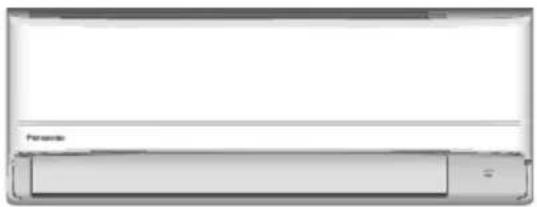
Model No.
Indoor Unit Outdoor Unit
CS-PZ25WKD
CU-PZ25WKD
CS-PZ35WKD
CU-PZ35WKD
CS-PZ50WKD
CU-PZ50WKD
Operating Instructions
2-24
Air Conditioner
Before operating the unit, please read these operating instructions thoroughly and keep them for future reference. The included Installation Instructions should be kept and read by the installer before installation.
Remote control is packaged in the indoor unit and removed by the installer before installation.
Provides maximum comfort with optimal energy saving methods.
Use remote control within 8 m from the remote control receiver of the indoor unit.
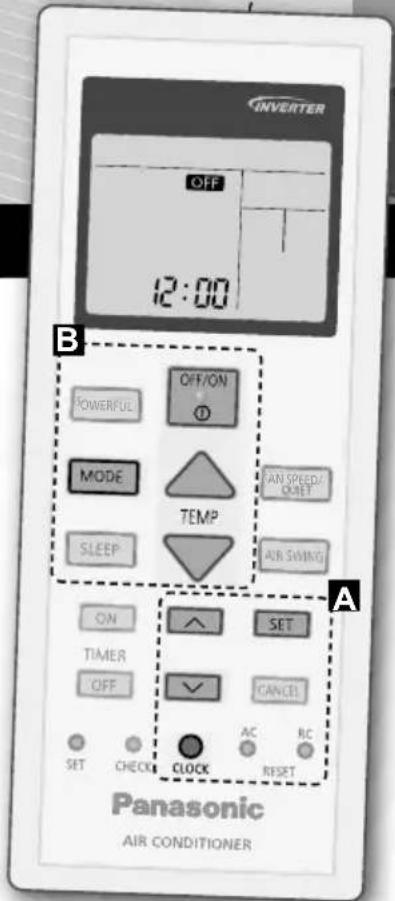
Quick Guide
Inserting the batteries
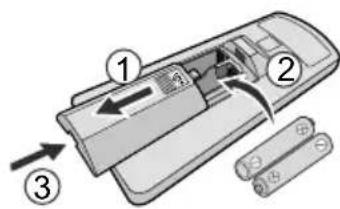
① Pull out the back cover of remote control.
② Insert AAA or R03 batteries.
③ Close the cover.
A Clock setting
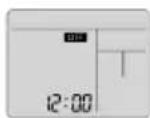
① Press CLOCK and set the time
- Press and hold for approximately 5 seconds to show time in 12-hour (am/pm) or 24 hour indication.
② Confi rm SET
natural_image
Interior view of a modern living room with two large bookshelves and horizontal ceiling beams (no text or symbols visible)Thank you for purchasing Panasonic Air Conditioner.
Table of contents
Safety precautions...... 4-15
How to use....16-17
To learn more.... 18
Cleaning instructions...... 19
Troubleshooting...... 20-22
Information...... 23-24
Accessories
- Remote control
- AAA or R03 batteries × 2
- Remote control holder
- Screws for remote control holder × 2
The illustrations in this manual are for explanation purposes only and may differ from the actual unit. They are subject to change without notice for future improvement.
B Basic operation
① Press OFF/ON to start/stop the operation.
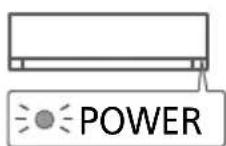
- Please note that the OFF indication is on display to start the unit.
② Press MODE to select the desired mode.
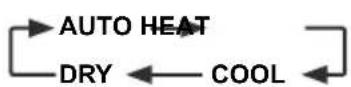
③ Select the desired temperature.
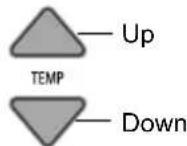
Selection range: 16.0 °C \~ 30.0 °C / 60 °F \~ 86 °F.
- Press and hold √ for approximately 10 seconds to switch the temperature indication in °C or °F.
To prevent personal injury, injury to others or property damage, please comply with the following:
Incorrect operation due to failure to follow instructions below may cause harm or damage, the seriousness of which is classified as below:
This appliances is not intended for accessibility by the general public.
| WARNING | This sign warns of death or serious injury. |
| CAUTION | This sign warns of injury or damage to property. |
The instructions to be followed are classified by the following symbols:

This symbol denotes an action that is PROHIBITED.


These symbols denote actions COMPULSORY.
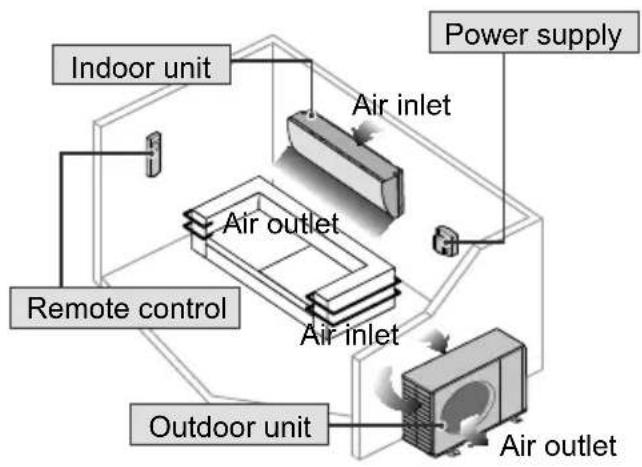
flowchart
graph TD
    A["Indoor unit"] --> B["Air outlet"]
    C["Power supply"] --> D["Air inlet"]
    E["Remote control"] --> F["Air outlet"]
    G["Outdoor unit"] --> H["Air outlet"]
    I["Air inlet"] --> J["Air outlet"]
WARNING
Indoor unit and outdoor unit

This appliance can be used by children aged from 8 years and above and persons with reduced physical, sensory or mental capabilities or lack of experience and knowledge if they have been given supervision or instruction concerning use of the appliance in a safe way and understand the hazards involved. Children shall not play with the appliance. Cleaning and user maintenance shall not be made by children without supervision.
Please consult authorised dealer or specialist to clean the internal parts, repair, install, remove, disassemble and reinstall the unit. Improper installation and handling will cause leakage, electric shock or fire.
Confir rm with authorised dealer or specialist on usage of any specifi ed refrigerant type. Using refrigerant type other than the specifi ed may cause product damage, burst and injury etc.

Do not use means to accelerate the defrosting process or to clean, other than those recommended by manufacturer.
Any unfi t method or using incompatible material may cause product damage, burst and serious injury.
Do not install the unit in a potentially explosive or fl ammable atmosphere. Failure to do so could result in fi re.

Do not insert your fingers or other objects into the air conditioner indoor or outdoor unit, rotating parts may cause injury.

Do not touch the outdoor unit during lightning, it may cause electric shock.
Do not expose yourself directly to cold air for a long period to avoid excess cooling.
Do not sit or step on the unit, you may fall down accidentally.

Remote control

Do not allow infants and small children to play with the remote control to prevent them from accidentally swallowing the batteries.
Power supply

Do not use a modified cord, joint cord, extension cord or unspecified cord to prevent overheating and fire.


To prevent overheating, fi re or electric shock:
- Do not share the same power outlet with other equipment.
- Do not operate with wet hands.
- Do not over bend the power supply cord.
- Do not operate or stop the unit by inserting or pulling out the power plug.

If the supply cord is damaged, it must be replaced by the manufacturer, service agent or similarly qualified persons in order to avoid a hazard.
It is strongly recommended to be installed with Earth Leakage Circuit Breaker (ELCB) or Residual Current Device (RCD) to prevent electric shock or fire.
To prevent overheating, fi re or electric shock:
- Insert the power plug properly.
- Dust on the power plug should be periodically wiped with a dry cloth.
Stop using the product if any abnormality/failure occurs and disconnect the power plug or turn off the power switch and breaker. (Risk of smoke/fi re/electric shock) Examples of abnormality/failure
• The ELCB trips frequently.
- Burning smell is observed.
- Abnormal noise or vibration of the unit is observed.
• Water leaks from the indoor unit.
• Power cord or plug becomes abnormally hot.
•Fan speed cannot be controlled.
- The unit stops running immediately even if it is switched on for operation.
• The fan does not stop even if the operation is stopped.
Contact your local dealer immediately for maintenance/repair.

This equipment must be earthed to prevent electrical shock or fire.

Prevent electric shock by switching off the power supply and unplug:

- Before cleaning or servicing,
- When extended non-use, or
- During abnormally strong lightning activity.
CAUTION
Indoor unit and outdoor unit

Do not wash the indoor unit with water, benzine, thinner or scouring powder to avoid damage or corrosion at the unit.
Do not use for preservation of precise equipment, food, animals, plants, artwork or other objects. This may cause quality deterioration, etc.
Do not use any combustible equipment in front of the airflow outlet to avoid fire propagation.
Do not expose plants or pet directly to airflow to avoid injury, etc.
Do not touch the sharp aluminium fi n, sharp parts may cause injury.

Do not switch ON the indoor unit when waxing the floor. After waxing, aerate the room properly before operating the unit.
Do not install the unit in oily and smoky areas to prevent damage to the unit.
Do not dismantle the unit for cleaning purpose to avoid injury.
Do not step onto an unstable bench when cleaning the unit to avoid injury.
Do not place a vase or water container on the unit. Water may enter the unit and degrade the insulation. This may cause an electric shock.
Do not open window or door for long time during operation, it may lead to ineffi cient power usage and uncomfortable temperature changes.

Prevent water leakage by ensuring drainage pipe is:
- Connected properly,
- Kept clear of gutters and containers, or
- Not immersed in water.
After a long period of use or use with any combustible equipment, aerate the room regularly.
After a long period of use, make sure the installation rack does not deteriorate to prevent the unit from falling down.
Remote control

Do not use rechargeable (Ni-Cd) batteries. It may damage the remote control.

To prevent malfunction or damage of the remote control:
- Remove the batteries if the unit is not going to be used for a long period of time.
- New batteries of the same type must be inserted following the polarity stated.
Power supply

Do not disconnect the plug by pulling the cord to prevent electric shock.
WARNING
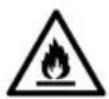
This appliance is fi lled with R32
(mild fl ammable refrigerant).
If the refrigerant is leaked and exposed to an external ignition source, there is a risk of fire.
Indoor unit and outdoor unit

The appliance shall be installed, and/or operated in a room with floor area larger than Amin (m²) and keep away from ignition sources, such as heat/sparks/open flame or hazardous areas such as gas appliances, gas cooking, reticulated gas supply systems or electric cooking appliances, etc. (Refer to Table A of Installation instructions table for Amin (m²))
Be aware that refrigerant may not contain an odour, highly recommended to ensure suitable fl ammable refrigerant gas detectors are present, operating and able to warn of a leak.
Keep any required ventilation openings clear of obstruction.

Do not pierce or burn as the appliance is pressurized. Do not expose the appliance to heat, flame, sparks, or other sources of ignition. Else it may explode and cause injury or death.
Precaution for using R32 refrigerant
The basic installation work procedures are the same as conventional refrigerant (R410A, R22) models.

Since the working pressure is higher than that of refrigerant R22 models, some of the piping and installation and service tools are special. Especially, when replacing a refrigerant R22 model with a new refrigerant R32 model, always replace the conventional piping and fl are nuts with the R32 and R410A piping and fl are nuts on the outdoor unit side.
For R32 and R410A, the same fl are nut on the outdoor unit side and pipe can be used.
The mixing of different refrigerants within a system is prohibited. Models that use refrigerant R32 and R410A have a different charging port thread diameter to prevent erroneous charging with refrigerant R22 and for safety.
Therefore, check beforehand. [The charging port thread diameter for R32 and R410A is 1/2 inch.]
Must always ensure that foreign matter (oil, water, etc.) does not enter the piping. Also, when storing the piping, securely seal the opening by pinching, taping, etc. (Handling of R32 is similar to R410A.)
• Operation, maintenance, repairing and refrigerant recovery should be carried out by trained and certified personnel in the use of fl ammable refrigerants and as recommended by the manufacturer. Any personnel conducting an operation, servicing or maintenance on a system or associated parts of the equipment should be trained and certified.

- Any part of refrigerating circuit (evaporators, air coolers, AHU, condensers or liquid receivers) or piping should not be located in the proximity of heat sources, open flames, operating gas appliance or an operating electric heater.
- The user/owner or their authorised representative shall regularly check the alarms, mechanical ventilation and detectors, at least once a year, where as required by national regulations, to ensure their correct functioning.
- A logbook shall be maintained. The results of these checks shall be recorded in the logbook.
• In case of ventilations in occupied spaces shall be checked to confirm no obstruction. - Before a new refrigerating system is put into service, the person responsible for placing the system in operation should ensure that trained and certified operating personnel are instructed on the basis of the instruction manual about the construction, supervision, operation and maintenance of the refrigerating system, as well as the safety measures to be observed, and the properties and handling of the refrigerant used.
- The general requirement of trained and certified personnel are indicated as below:
a) Knowledge of legislation, regulations and standards relating to fl ammable refrigerants; and,
b) Detailed knowledge of and skills in handling fl ammable refrigerants, personal protective equipment, refrigerant leakage prevention, handling of cylinders, charging, leak detection, recovery and disposal; and,

c) Able to understand and to apply in practice the requirements in the national legislation, regulations and Standards; and,
d) Continuously undergo regular and further training to maintain this expertise.
e) Air-conditioner piping in the occupied space shall be installed in such a way to protect against accidental damage in operation and service.
f) Precautions shall be taken to avoid excessive vibration or pulsation to refrigerating piping.
g) Ensure protection devices, refrigerating piping and fittings are well protected against adverse environmental effects (such as the danger of water collecting and freezing in relief pipes or the accumulation of dirt and debris).
h) Expansion and contraction of long runs piping in refrigerating systems shall be designed and installed securely (mounted and guarded) to minimize the likelihood hydraulic shock damaging the system.
i) Protect the refrigerating system from accidental rupture due to moving furniture or reconstruction activities.
j) To ensure no leaking, fi eld-made refrigerant joints indoors shall be tightness tested. The test method shall have a sensitivity of 5 grams per year of refrigerant or better under a pressure of at least 0.25 times the maximum allowable pressure (>1.04 MPa, max 4.15 MPa). No leak shall be detected.

1. Installation (Space)
- Product with fl ammable refrigerants, shall be installed according to the minimum room area, Amin (^2) mentioned in Table A of the Installation Instructions.
• In case of fi eld charge, the effect on refrigerant charge caused by the different pipe length has to be quantifi ed, measured and labelled. - Must ensure the installation of pipework shall be kept to a minimum. Avoid use dented pipe and do not allow acute bending.
- Must ensure that pipe-work shall be protected from physical damage.
- Must comply with national gas regulations, state municipal rules and legislation. Notify relevant authorities in accordance with all applicable regulations.
- Must ensure mechanical connections be accessible for maintenance purposes.
• In cases that require mechanical ventilation, ventilation openings shall be kept clear of obstruction. - When disposal of the product, do follow to the precautions in #12 and comply with national regulations. Always contact to local municipal offi ces for proper handling.

2. Servicing
2-1. Service personnel
• The system is inspected, regularly supervised and maintained by a trained and certified service personnel who is employed by the person user or party responsible.
- Ensure the actual refrigerant charge is in accordance with the room size within which the refrigerant containing parts are installed.
- Ensure refrigerant charge not to leak.
- Any qualified person who is involved with working on or breaking into a refrigerant circuit should hold a current valid certifi cate from an industry-accredited assessment authority, which authorizes their competence to handle refrigerants safely in accordance with an industry recognised assessment specifi cation.
- Servicing shall only be performed as recommended by the equipment manufacturer. Maintenance and repair requiring the assistance of other skilled personnel shall be carried out under the supervision of the person competent in the use of fl ammable refrigerants.
• Servicing shall be performed only as recommended by the manufacturer.

2-2. Work
- Prior to beginning work on systems containing fl ammable refrigerants, safety checks are necessary to ensure that the risk of ignition is minimised. For repair to the refrigerating system, the precautions in #2-2 to #2-8 must be followed before conducting work on the system.
• Work shall be undertaken under a controlled procedure so as to minimize the risk of a fl ammable gas or vapour being present while the work is being performed. - All maintenance staff and others working in the local area shall be instructed and supervised on the nature of work being carried out.
- Avoid working in confined spaces. Always ensure away from source, at least 2 meter of safety distance, or zoning of free space area of at least 2 meter in radius.
- Wear appropriate protective equipment, including respiratory protection, as conditions warrant.
- Keep all sources of ignition and hot metal surfaces away.

2-3. Checking for presence of refrigerant
- The area shall be checked with an appropriate refrigerant detector prior to and during work, to ensure the technician is aware of potentially fl ammable atmospheres.
- Ensure that the leak detection equipment being used is suitable for use with fl ammable refrigerants, i.e. non sparking, adequately sealed or intrinsically safe.
• In case of leakage/spillage happened, immediately ventilate area and stay upwind and away from spill/release.
• In case of leakage/spillage happened, do notify persons down wind of the leaking/spill, isolate immediate hazard area and keep unauthorized personnel out.

2-4. Presence of fi re extinguisher
- If any hot work is to be conducted on the refrigerating equipment or any associated parts, appropriate fire extinguishing equipment shall be available at hand. - Have a dry powder or CO_2 fire extinguisher adjacent to the charging area.

2-5. No ignition sources
- No person carrying out work in relation to a refrigerating system which involves exposing any pipe work that contains or has contained fl ammable refrigerant shall use any sources of ignition in such a manner that it may lead to the risk of fire or explosion. He/She must not be smoking when carrying out such work.
- All possible ignition sources, including cigarette smoking, should be kept sufficiently far away from the site of installation, repairing, removing and disposal, during which fl ammable refrigerant can possibly be released to the surrounding space.
- Prior to work taking place, the area around the equipment is to be surveyed to make sure that there are no fl ammable hazards or ignition risks.
- “No Smoking” signs shall be displayed.

2-6. Ventilated area
- Ensure that the area is in the open or that it is adequately ventilated before breaking into the system or conducting any hot work.
- A degree of ventilation shall continue during the period that the work is carried out.
- The ventilation should safely disperse any released refrigerant and preferably expel it externally into the atmosphere.

2-7. Checks to the refrigerating equipment
- Where electrical components are being changed, they shall be fit for the purpose and to the correct specification.
- At all times the manufacturer's maintenance and service guidelines shall be followed.
- If in doubt consult the manufacturer's technical department for assistance.
• The following checks shall be applied to installations using fl ammable refrigerants.
-The actual refrigerant charge is in accordance with the room size within which the refrigerant containing parts are installed.
-The ventilation machinery and outlets are operating adequately and are not obstructed.
-If an indirect refrigerating circuit is being used, the secondary circuit shall be checked for the presence of refrigerant.
-Marking to the equipment continues to be visible and legible. Markings and signs that are illegible shall be corrected.
-Refrigerating pipe or components are installed in a position where they are unlikely to be exposed to any substance which may corrode refrigerant containing components, unless the components are constructed of materials which are inherently resistant to being corroded or are properly protected against being so corroded.

2-8. Checks to electrical devices
• Repair and maintenance to electrical components shall include initial safety checks and component inspection procedures.
- Initial safety checks shall include but not limit to:-
-That capacitors are discharged: this shall be done in a safe manner to avoid possibility of sparking.
-That there no live electrical components and wiring are exposed while charging, recovering or purging the system.
-That there is continuity of earth bonding.
- At all times the manufacturer's maintenance and service guidelines shall be followed.
- If in doubt consult the manufacturer's technical department for assistance.
- If a fault exists that could compromise safety, then no electrical supply shall be connected to the circuit until it is satisfactorily dealt with.
- If the fault cannot be corrected immediately but it is necessary to continue operation, an adequate temporary solution shall be used.
• The owner of the equipment must be informed or reported so all parties are advised thereinafter.

3. Repairs to sealed components
- During repairs to sealed components, all electrical supplies shall be disconnected from the equipment being worked upon prior to any removal of sealed covers, etc.
- If it is absolutely necessary to have an electrical supply to equipment during servicing, then a permanently operating form of leak detection shall be located at the most critical point to warn of a potentially hazardous situation.
- Particular attention shall be paid to the following to ensure that by working on electrical components, the casing is not altered in such a way that the level of protection is affected. This shall include damage to cables, excessive number of connections, terminals not made to original specification, damage to seals, incorrect fitting of glands, etc.
- Ensure that apparatus is mounted securely.
- Ensure that seals or sealing materials have not degraded such that they no longer serve the purpose of preventing the ingress of fl ammable atmospheres.
- Replacement parts shall be in accordance with the manufacturer's specifications.
NOTE: The use of silicon sealant may inhibit the effectiveness of some types of leak detection equipment. Intrinsically safe components do not have to be isolated prior to working on them.

4. Repair to intrinsically safe components
- Do not apply any permanent inductive or capacitance loads to the circuit without ensuring that this will not exceed the permissible voltage and current permitted for the equipment in use.
- Intrinsically safe components are the only types that can be worked on while live in the presence of a flammable atmosphere.
- The test apparatus shall be at the correct rating.
- Replace components only with parts specified by the manufacturer. Unspecified parts by manufacturer may result ignition of refrigerant in the atmosphere from a leak.

5. Cabling
- Check that cabling will not be subject to wear, corrosion, excessive pressure, vibration, sharp edges or any other adverse environmental effects.
- The check shall also take into account the effects of aging or continual vibration from sources such as compressors or fans.

6. Detection of fl ammable refrigerants
- Under no circumstances shall potential sources of ignition be used in the searching or detection of refrigerant leaks.
- A halide torch (or any other detector using a naked flame) shall not be used.

7. The following leak detection methods are deemed acceptable for all refrigerant systems
- No leaks shall be detected when using detection equipment with a sensitivity of 5 grams per year of refrigerant or better under a pressure of at least 0.25 times the maximum allowable pressure (>1.04 MPa, max 4.15 MPa), for example, a universal sniffer.
- Electronic leak detectors may be used to detect fl ammable refrigerants, but the sensitivity may not be adequate, or may need re-calibration.
(Detection equipment shall be calibrated in a refrigerant-free area.)
- Ensure that the detector is not a potential source of ignition and is suitable for the refrigerant used.
- Leak detection equipment shall be set at a percentage of the LFL of the refrigerant and shall be calibrated to the refrigerant employed and the appropriate percentage of gas (25 % maximum) is confirmed.
- Leak detection fl uids are also suitable for use with most refrigerants, for example, bubble method and fl fluorescent method agents. The use of detergents containing chlorine shall be avoided as the chlorine may react with the refrigerant and corrode the copper pipe-work.
- If a leak is suspected, all naked flames shall be removed/extinguished.
- If a leakage of refrigerant is found which requires brazing, all of the refrigerant shall be recovered from the system, or isolated (by means of shut off valves) in a part of the system remote from the leak. The precautions in #8 must be followed to remove the refrigerant.

8. Removal and evacuation
- When breaking into the refrigerant circuit to make repairs – or for any other purpose – conventional procedures shall be used. However, it is important that best practice is followed since flammability is a consideration. The following procedure shall be adhered to: remove refrigerant -> purge the circuit with inert gas -> evacuate -> purge with inert gas -> open the circuit by cutting or brazing.
• The refrigerant charge shall be recovered into the correct recovery cylinders.
• The system shall be purged with OFN to render the appliance safe.
• This process may need to be repeated several times.
- Compressed air or oxygen shall not be used for this task.
- Purging shall be achieved by breaking the vacuum in the system with OFN and continuing to fill until the working pressure is achieved, then venting to atmosphere, and finally pulling down to a vacuum.
• This process shall be repeated until no refrigerant is within the system.
- When the final OFN charge is used, the system shall be vented down to atmospheric pressure to enable work to take place.
- This operation is absolutely vital if brazing operations on the pipe work are to take place.
- Ensure that the outlet for the vacuum pump is not close to any potential ignition sources and there is ventilation available.
$$ \begin{array}{c} \text { OFN } = \text { oxygen free nitrogen }, \ \text { type of inert gas }. \end{array} $$

9. Charging procedures
• In addition to conventional charging procedures, the following requirements shall be followed.
-Ensure that contamination of different refrigerants does not occur when using charging equipment.
-Hoses or lines shall be as short as possible to minimize the amount of refrigerant contained in them.
-Cylinders shall be kept in an appropriate position according to the instructions.
-Ensure that the refrigerating system is earthed prior to charging the system with refrigerant.
-Label the system when charging is complete (if not already).
-Extreme care shall be taken not to over fi ll the refrigerating system.
- Prior to recharging the system it shall be pressure tested with OFN (refer to #7).
- The system shall be leak tested on completion of charging but prior to commissioning.
- A follow up leak test shall be carried out prior to leaving the site.
- Electrostatic charge may accumulate and create a hazardous condition when charging and discharging the refrigerant. To avoid fire or explosion, dissipate static electricity during transfer by grounding and bonding containers and equipment before charging/ discharging.

10. Decommissioning
- Before carrying out this procedure, it is essential that the technician is completely familiar with the equipment and all its details.
- It is recommended good practice that all refrigerants are recovered safely.
- Prior to the task being carried out, an oil and refrigerant sample shall be taken in case analysis is required prior to re-use of recovered refrigerant.
- It is essential that electrical power is available before the task is commenced.
a) Become familiar with the equipment and its operation.
b) Isolate system electrically.
c) Before attempting the procedure ensure that:
- mechanical handling equipment is available, if required, for handling refrigerant cylinders;
- all personal protective equipment is available and being used correctly;
• the recovery process is supervised at all times by a competent person;
• recovery equipment and cylinders conform to the appropriate standards.
d) Pump down refrigerant system, if possible.
e) If a vacuum is not possible, make a manifold so that refrigerant can be removed from various parts of the system.
f) Make sure that cylinder is situated on the scales before recovery takes place.
g) Start the recovery machine and operate in accordance with instructions.
h) Do not over fi II cylinders. (No more than 80 % volume liquid charge).

i) Do not exceed the maximum working pressure of the cylinder, even temporarily.
j) When the cylinders have been filled correctly and the process completed, make sure that the cylinders and the equipment are removed from site promptly and all isolation valves on the equipment are closed off.
k) Recovered refrigerant shall not be charged into another refrigerating system unless it has been cleaned and checked.
- Electrostatic charge may accumulate and create a hazardous condition when charging or discharging the refrigerant. To avoid fire or explosion, dissipate static electricity during transfer by grounding and bonding containers and equipment before charging/discharging.

11. Labelling
• Equipment shall be labelled stating that it has been de-commissioned and emptied of refrigerant.
• The label shall be dated and signed.
- Ensure that there are labels on the equipment stating the equipment contains fl ammable refrigerant.

12. Recovery
- When removing refrigerant from a system, either for servicing or decommissioning, it is recommended good practice that all refrigerants are removed safely.
- When transferring refrigerant into cylinders, ensure that only appropriate refrigerant recovery cylinders are employed.
- Ensure that the correct number of cylinders for holding the total system charge are available.
- All cylinders to be used are designated for the recovered refrigerant and labelled for that refrigerant (i.e. special cylinders for the recovery of refrigerant).

• Cylinders shall be complete with pressure relief valve and associated shut-off valves in good working order.
•Recovery cylinders are evacuated and, if possible, cooled before recovery occurs.
• The recovery equipment shall be in good working order with a set of instructions concerning the equipment that is at hand and shall be suitable for the recovery of fl ammable refrigerants.
• In addition, a set of calibrated weighing scales shall be available and in good working order.
- Hoses shall be complete with leak-free disconnect couplings and in good condition.
- Before using the recovery machine, check that it is in satisfactory working order, has been properly maintained and that any associated electrical components are sealed to prevent ignition in the event of a refrigerant release. Consult manufacturer if in doubt.
• The recovered refrigerant shall be returned to the refrigerant supplier in the correct recovery cylinder, and the relevant Waste Transfer Note arranged.
- Do not mix refrigerants in recovery units and especially not in cylinders.
- If compressors or compressor oils are to be removed, ensure that they have been evacuated to an acceptable level to make certain that fl ammable refrigerant does not remain within the lubricant.
• The evacuation process shall be carried out prior to returning the compressor to the suppliers.
- Only electric heating to the compressor body shall be employed to accelerate this process.
- When oil is drained from a system, it shall be carried out safely.
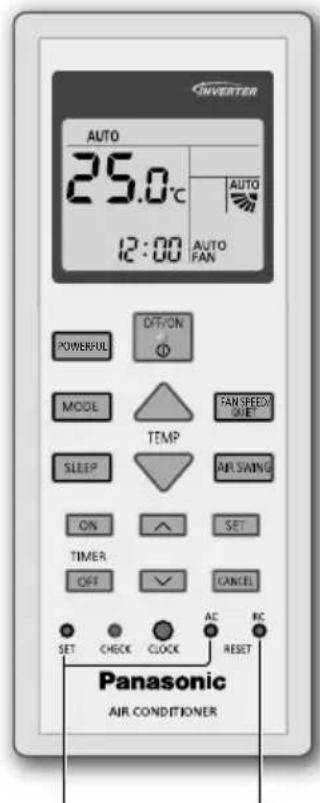
Not used in normal operations.
Press to restore the remote control to default setting.
To adjust airflow direction

flowchart
graph LR
    A["AIR SWING"] --> B["Upper direction"]
    B --> C["AUTO"]
    C --> D["Arrow right"]
    C --> E["Arrow down"]
    C --> F["Arrow left"]
    C --> G["Arrow up"]
    C --> H["Arrow down"]
    C --> I["Arrow right"]
    C --> J["Arrow down"]
    C --> K["Arrow up"]
    C --> L["Arrow down"]
Upper direction:
- Do not adjust the fl ap by hand.
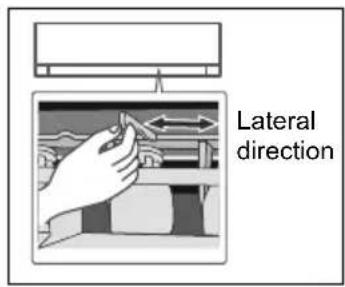
Lateral direction:
- For lateral direction, it is manually adjustable as shown.
To adjust FAN SPEED and QUIET condition

flowchart
graph LR
    A["FAN SPEED/<br>QUIET"] --> B["AUTO<br>FAN"]
    B --> C["QUIET"]
    C --> D["..."]
    D --> E["..."]
    E --> F["..."]
    F --> G["..."]
    G --> H["..."]
    H --> I["..."]
FAN SPEED:
- For AUTO, the indoor fan speed is automatically adjusted according to the operation mode.
QUIET:
• This operation reduces airflow noise.
To reach set temperature quickly
• This operation stops automatically after 20 minutes.
To maximise comfort while sleeping

- This operation provides you with a comfortable environment while sleeping. It will automatically adjust the sleep pattern temperature during the activation period.
- The indoor unit indicator will dim when this operation is activated. This is not applicable if the indicator brightness has been manually dimmed.
• This operation is incorporated with the activation timer (0.5, 1, 2, 3, 4, 5, 6, 7, 8 or 9 hours). - This operation can be set together with timer. Sleep operation has the priority over OFF timer.
- This operation can be cancelled by pressing the respective button until the sleep timer reaches 0.0h.
To set the timer
2 sets of ON and OFF timers are available to turn ON or OFF the unit at different preset time.
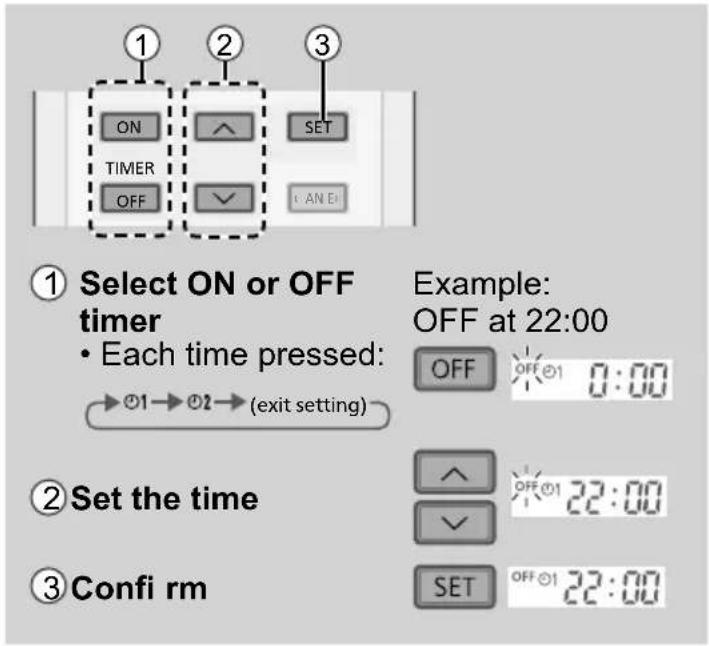
- To cancel ON or OFF timer, press ON or OFF to select respective ☐ or then press CANCEL.
- If timer is cancelled manually or due to power failure, you can restore the timer again by pressing ON or to select respective ⓞ1 or ⓞ then press . SET
- The nearest timer setting will be displayed and will activate in sequence.
- Timer operation is based on the clock set in the remote control and repeats daily once set. For clock setting, please refer to Quick Guide.
Note
| SLEEP , POWERFULPOWERFULCan be selected at the same time.Can be activated in all modes.Can be cancelled by pressing the respective button again. | |
| POWERFUL, QUIET and FAN SPEED cannot be selected at the same time. |
Operating conditions
Use this air conditioner in the temperature range indicated in the table.
| Temperature °C (°F) | Indoor Outdoor | ||||
| DBT WBT DBT WBT | |||||
| COOL | Max. 32 | (89.6) 23 (73.4) | 43 (109.4) | 26 (78.8) | |
| Min. | 16 (60.8) | 11 (51.8) | 5 (41.0) | - | |
| HEAT | Max. 30 | (86.0) | - 24 | (75.2) 18 (64.4) | |
| Min. | 16 (60.8) | - | -15 (5.0) | -16 (3.2) | |
DBT: Dry bulb temperature, WBT: Wet bulb temperature
Operation mode
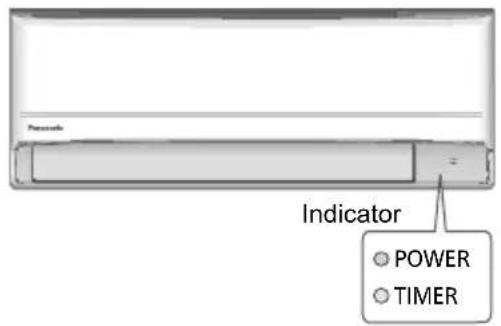
AUTO : During operation, the POWER indicator will blinks at initial.
Unit selects operation mode every 10 minutes according to the setting and room temperatures.
HEAT : The POWER indicator blinks at the initial stage of this operation. Unit takes a while to warm up.
- For system which HEAT mode has been locked, if operation mode other than HEAT is selected, the indoor unit stops and the POWER indicator blinks.
COOL : Provides efficient comfort cooling to suit your needs.
DRY : Unit operates at low fan speed to give a gentle cooling operation.
Energy saving temperature setting
Operating the unit within the recommended temperature range may save energy.
HEAT : 20.0 °C \~ 24.0 °C / 68 °F \~ 75 °F.
COOL : 26.0 °C \~ 28.0 °C / 79 °F \~ 82 °F.
Air flow direction
In COOL/DRY mode :
If AUTO is set, the fl ap swings up/down automatically.
In HEAT mode :
If AUTO is set, the horizontal flap is fixed at predetermined position.
Auto restart control
If power is resumed after a power failure, the operation will restart automatically after a period of time with previous operation mode and airflow direction.
- This control is not applicable when TIMER is set.
cleaning has to be carried out at regular intervals. Dirty unit may caused malfunction and you may retrieve error code "H 99". Please consult authorised dealer.
- Switch off the power supply and unplug before cleaning.
- Do not touch the aluminium fi n, sharp parts may cause injury.
- Do not use benzine, thinner or scouring powder.
- Use only soap (≈ pH 7) or neutral household detergent.
- Do not use water hotter than 40^ / 104^ .
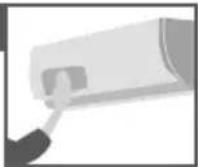
Indoor unit
Wipe the unit gently with a soft, dry cloth.
Coils and fans should be cleaned periodically by authorised dealer.
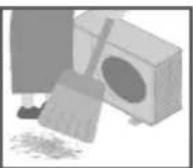
Outdoor unit
Clear debris that surround the unit.
Clear any blockage from the drain pipe.
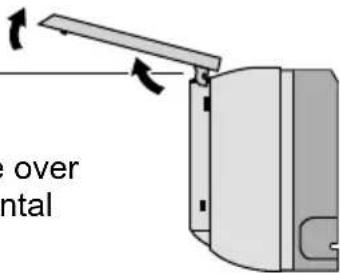
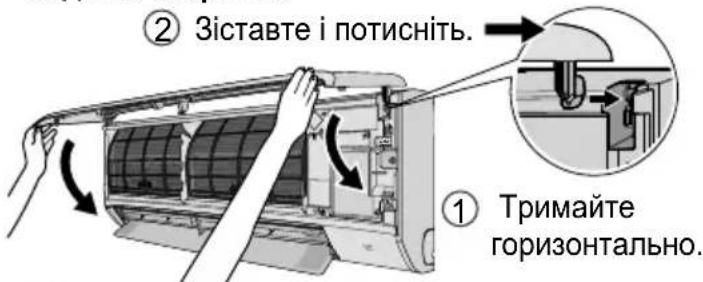
Front panel
Wash gently and dry.
How to remove front panel
② Pull upward.
Horizontal
① Raise over horizontal level.
Close it securely
② Match and push in.
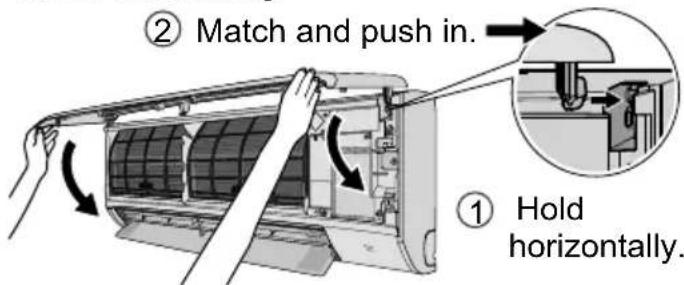
③ Close down.
④ Press both ends and center of the front panel.
Indoor unitTo ensure optimal performance
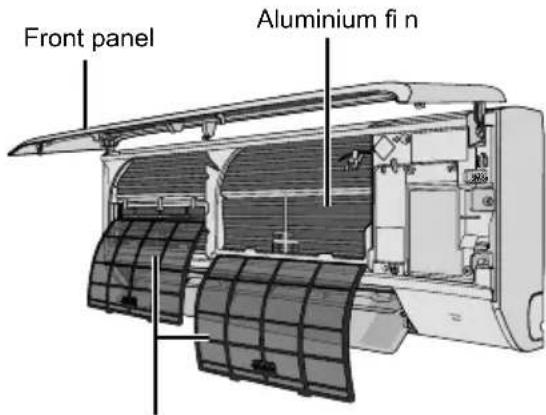
Air fi Iters
Air fi Iters
Once every 2 weeks
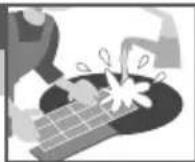
- Wash/rinse the fi Iters gently with water to avoid damage to the fi Iter surface.
- Dry the filters thoroughly under shade, away from fi re or direct sunlight.
- Replace any damaged filters.
Remove air filter
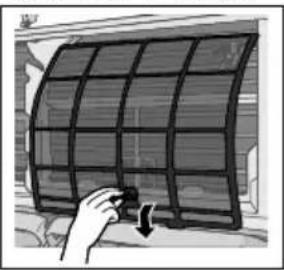
natural_image
Illustration of a hand holding a flexible solar panel with a button, no text or symbols presentAttach air filter
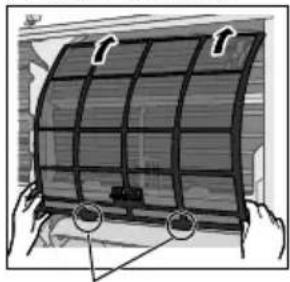
natural_image
Illustration of a flexible solar panel being held, showing grid structure and mounting points (no text or symbols)Insert into the unit
The following symptoms do not indicate malfunction.
| Symptom Cause | |
| POWER indicator blinks before the unit is switched on. | ·This is a preliminary step in preparation for the operation when the ON timer has been set.When ON Timer is set, the unit may start earlier (up to 35 minutes) before the actual set time in order to achieve the desired temperature on time. |
| POWER indicator blinks during HEAT mode with no warm air supply (and fl ap is closed). | ·The unit is in defrost mode (and AIR SWING is set to AUTO). |
| POWER indicator blinks and stops when operate COOL/DRY mode. | ·The system has locked to operate in HEAT mode only. |
| TIMER indicator is always on. · The timer setting repeats daily once set. | |
| Operation is delayed a few minutes after restarting. | ·The delay is a protection to the unit's compressor. |
| Cooling/heating capacity reduced during the lowest fan speed setting. | ·The low fan speed is low noise priority operation, so cooling/heating capacity may be reduced (depending on the condition). Increase the Fan Speed to increase the capacity. |
| Indoor fan stops occasionally during heating operation. | ·To avoid unintended cooling effect. |
| Indoor fan stops occasionally during automatic fan speed setting. | ·This helps to remove the surrounding odour. |
| Airfl ow continues even after operation has stopped. | ·Extraction of remaining heat from the indoor unit (maximum 30 seconds). |
| The room has a peculiar odour. · This may be due to damp smell emitted by the wall, carpet, furniture or clothing. | |
| Cracking sound during operation. · Changes of temperature caused the expansion/contraction of the unit. | |
| Water flowing sound during operation. | ·Refrigerant flow inside the unit. |
| Mist emerges from indoor unit. · Condensation effect due to cooling process. | |
| Outdoor unit emits water/steam. · Condensation or evaporation occurs on pipes. | |
| Discoloration of some plastic parts. · Discoloration is subject to material types used in plastic parts, accelerated when exposed to heat, sun light, UV light or environmental factor. | |
Check the following before calling for servicing.
| Symptom Check | |
| Operation in HEAT/COOL mode is not working effi ciently. | Set the temperature correctly.Close all doors and windows.Clean or replace the fil ters.Clear any obstruction at the air inlet and air outlet vents. |
| Noisy during operation. • Check if the unit has been installed at an incline.Close the front panel properly. | |
| Remote control does not work. (Display is dim or transmission signal is weak.) | Insert the batteries correctly.Replace weak batteries. |
| The unit does not work. • Check if the circuit breaker is tripped.Check if timers have been set. | |
| The unit does not receive the signal from the remote control. | Make sure the receiver is not obstructed.Certain fl uorescent lights may interfere with signal transmitter. Please consult authorised dealer. |
When...
■ The remote control is missing or a malfunction has occurred
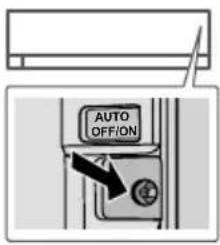
- Raise the front panel.
- Press the button once to use in AUTO mode.
- Press and hold the button until you hear 1 beep, then release to use in forced COOL mode.
- Repeat step 3. Press and hold the button until you hear 2 beeps, then release to use in forced HEAT mode.
- Press the button again to turn off.
■ The indicators are too bright
- To dim or restore the unit's indicator brightness, press ^ and hold for 5 seconds.
■ Conducting a seasonal inspection after extended non-use
- Check the remote control batteries.
- Check that there is no obstruction around the air inlet and outlet vents.
- Use Auto OFF/ON button to select COOL/HEAT operation. After 15 minutes of operation, it is normal to have the following temperature difference between the air inlet and outlet vents:
COOL: ≥ 8 °C / 14.4 °F HEAT: ≥ 14 °C / 25.2 °F
■ The units are not going to be used for a long period of time
- Activate HEAT mode for 2\~3 hours to remove moisture left in the internal parts thoroughly to prevent mould growth.
- Turn off the power supply and unplug.
- Remove the remote control batteries.
NON SERVICEABLE CRITERIAS
TURN OFF THE POWER SUPPLY AND UNPLUG then please consult an authorised dealer when in following conditions:
• Abnormal noise during operation.
• Water/foreign particles have entered the remote control.
• Water leaks from Indoor unit.
- Circuit breaker switches off frequently.
• Power cord becomes unnaturally warm.
- Switches or buttons are not functioning properly.
How to retrieve error codes
If the unit stops and the TIMER indicator blinks, use the remote control to retrieve the error code.
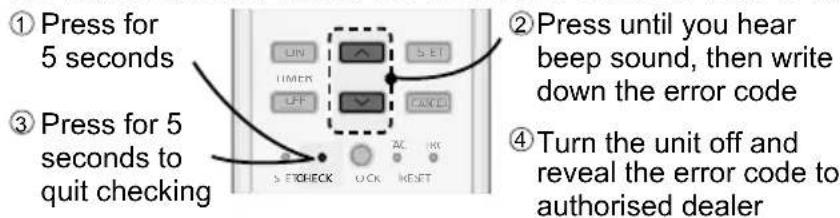
- For certain errors, you may restart the unit for limited operation if there are 4 beeps when operation starts.
| Diagnostic display | Abnormality/Protection control |
| H 00 No memory of failure | |
| H 11 | Indoor/outdoor abnormal communication |
| H 12 Indoor unit capacity unmatched | |
| H 14 | Indoor intake air temperature sensor abnormality |
| H 15 | Outdoor compressor temperature sensor abnormality |
| H 16 | Outdoor current transformer (CT) abnormality |
| H 17 | Outdoor suction temperature sensor abnormality |
| H 19 Indoor fan motor mechanism lock | |
| H 21 | Indoor fl oat switch operation abnormality |
| H 23 | Indoor heat exchanger temperature sensor 1 abnormality |
| H 24 | Indoor heat exchanger temperature sensor 2 abnormality |
| H 25 | Indoor ion device abnormality |
| H 26 Minus ION abnormality | |
| H 27 | Outdoor air temperature sensor abnormality |
| H 28 | Outdoor heat exchanger temperature sensor 1 abnormality |
| H 30 | Outdoor discharge pipe temperature sensor abnormality |
| H 31 Abnormal swimming pool sensor | |
| H 32 | Outdoor heat exchanger temperature sensor 2 abnormality |
| H 33 | Indoor/outdoor misconnection abnormality |
| H 34 | Outdoor heat sink temperature sensor abnormality |
| H 35 | Indoor/outdoor water adverse current abnormality |
| H 36 | Outdoor gas pipe temperature sensor abnormality |
| H 37 | Outdoor liquid pipe temperature sensor abnormality |
| H 38 | Indoor/outdoor mismatch (brand code) |
| H 39 | Abnormal indoor operating unit or standby units |
| Diagnostic display | Abnormality/Protection control |
| H 41 | Abnormal wiring or piping connection |
| H 50 Ventilation fan motor locked | |
| H 51 Ventilation fan motor locked | |
| H 52 | Left-right limit switch fi xing abnormality |
| H 58 Indoor gas sensor abnormality | |
| H 59 Eco sensor abnormality | |
| H 64 | Outdoor high pressure sensor abnormality |
| H 67 nanoe abnormality | |
| H 70 Light sensor abnormality | |
| H 71 | DC cooling fan inside control board abnormality |
| H 72 Abnormality tank temperature sensor | |
| H 85 | Abnormal communication between indoor & wireless LAN module |
| H 97 Outdoor fan motor mechanism lock | |
| H 98 Indoor high pressure protection | |
| H 99 Indoor operating unit freeze protection | |
| F 11 4-way valve switching abnormality | |
| F 16 Total running current protection | |
| F 17 | Indoor standby units freezing abnormality |
| F 18 Dry circuit blocked abnormality | |
| F 87 Control box overheat protection | |
| F 90 | Power factor correction (PFC) circuit protection |
| F 91 Refrigeration cycle abnormality | |
| F 93 | Outdoor compressor abnormal revolution |
| F 94 | Compressor discharge pressure overshoot protection |
| F 95 | Outdoor cooling high pressure protection |
| F 96 | Power transistor module overheating protection |
| F 97 Compressor overheating protection | |
| F 98 Total running current protection | |
| F 99 | Outdoor direct current (DC) peak detection |
Information for Users on Collection and Disposal of Old Equipment and Used Batteries
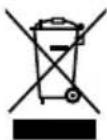
These symbols on the products, packaging, and/or accompanying documents mean that used electrical and electronic products and batteries should not be mixed with general household waste.
For proper treatment, recovery and recycling of old products and used batteries, please take them to applicable collection points, in accordance with your national legislation.
By disposing of these products and batteries correctly, you will help to save valuable resources and prevent any potential negative effects on human health and the environment which could otherwise arise from inappropriate waste handling.
For more information about collection and recycling of old products and batteries, please contact your local municipality, your waste disposal service or the point of sale where you purchased the items.
Penalties may be applicable for incorrect disposal of this waste, in accordance with national legislation.
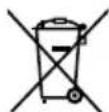
For business users in the European Union
If you wish to discard electrical and electronic equipment, please contact your dealer or supplier for further information.
[Information on Disposal in other Countries outside the European Union]
These symbols are only valid in the European Union. If you wish to discard these items, please contact your local authorities or dealer and ask for the correct method of disposal.
Pb
Note for the battery symbol (bottom two symbol examples):
This symbol might be used in combination with a chemical symbol. In this case it complies with the requirement set by the Directive for the chemical involved.
 WARNING WARNING | This symbol shows that this equipment uses a fl ammable refrigerant. If the refrigerant is leaked, together with an external ignition source, there is a possibility of ignition. |  | This symbol shows that the Operation Instructions should be read carefully. |
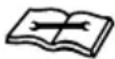 | This symbol shows that a service personnel should be handling this equipment with reference to the Installation Instructions. |  | This symbol shows that there is information included in the Operation Instructions and/or Installation Instructions. |
Panasonic®
CS-PZ35WKD CU-PZ35WKD
CS-PZ50WKD CU-PZ50WKD
natural_image
Interior view of a modern living room with a sofa and high ceiling (no text or symbols visible)16,0 °C \~ 30,0 °C /
60^ 86^ .
natural_image
Illustration of a hand holding a small solar panel with a curved arrow indicating rotation (no text or symbols)natural_image
Illustration of a flexible solar panel being held, showing grid structure and mounting points (no text or symbols)Вставьте в блок
CS-PZ35WKD CU-PZ35WKD
CS-PZ50WKD CU-PZ50WKD
natural_image
Interior view of a minimalist living room with a sofa and ceiling beams (no text or symbols)natural_image
Illustration of a hand holding a flexible solar panel with a curved arrow indicating rotation (no text or symbols)natural_image
Illustration of a flexible solar panel being held, showing grid structure and mounting points (no text or symbols)Вставте у блок
Надійно закрийте
- Operating Instructions
- Air Conditioner
- Provides maximum comfort with optimal energy saving methods.
- Quick Guide
- Inserting the batteries
- A Clock setting
- Table of contents
- Accessories
- B Basic operation
- WARNING
- Indoor unit and outdoor unit
- Remote control
- Power supply
- CAUTION
- This appliance is fi lled with R32
- Precaution for using R32 refrigerant
- Installation (Space)
- Servicing
- 2-1. Service personnel
- 2-2. Work
- 2-3. Checking for presence of refrigerant
- 2-4. Presence of fi re extinguisher
- 2-5. No ignition sources
- 2-6. Ventilated area
- 2-7. Checks to the refrigerating equipment
- 2-8. Checks to electrical devices
- Repairs to sealed components
- Repair to intrinsically safe components
- Cabling
- Detection of fl ammable refrigerants
- The following leak detection methods are deemed acceptable for all refrigerant systems
- Removal and evacuation
- Charging procedures
- Decommissioning
- Labelling
- Recovery
- Upper direction:
- Lateral direction:
- FAN SPEED:
- QUIET:
- To maximise comfort while sleeping
- To set the timer
- Operating conditions
- Operation mode
- Energy saving temperature setting
- Air flow direction
- In COOL/DRY mode :
- In HEAT mode :
- Auto restart control
- Indoor unit
- Outdoor unit
- Front panel
- How to remove front panel
- Close it securely
- Air fi Iters
- When...
- ■ The remote control is missing or a malfunction has occurred
- ■ The indicators are too bright
- ■ Conducting a seasonal inspection after extended non-use
- ■ The units are not going to be used for a long period of time
- NON SERVICEABLE CRITERIAS
- How to retrieve error codes
- Information for Users on Collection and Disposal of Old Equipment and Used Batteries
- For business users in the European Union
- [Information on Disposal in other Countries outside the European Union]
- Pb
- Note for the battery symbol (bottom two symbol examples):
- Panasonic®
Brand : PANASONIC
Model : CS-PZ50WKD
Category : Air conditioner