
MC-5030 - Iron PANASONIC - Free user manual and instructions
Find the device manual for free MC-5030 PANASONIC in PDF.


| Product Type | Steam Iron |
| Brand | Panasonic |
| Model | MC-5030 |
| Dimensions (approx.) | 30 x 13 x 15 cm |
| Weight (approx.) | 1.2 kg |
| Power Supply | 220-240V, 50-60Hz |
| Power Consumption | 2400 W |
| Soleplate Material | Stainless Steel / Ceramic coating |
| Water Tank Capacity | 300 ml |
| Steam Output (continuous) | Up to 40 g/min |
| Steam Boost | Yes, up to 150 g/min |
| Spray Function | Yes |
| Vertical Steaming | Yes |
| Anti-Drip System | Yes |
| Self-Clean Function | Yes |
| Auto Shut-Off | Yes, after 8 minutes vertical, 30 seconds horizontal |
| Cord Length | 2.5 m |
| Variable Temperature Control | Yes |
| Water Fill Opening | Wide, with measuring cup |
| Maintenance | Clean soleplate with damp cloth; descale periodically |
| Safety Features | Auto shut-off, heat-resistant handle, stable heel rest |
Frequently Asked Questions - MC-5030 PANASONIC
User questions about MC-5030 PANASONIC
0 question about this device. Answer the ones you know or ask your own.
Ask a new question about this device
Download the instructions for your Iron in PDF format for free! Find your manual MC-5030 - PANASONIC and take your electronic device back in hand. On this page are published all the documents necessary for the use of your device. MC-5030 by PANASONIC.
USER MANUAL MC-5030 PANASONIC
NO. MC-5030/5010 Operating Instructions
natural_image
Line drawing of a small robotic vacuum cleaner (no text or symbols)This appliance is provided with a flexible cord and if this becomes damaged, it must be repaired by Panasonic, or an Authorised Service Centre or a qualified person in order to avoid any hazard.
Operating your vacuum cleaner …8
Storing your vacuum cleaner .....13
Maintaining your vacuum cleaner 14
Troubleshooting....18
In order to prevent the risk of danger to the operator of this product or those nearby, and damaging property, be sure to follow the safety precautions outlined below.
■The following terms are used for precautions. They are separated depending on the degree of the danger or damage that may occur if their contents are ignored while using this product.
■The following signs are used to explain operations that you are requested to follow.
They are separated as shown below. (Below are examples of the signs used in this manual.)
natural_image
Simple line drawing of a broken box with a cross mark and a broken handle, no text or symbols present.May result in fire or explosion.
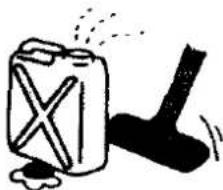
■Never use this vacuum cleaner near or to clean up flammable or burning items or materials (i.e., gasoline, kerosene, thinner, or burning cigarettes).
■Never wash with water or use near bathtubs.
■Never remove or install the plug with wet hands.
May cause an electrical shock Это может вызвать удар электрическим током. อาจเกิดไฟฟ้าชื่อตได้ เครื่องทำงานไม่ปกติ
■Never attempt to disassemble, repair, or remodel the vacuum cleaner.
■Periodically clean the plug.
natural_image
Illustration of a hand holding a tool with motion lines, accompanied by a black exclamation mark and sparkles (no text or symbols)May cause a fire due to improper insulation.
■Always insert the plug all the way in until it butts up against the wall.
May cause an electrical shock or a fire due to excessive heat.
■Always unplug the vacuum cleaner before beginning maintenance or inspection operations.
May cause an electrical shock or injury.
■Never do actions that may damage the plug or power cord.
This appliance is not intended for use by young children or infirm persons without supervision. Young children should be supervised to ensure that they do not play with the appliance.
When unplugging the vacuum cleaner, always hold the plug and not the power cord.
May cause an electrical shock or fire due to short circuiting
■Never go near burning objects or materials.
(The motor is equipped with an overheat protector, but an external cause may get the cleaner overheated. Do not use it in such condition, because otherwise a fire or electric shock may result.)

May cause an accident by being hit by the plug.
Существует опасность удара штепсельной вилкой. อาจเกิดอุบัติเหตุจากตัวปลักสะบัด
■Always unplug the vacuum cleaner when it is not in use.
Не оставлять пылесос подсоединенным к сети питания после его использования.
■ ให้อตปลักไฟเครื่องดูดผุ่นเสมอเมื่อไม่ใช้งาน

May cause an injury, burn, or electrical shock or electrical fire due to the deterioration of insulation.
Obey the following to ensure long life of your vacuum cleaner
natural_image
Simple line drawing of two cylindrical rods (no text or symbols)For synthetic filter type
Синтетический фильтр
สำหรับไส้กรองสังเตราะห์

Prefilter
Предварительный
фильтр
กรวยไส้กรอง
Main Filter
Главный фильтр
lastration:
(under tool pocket cover)

●Crevice tool
For radiators, crevices, corners,
baseboards, and between
cushions.
● Щелевая насадка
For furniture, venetian blinds,
and bookshelves. To be
attached onto the crevice tool.
For cushions and draperies.
● Щетка для обивки
● Insert the curved wand and hose connection wand into the hose supporter at each end of the hose until the projection clicks into the hole of the attachment.
Hose connection wand
natural_image
Hand holding a small circular object with an arrow pointing to it, next to a mechanical component (no text or symbols visible)Operating your vacuum cleaner
How to use the blower
natural_image
Diagram showing airflow around a pipe with arrows indicating direction, no text or symbols presentHose connection wand
natural_image
Mechanical diagram showing a lever mechanism with no visible text or symbolsPower control switch
ปุ่มปรับกำลังดูด
natural_image
Simple line drawing of a mechanical device with no text or symbolsBlower
natural_image
Diagram of a hand holding a mechanical component with a circular arrow indicating rotation (no text or symbols present)Be sure to use the cleaner with the filter at the dust container.
natural_image
Diagram of a device with a power plug and cable, showing no text or symbolsPull out the power cord and put the plug into the wall socket.
Gently press at the center of on/off switch pedal to turn on the vacuum cleaner.
●Press the pedal again to turn it off.
Changing the cleaning power.
●With the MC-5030, there are three levels of cleaning power.
HIGH: For carpet where a strong suction power is necessary.
MEDIUM: For the cleaning of floors.
LOW: For curtains or table cloths where only a weak suction power is required (For MC-5030, When you press the on/off switch pedal and the power control switch is not set at any position yet, it is automatically set at "low" position.)
●MC-5010 incorporates a variable power control to select the most suitable power required for your cleaning needs.
Switching between carpet and flooring:
●Flooring: Press lever A ●Carpet: Press lever B
After you finish vacuuming, remove the plug from the wall socket and press the cord rewind pedal.
natural_image
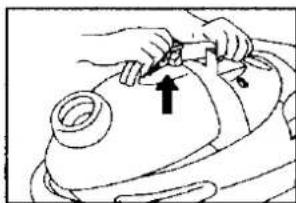
Line drawing of a hand pressing down on a mechanical component (no text or symbols)Push the dust container buckle in the direction of arrow.(release)
natural_image
Line drawing of a hand using a tool to adjust or install a mechanical component (no text or symbols present)2
natural_image
Illustration of a hand using a tool to adjust or install a device (no text or symbols visible)natural_image
Illustration of a hand adjusting a component with an arrow indicating direction (no text or symbols)Rotate the lever for shaking off dust about 10 times.
Detach the expander and shake the filter well in all direction to let off dust.
The lever of dust container should be upper side and pull out the filter from canter of dust container as illustrated.
natural_image
Simple line drawing of a hand holding a bag, no text or symbols presentRemove the filter and empty dirt and dust.
natural_image
Line drawing of a hand pressing down on a circular object, possibly a device or tool (no text or symbols present)NOTE
Примечание
natural_image
Diagram of a mechanical component with a pointed tool inserted into a grooved surface (no text or symbols)If the dust particles still remain stuck, scrape the particles from between the pleats using the accompanying stick. Be careful not to damage the filter surface. Если на фильтре осталась наличшая пыль, удалите пыль в промежутках между выступами с помощью прилагаемого инструмента. Делайте это аккуратно, чтобы не повредить поверхность фильтра. ถ้าผุ่นยังคงติดอยู่ ให้ขูดผุ่นผงที่อยู่ระหว่างร่วง และ จับ ให้ทําอย่างระมตระวังอย่าท่าให้ผิวใส่กรอง เสียหาย

And clean the prefilter as illustrated.
It is advisable to clean inside of the dust container as illustrated.
Throw out the accumulated dust regularly to prevent the cleaner from malfunctioning. A full dust container may reduce the suction power and the lever might not turn smoothly.
Installing the filter
Установка фильтра
การใส่ไสกรอง
natural_image
Diagram of a mechanical device with a handle and roller, showing no text or symbolsInstall the filter deep enough into position,
natural_image
Diagram of a hand holding a coiled device with an arrow indicating rotation (no text or symbols present)2

natural_image
Illustration of a hand performing a medical procedure on a patient's abdomen (no text or symbols visible)Fix the dust container to the main body.
natural_image
Illustration of hands using a tool to adjust or install a component (no text or symbols visible)
Storing your vacuum cleaner
Хранение пылесоса
การเก็บรักษา
natural_image
Technical line drawing of a sewing machine with three inset views showing mechanical components (no text or symbols)●Insert the nozzle holder straight into the nozzle supporter.
●Вставить держатель щетки в фиксатор.
- เลียบหัวดูดที่ช่องเก็บ
Park position
Позиция
การเก็บแบบแนวนอน
natural_image
Technical line drawing of a mechanical assembly with two views of a component (no text or symbols)When you use park position, please turn off the power first to prevent from heating up.
natural_image
Line drawing of a vacuum cleaner with coiled hose and wheels (no text or symbols)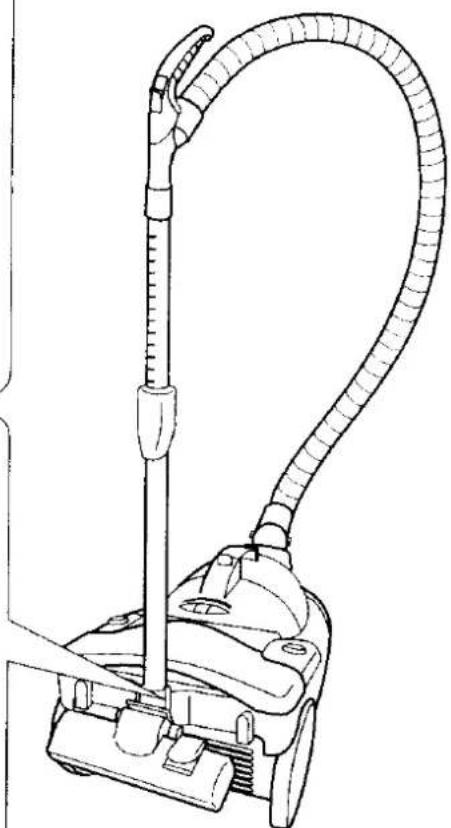
natural_image
Line drawing of a vacuum cleaner with coiled tube and handle (no text or symbols)The image is too blurry to recognize any text content.
Maintaining your vacuum cleaner
Уход за пылесосом
การดูแลรักษา

natural_image
Technical line drawing of a mechanical component labeled MC-5010, showing a stepped handle and mounting holes (no text or symbols beyond label)
natural_image
Technical line drawing of a mechanical component with symmetrical slots and central bore (no text or symbols)MC-5030
NOTE Примечание
Maintaining the filter
Уход за фильтром
การดูแลรักษาไสกรอง
natural_image
Hand turning a mechanical component with a circular housing (no text or symbols visible)Shake off the dust in the filter.
natural_image
Diagram of a hand fastening a mechanical component with directional arrows (no text or symbols)
natural_image
Mechanical component diagram showing a rotating assembly with a black arrow indicating rotation (no text or symbols)Remove the filter.
Снять фильтр
ถอดใส่กรองออก
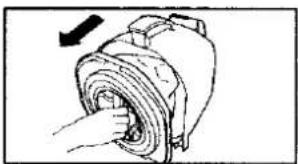
natural_image
Diagram of a hand inserting a cylindrical device into a motor (no text or symbols visible)
natural_image
Hand holding a mechanical component with gears and shaft (no text or symbols visible)Remove the prefilter.
natural_image
Illustration of a hand holding a faucet above a bowl (no text or symbols)Wash the filter with water. After washing, let the filter dry up in the shade.
natural_image
Simple line drawing of a hand holding a small object with a crown-like object above it (no text or symbols)
natural_image
Mechanical gear assembly diagram showing internal components and a black arrow indicating direction (no text or labels)Align the mark to the mark and fit the filter into position.
natural_image
Diagram of a mechanical device with hoses and a valve (no text or symbols)When filter becomes completely dry, Install it deep enough into the dust container.
natural_image
Illustration of a hand inserting a rolled-up cable into a motor (no text or symbols)NOTE Примечание
Maintaining your vacuum cleaner
Maintaining the Pre-motor Filter
natural_image
Line drawing of hands operating a vacuum cleaner (no text or symbols)Remove the dust container.
natural_image
Line drawing of a hand inserting a small object into a container (no text or symbols)Remove the filter.
Снять фильтр.
ถอดไสกรองออก
3
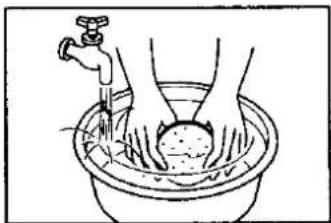
natural_image
Illustration of hands washing in a basin with a faucet (no text or symbols)Wash gently with water and then allow to dry in a shaded location.
natural_image
Line drawing of a hand inserting a small object into a device (no text or symbols)Replace to its original location.
IMPORTANT: Never use the cleaner without the correct filters properly installed.
Failure to do so may result in damage to the motor.
- MC-5030/5010 Operating Instructions
- Obey the following to ensure long life of your vacuum cleaner
- (under tool pocket cover)
- ●Crevice tool
- ● Щелевая насадка
- ● Щетка для обивки
- Operating your vacuum cleaner
- How to use the blower
- Blower
- 2
- NOTE
- Примечание
- Installing the filter
- Storing your vacuum cleaner
- Хранение пылесоса
- Maintaining your vacuum cleaner
- Уход за пылесосом
- NOTE Примечание
- Maintaining the filter
- Maintaining the Pre-motor Filter
Brand : PANASONIC
Model : MC-5030
Category : Iron