
McOne Active - Contrôleur de moniteur actif DEERSYNC - Free user manual and instructions
Find the device manual for free McOne Active DEERSYNC in PDF.


| Type | Monitor Controller |
| Dimensions | 10.25W x 6D x 3.25H inches (260 x 152 x 83 mm) |
| Weight | 3.55 lbs (1.6 kg) |
| Power Supply | 12-18V DC @ 1A via 2.1mm barrel, universal auto-sensing (IEC 3 prong) included |
| Inputs | 3x stereo TRS 1/4" balanced (accepts unbalanced) |
| Speaker Outputs | 3x stereo TRS 1/4" balanced for 3 pairs of speakers |
| Subwoofer Output | 1x stereo TRS 1/4" balanced with on/off switch |
| CUE Output | 1x stereo TRS 1/4" for headphone system, feed from 3 inputs independently |
| Headphone Output | 1x 1/4" TRS on rear, volume control on front |
| Talkback | Built-in microphone with gain trim on bottom; dims speakers -17dB when active |
| Volume Control | High quality ALPS potentiometer |
| Mono Summing | Sum left/right to mono for all speaker outputs and sub |
| Dim Function | Lowers output by -17dB, engages automatically during talkback |
| Mute | Silences all speaker outputs and sub |
| Input Select | 3 buttons to choose which input feeds speakers and sub |
| Cue Select | 3 buttons to choose which input feeds the CUE output independently |
| Maximum Input Level | +26 dBu |
| Maximum Output Level | +29 dBu before clipping |
| Signal-to-Noise Ratio | 120 dB @ 0 dBu unity gain |
| Frequency Response | 20 Hz - 20 kHz ±0.3 dB |
| THD+N | 0.005% at +24 dBu input, unity gain |
| Crosstalk | L/R @ 1 kHz: -105 dBu |
| Design | Tabletop, ergonomic, cream color with black text, wooden side panels |
| Warranty | 1 year limited warranty |
| Cleaning | Dry cloth only; no liquids, sprays, or solvents |
Frequently Asked Questions - McOne Active DEERSYNC
User questions about McOne Active DEERSYNC
0 question about this device. Answer the ones you know or ask your own.
Ask a new question about this device
Download the instructions for your Contrôleur de moniteur actif in PDF format for free! Find your manual McOne Active - DEERSYNC and take your electronic device back in hand. On this page are published all the documents necessary for the use of your device. McOne Active by DEERSYNC.
USER MANUAL McOne Active DEERSYNC
natural_image
Stylized black-and-white graphic of a deer head silhouette within a circular frame (no text or symbols)DEERSYNC™
McONE
User's Guide
TABLE OF CONTENT
Protect your McOne ....4
Getting to know your McOne: ....
- Functions ......6
- Features 8
- Specifications 9
- Block Diagram 10
Thank you for purchasing Deersync McOne Active Monitor Controller. The praised name in monitor control rendering an impressive active design was original launch six years ago. Today, we are delighted to see the Deersync R&D team, led by audio engineer and original designer Mr. Evgeny Klukin, bring this blend of classi fashion to life again.
Legal Disclaimer:
The information contained in this User's Guide is believed to be correct at the time of Deersync is not responsible for any losses incurred due to the descriptions, images, or statements mentioned in this User Guide. Deersync reserves the right to change or may any of the specifications without notice or obligation.
Warranty:
Deersync LLC warrants that the product conforms substantially to the specifications contained in the Product's documentation for a period of one (1) year from the date of purchase. In the case of a valid warranty claim, Deersync's liability will be, at its option repair or replace the product without charge or, if this is not possible, to refund the price to you.
For warranty service, please contact Deersync's international distributor, Yeahtone Technology
Inc. by email: info@yeahtone.com.
Protect your McOne
- Keep dust or debris away from all connecting ports.
- Do not leave heavy objects resting on McOne for a long period of time.
- Always remove the cable before cleaning.
- Use only dry cloth, do not use liquid cleaners, sprays, or wet cloths. Do solvents such as gasoline, alcohol, or any organic solutions.
- Do not use this device near water.
- Do not install this product near heat sources such as radiators, stoves, or heat-generating devices.
- Disconnect the power plug during thunderstorms, prolonged non-use, or when the device is damaged, eg., damaged pins, liquid ingress, foreign objects inside device, exposure to rain or moisture, or if the device malfunctions.
- Please let qualified technicians perform all repairs. If the device is damage plugs, liquid ingress, or foreign objects inside the device, the device does not function.
Getting to know your McOne:
The New Deersync McOne Active iAVL Edition is designed to be a desktop studio hub for all monitoring needs, delivering all the modern detail and nuances of your music as well as cue and talkback features, with a laid-bac vibe in appearance.
We were able to combine popular feature requests with an elegant and mod design that is easy to use right out of the box. Each component, including I Brown amps, a high-quality ALPS pot and smooth switches were carefully chosen based on function and sonics.
We have included explanations of features as well as a block diagram in this manual in case you need to reference this info to best benefit your studio's workflow.
1. Functions:

front panel
-
INPUT A, B & C: Selects three stereo TRS 1/4" inputs routed to OUTPUTS A, B & C and SUB.
-
OUTPUT A, B & C: Selects three stereo TRS 1/4" outputs for connection to three pairs of speakers.
-
CUE SELECT A, B & C: Choose from INPUTS A, B & C to feed the stereo CUE output separately (for headphone amps) regardless of what is playing back on the monitor pairs.
-
MONO: Sums the left and right stereo inputs to mono before the OUTPUTS A, B & C and SUB.
-
SUB: Switches the subwoofer output on and off, allowing you to check your mix with and without instantly.
- DIM: Lowers signal output by -17dB to speaker OUTPUTS A, B & C and SUB.
- MUTE: Silences audio to speaker OUTPUTS A, B & C and SUB.
- VOLUME: Raises and lowers volume to OUTPUTS A, B & C and SUB.
- TALKBACK: Engages built in microphone located next to switch and feeds the CUE OUT while dimming -17dB to OUTPUTS A, B & and SUB (gain trim is located on bottom of unit).
- POWER: Turns the unit on (soft amber LED will glow) and off.
- HEADPHONE: Raises and lowers volume to the 1/4" headphone jack on rear of the unit, receives input from INPUT A, B & C (same as the speaker outputs).
- POWER: 2.1mm barrel connection, fed by included universal power supply.
- REAR CONNECTIONS: 1/4" TRS is used for all audio connections in and out, will accept balanced or unbalanced signals as needed.
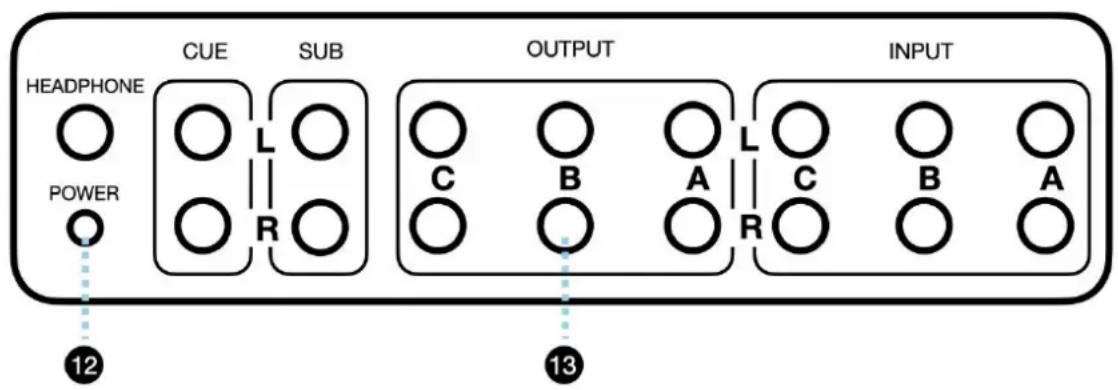
flowchart
graph LR
    A["HEADPHONE"] --> B["CUE"]
    B --> C["SUB"]
    C --> D["OUTPUT"]
    D --> E["INPUT"]
    F["POWER"] --> G["12"]
    H["13"] --> I["13"]
rear panel
2. Features:
Deersync McOne get you clean, uncolored, and detailed audio with uber flat response at all volumes.
• Active balanced on all inputs and outputs.
- Also accepts unbalanced signals from iPods, CD players, etc.
- 3 Inputs, TRS 1/4" Balanced, selectable for monitoring or CUE feed.
- 3 Speaker Outputs, TRS 1/4" balanced for multiple stereo pairs.
- 1 Stereo Subwoofer Output, TRS 1/4" Balanced with on/off switch.
• 1 Stereo CUE output, feed your artist headphone system with three inputs talkback.
• 1 Headphone output for control room / engineer.
- Talkback microphone with talkback gain trim access on bottom of unit.
• Volume pot, high quality ALPS.
• Headphone amp volume control.
• MONO summing for checking mixes, affects 3 speaker outs and subwoofer
• DIM function, -17dB value (engages during talkback).
- MUTE function.
• Universal power supply, auto sensing (standard IEC 3 prong).
- Power switch with soft amber glow LED indicator.
- Tabletop, ergonomic design is easy to reach for.
- Cream color with black text is easy to read in dim lighting.
- Wooden sides bring an old school vintage vibe to your DAW studio.
3. Specifications:
- INPUT: Maximum Input Level +26dBU
• OUTPUT: Maximum Output Level before clipping +29dBU
• SIGNAL TO NOISE RATIO: @ 0dBu unity gain 120dB
• CROSSTALK: L/R @ 1kHz -105dBu
• THD & NOISE: unity gain +24dBu input .005% - FREQUENCY RESPONSE: 20hz - 20khz +/-0.3dB
• DIMENSIONS: 10.25"W x 6"D x 3.25"H
• WEIGHT: 3.55 LBS (1.6 KG)
• POWER REQUIREMENTS: 12-18V @ 1000
4. Block Diagram

flowchart
graph TD
    subgraph Main Volume
        A["INPUT SELECT"] --> B["MAIN Left Switching Logic"]
        B --> C["MAIN VOLUME"]
        C --> D["MONO"]
        C --> E["DIM"]
        C --> F["MUTE"]
        D --> G["OUTPUT SELECT"]
        E --> G
        F --> G
        G --> H["A-B-C"]
        G --> I["B"]
        G --> J["C"]
    end

    subgraph CUE Select
        K["CUE Left Switching Logic"] --> L["Square Block"]
        M["CUE Right Switching Logic"] --> N["Square Block"]
        O["A-B-C"] --> P["Square Block"]
        Q["TALKBACK MIC"] --> R["NOT"]
        S["TOTAL PANEL TRIM"] --> T["TALKBACK SWITCH"]
    end

    subgraph OUTPUT Select
        U["SUB MUTE"] --> V["L"]
        U --> W["R"]
        X["SUB OUT"] --> Y["L"]
        Z["HEADPHONE LEVEL"] --> AA["R"]
        AB["CUE OUT"] --> AC["R"]
    end

    style Main Volume fill:#f9f,stroke:#333
    style CUE Select fill:#ccf,stroke:#333
    style OUTPUT Select fill:#cfc,stroke:#333

natural_image
Stylized black-and-white graphic of a deer head silhouette within a circular frame (no text or symbols)DEERSYNC™
McONE
User's Guide
用户手册
目录
如何保护你的McOne 4
了解你的McOne 5
正面板
Brand : DEERSYNC
Model : McOne Active
Category : Contrôleur de moniteur actif